 Agent Durbar
 docs
Agent Durbar is spec-driven with GitHub Spec Kit: no code without a spec, a plan and tasks.
Status: first stable release, latest
v0.1.17, unsigned. What changed: CHANGELOG.
What you can do
Where each feature works (Flat, Real office, worlds): feature inventory.
The office
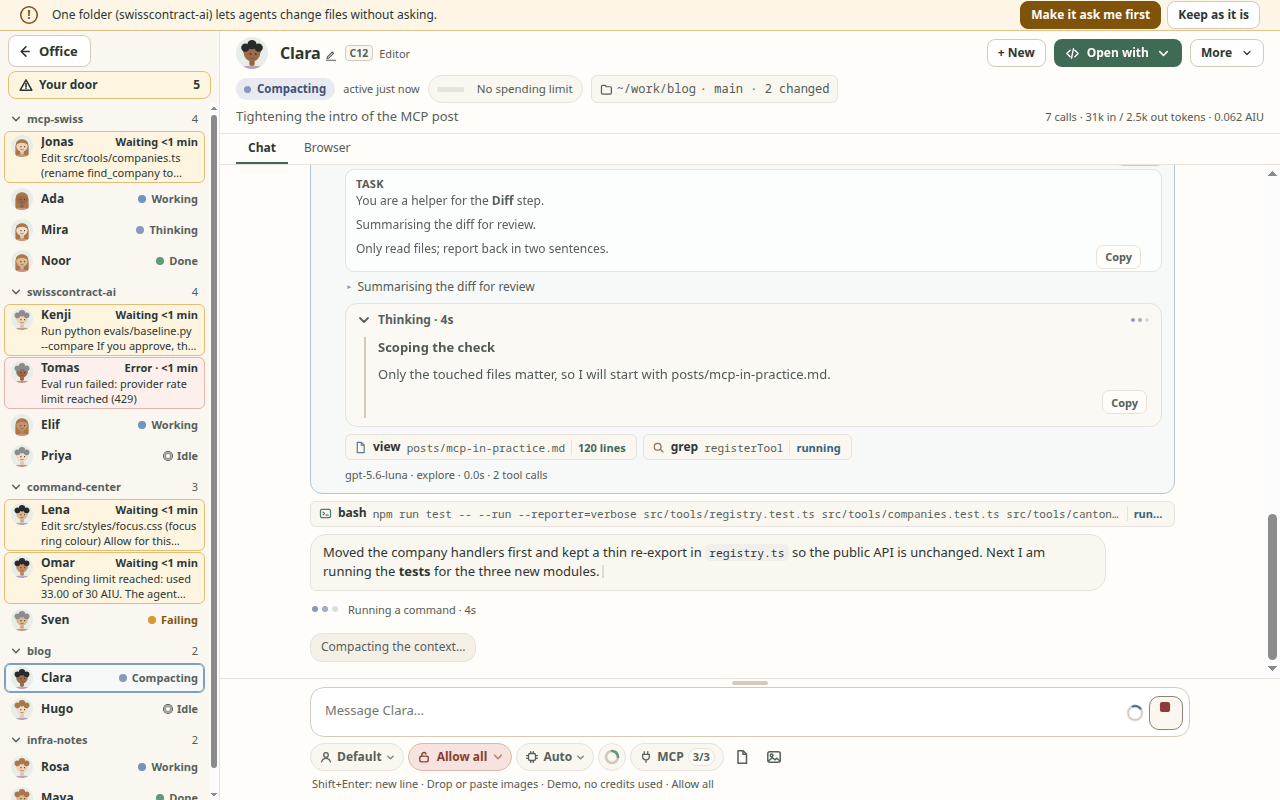
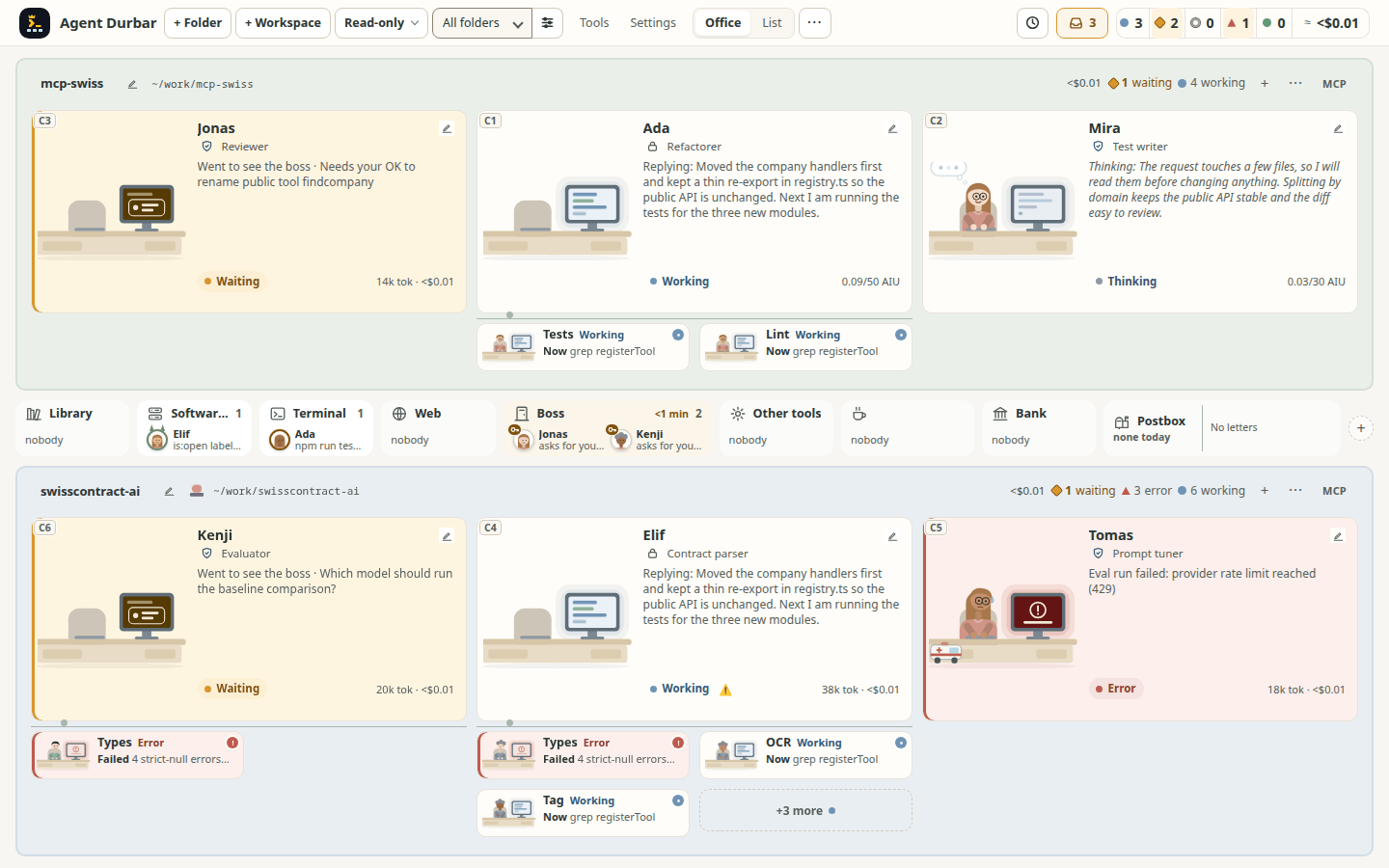
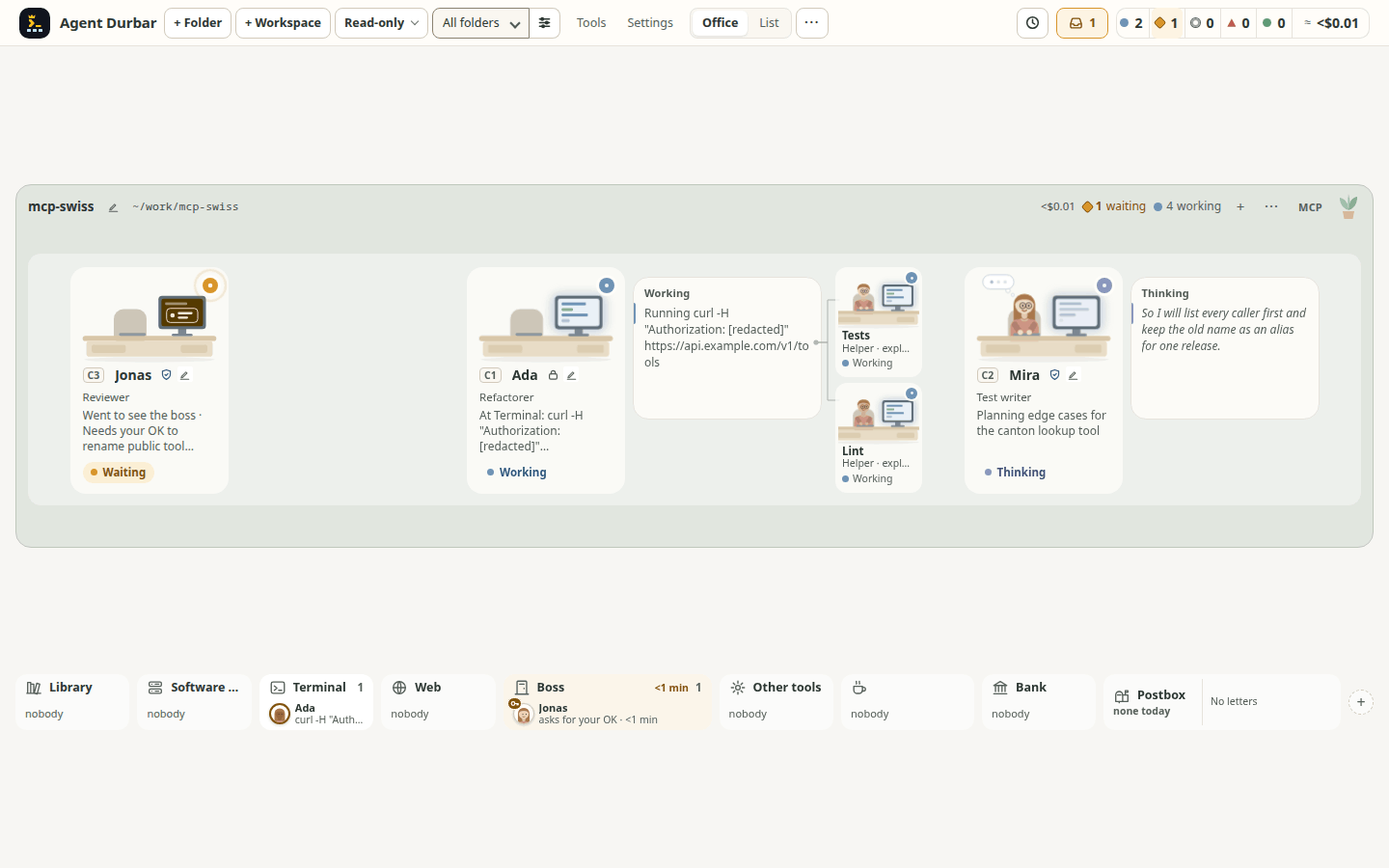
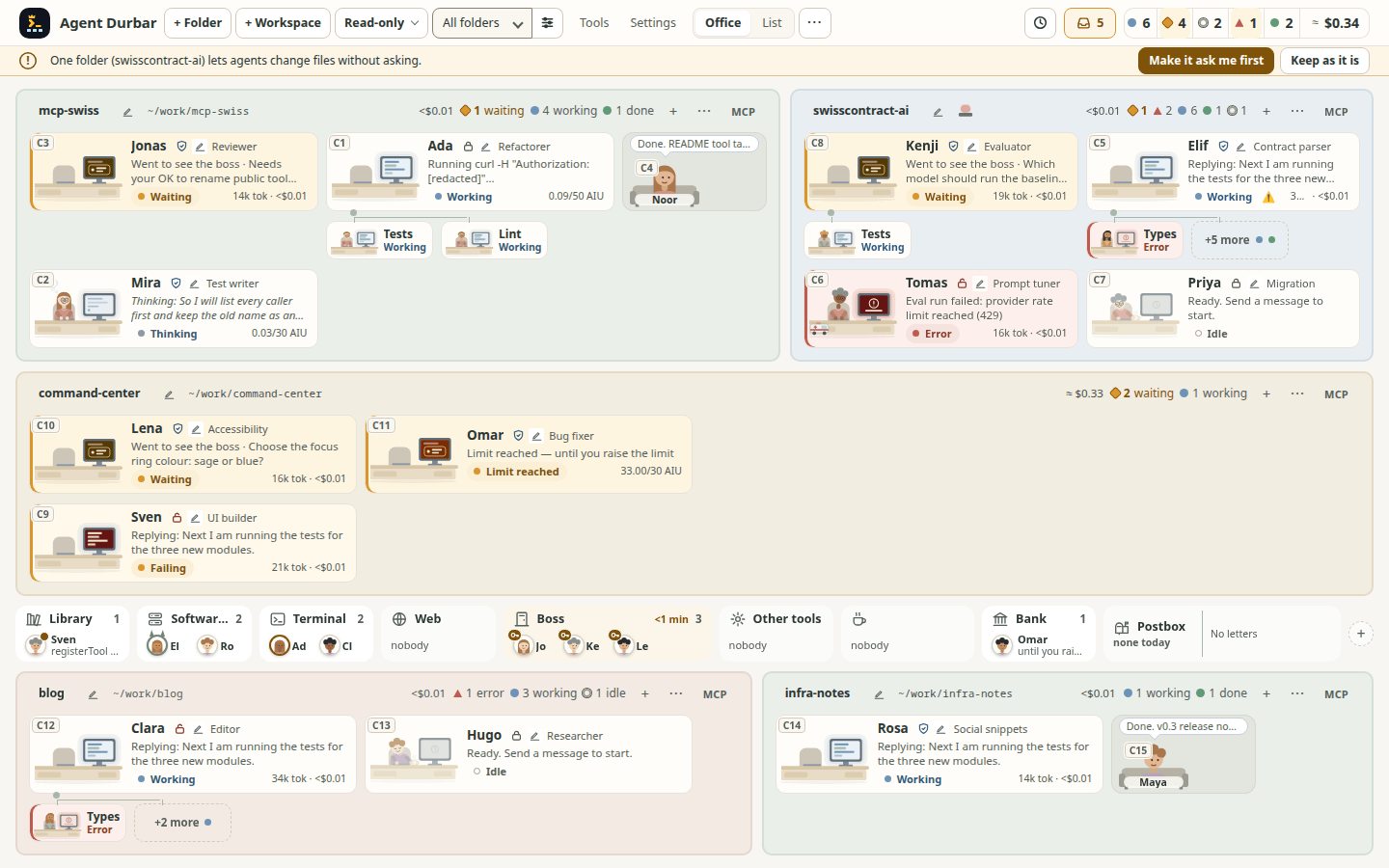
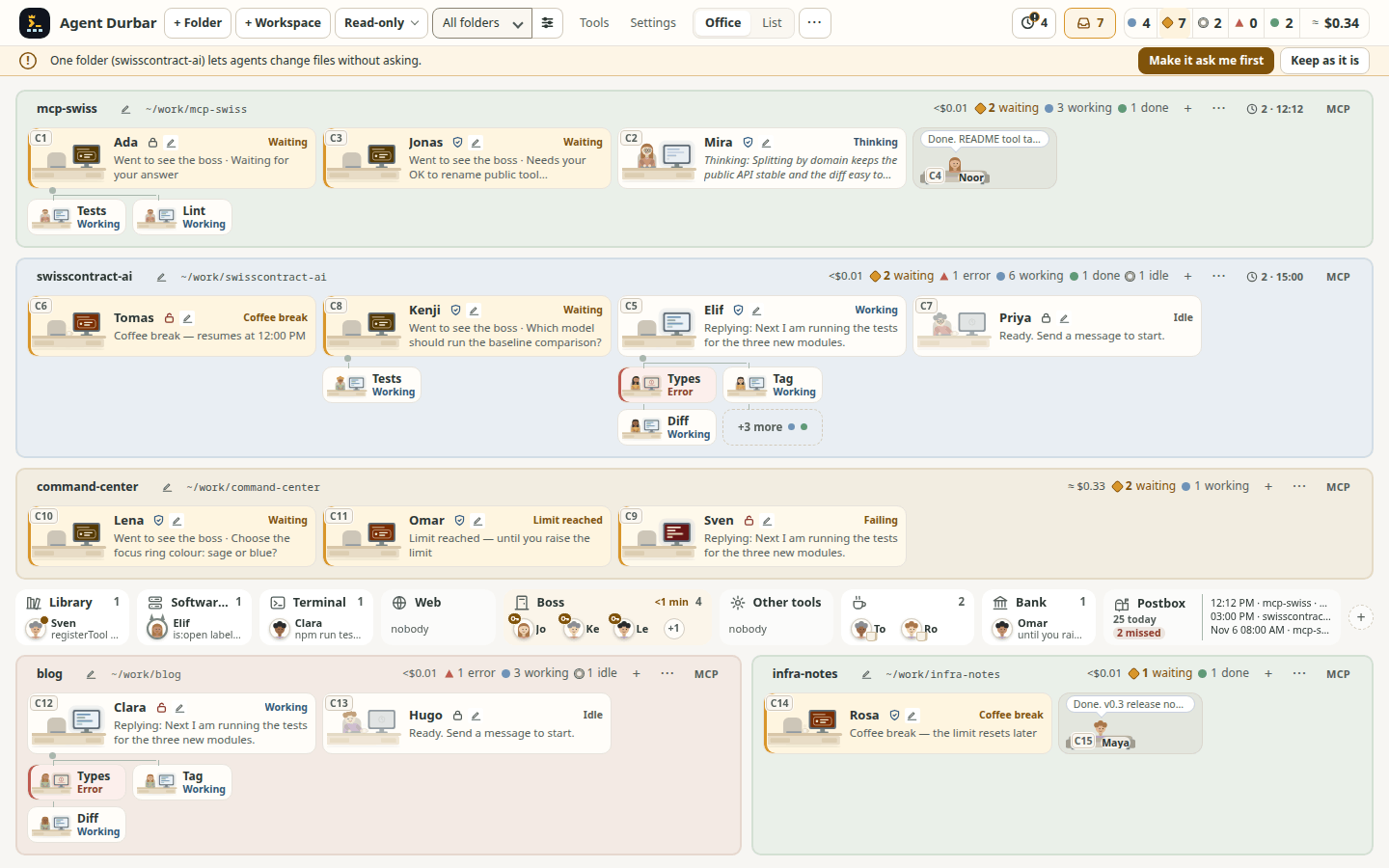
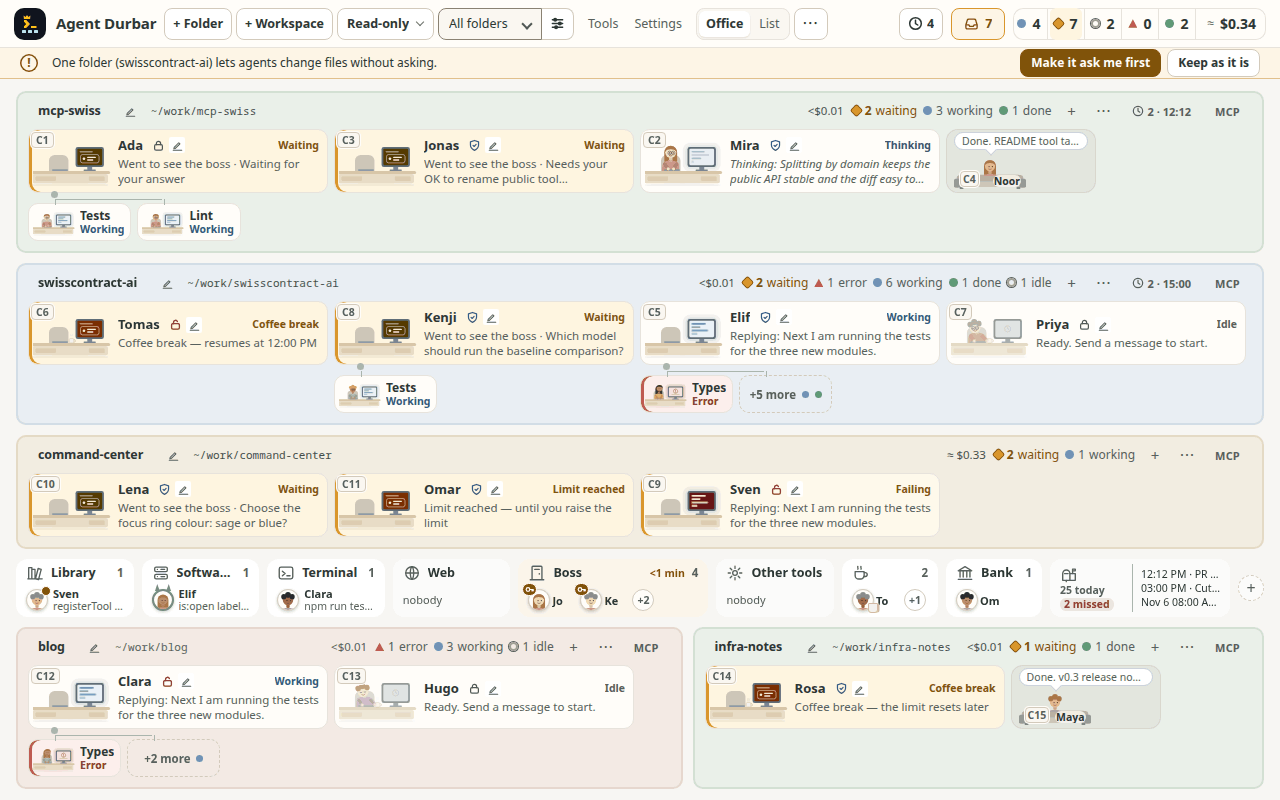
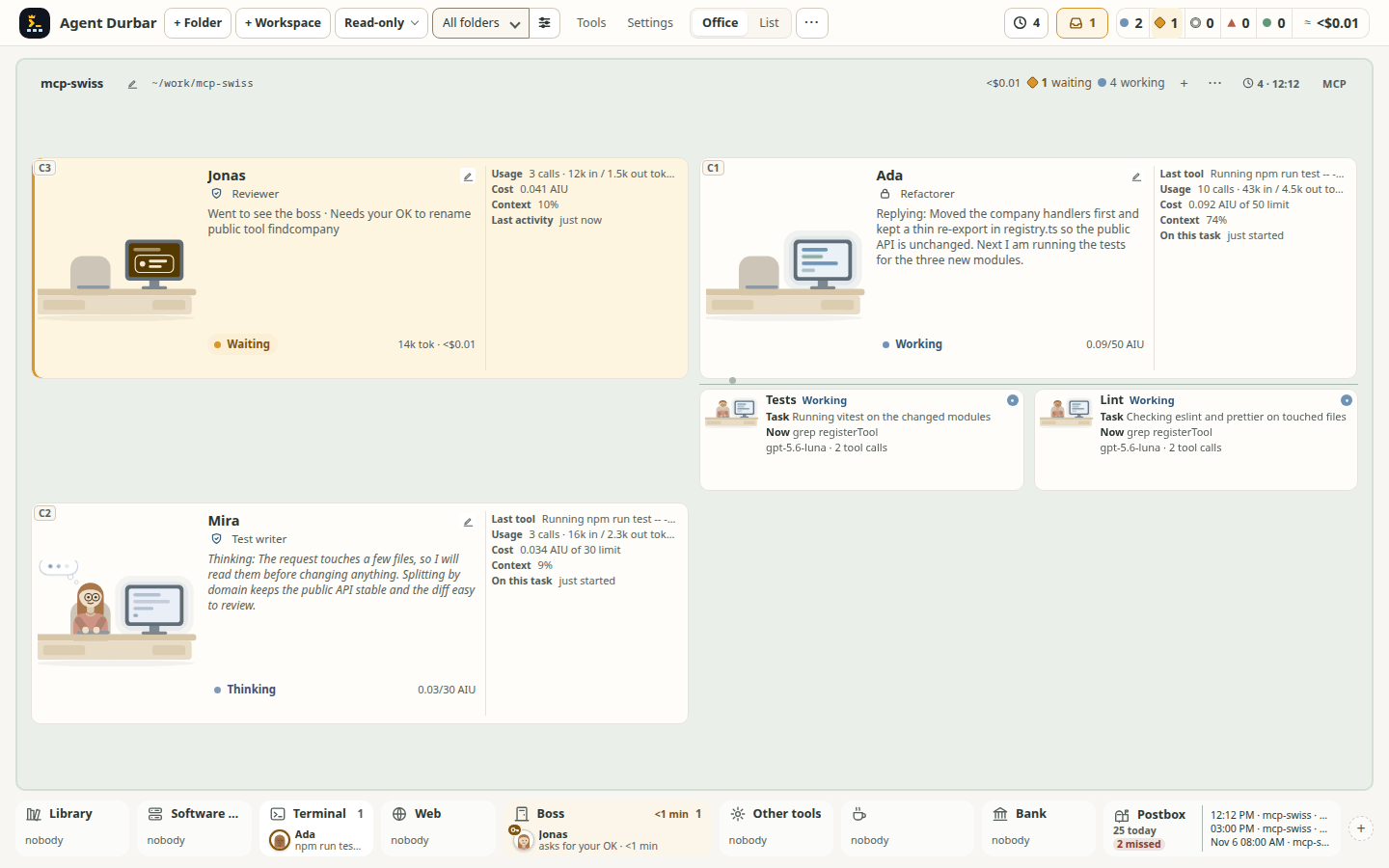
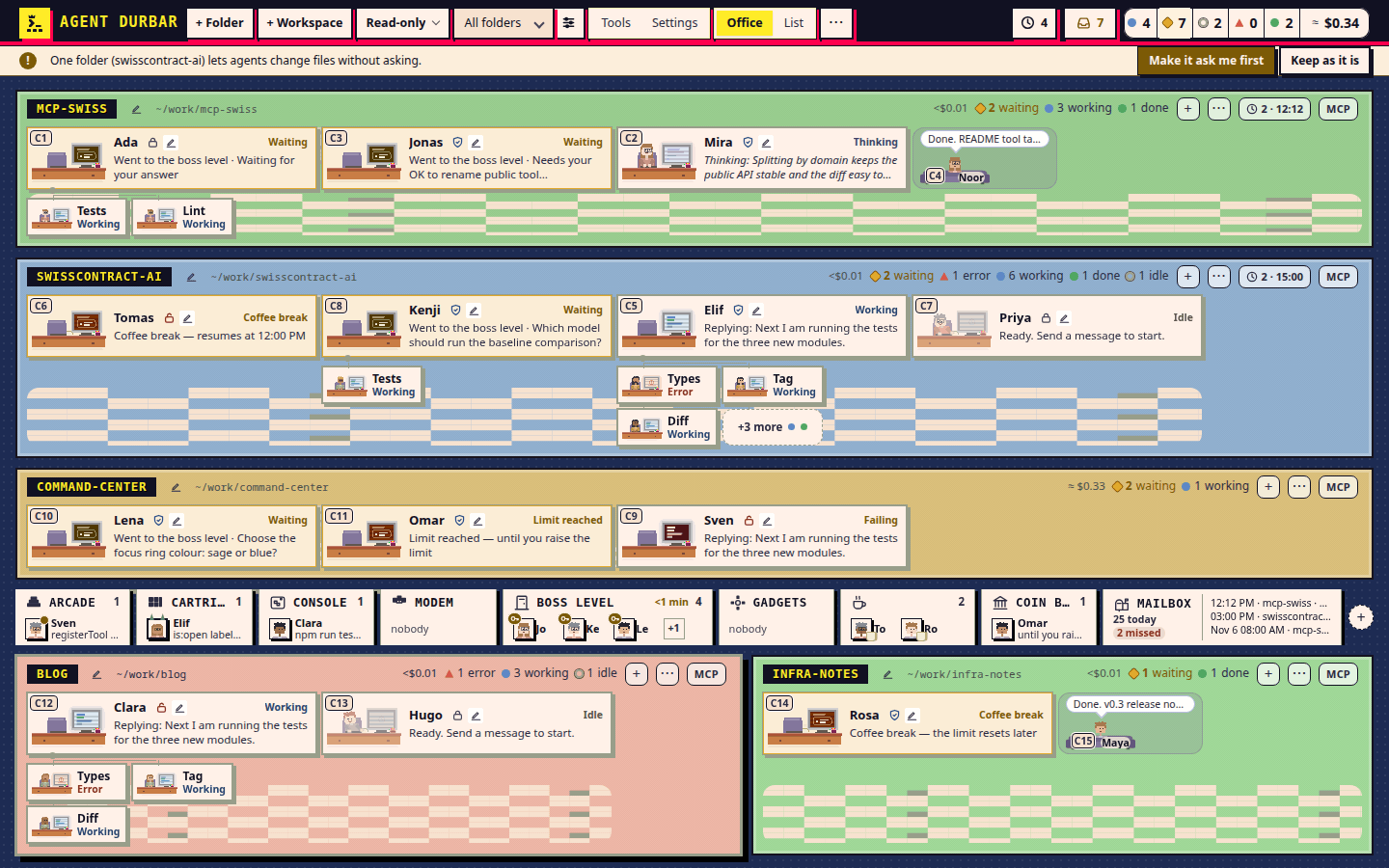
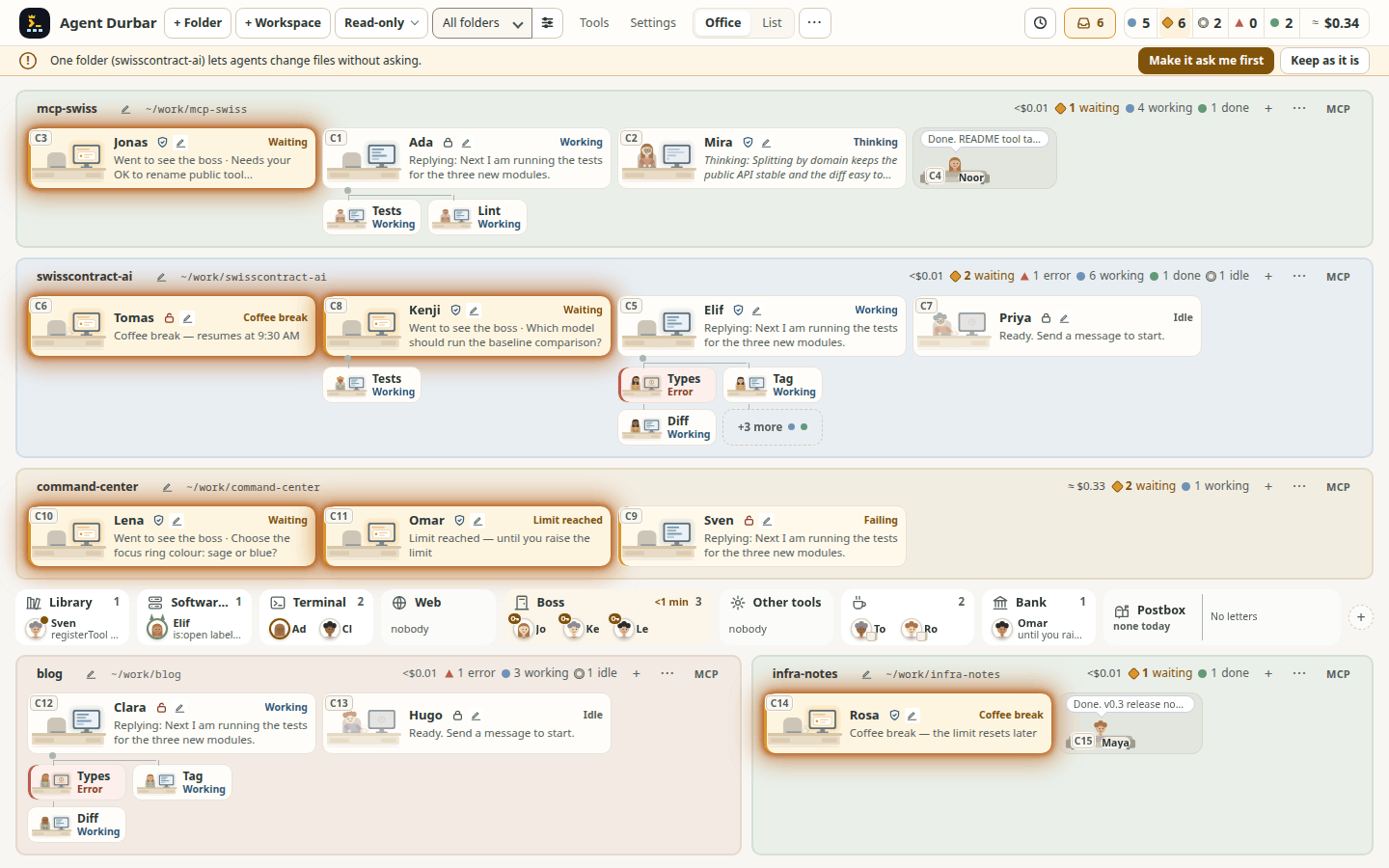
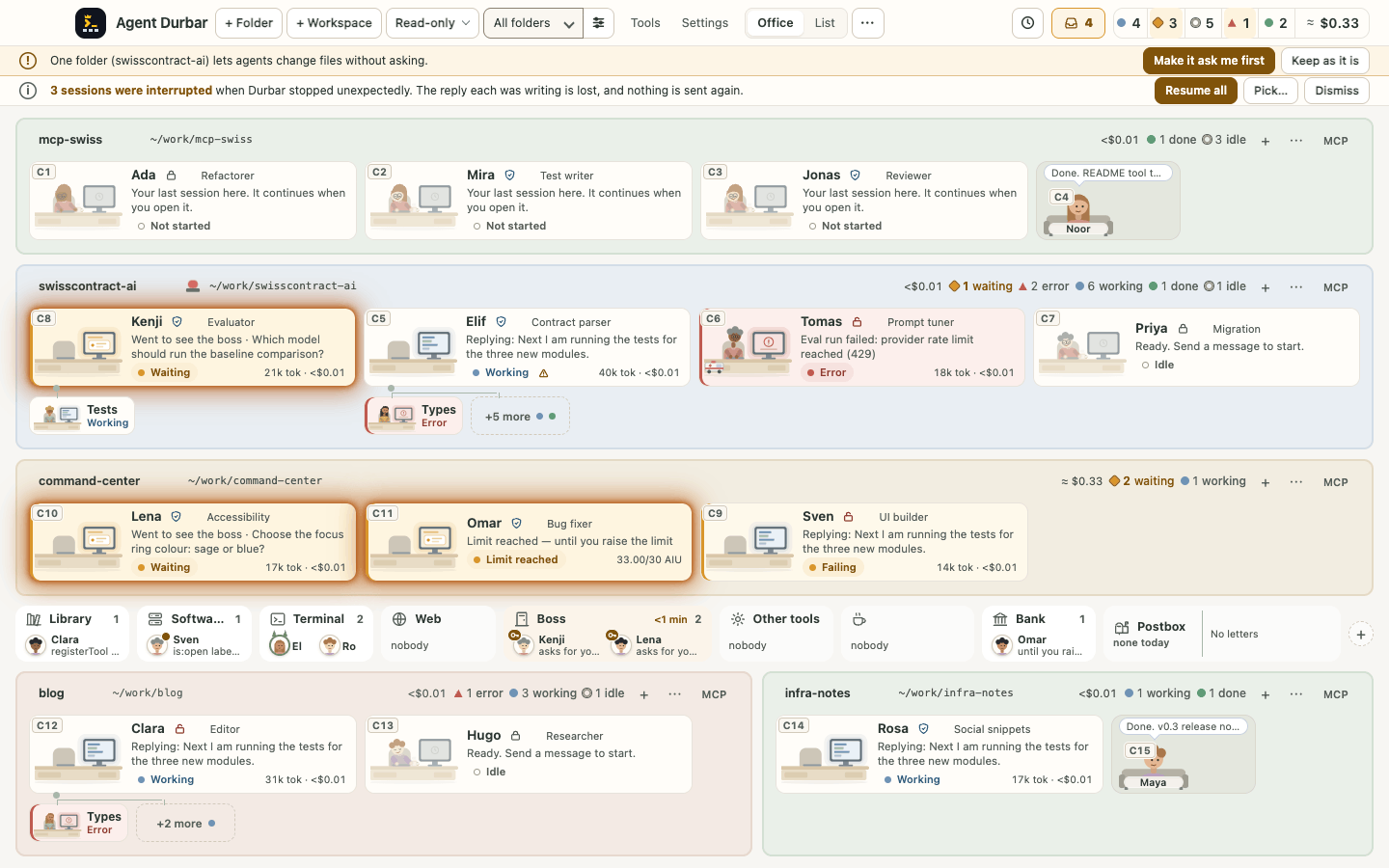
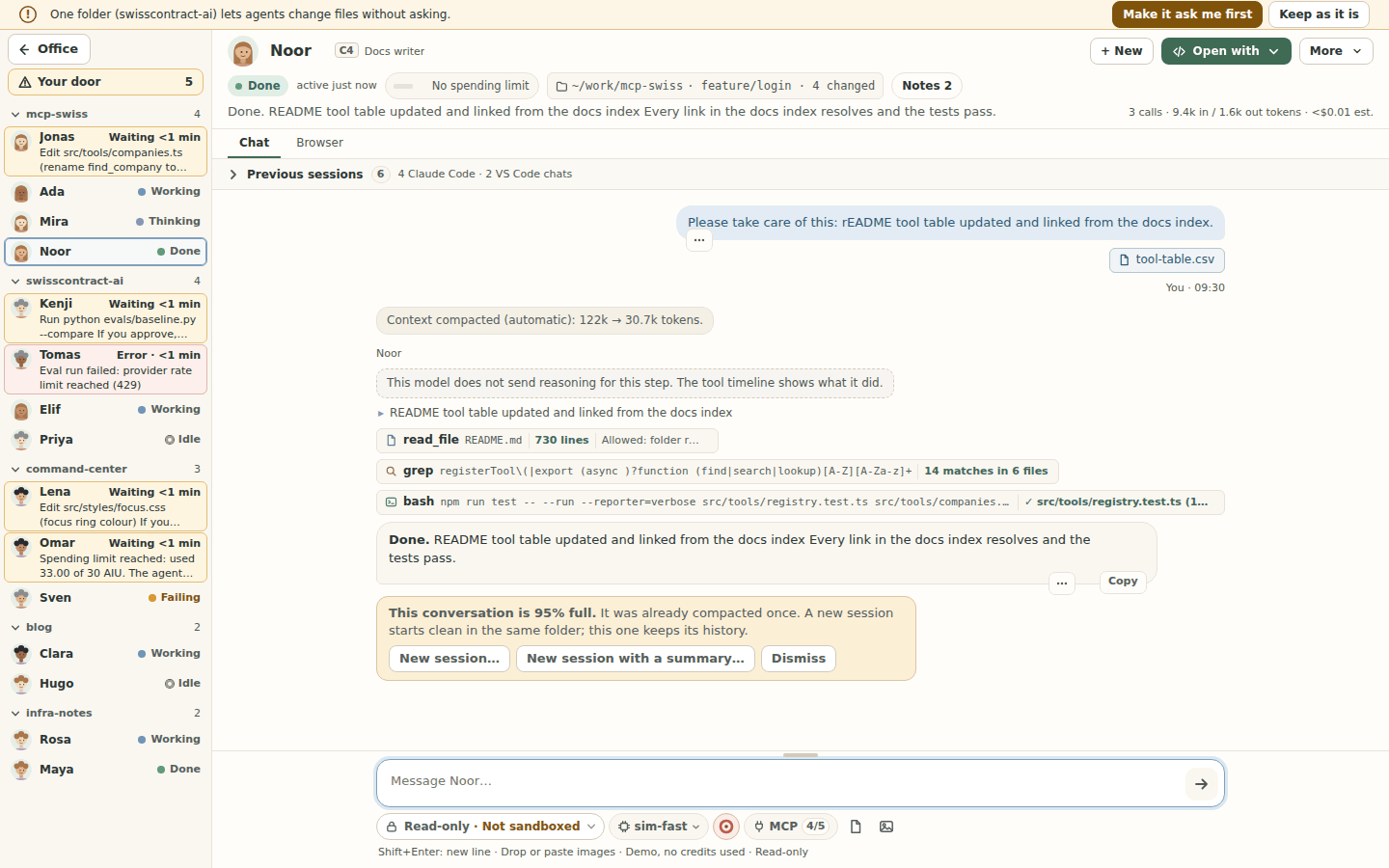
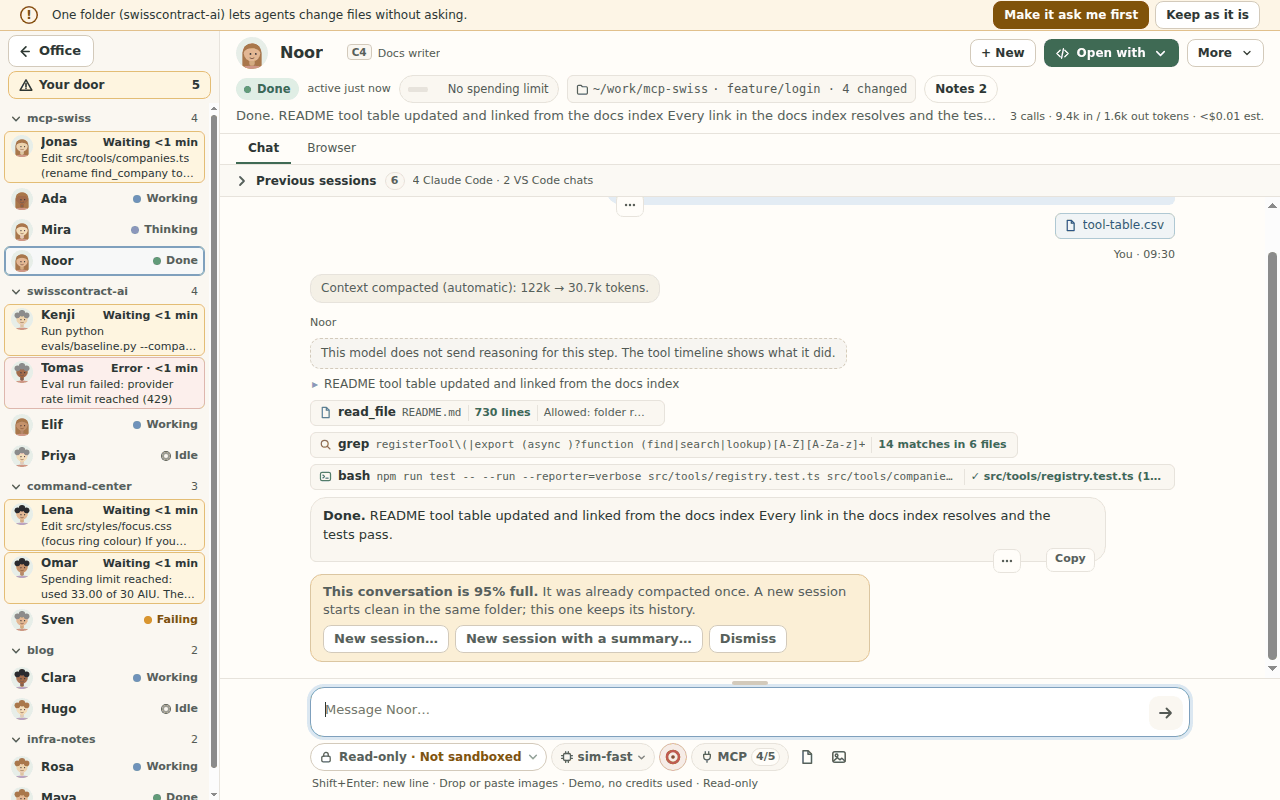
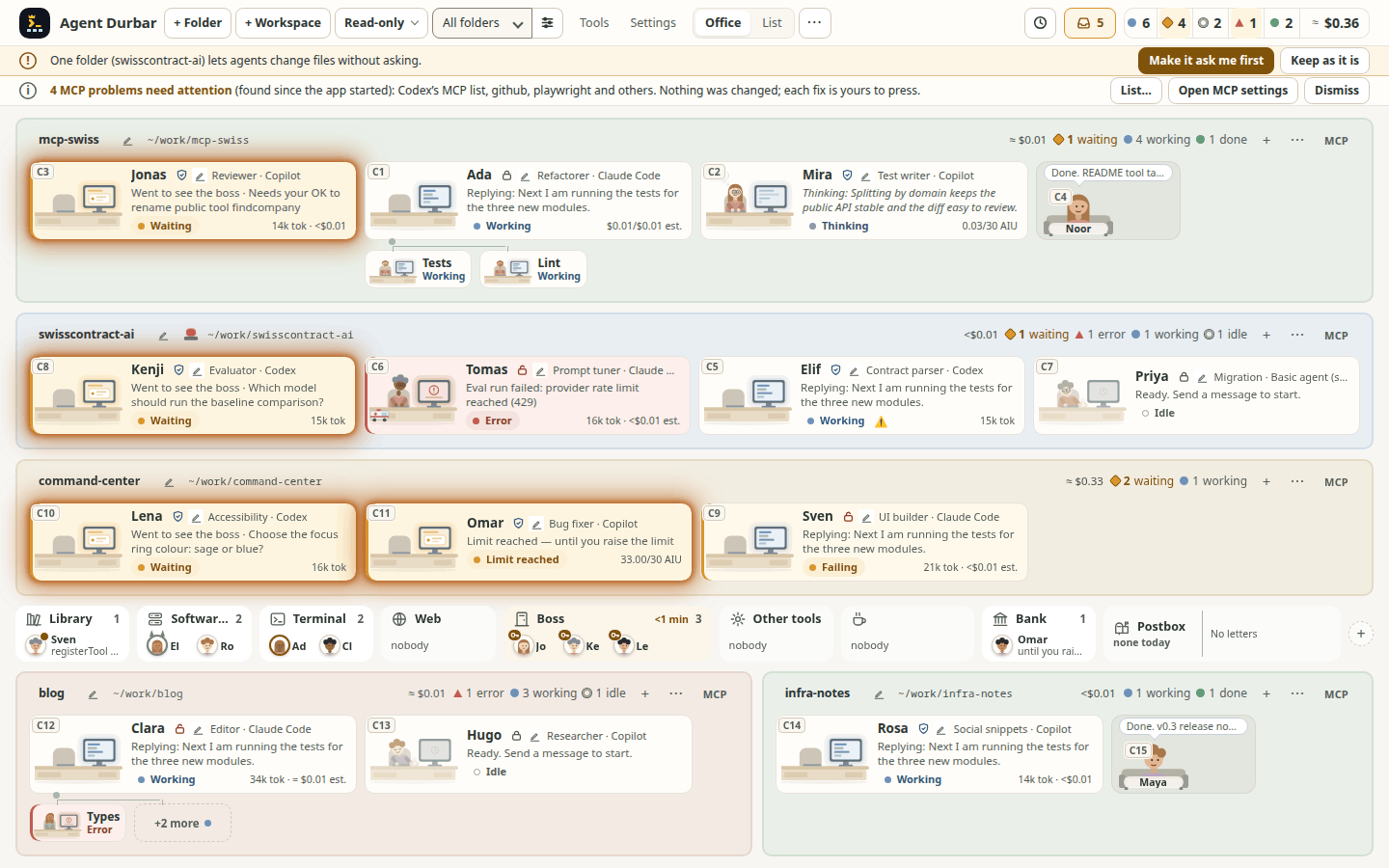
- Every agent is a person at a desk in its folder's room. You see at a glance who is idle, working, thinking, waiting for you or in trouble. A working agent whose last tool calls failed in a row says Failing (with a lightning icon, in the amber trouble colours); one whose agent app is retrying a failed model call says Retrying with the attempt and a short reason (Retrying (attempt 3 of 10) – servers busy (HTTP 529)), and Gave up after 4 retries – rate limit when the retries run out (spec 034; read from each app's documented events, not yet seen on a real session). While an agent app compacts (summarises) a long conversation the card says Compacting with Compacting the conversation…, the chat shows a line where history was summarised (or Older messages dropped… when an app only trims), and the context ring says it too (desk and chat, chat; at 1280x800: desk, chat); after a compaction whose new size the app does not report, the ring waits for the next message instead of showing the old figure (spec 015; Claude Code and Codex are read from their documented messages, Copilot's compaction was seen on a real account, none of the new Claude, Codex or truncation paths on a real session). A card in an Allow all folder says Allow all, and hovering a card tells when it last did something.
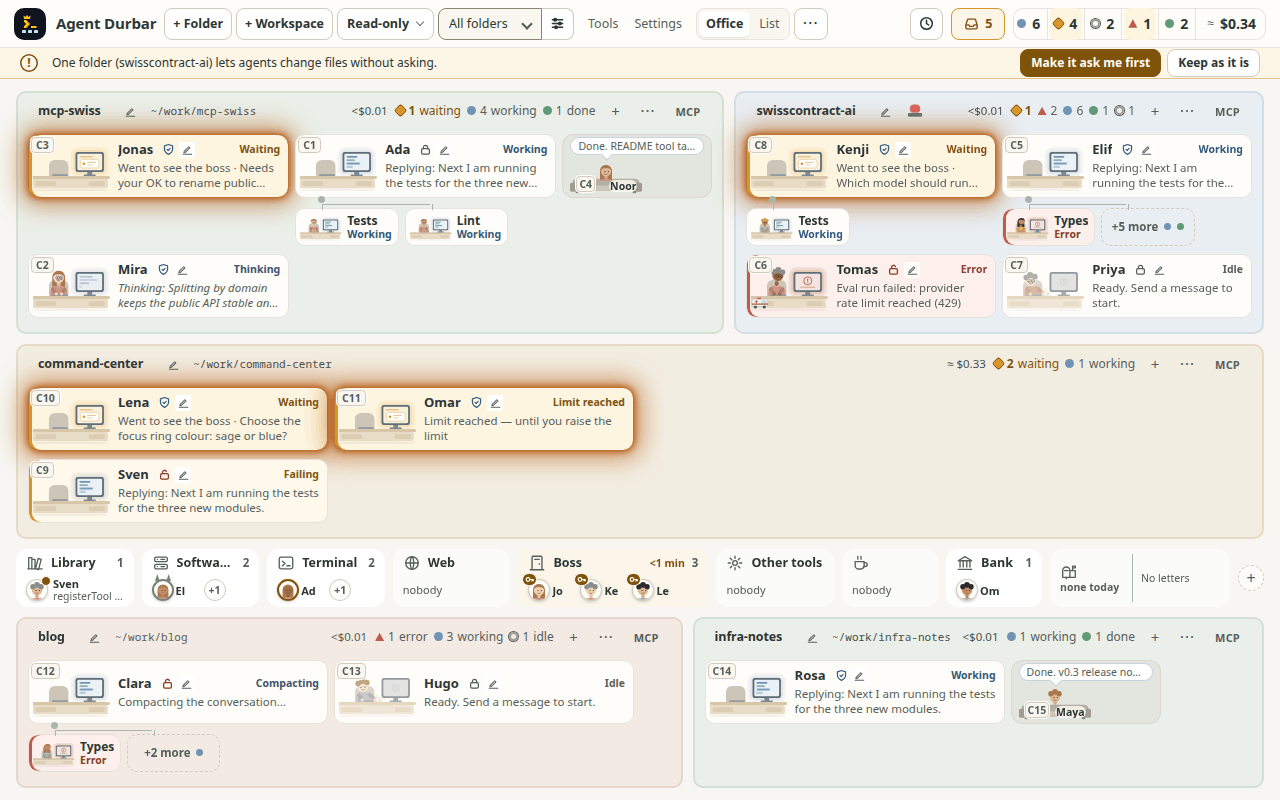
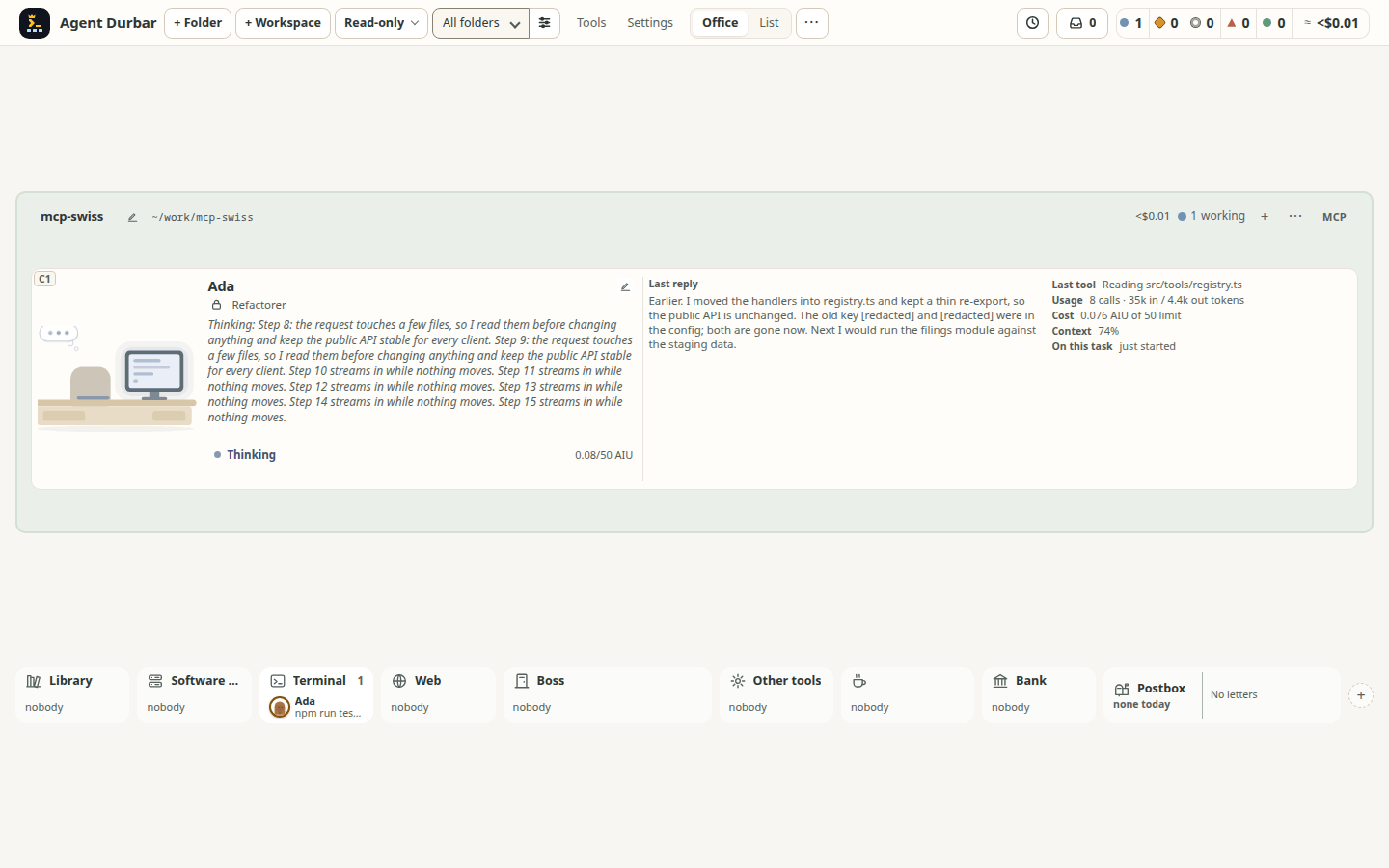
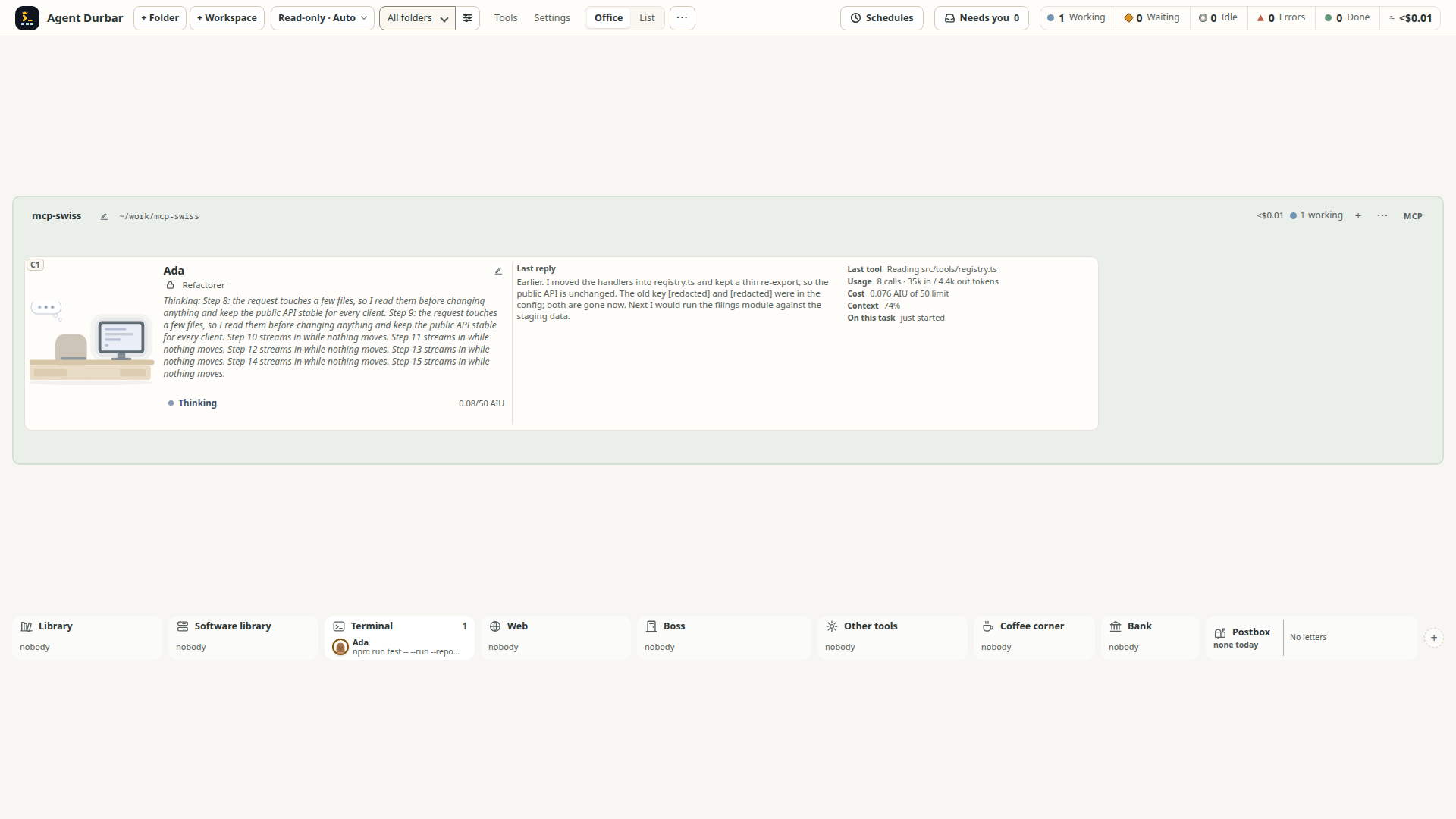
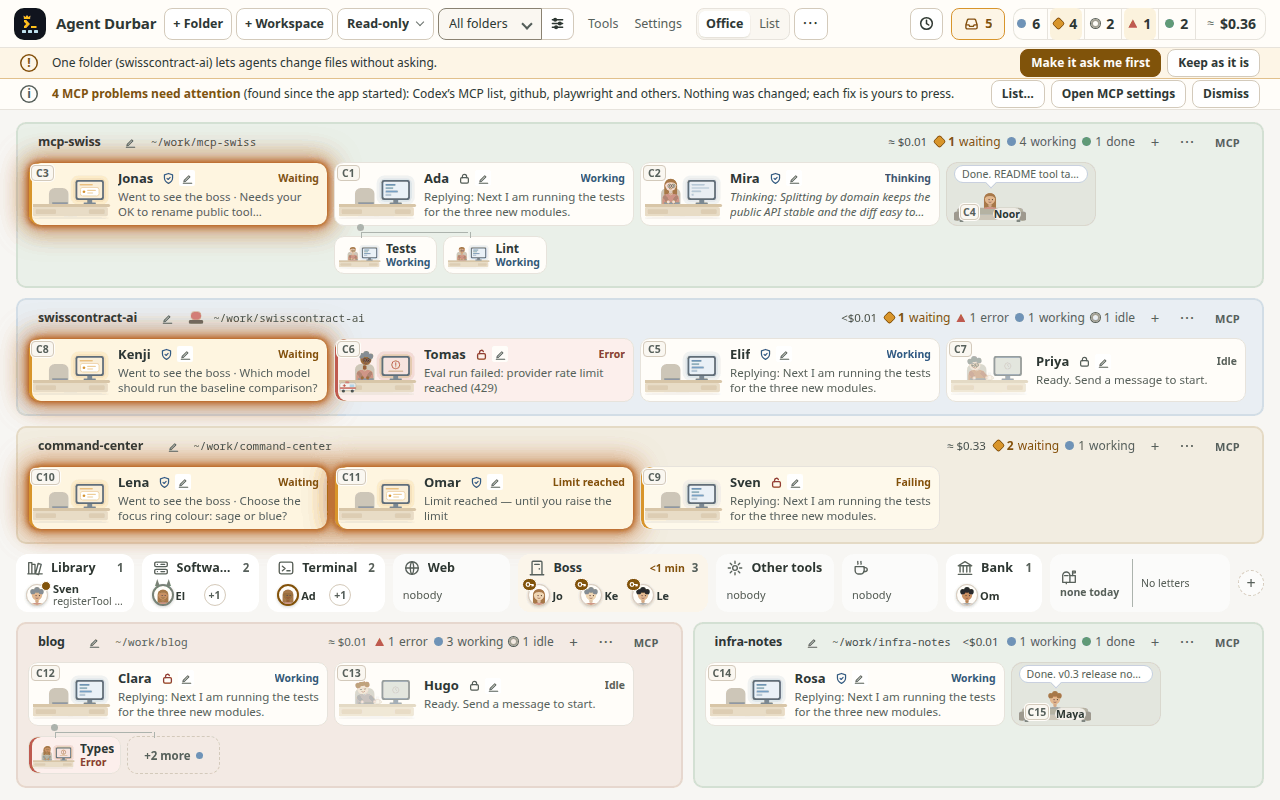
- 10-15 agents stay readable on one 1440x900 or 1280x800 screen, and the desks get denser on their own. Checked with 15 real Copilot sessions at once (Linux, 2026-10-21): no overlap or clipping at either size. With few agents the desks grow (up to about 2.5x, the largest size that fits without scrolling) and show more: the full title on two lines, up to 8 lines of the agent's thinking or reply as it streams (newest at the bottom), the start of the last reply when it is done, and tokens and cost. They get smaller as agents are added, down to the usual densities; the size is the largest that fits, so a new row of desks can make it drop several sizes at once. Grown desks come before the side panel below. A wide grown desk (one agent, or a row with spare width) uses the width for more information, not longer lines: beside the stream it shows the start of the last reply (masked) and the tool, usage, context and time on task, in columns of at most about 85 characters a line, and folds back to one column as it gets narrower. Simulator-checked from 1024x700 to 2560x1440 (1 agent, 1 agent at 1920x1080, 4 agents, 6 agents); not yet watched on real sessions.
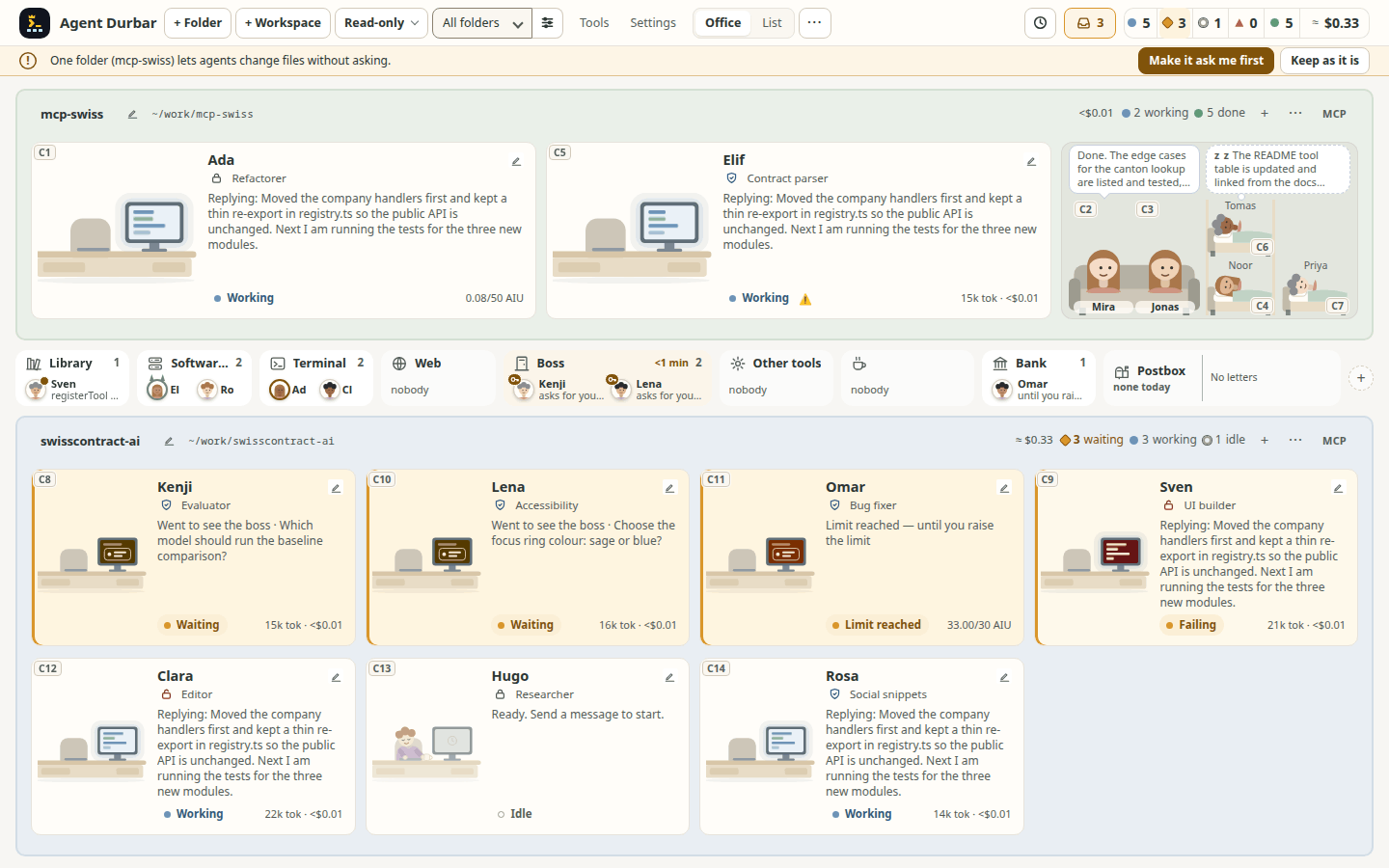
- Finished agents rest in the lounge when others still work in their folder, so the busy desks get the width: a lounge corner at the end of the desk row (about 300 px for five). An agent that finished in the last 10 minutes sits on the couch, its name on the cushion, with a speech bubble saying what it did last (the start of its reply on up to three lines, secrets masked); an older one naps in a bunk bed and dreams of its last work (with several sleepers the dreams take turns; "+N asleep" past four). Each is the same character as at its desk. Hover or keyboard focus opens a small card beside the lounge; a click or Enter opens the chat as before. Waiting, Error, Limit and Paused agents never rest, and a folder where everyone is finished stays as it is. Turn it off in Settings > Display (Finished agents rest in the lounge). Simulator-checked at 1440x900 and 1280x800 (2 working, 2 on the couch, 3 asleep); not yet watched on real sessions.
- A finished agent's reply is marked "New" until you have seen it (spec 001 FR-170..FR-177, spec 005 FR-176, FR-177, issue 691). When an agent finishes while you are not looking at its chat (you are in the office, in another chat, in the Browser tab or in the Notes drawer, or the window is hidden), its desk, list row and chat-strip item get a small New badge with a dot, and the desk's monitor screen turns green, and the person zooms gently (a desk that needs you has an amber screen, orange at the spending limit and red on an error, and its person pulses more, and that wins; with reduced motion or Settings > Highlights > Still highlights nothing moves, and the screen never does; spec 001 FR-178, FR-192); the desk's accessible name adds "new reply not read yet" and one polite announcement says "<name> finished. New reply." (once, not per streaming update; none for a hidden folder or floor, which keeps its marker for when it is shown again). It is a marker beside the state, not a state: the Done count, sort, filters, attention and permissions are as before, and an unread agent stays on its desk instead of going to the couch. It clears only when its chat is shown (opening the chat, or coming back to the Chat tab, closing the Notes drawer or bringing the window back while it is open) or with Mark as read in the card menu (right-click, or Shift+F10 / the Menu key on a focused desk or list row); closing the chat or returning to the office does not clear it, and once read the agent follows the couch rule above. The badge pulses once when it appears, and only if your system allows motion. It is not kept across a restart (like the chat itself): after a restart or reload nothing is marked. Simulator-checked at 1440x900 and 1280x800 (all 15 unread fit;
npm run check:ui -- --only check-unread); not watched on real sessions.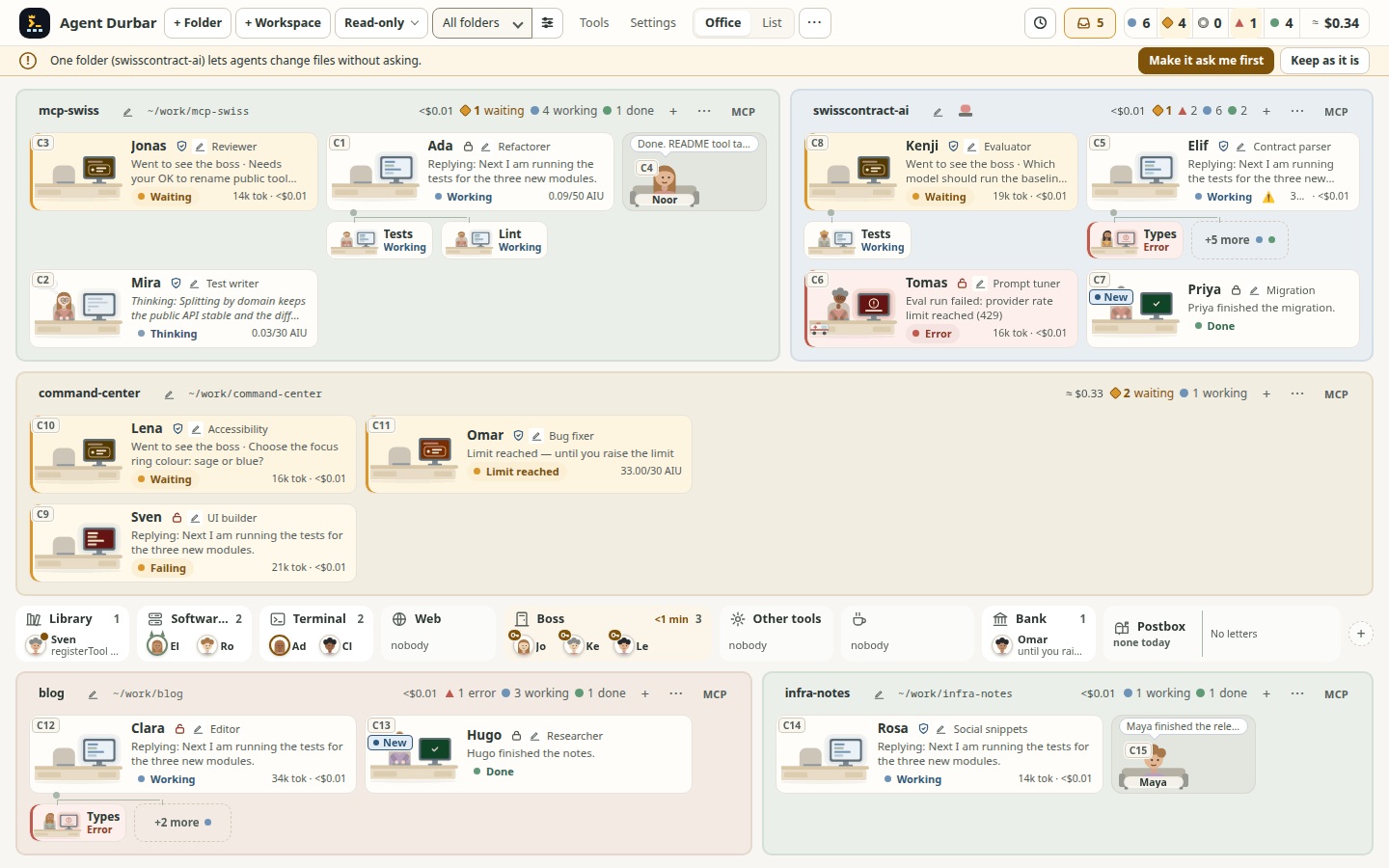
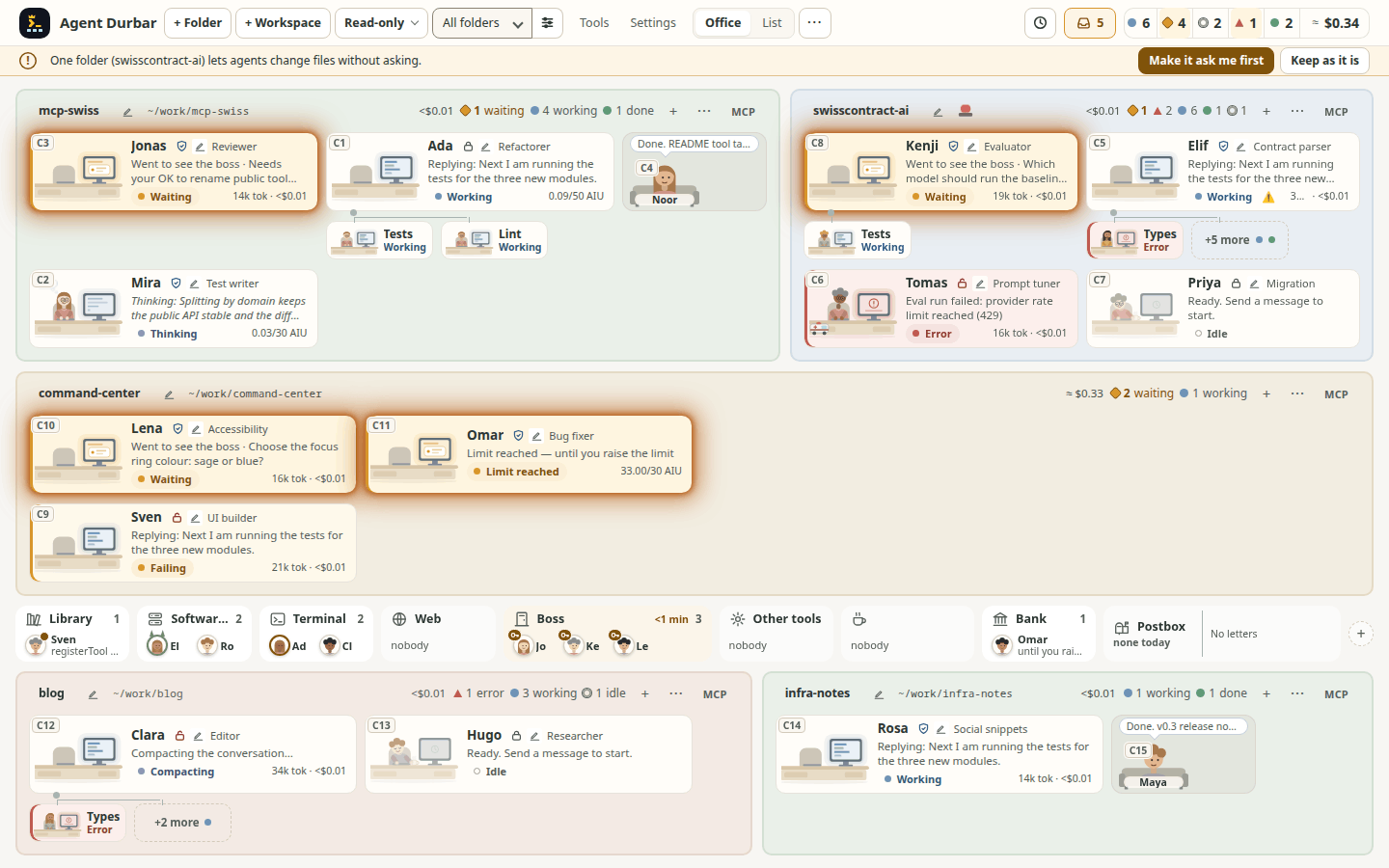
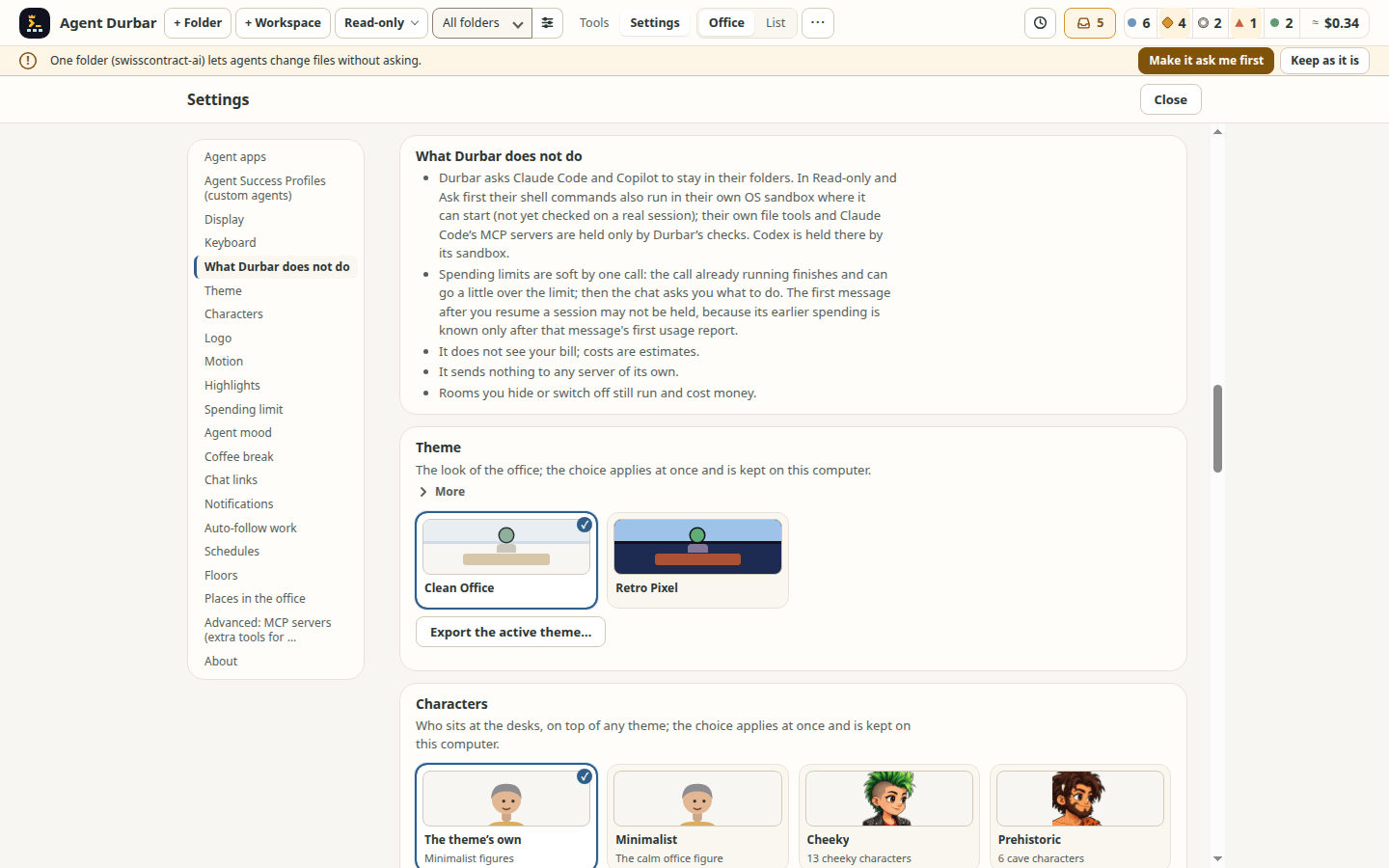
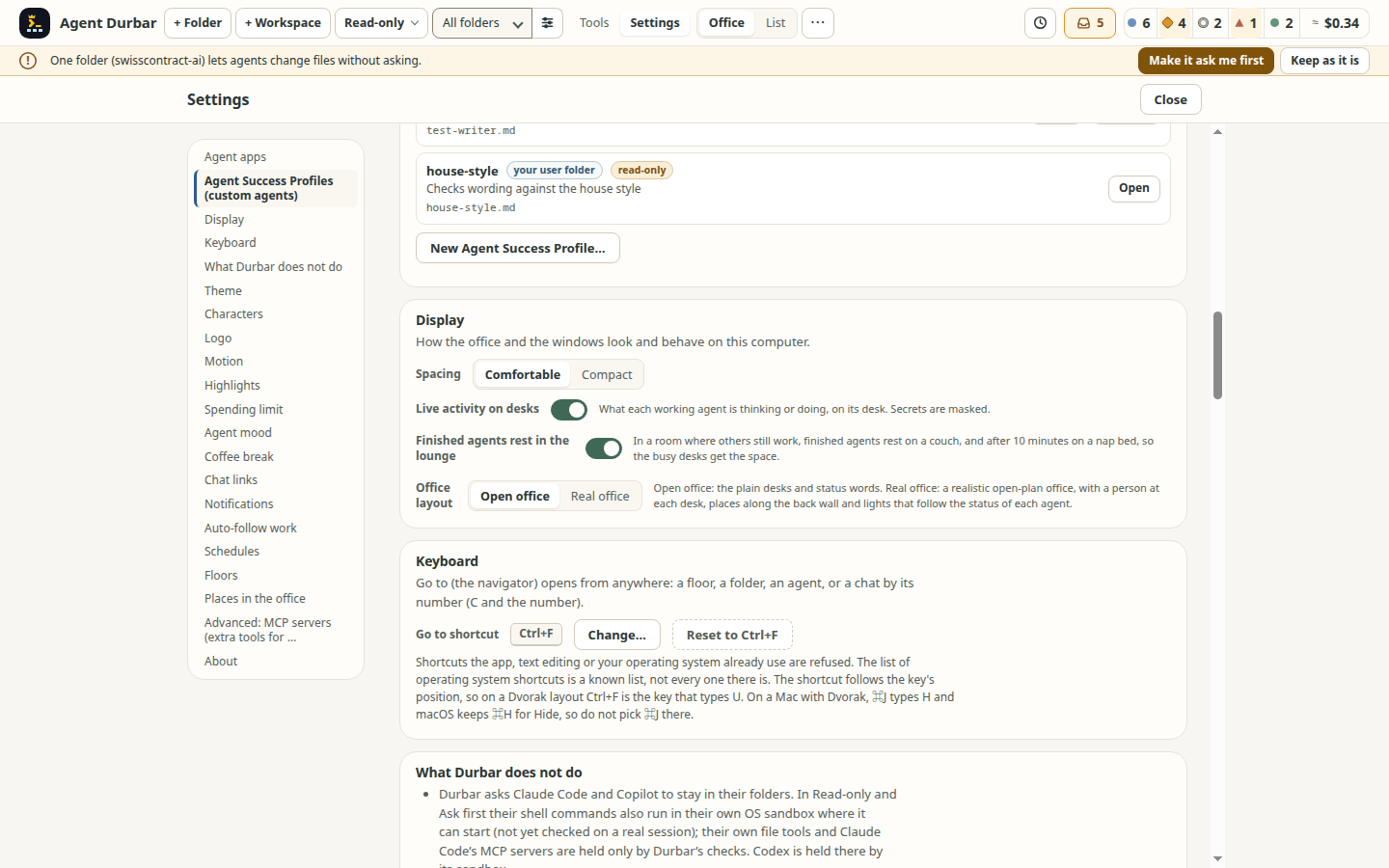
- A section list in Settings (spec 052 FR-226, T219): Settings is one long page, so a list of its sections sits on its left and jumps to the one you pick (a click or Enter; the arrow keys, Home and End move inside the list, and the list is one Tab stop). The section at the top of the page is marked as you scroll. The list is read from the headings the page shows, so it needs no edit when a section comes or goes, and it looks the same in the Flat office, Retro and Real office in each world. In a narrow window it becomes a row above the page. It jumps at once, with no smooth scrolling. Checked on the simulator at 1440x900 and 1280x800 (picture; the 1280x800 twin is kept in
docs/screenshotsbut not linked, for the website's 8 MB budget); not tried with a screen reader. The page's rows still use more than one layout ([KNOWN GAP], spec 052 FR-226). - Still highlights (no motion) (spec 001 FR-192, issue 780, WCAG 2.2.2): a desk that needs you or has a New reply tints its monitor's screen and its person keeps jumping and pulsing until you answer. Settings > Highlights > Still highlights keeps the tint and the New badge but stops that movement: the pulsing, the badge's pings and pulse, the waiting person's waving hand and the tap on the desk after a minute; in Real office the whole room stands still. It is not the same as your system's reduced motion setting, which stops every animation (some small ones, such as a theme's own figures, only follow that). Off by default; saved on this computer. A failed save says so and the switch shows what is really saved.
- A status pill says what it hides (spec 001 FR-180, FR-181, issue 790): the counts in the top bar (Working, Waiting, Idle, Error, Done) are also filters. While one is on, the office and List show Showing only idle · 3 hidden · Show all (Show all is the same toggle as pressing the pill again; a screen reader is told once; a hidden session that needs you is named, for example 3 hidden (1 needs you)), so a finished session the filter hides does not look lost. The chat strip still lists every open chat. Checked on the simulator only (
npm run check:ui -- --only check-status-filter, both sizes); the reported case is not confirmed on a real run. - No doors (spec 017, removed on 2026-10-31 by the owner's decision): a session is a desk, and the plain status word (Working, Thinking, Waiting for you, Error, ...) tells its state. There are no cabin doors, meeting-room signs, desk door button, room door plates or Close all / Open all, and the layouts are Open office and Real office (the cabins choice of the Office layout setting is gone). Hide folder and floors stay. A scheduled prompt that was held behind a closed door when you updated is never sent and never lost on its own: one notice asks once whether to Send (one by one, through the schedules, so Pause all and each schedule's own limit still apply), Discard, or Decide later (the default, and Escape); what you leave undecided stays in Settings > Schedules as Held from before the update, with the same two actions. Every schedule now runs as normal, including those of a session that had a closed door. Remote control that a door had turned off stays off; the update never turns it on, and turning it on still needs its own confirmation. Lost with the doors, listed in spec 017: one click to hold a session's scheduled prompts (use Pause or Pause all schedules, which skip a run instead of queuing it) and one click that also cut remote control (use Stop remote control). The MCP tool
durbar_list_foldersno longer has adoorfield. Simulator-checked on Linux only. - Real office (spec 097, phases 1 and 2), draws the same agents as a realistic open-plan office: a person at each desk in a pose for its status, a monitor, a name plate with the status word, one zone per folder, and the places along the back wall with the agents visiting them standing on the floor in front of them, at a real person's height against the door, their name tags above their heads (a busy place widens with its crowd). Lights follow the status: a warm desk lamp while working, lamp and screen off when asleep, and the room gets a little darker as fewer agents are active. The monitor's screen says who needs you: it turns amber when the agent needs you (also on its empty desk while it waits at the Boss), red on an error, orange at the spending limit, and green for a reply you have not read yet, with a New reply tag above the name plate; a need always wins over a new reply, and reading the reply brings the normal screen back. The arcade's cabinet screens do the same. Every light repeats a word or an icon, nothing flashes, the lights stand still with reduced motion, with Settings > Motion off or with Still highlights (Serious mode hides the mood drawings and trouble signs, and does not stop motion), and are not drawn with forced colours (the setting; the 15-agent pictures are photos too large for the website's budget and are linked from spec 097). Open office stays the default. While Real office is shown, the whole app follows its look (the photo office's colours): a dark wood-and-glass top bar and toasts, frosted-glass menus, popovers and dialogs, warm neutrals with oak-and-amber buttons and focus rings, every text pair at WCAG AA; status colours and your theme's fonts stay, forced colours use the system colours, and leaving Real office brings your theme back. Real office loads its code, pictures and these rules only when you choose it. Real office draws the people of your Characters choice: Cheeky, Prehistoric, Pirate, Monster, Royal and Rebels each have their own Real office people, in every Real office world, and Settings says "Real office draws the <Crew> people." Minimalist (its pictures are not made yet) and the default show the world's own people, and Settings says so for Minimalist (spec 097 FR-335, FR-336). In the Retro arcade another crew's people are scaled to the arcade's people. Each monitor shows the agent's newest output, masked like the desk's live readout, a line at a time at most every 2 seconds; with 4 agents or fewer the monitors are big enough to read, and hovering a monitor, a person, a desk or a name plate (or tabbing to its desk) zooms it, for an asleep agent too (its last reply; a resting agent also shows what it changed, as the Open office's card does), beside the desk and clear of any plate that needs you, and shows the agent's model, usage, cost, context and last tool in the Open office's words (what is not known is left out); Esc closes it. People type, wave, think and rest with smooth, small movements, each on their own timing, visitors sip, knock and jog, and someone going to a place zooms out at the desk and in at the place, leaving a note on the desk that says where; the room stays still; nothing moves with reduced motion, in Serious mode or with Still highlights, while the window is hidden, or for a desk scrolled out of view. Simulator-checked at 1440x900 and 1280x800 on Clean Office. Not yet watched on real sessions. Finished agents sit in a lounge row (owner decision 2026-11-06): an agent that is done and whose reply you have read leaves its desk for a compact row under the desks, the person on their chair beside a small desk with a dark monitor and their name plate (asleep after 10 minutes: lamp and screen off, "z z"), so the working and waiting desks get the room. A reply you have not read yet keeps the full desk with its green screen. The same rule as the flat office's lounge (and its setting); in the Retro arcade the seats are stools beside a small console, in the free cells after the cabinets. Going back to work, the person eases back to a desk (no animation with reduced motion). Simulator-checked at both sizes. Each monitor's frame also shows the agent's context as a thin line that fills clockwise from the top-left as the context fills, soft white up to 90 % and red above 90 % (the chat header's steps); none while the context is unknown, and the plate's name says "context N %" (spec 097 FR-322..FR-326; Photo office, cave and arcade).
- Real office marks a desk with an unsent draft (spec 097 FR-316, issue 1149): a small Draft tag (a pencil and the word) above the left end of the plate while its chat holds text you have not sent (not the open chat), and the plate's name says "unsent draft", as in Open office. On by default. A desk's question is already shown by the "?" bubble, the plate's second line and "needs you".
- Live activity on the desks: while an agent works you see what it is doing without opening the chat: the latest sentence of its thinking, the tool it runs ("Reading src/x.ts", "Running npm test") or the reply as it streams. With few agents across, a panel beside each desk shows a few lines; in a busy office it takes the line under the agent's name (the name stays). At most 4 updates a second, nothing moves, and secrets are masked like everywhere else. Settings > General > Live activity on desks turns it off. Simulator-checked (sparse, busy); not yet watched on a real session.
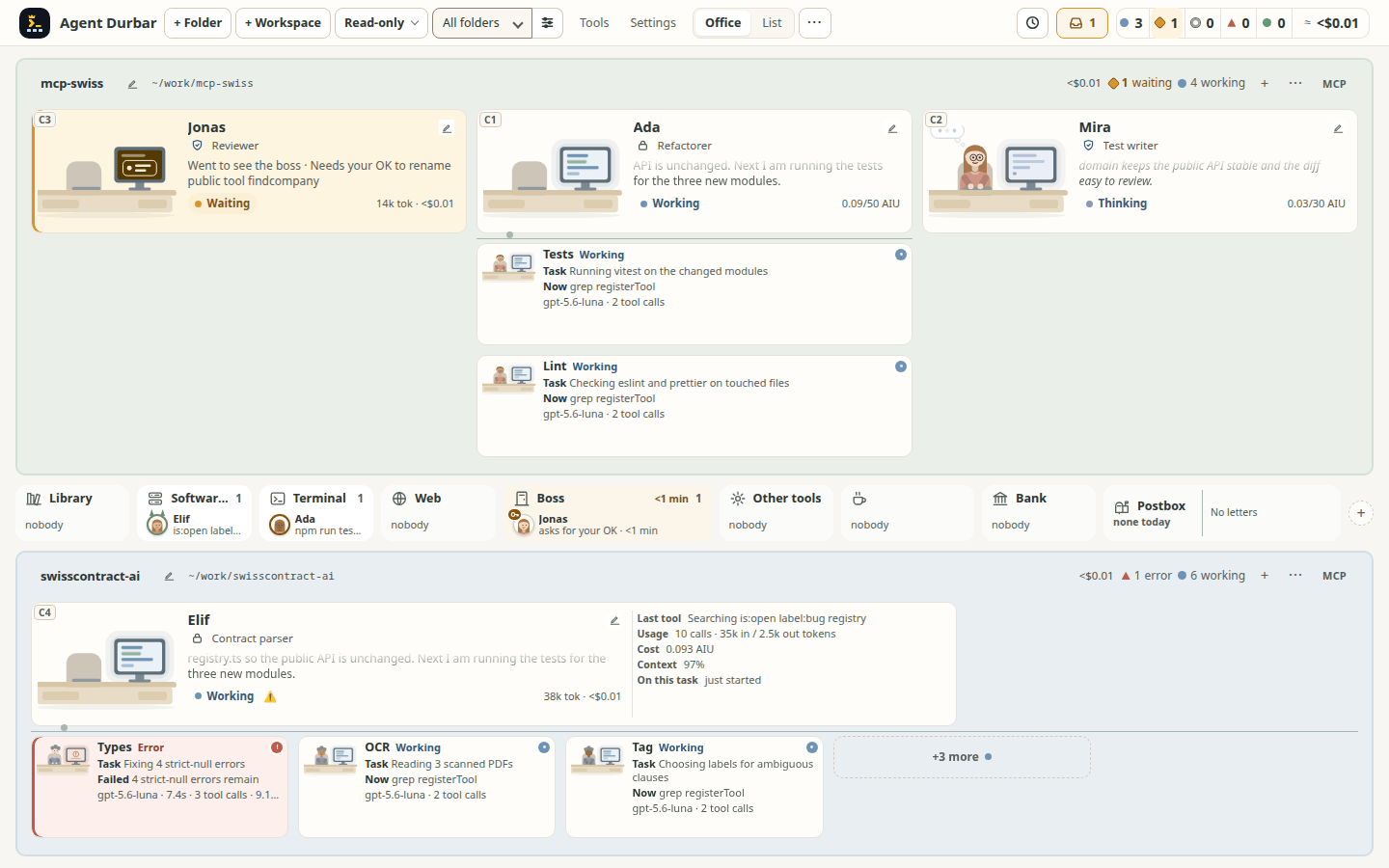
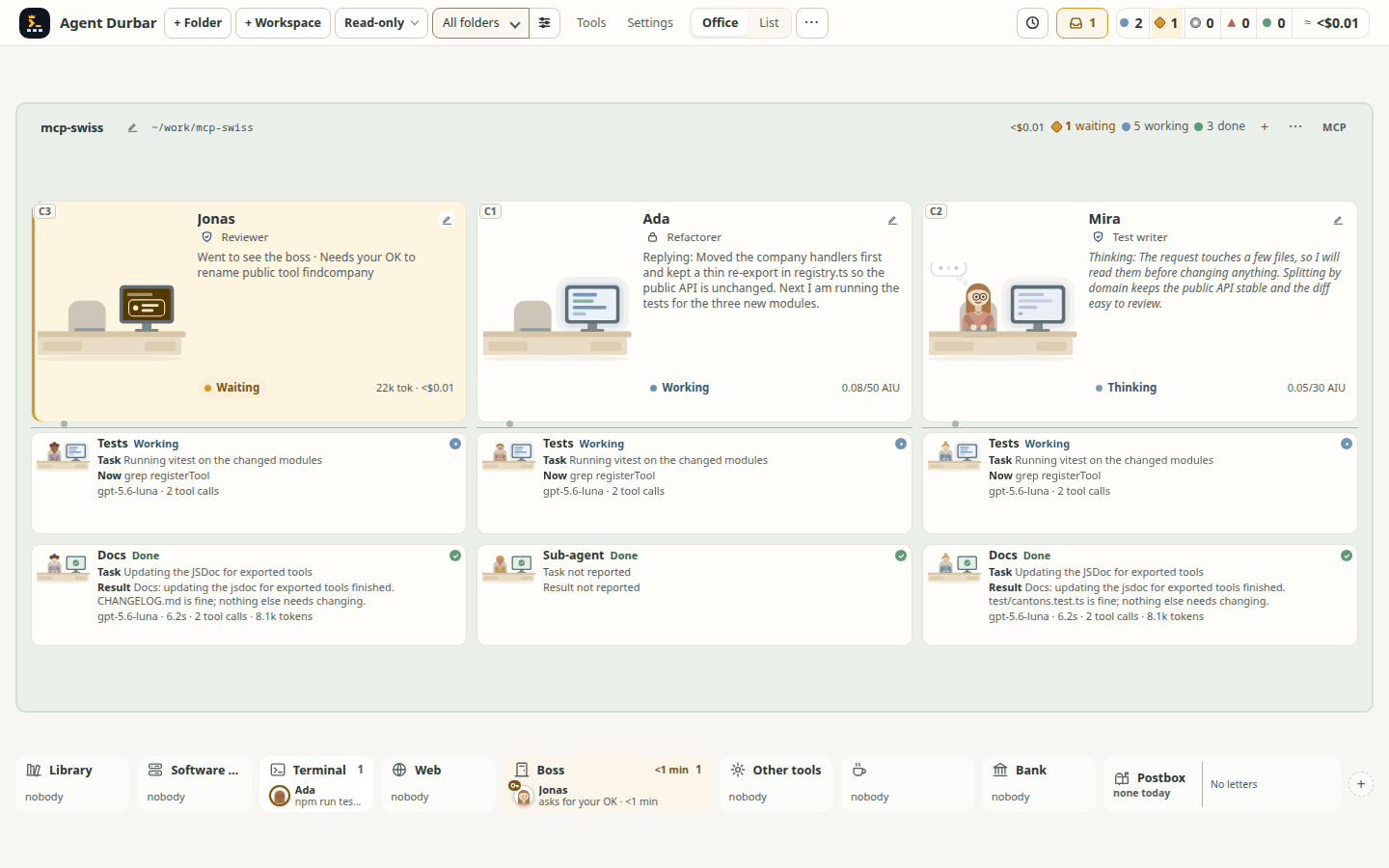
- Boss, Bank and Postbox in the lobby (who waits, what is scheduled, who is where): an agent with a question or a permission for you gets up and walks to the Boss in the middle of the lobby and queues there, first come first served, with a small ? or key on its figure; the Boss shows the longest wait ("12 min") and its desk an empty chair with Went to see the boss. Click a figure to open its chat at the request; once you answer, it walks back. An agent at your spending limit waits at the Bank (click: the chat with the raise-limit card); usage-window limits of the agent apps still go to the coffee corner. The Postbox shows the next three scheduled runs ("09:14 · mcp-swiss · Morning summary"), how many are still due today and a flag for a missed or failed run; when a schedule fires, a letter flies to that desk (not with reduced motion). Click it for Settings > Schedules. Every lobby place says who is there and what they do ("Ada · npm test"; initials when names do not fit, "+N" lists everyone), and room headers count in words ("4 working"). Theme words rename the three tiles (Durbar: Diwan-e-Khas, Khazana, Dak ghar). Simulator-checked at 1440x900 and 1280x800 (office, 1280x800, few agents, Retro); not yet seen on a real session or on a Mac or Windows PC.
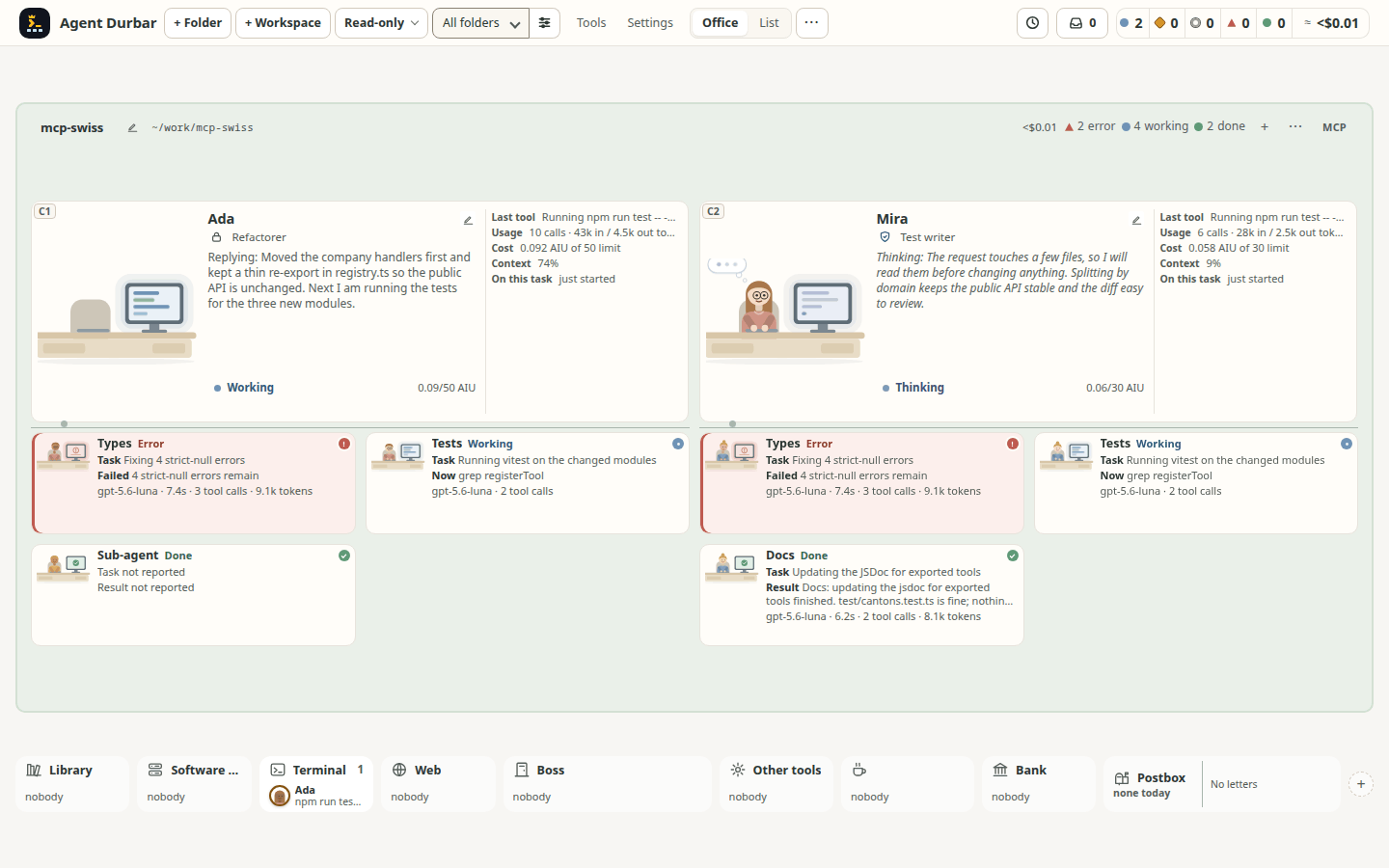
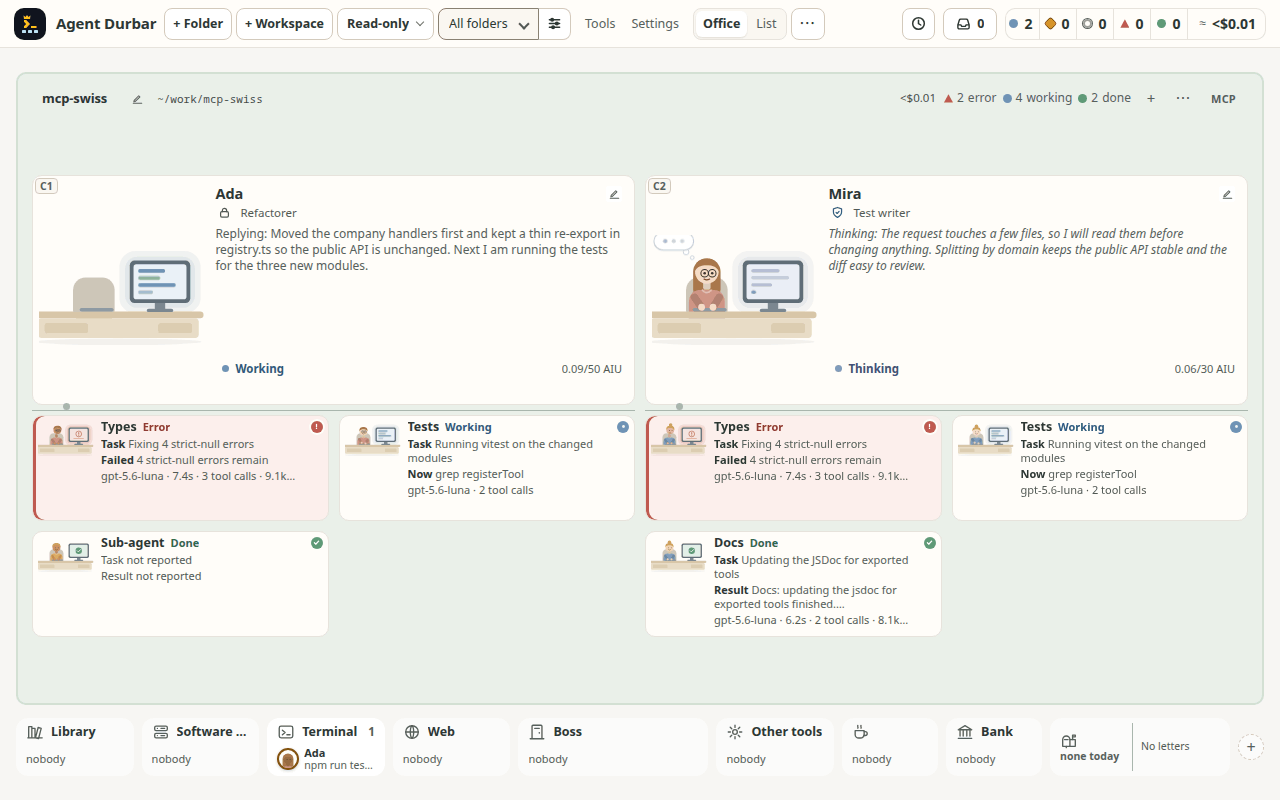
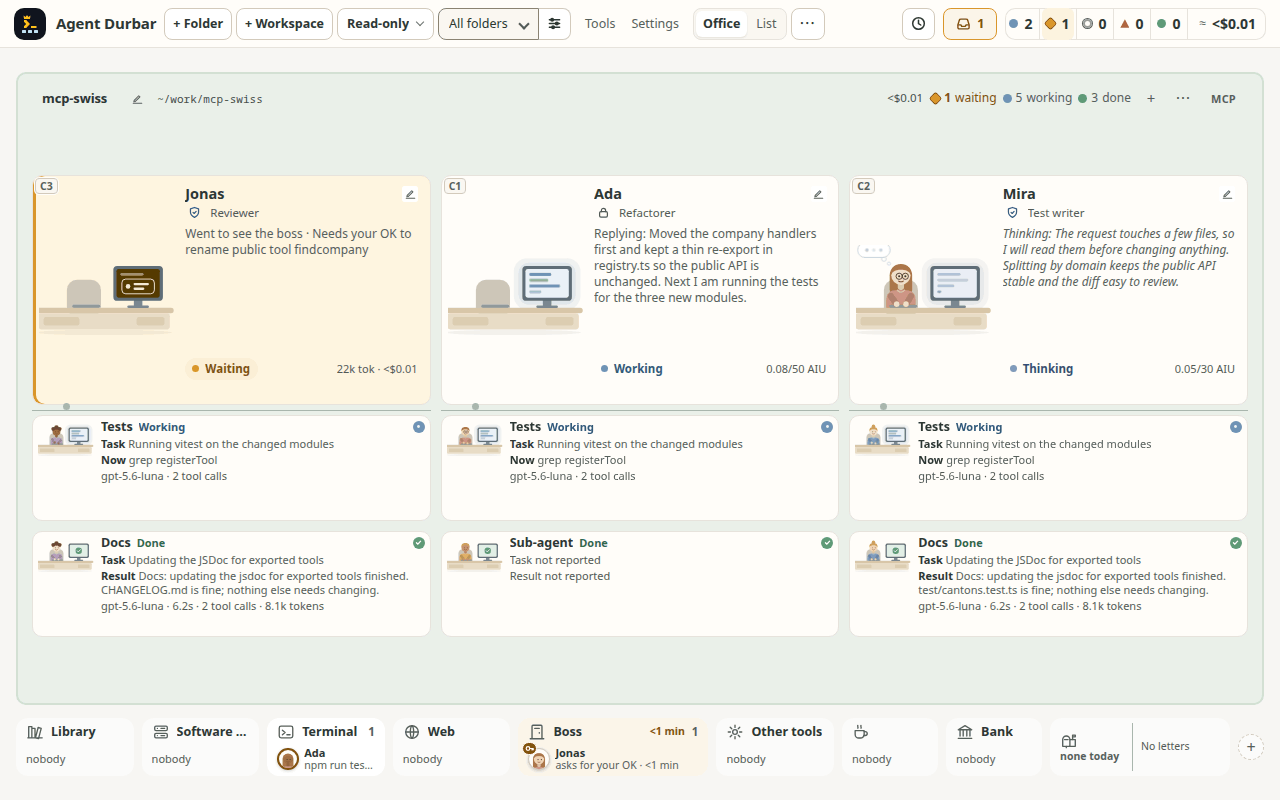
- Sub-agents (helpers) sit under the agent that started them, and show what they do when the office has room (spec 001, issue 697). With few agents, while the parent desks can stay at least 1.4x grown, a helper is a card with labelled lines instead of a name-and-status tile: Task, what it does Now (the tool, its intent or Thinking), its Result when it is done or Failed with the error, and a line of facts (model, time, tool calls, tokens); the full card when there is room, name plus one line when there is less, the small tile as before when there is not even that (so 15 agents look as they did). What the agent app did not send reads Task not reported, Result not reported or No activity reported yet, never another field: OpenAI Codex sends no result for a helper, so its card says so. Click a card for the helper's read-only activity. A helper the agent started in the background (its call returns at once) stays Running until the helper itself finishes or fails, or its session stops (then Failed, "Stopped with its session") (spec 015 FR-018, simulator-checked, not seen on a real session). Task, Result and Failed text is always on the office floor when there is room (masked for secret shapes like everywhere else and cut to 240 characters); only the Now line follows Live activity on desks. There is no setting to hide the rest, and none is planned (owner decision, 2026-10-25), so mind screen sharing: a result can show file contents, names or other text that is not a token. Simulator-checked (two agents, 1440x900 and 1280x800; three agents, 1440x900 and 1280x800); not run on a real session (what each agent app sends is read from the adapters and earlier captures, not seen live for this). Finished helpers are not kept forever: each agent keeps its newest 50 done and 20 failed ones (running and open ones always stay), and a line in the chat says how many are not kept (spec 005 FR-240, FR-241; measured on the Linux simulator only, Windows and macOS not measured).
- Real office shows each desk's helpers as small heads (spec 097 FR-306..FR-311, issue #1139; owner decision 2026-11-08): under each desk's name plate, one small round head (a person of the room's own set) per helper with a status dot on its corner; the helper's name is in its tooltip and accessible name only. A click opens that helper's read-only activity view, +K opens the rest in a scrolling row and Fewer folds them. Photo office and cave show one row of heads, never a second line: when the heads do not fit, the last place is +K (at most 3 heads and +K in the narrowest desks at 15 agents; spec 097 FR-338, bug #1384); the Retro arcade shows one row under each cabinet's plate at 1440x900 and keeps its +N count and dots at 1280x800, where the hall has no room. 15 agents still fit both window sizes.
- Agents show how they are doing: heavy, monster, ambulance, room sirens. Main agents walk to a place in a shared lobby for the tool they use.
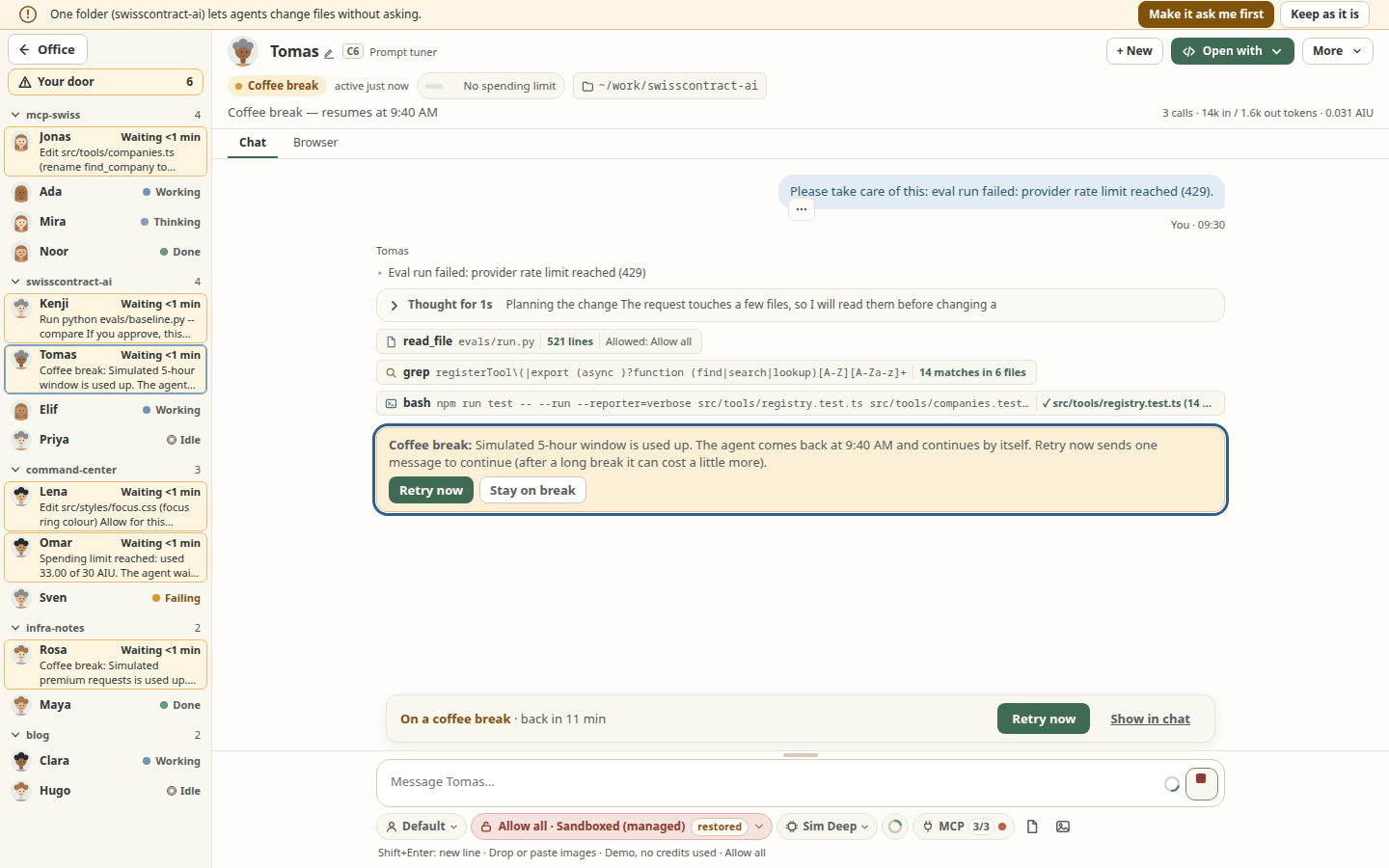
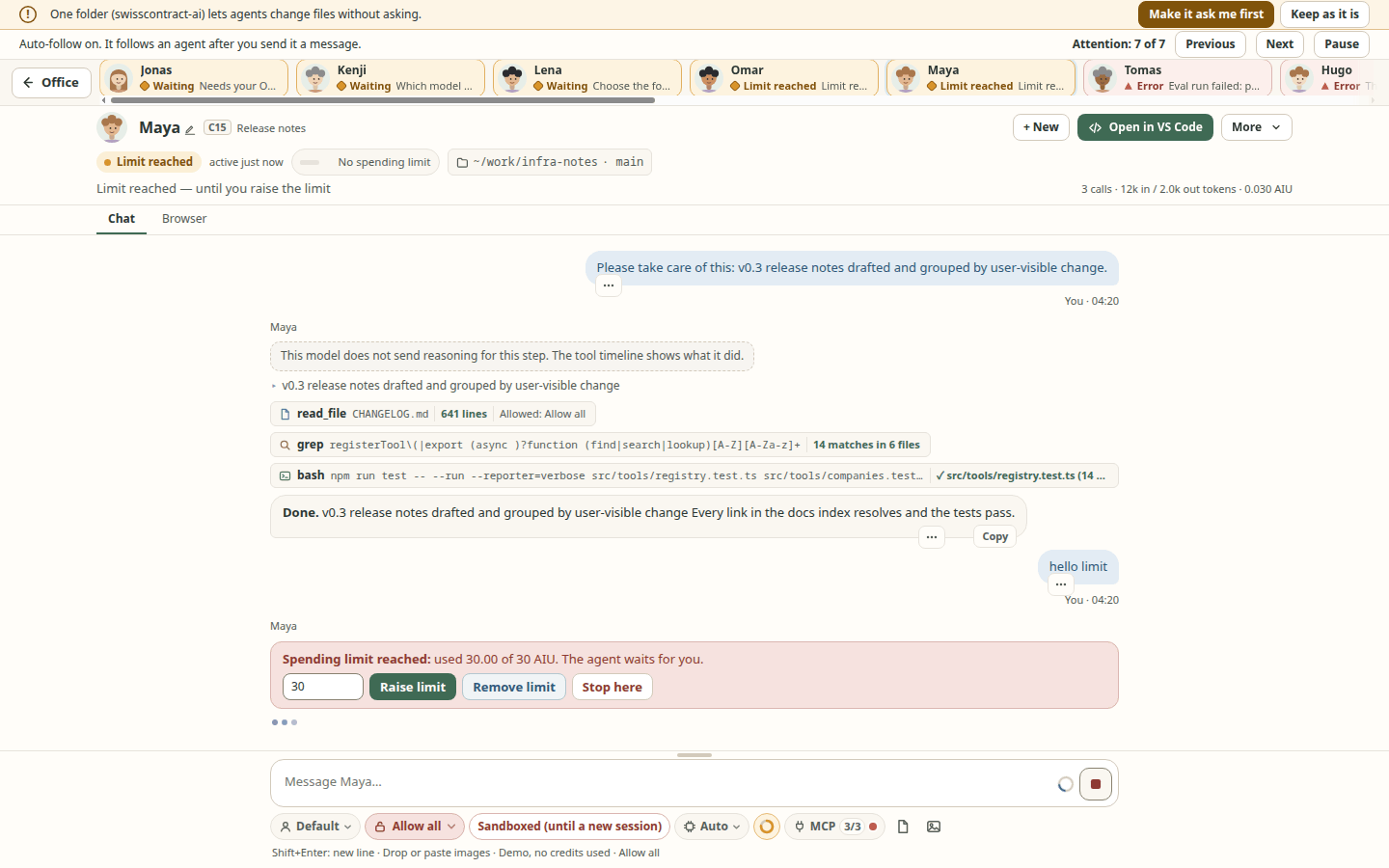
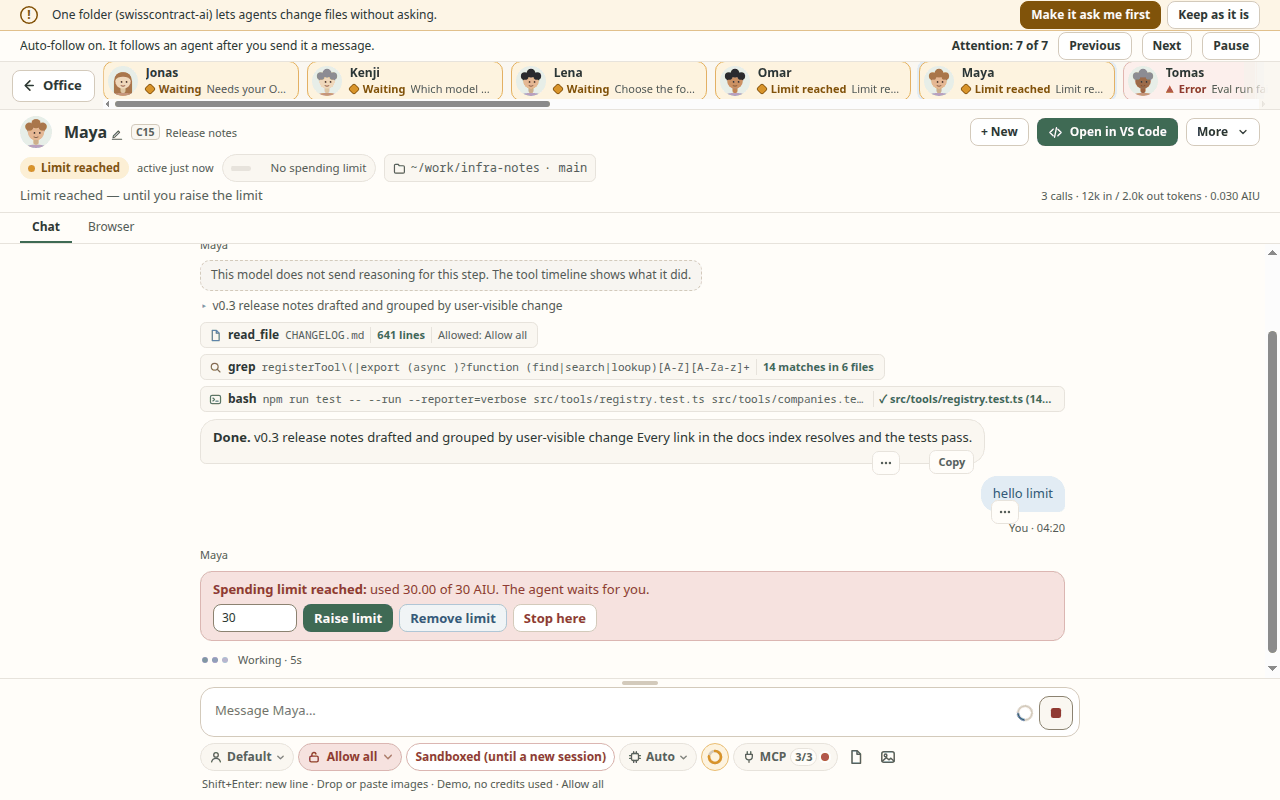
- Coffee break (spec 068): when an agent's usage limit is used up (a Claude Code or Codex plan window, Copilot's usage limit or rate limit), it waits in the lobby's coffee corner with a cup instead of showing an error. Its card says Coffee break — resumes at 4:24 PM when the agent app says when the limit resets. The spending limit you set in Durbar sends the agent to the Bank instead (Limit reached — until you raise the limit). When the limit resets it comes back and sends one message to continue, but only by itself when that costs nothing extra (a plan or rate window); a quota that may lead to paid usage, or Always ask me in Settings, asks first. It never resumes past your spending limit or after a restart, and never checks on its own whether a limit has reset (screenshot). Click an agent in the coffee corner (or press Enter on it) to open its chat, where a bar says how long the break lasts (On a coffee break · back in 4 min) and offers Retry now: one message now instead of waiting (right-click or Shift+F10 on the corner's entry offers the same; screenshot). Simulator and unit tests only: no real session has been run into a limit, so the limit messages and reset times of the agent apps are read from their docs and may differ.
- Floors group rooms and can be switched off with a toggle switch, the same as the one for MCP servers. In the panel each floor row has a drag handle (drag a floor to reorder it; the up and down arrow buttons do the same from the keyboard), a Focus mode icon button (shows only that floor; it stays pressed while that floor is the only one on, and you leave it by switching another floor on), and quiet icon buttons for Rename and Delete. With two or more floors on, the office shows one floor at a time, at the best size for that floor's agents (the lobby is on every floor), and a lift panel at the right edge has one numbered button per floor that is on, floor 1 at the bottom (the name is in its tooltip). A button of another floor carries a badge with the number of agents there that need you (waiting, error, limit reached, a New reply; the words are in its tooltip and accessible name). All at the top of the lift shows every floor on one screen, floor 1 at the bottom, with one size for all of them; the choice is remembered. The lift is one Tab stop: Up/Down, Home/End, Enter or Space. PageUp goes to the next floor up that is on, PageDown to the next one down (Fn+Up / Fn+Down on a Mac laptop), and a floor taller than the window scrolls first with the same keys (it changes floor only from its edge); in All they only scroll. The pills, the inbox and the usage total still count the whole building. This is spec 092 phases 1 and 2: the slide between floors and "open an agent, land on its floor" are not built yet (a floor change is instant, and a chat opened from another floor returns to the floor you were on); tried on the simulator, not on a real Mac or Windows keyboard nor with a screen reader. With two or more floors, right-click a folder (or its ⋯) and choose Move to floor ▸ to send the whole folder, agents included, to another floor, with Undo. A List view is there when you want rows instead of desks: agent app, role, folder, task, last activity and cost columns, sortable, with J/K to move; the columns follow their content (a cut cell shows its full text on hover) and a narrow window drops Role, then Folder, instead of scrolling sideways. With two or more floors on, the office shows one floor at a time, at the best size for that floor's agents (the lobby is on every floor), and a lift panel at the right edge has one numbered button per floor that is on, floor 1 at the bottom (the name is in its tooltip). A button of another floor carries a badge with the number of agents there that need you (waiting, error, limit reached, a New reply; the words are in its tooltip and accessible name). All at the top of the lift shows every floor on one screen, floor 1 at the bottom, with one size for all of them; the choice is remembered. The lift is one Tab stop: Up/Down, Home/End, Enter or Space. PageUp goes to the next floor up that is on, PageDown to the next one down (Fn+Up / Fn+Down on a Mac laptop), and a floor taller than the window scrolls first with the same keys (it changes floor only from its edge); in All they only scroll. The pills, the inbox and the usage total still count the whole building. This is spec 092 phases 1 and 2: the slide between floors and "open an agent, land on its floor" are not built yet (a floor change is instant, and a chat opened from another floor returns to the floor you were on); tried on the simulator, not on a real Mac or Windows keyboard nor with a screen reader. With two or more floors, right-click a folder (or its ⋯) and choose Move to floor ▸ to send the whole folder, agents included, to another floor, with Undo. A List view is there when you want rows instead of desks: agent app, role, folder, task, last activity and cost columns, sortable, with J/K to move; the columns follow their content (a cut cell shows its full text on hover) and a narrow window drops Role, then Folder, instead of scrolling sideways.
- A room's ⋯ menu offers New session, Schedules, Rename, MCP extras, Cost, Move to floor, Move earlier / Move later (the room's place among the rooms of its floor), Hide and Remove folder. The folder name always keeps at least 8 characters: in a tight header the pencil, the schedule chip, MCP, the floor tag and the cost give way one at a time, and are all in that menu. You can also rename a folder in place: the pencil after its name (or F2 on its ⋯ button) edits the name where it is.
- Rearrange the office (spec 033): press and drag a room's header, a desk or a lobby place tile onto another to put it before or after it; neighbours slide as a preview and a click without moving still opens the chat. Releasing the pointer anywhere (even outside the group) drops it in the nearest spot; Escape, a scroll or leaving the window cancels. From the keyboard, Alt+arrows move the focused desk or place one spot (Option on a Mac), Alt+Shift+arrows move its room, and the folder menu has Move earlier / Move later; the new spot is spoken and the focus stays. The order is global (all themes), saved with the floors, only sequences things (the layout stays automatic), and Reset the office order in the command palette (Ctrl/Cmd+K) puts the automatic order back. Not available in the List view. In the Real office (spec 097 FR-345..FR-348) the same order shows (desks too, not sorted by status over it) and Alt+arrows on a focused name plate, Alt+Shift+arrows on a plate or a folder sign's button and the folder menu's Move earlier / Move later move things; the mouse drag is not built there yet. Simulator-checked at 1440x900 and 1280x800; touch and macOS/Windows not verified.
- A new logo family (spec 101): the app icon (installer, Dock, taskbar, Finder, README, website favicon) is a command prompt wearing a crown with three bots below. Settings > Logo picks one of four icons for the top bar (Prompt sovereign, Terminal chair, Figure with badge, Underscore floor); the choice is kept on this computer and applies at once. The top-bar icon is drawn in the colours of the theme (the Clean style has its own palette), and in a Real office world in that world's palette; it is always a small vector drawing, never a picture, in a tile of the same size as before. The Dock, taskbar and Finder icon is fixed at build time and does not follow the choice. Limits: painted previews of the icons are not built (the picker shows vector previews), the country and kingdom worlds have no palette yet, a quick web search is no trademark clearance, and the icons were looked at on Linux only, not on a real macOS or Windows desktop.
npm run icons:buildrebuilds the icon files.
Chat
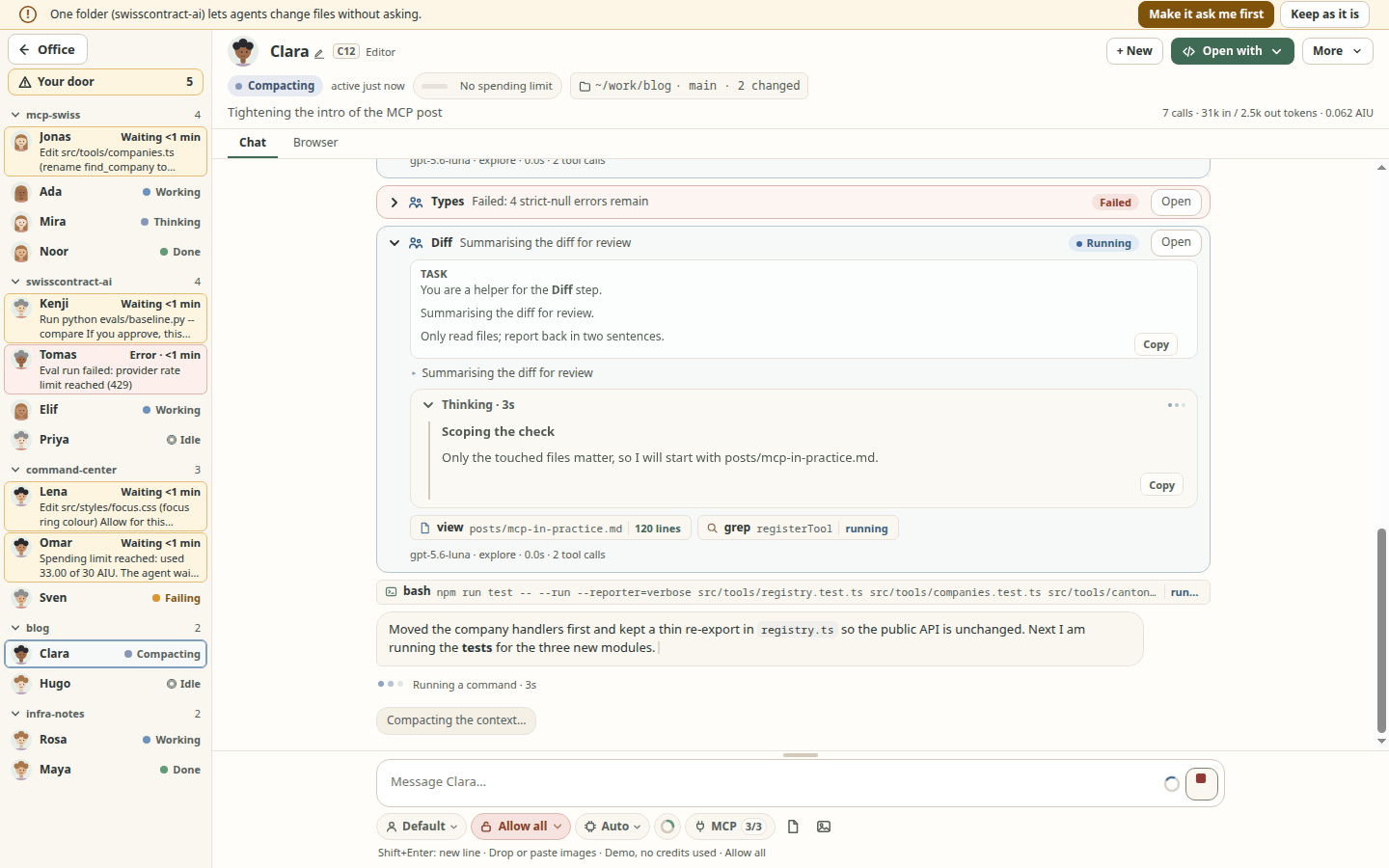
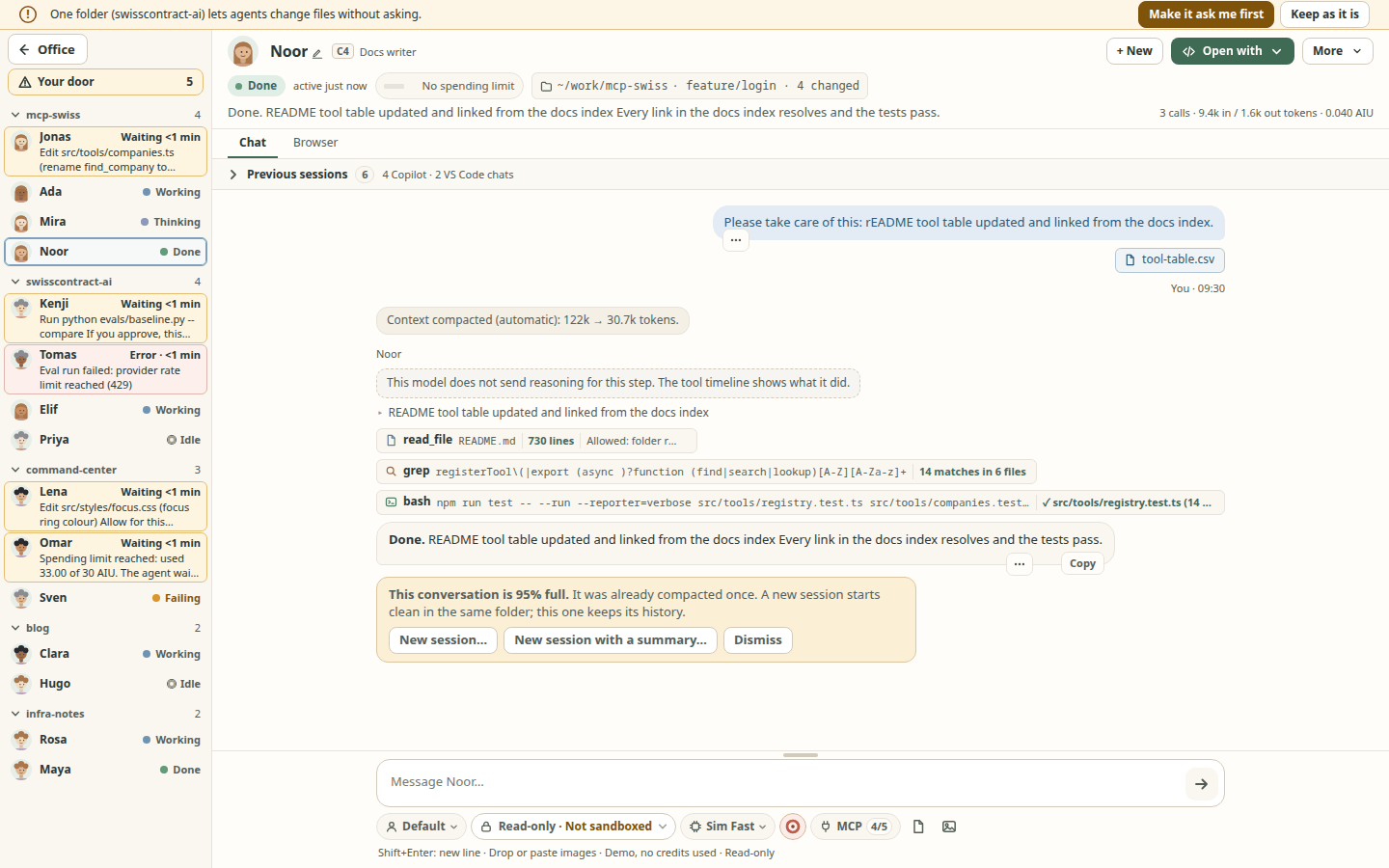
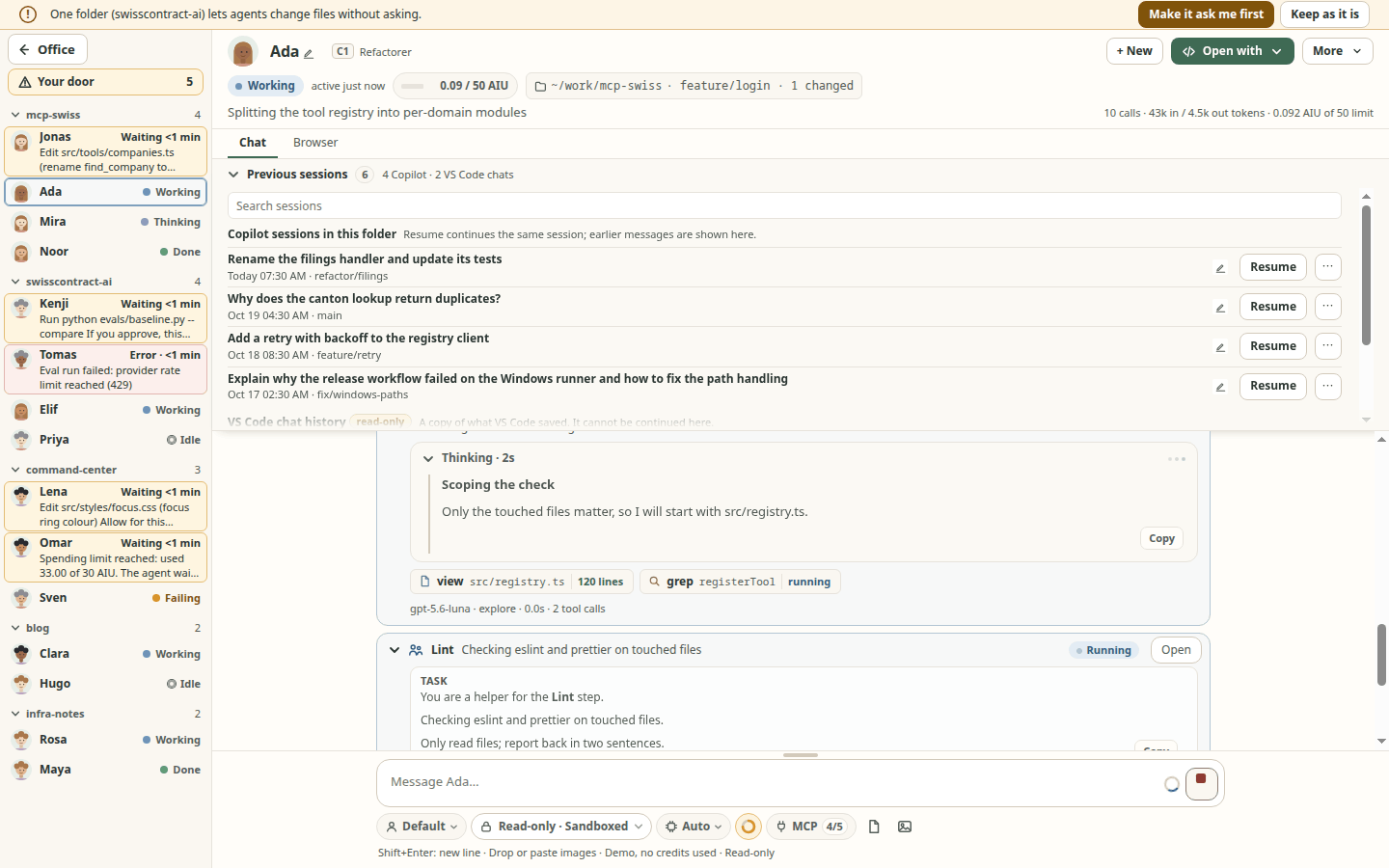
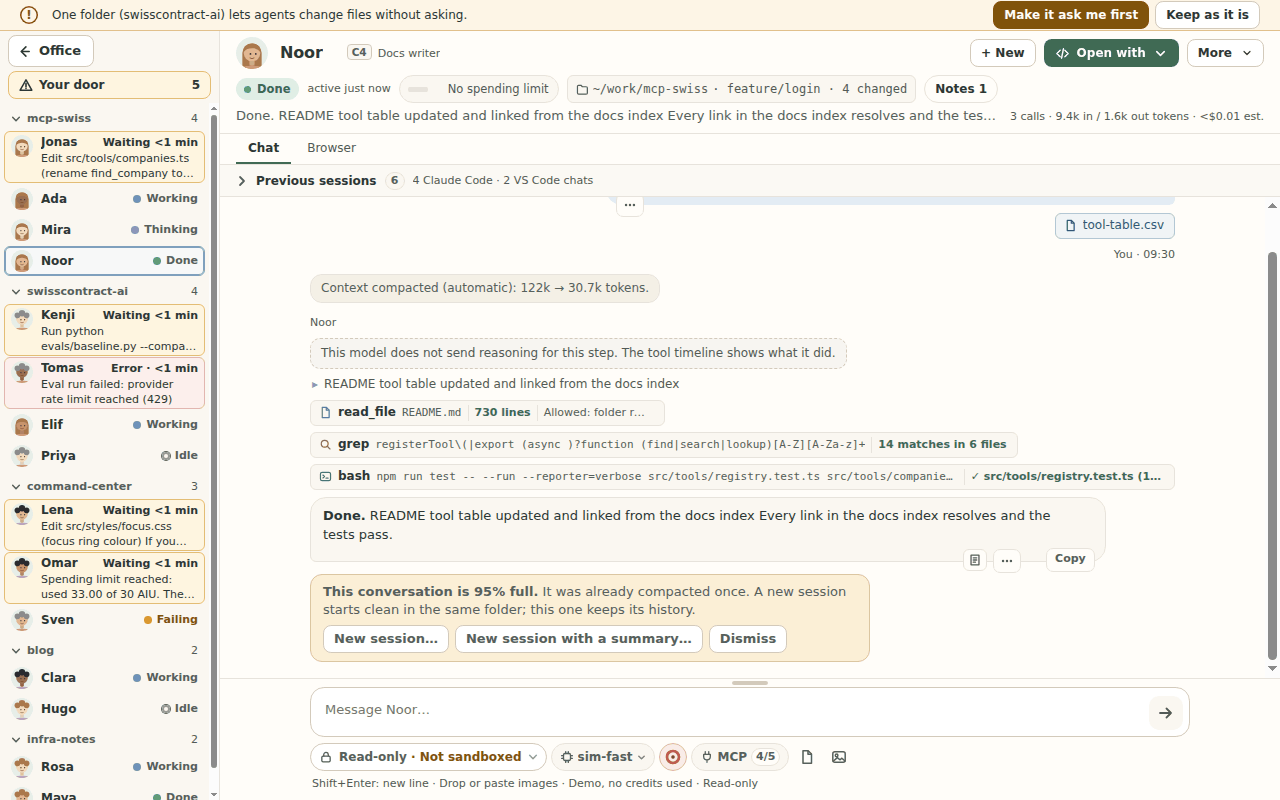
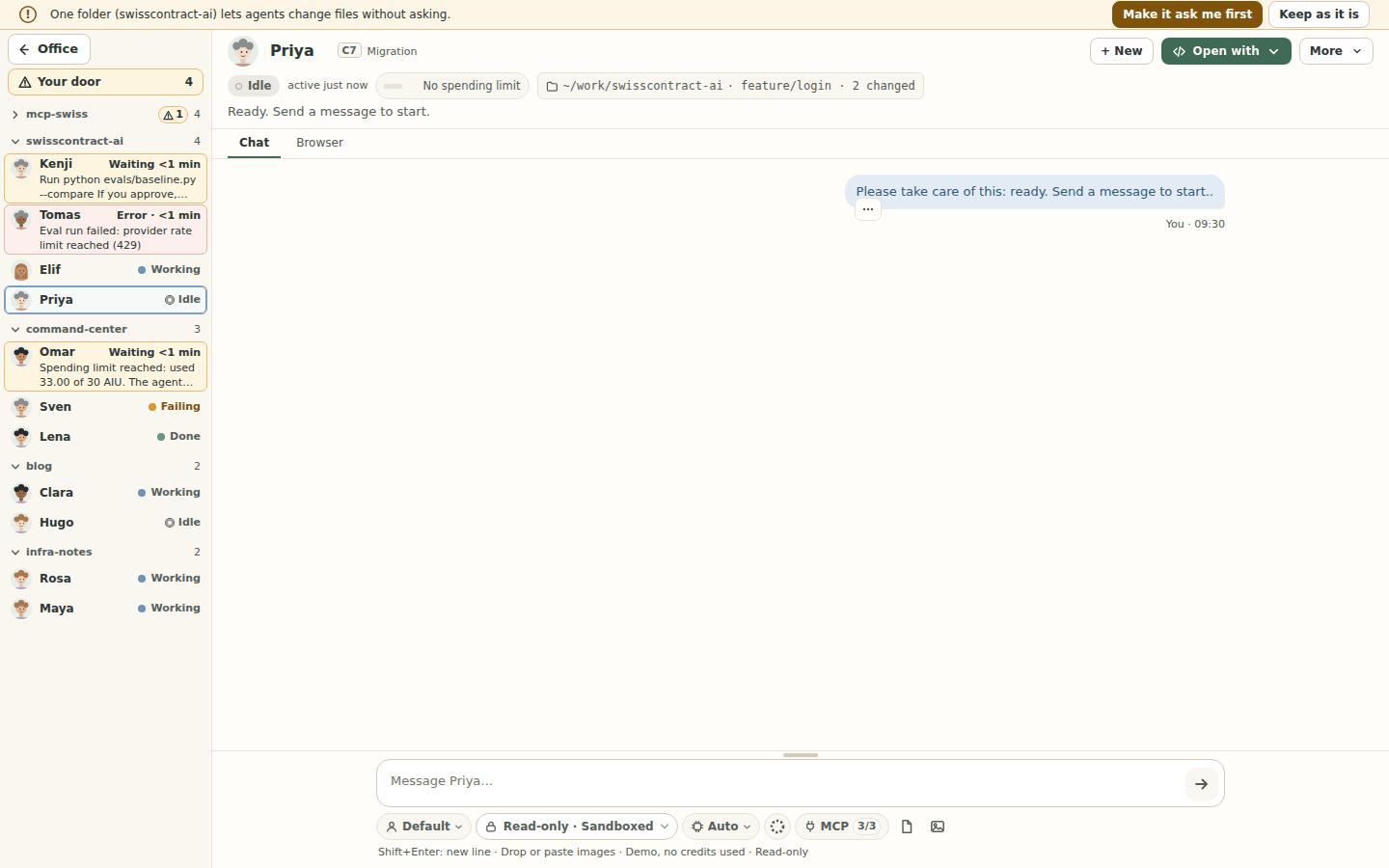
- Click an agent to open a full-screen chat. All the other agents stay in the rail on its left (spec 005 FR-190, FR-194, FR-216), grouped by folder with each folder's count. Whoever needs you comes first: a taller, tinted row says how long they have waited ("Waiting 3 min") and what they ask, and their folder moves up. Your door at the top shows how many need you and opens the Needs you queue. Click a folder's name (or press Enter or Space on it; a double click does the same) to collapse or expand it; a collapsed folder still shows its count and a mark with how many in it need you, and opening a chat in it expands it again. Drag the rail's right edge to make it wider or narrower (180 px up to 40% of the window; arrow keys, Home and End, work too, and a double-click goes back to 220 px); the width is remembered on this computer (FR-236). The collapsed folders are remembered per window (not in the demo or the simulator). Not yet: the floor-plan view of the rail and collapsing the whole rail.
- You see its thinking, tool calls and replies as they stream in, with Markdown and copy buttons. An open tool call shows the whole command (with Copy), how long it took and its output; a Claude Code or Codex edit request has a Show the change diff (a Codex request with no known file says "Codex did not say which file").
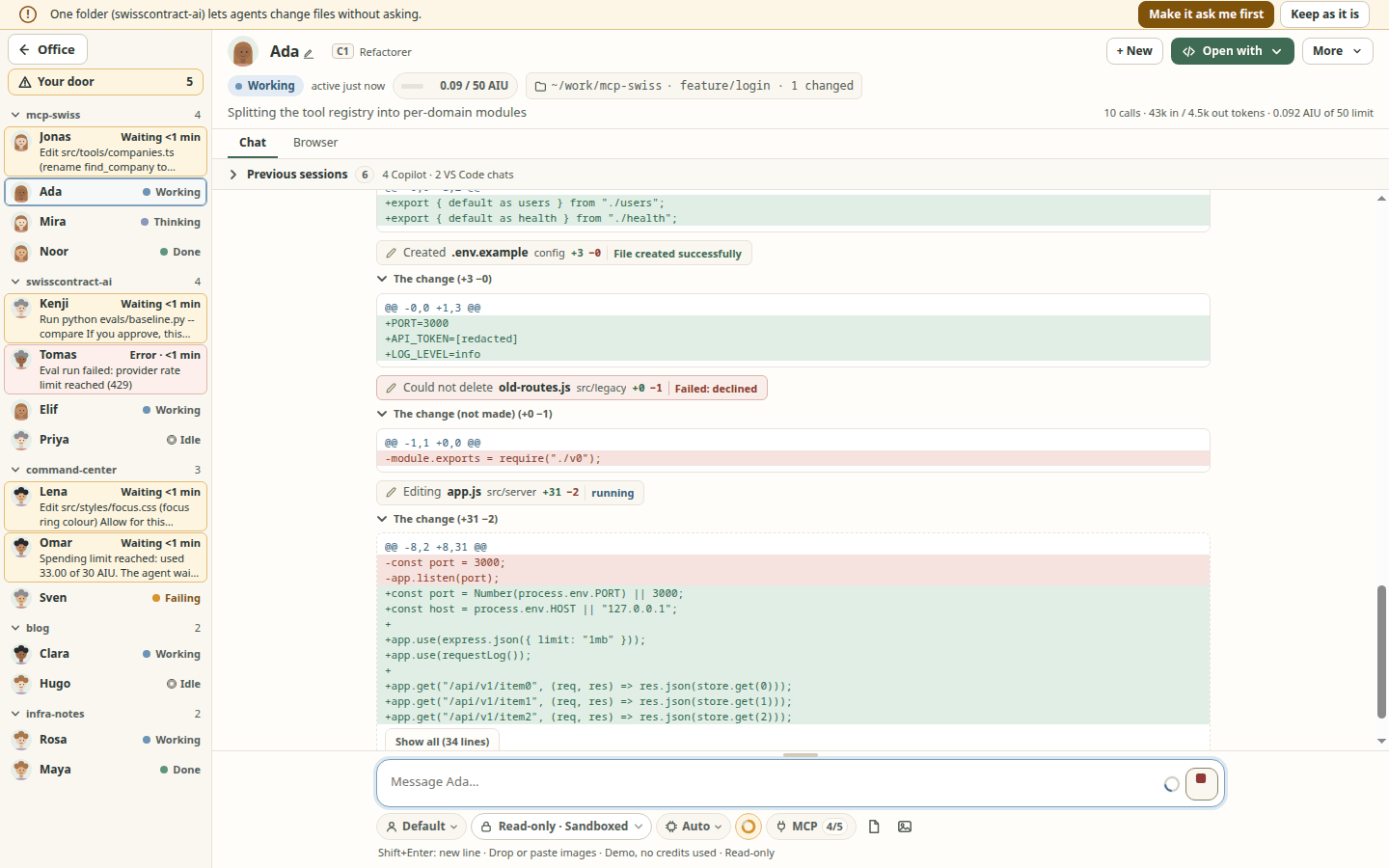
- File edits show up while the agent writes them: the moment an agent starts changing a file, the chat shows "Editing app.js" with its folder and "+12 −3", and the change itself as a compact diff (12 lines, then Show all) that grows as the agent writes it; several files are listed one by one. The line under the chat names what runs now ("Editing app.js · 12s", or "Waiting for your OK" while a permission card waits). An edit that was refused or failed says so ("Could not edit app.js"). Secrets in a diff are masked (by the adapter, then in main with the session's MCP secret values too). Claude Code and Copilot stream the edit, so the row appears before the tool runs (checked on real sessions, Linux); Codex sends the whole change at once, so its row appears when the edit starts (spec 005, screenshot).
- Attach files and images by picking, dropping or pasting.
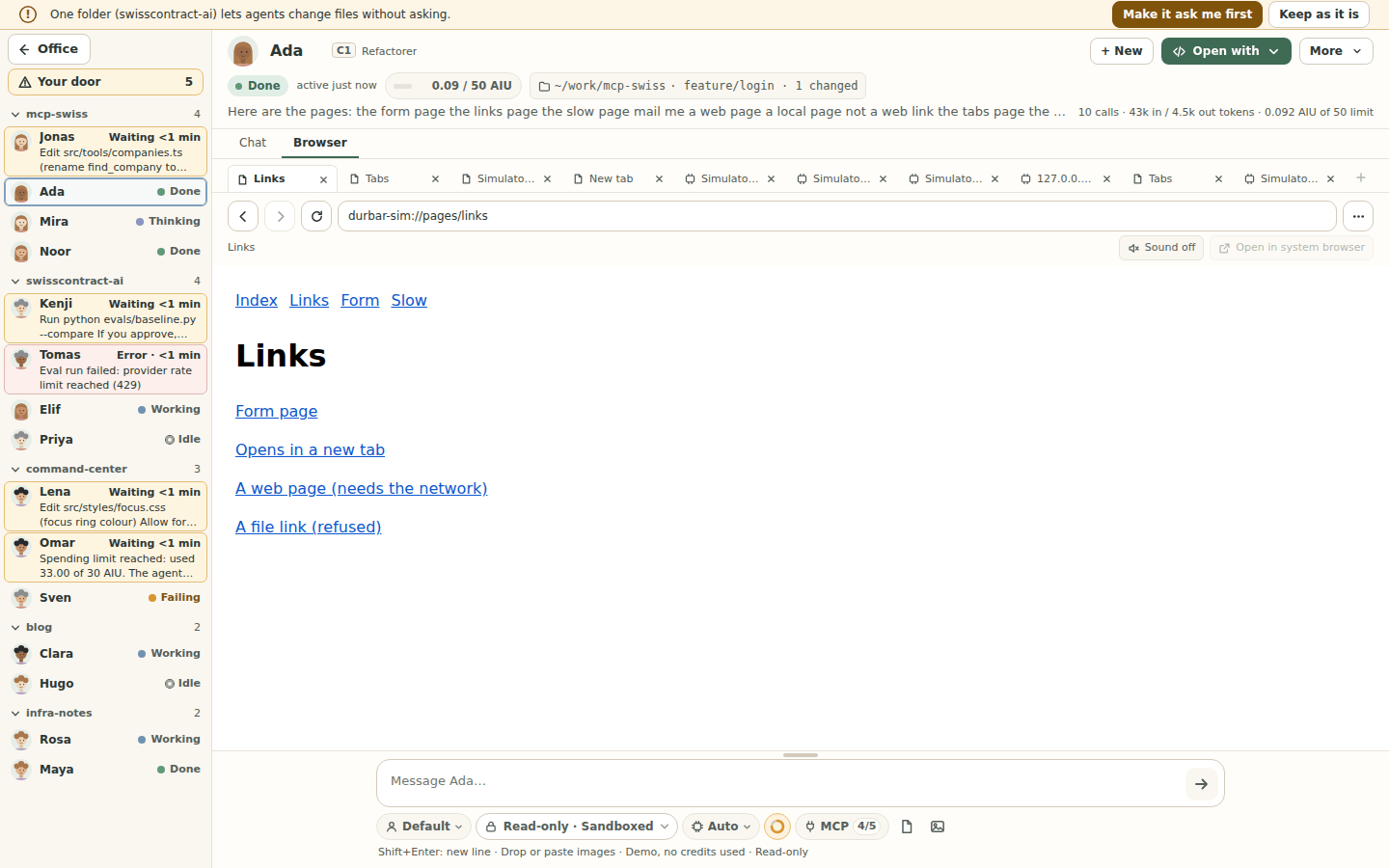
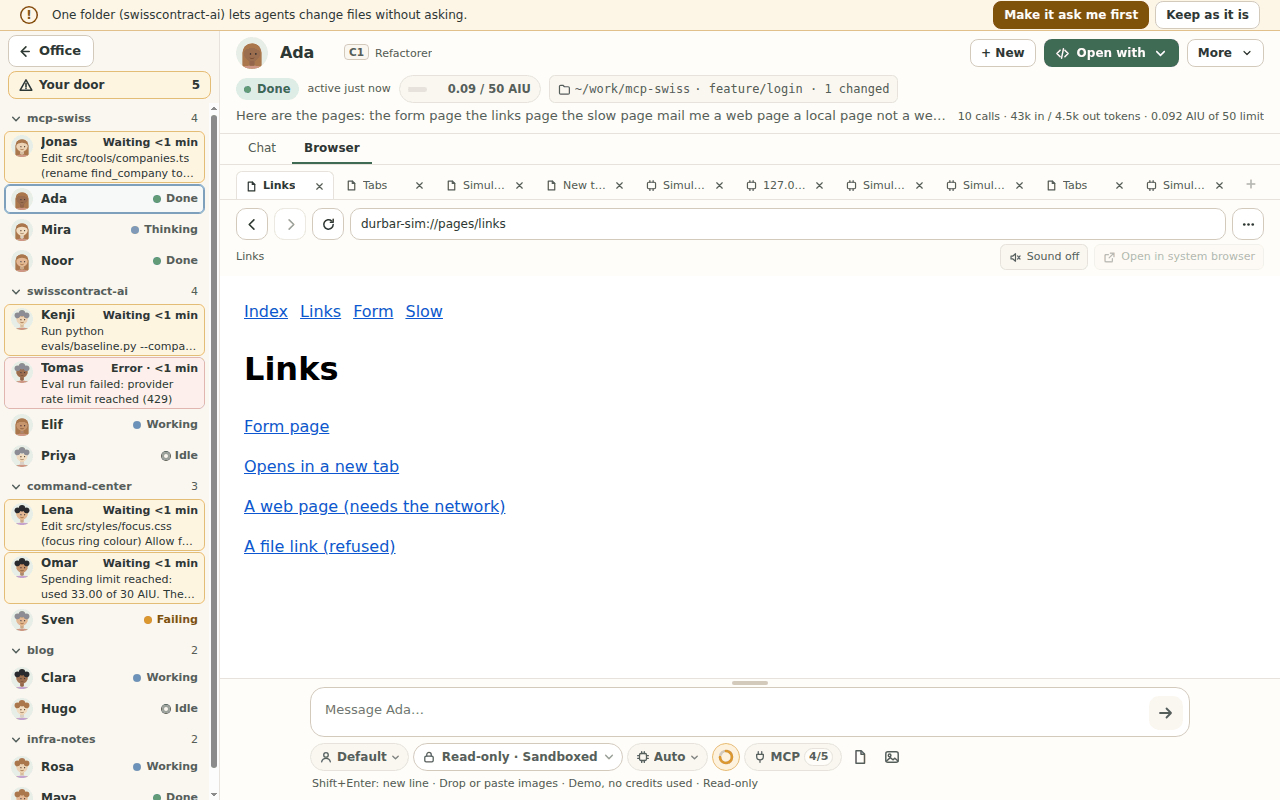
- A browser in every chat (spec 080, issue #556): each chat has Chat | Browser tabs. The Browser tab has an address field, Back, Forward, Reload and Stop, a Sound toggle (sound starts off) and Open in system browser. Each session gets its own private, in-memory profile: cookies, storage and cache are never shared with another session and are wiped when the session ends, is removed or its folder is removed. A click on an
httporhttpslink in a chat opens it in that session's Browser tab (Ctrl+click, or ⌘+click on a Mac, and the link's right-click menu open it in your usual browser; Settings > Open chat links in changes the plain click). Onlyhttpandhttpsaddresses open;file:,javascript:, other schemes and addresses with a user name and password are refused with a reason. Page tabs (spec 080 US6, issue #910): each session's browser holds up to 10 tabs, in a strip above the address bar (screenshot, 1280x800); + or Ctrl+T (⌘T) opens one, its x, Ctrl+W (⌘W) or Delete in the strip closes one, Ctrl+Tab and Ctrl+Shift+Tab switch. The bar's ⋯ menu has Open chat links in a new tab (off by default, one setting for every session): with it on, a chat link opens in a new tab next to the one you are reading, and a link a tab already shows brings that tab to the front instead of opening it twice; the link's right-click menu has Open in a new tab either way. A page's own open in a new tab links open a tab of the same session too (onlyhttp/httpsfrom the page's own site, at most 5 per page load). The session's tabs share its private profile, so a sign-in in one tab holds in the others, and all of it is wiped when the session ends. Linux and the simulator only so far; see Known limits. - Questions an agent asks you appear as a card with its choices, an "Other" answer and Skip. The whole question, every choice and its description are shown in full; Enter in the "Other" box sends your answer (Shift+Enter adds a line). While a question waits and its card is scrolled out of view, the bar above the message box shows it; a short one can be answered right there (its choices, an "Other" box and Skip), a longer one has Show question. Several context compactions in a row are one line that counts them ("Context compacted 4 times · last 10:21").
- Needs you: one inbox of every agent waiting for you, oldest first with how long each has waited. Open it with I, Ctrl+Shift+A (also from a text box) or Ctrl+A when the cursor is not in a text box or the chat log (there Ctrl+A still selects all). While Durbar is in the background the window title ("(3) Agent Durbar"), the app icon and one notification tell you (Settings > Notifications turns it off; it shows only the agent's name and a short summary). In a waiting chat, Alt+A allows once, Alt+S allows for the session, Alt+D denies and Alt+N goes to the next agent (a held key answers once, never down the queue; a spending limit is answered with its buttons, never a letter key); ? lists every shortcut.
- Auto-follow work (Settings, off by default): after a message is accepted, the window returns to the office with that agent's desk marked, then opens its chat (focus on the title; it never answers or approves for you) when the agent finishes, asks, errors or reaches its limit. It waits while you type, a dialog or menu is open, or you chose another agent; a reply that comes while its chat is on screen is seen there and never opens anything later, and a new message to an agent replaces its completion still waiting. A strip under the top bar has Previous and Next ([ and ]) over the Needs you queue then unread replies, with "2 of 3", and Pause. Before each automatic move, a full-screen notice says where it is taking you and why ("Priya is working on this. Taking you to the office.", "Priya finished. See if it is OK. Opening its chat.") and counts down 3 seconds; Stay here / Stay in the office or Esc cancels the move. With reduced motion, or Motion off in Settings, nothing in it moves; the text and the number stay. It looks the same in Open office and in every Real office world. Spec 052 FR-182..FR-190 (1440x900, 1280x800), FR-238..FR-241 (the notice), FR-242.
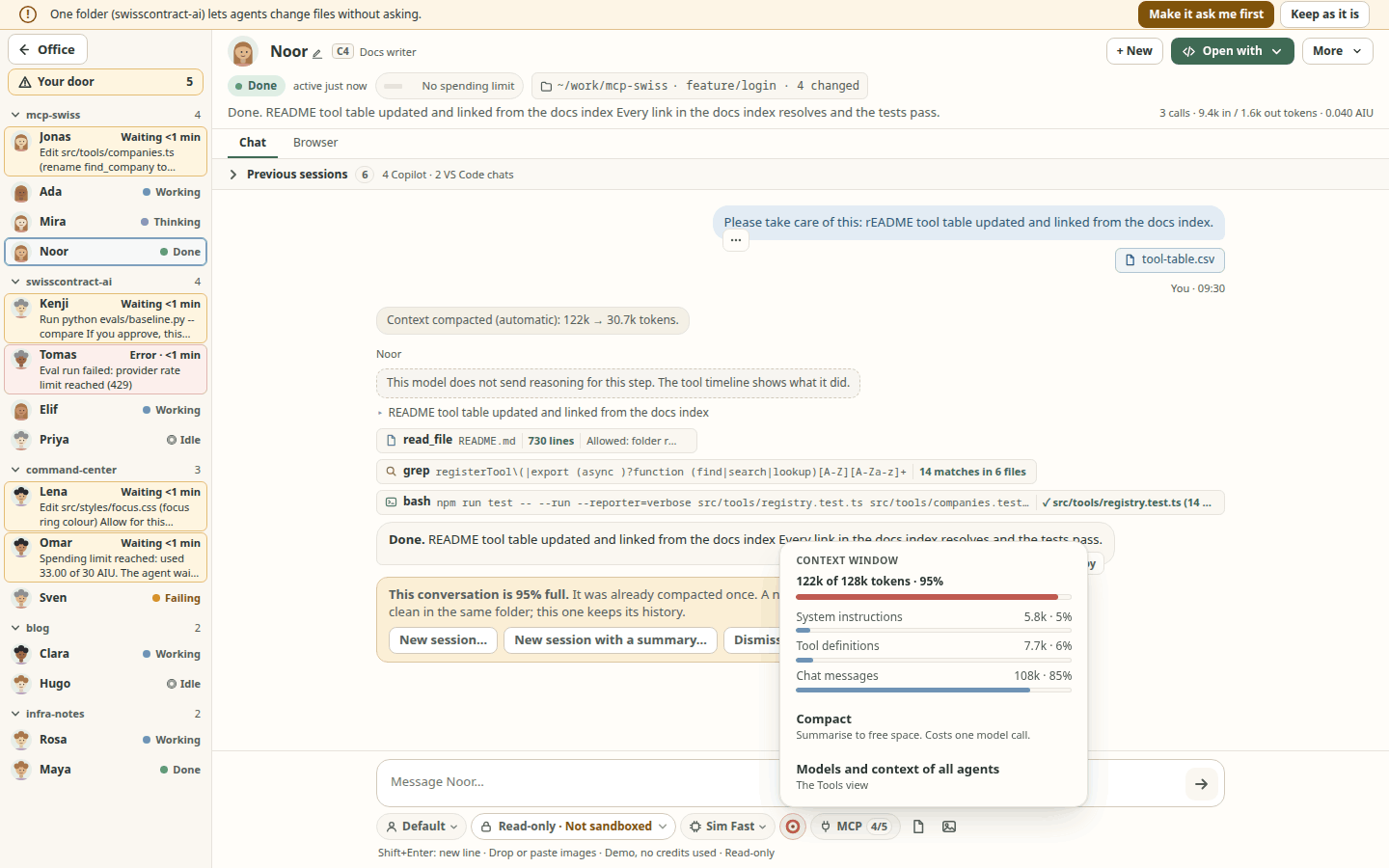
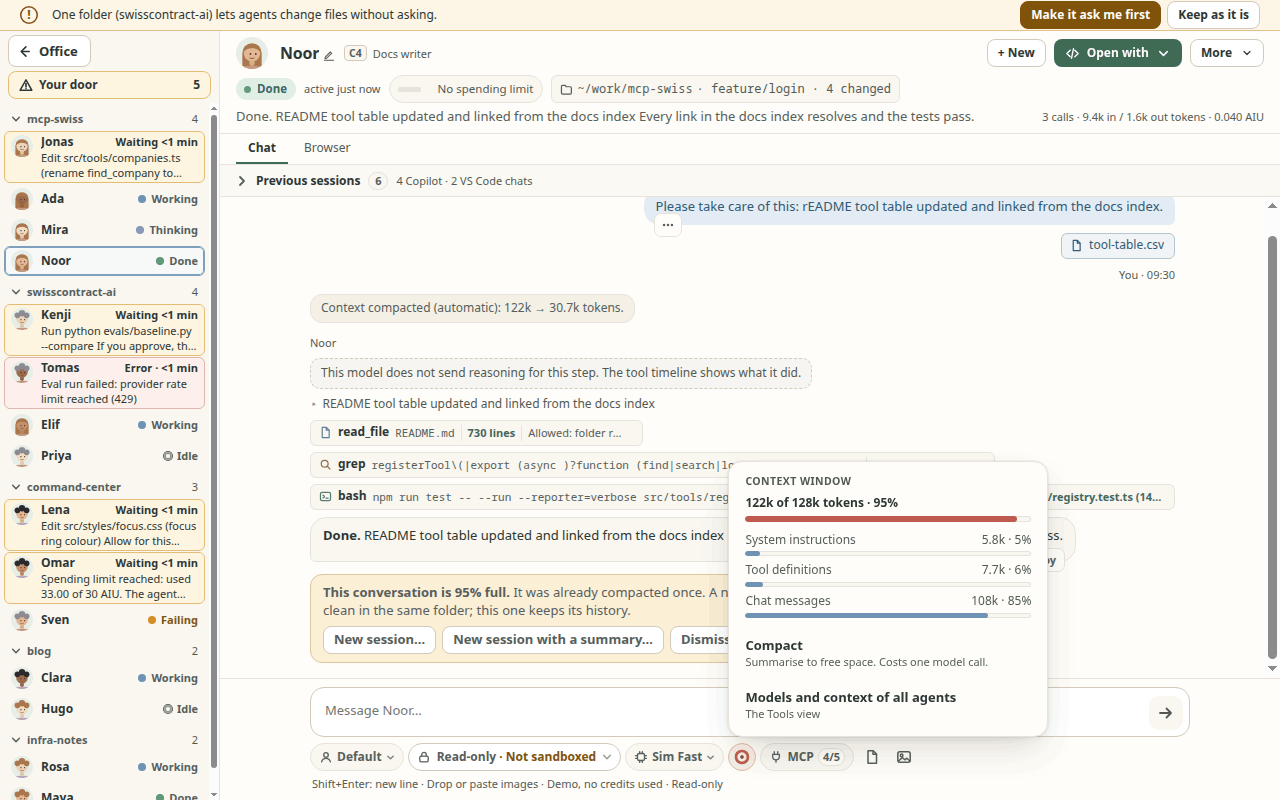
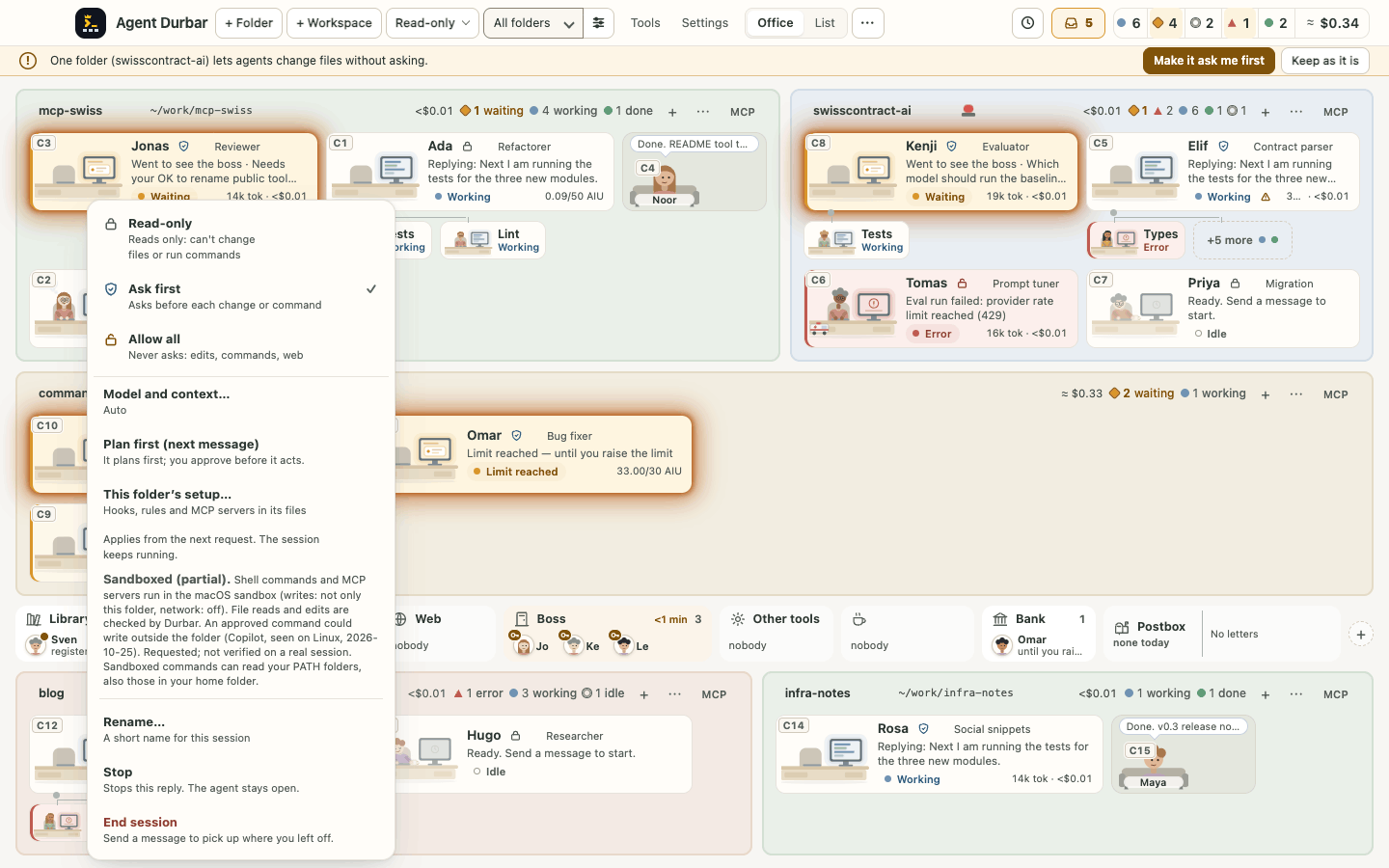
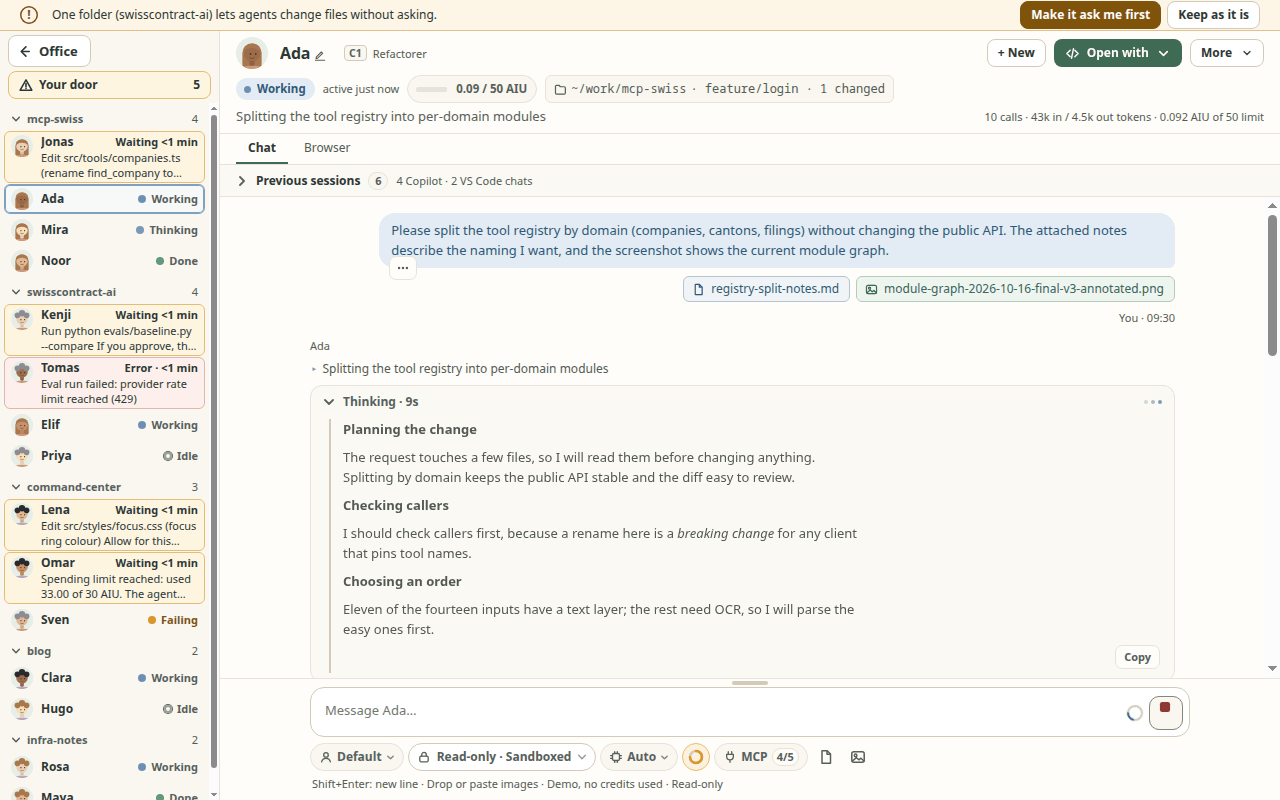
- Under the message box, as in VS Code, one compact row sets how the next message runs: the profile, the mode (Read-only, Ask first, Allow all in red), the model's name (its menu holds the effort and the context window choices that model has), a small context ring coloured by how full the window is (green, amber from 70%, red above 90%; hover for "Context 55% of 1M"; click for a token summary with one bar per type the agent app reports: system instructions, tool definitions, chat messages, other; Claude Code and Codex report only a total, and the summary says so; Compact is there too), MCP 12/16 (servers on out of all servers for this chat; it opens the server list), and attach file or image. In a narrow window what does not fit goes under ⋯; the mode always stays in view. (screenshot, token summary, at 1280x800).
- Type
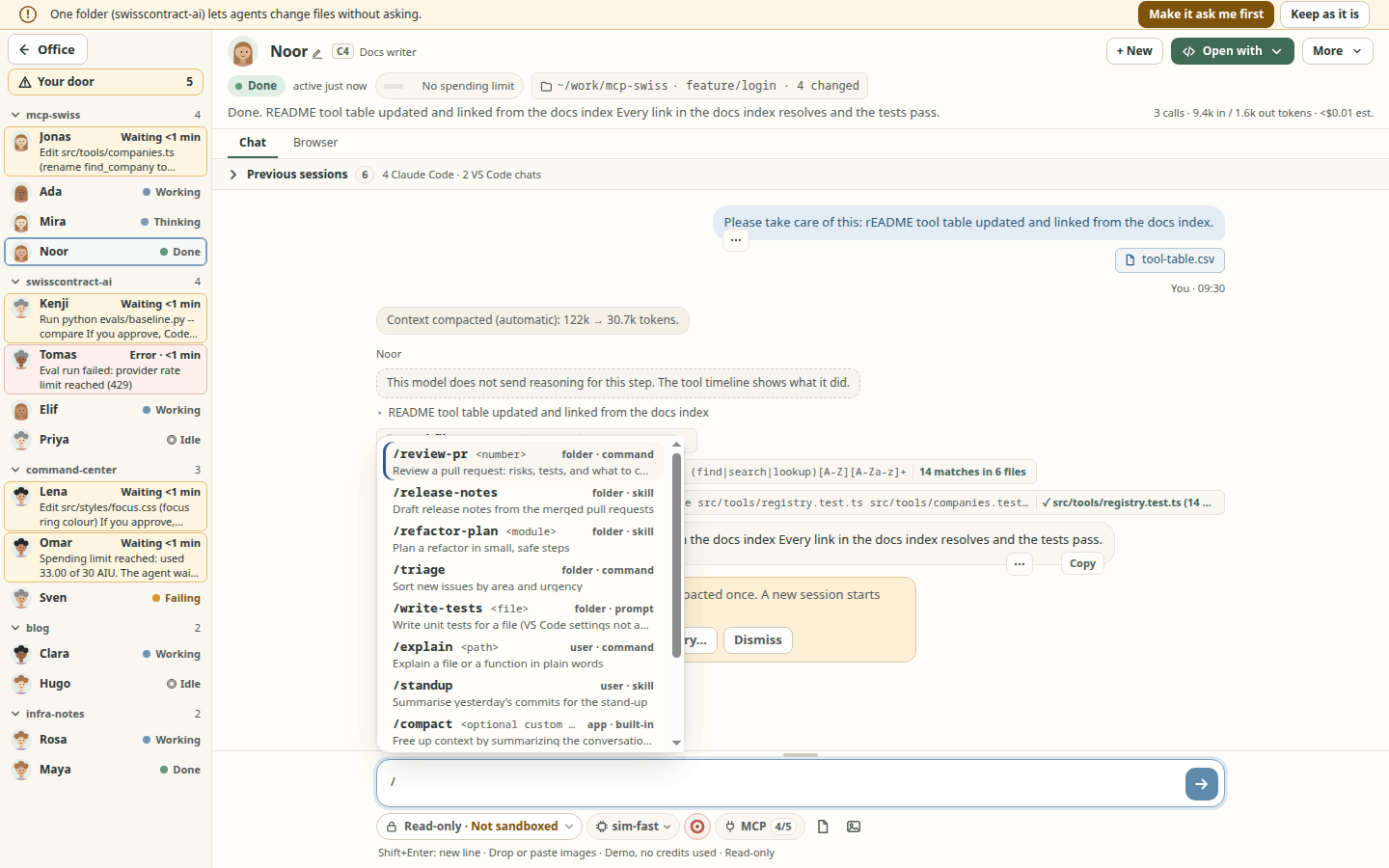
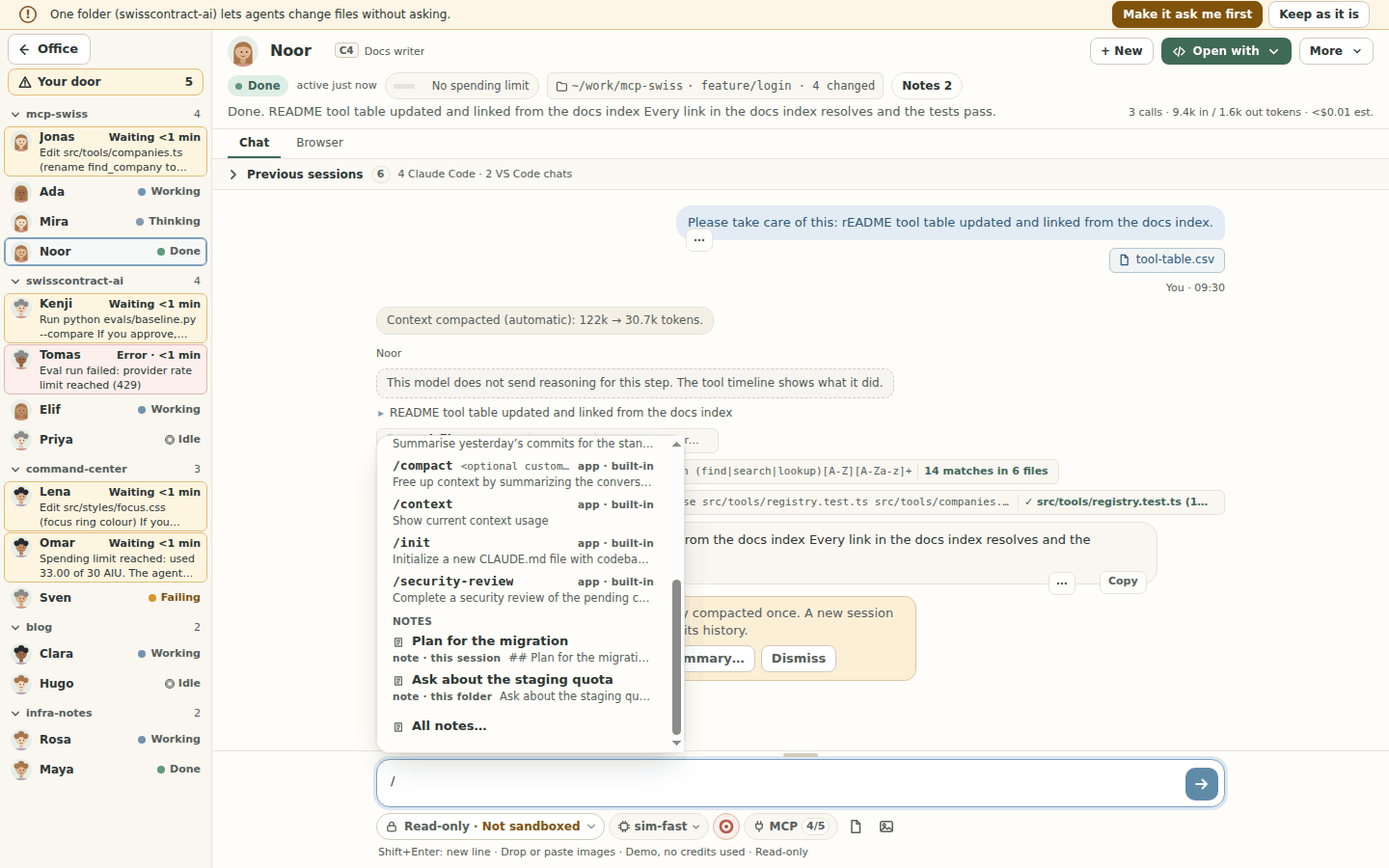
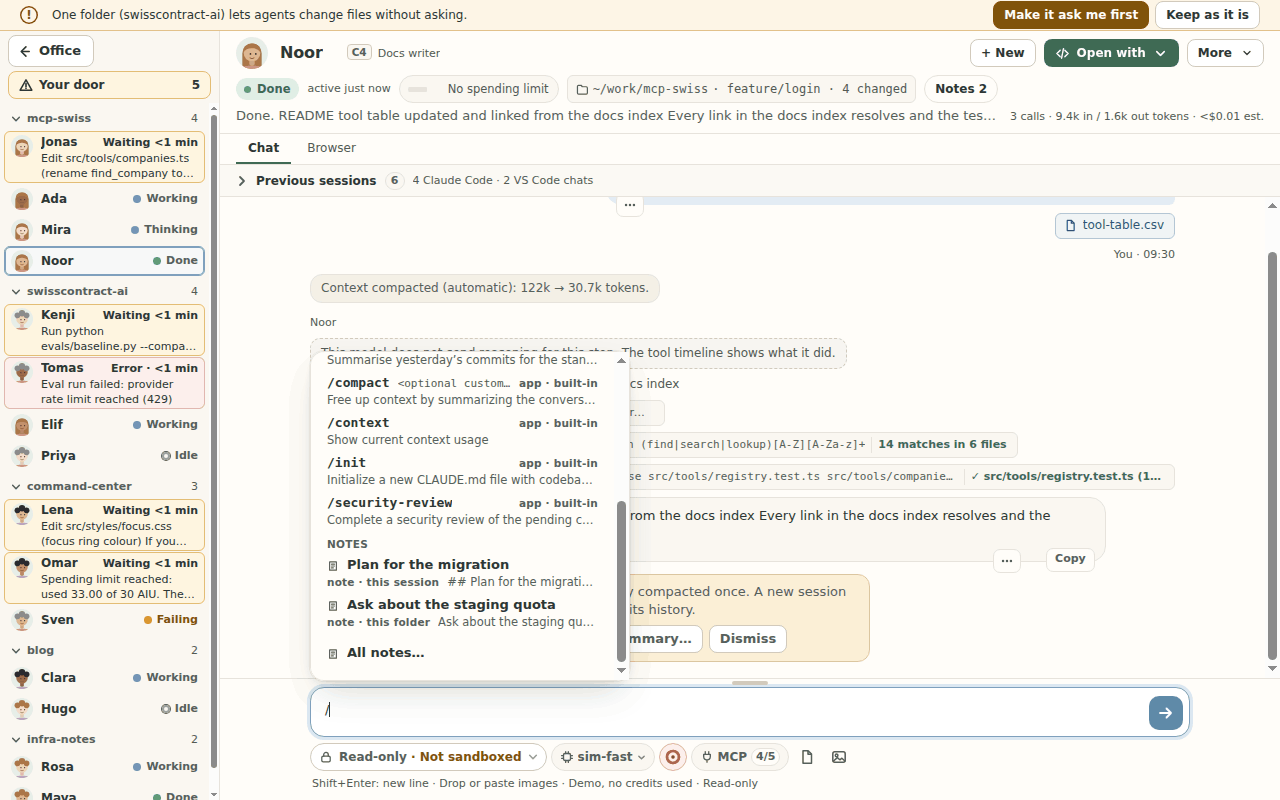
/for the folder's skills and commands (spec 073): at the start of a word in the message box, a list shows the skills, commands and prompt files of this agent app in the folder or workspace, then your own (user level), then a short allow list of the app's built-ins where typing them really runs them (Claude Code only:compact,context,cost,init,review,security-review; a built-in a later Claude Code adds is never offered by default). Each row has the name, a one-line description and where it comes from; typing filters, arrow keys move, Tab or Enter put it in the box, Esc closes the list. Places: Claude Code.claude/skills,.claude/commands(and~/.claude); Copilot.github/skills,.claude/skills,.agents/skills(and$COPILOT_HOME/skills, default~/.copilot/skills, and~/.agents/skills); Codex.agents/skills(and~/.agents/skills,~/.codex/skills,~/.codex/promptsas/prompts:<name>). Every app also lists VS Code prompt files: the folder's.github/prompts/*.prompt.mdand your VS Code user prompts (Code/User/promptsin%APPDATA%,~/Library/Application Supportor~/.config); Durbar fills their${input:name}variables from your words (in order, orname=value). Claude Code and Copilot do not load these files in Durbar's sessions (checked), and Codex's app-server does not expand a typed/name, so for a folder or user entry Durbar sends that file's text with your words as its arguments, and the chat says so (screenshot). - Send / Stop: one button inside the message box. It is Send while the agent is idle and Stop (with a spinner beside it) while a reply runs; type during a reply and Send shows beside Stop. End a session from More, or Stop and End from the agent's card menu (screenshot).
- A message box that grows (spec 005, issue #592): long prompts grow the box up to 40% of the chat (then it scrolls), and the transcript always keeps a few lines visible. Drag the thin handle on its top edge to choose a height (or focus it and use the arrow keys); double-click it, or press Enter on it, to let it grow with your text again. The chosen height is remembered for the whole app on this computer.
Sessions and folders
One session per folder or
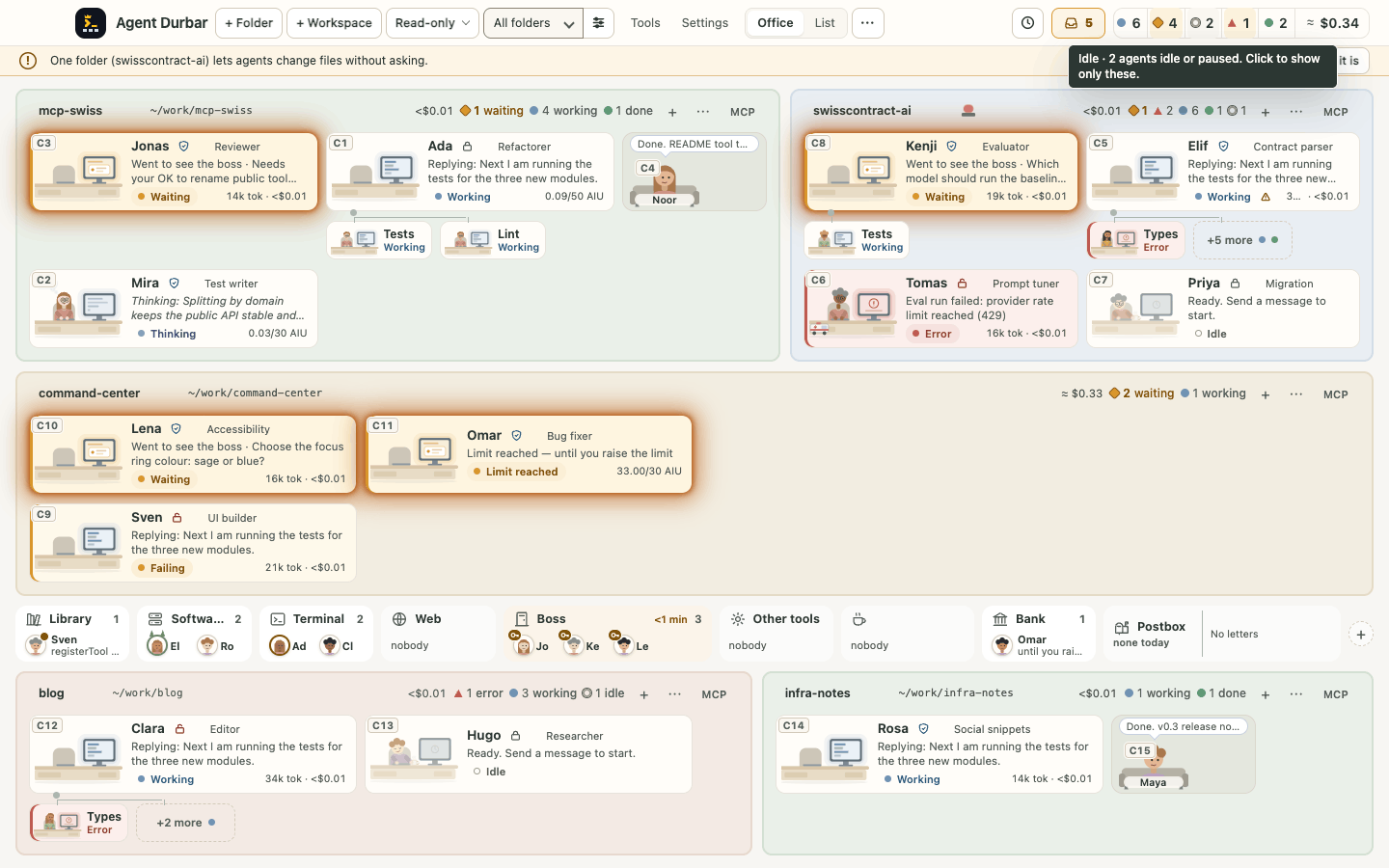
.code-workspacefile, or several per folder (+ New in a chat's header, or + New session under More).The top bar is one row: + Folder and + Workspace come first, right after the app name (Ctrl+O and Ctrl+Shift+O; on a Mac also File > Add Folder… ⌘O and Add VS Code Workspace… ⇧⌘O), the Defaults chip (for example "Copilot · Read-only · Auto") sets the agent app, permission mode and model for new sessions, and Manage folders sits next to the folder filter. On narrower screens the status counters show a dot and a number: hover one, or Tab to it, and a tooltip appears at once (no system delay, the same on every OS) naming the state and the count, for example Idle · 7 agents idle or paused. Click to show only these. (Click to show all. while that filter is on); Escape hides it, and it never covers the count it explains (spec 001 FR-187, issue 875; the schedules, Needs you and usage chips still use the system tooltip; checked on the simulator only, picture).
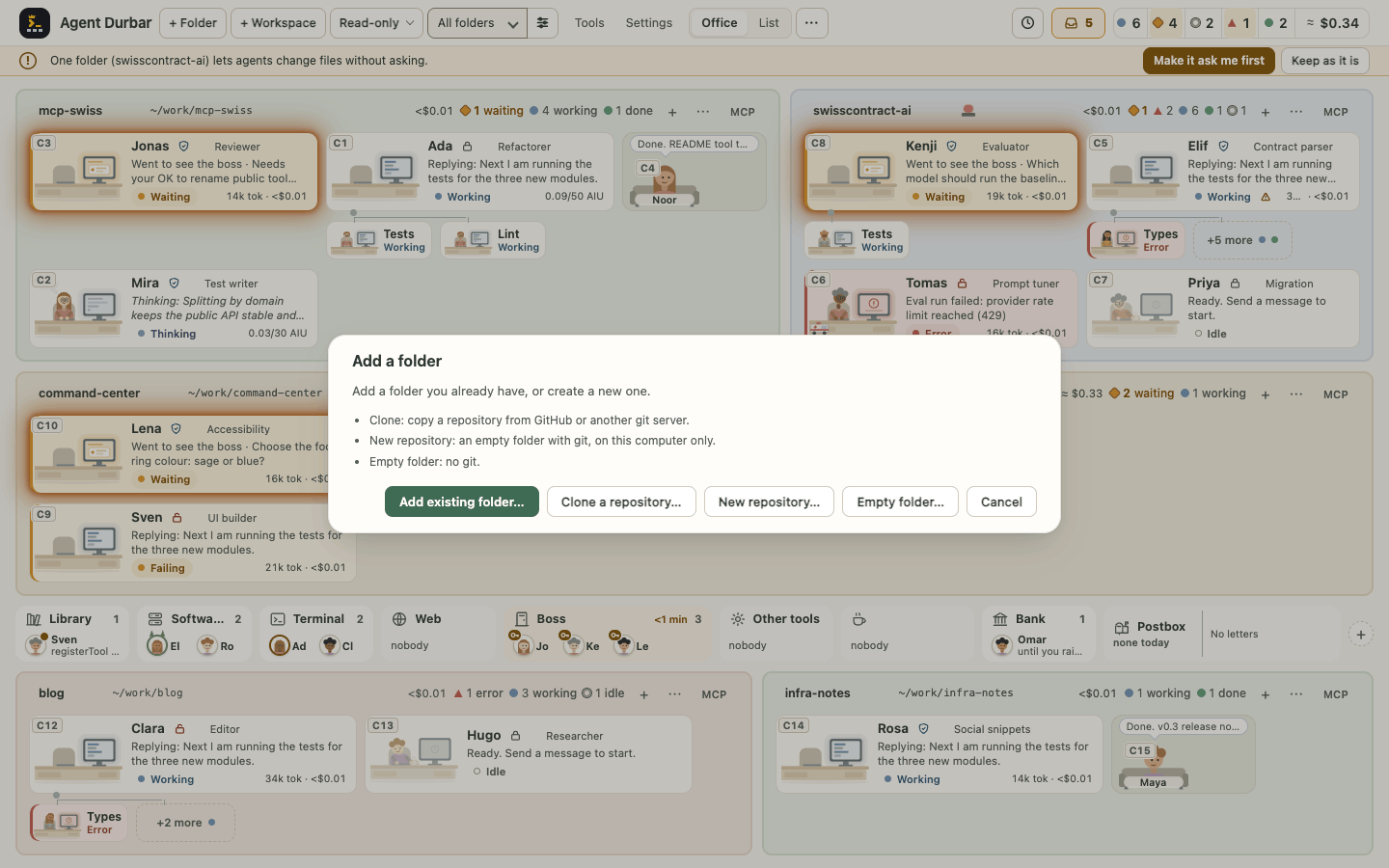
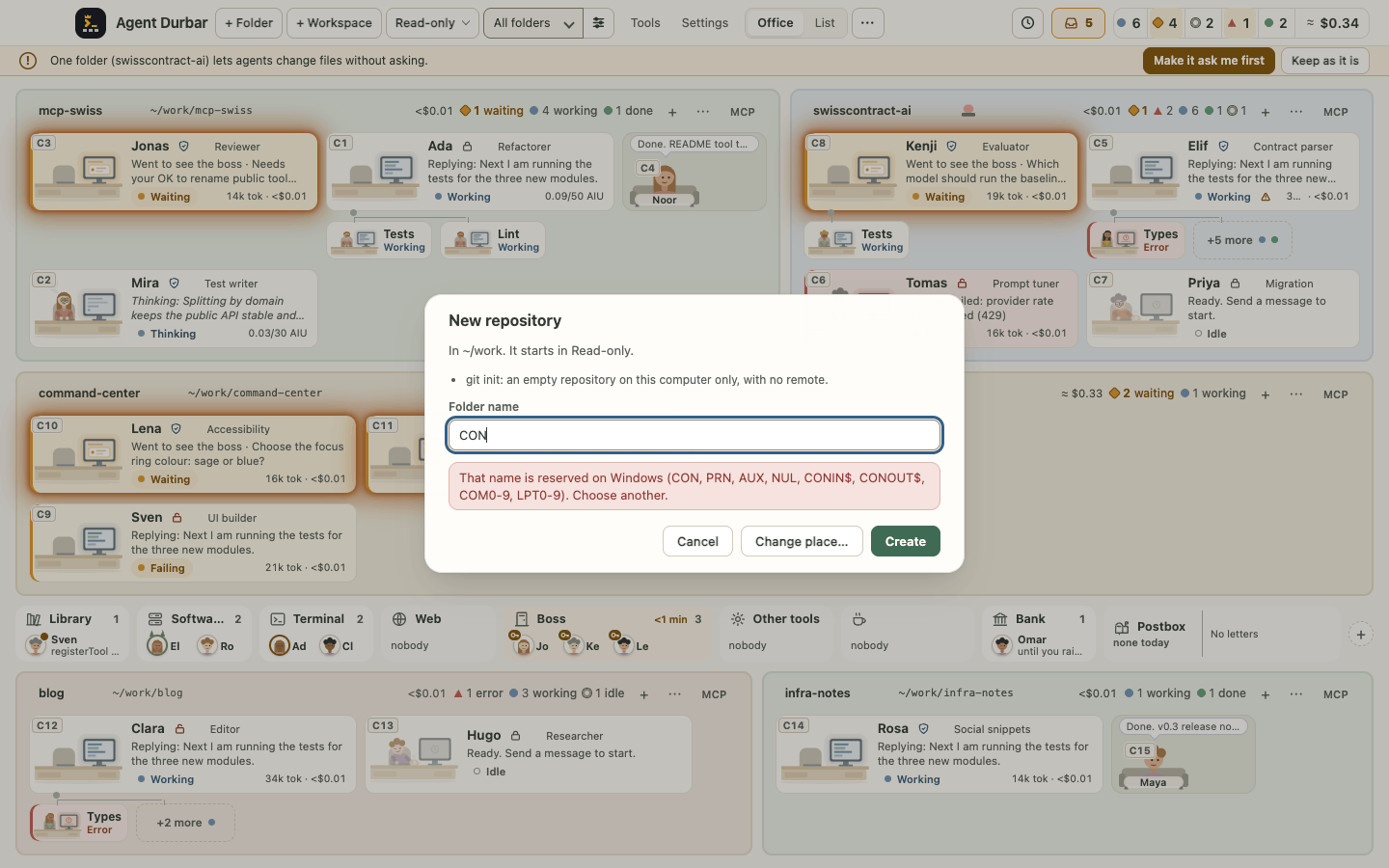
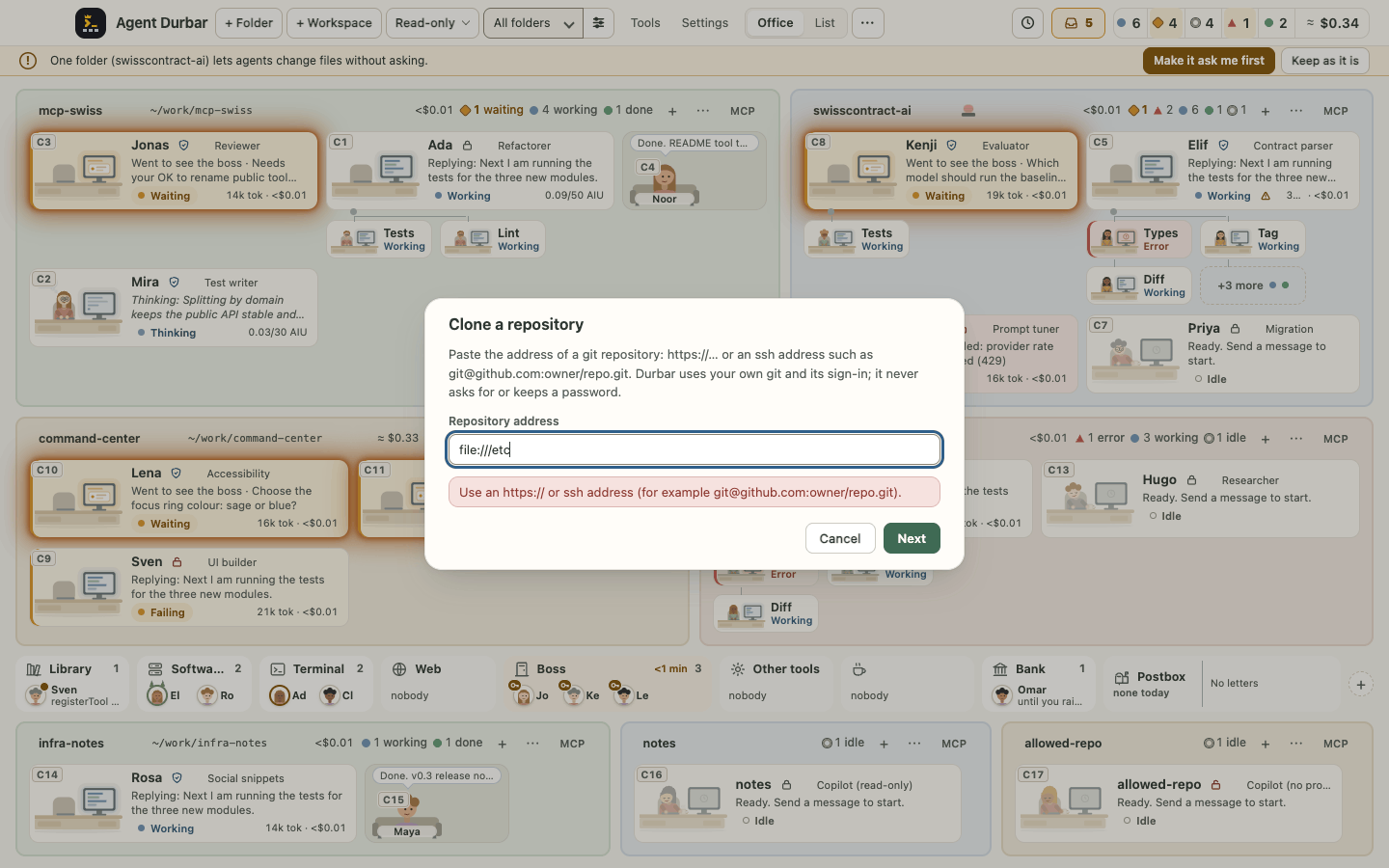
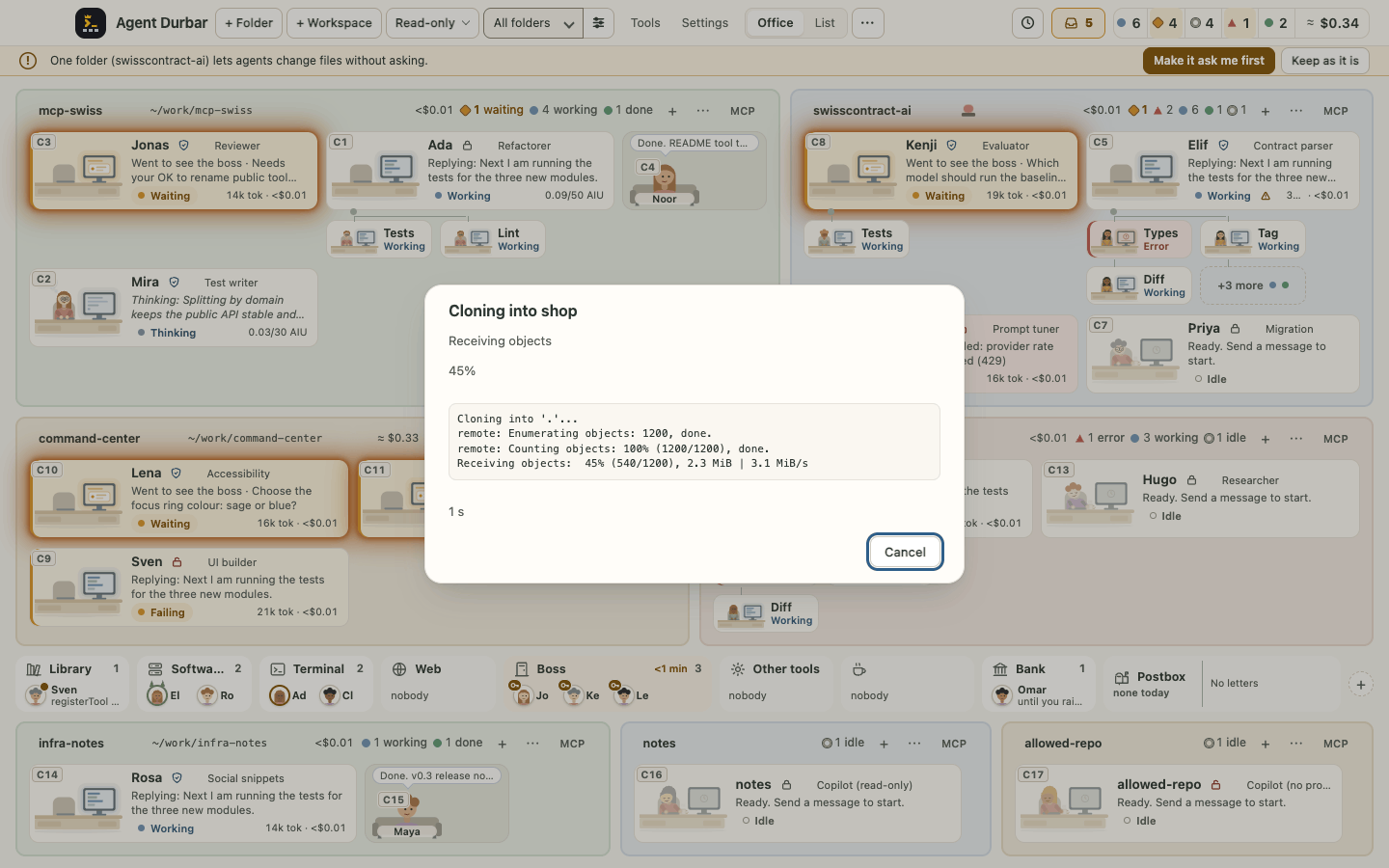
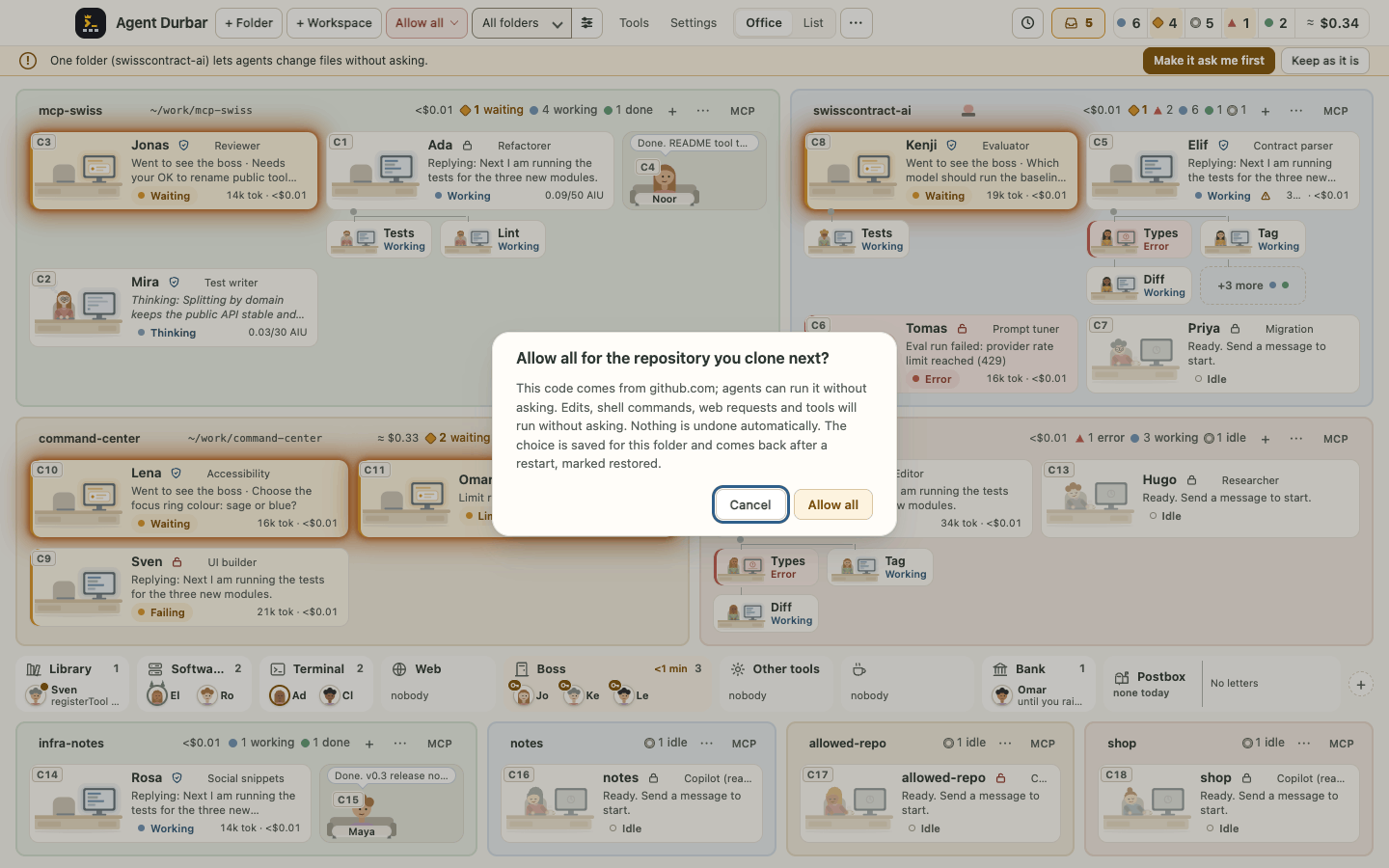
Create a folder from + Folder (spec 093, issue #805; phases 1 and 2): + Folder (and the welcome screen's add button) asks Add existing folder… (first, so Enter keeps today's behaviour), Clone a repository…, New repository… (an empty folder with
git init, on this computer only: no remote, no account) or Empty folder… (screenshot). You pick the place in the system picker (it opens where you created the last one) and type a name. Durbar refuses a name that would not work on every computer (/or\,..,CONand the other Windows device names, a trailing dot or space, a leading-,.git,< > : " | ? *) or that already exists there, says why and keeps what you typed (screenshot). The new folder joins the office like an added one, in the top bar's mode (Read-only by default; Allow all asks first). Ctrl+O, File > Add Folder… and the palette's Add folder still open the system picker directly; File > New Folder… (Mac) and the palette's Clone a repository, New repository and New empty folder go straight to creating. Without git installed, Clone and New repository say so and Empty folder still works. Clone a repository… takes anhttps://address or an ssh one (git@github.com:owner/repo.gitorssh://…) and refuses anything else (file://,ext::,git://,http://, local paths, a leading-, a password in the address) with the reason (screenshot); the name starts as the repository's (shopfrom…/shop.git). A progress dialog shows git's phase, percent and last lines, the time so far and Cancel (Escape too): Cancel ends the clone and removes the half-made folder ("Cancelled. Nothing was kept.") (screenshot). Your own git credentials do the sign-in (your credential helper, your ssh agent); Durbar never asks for, sees or keeps a password, so a repository that needs one you have not set up fails with a plain message. An ssh host you never connected to fails with "Connect once with ssh in a terminal". If the top bar is in Allow all, the confirmation also says "This code comes from <host>; agents can run it without asking." (screenshot).After a restart, each folder continues its open sessions (up to 6 per folder, each resumed when you open its chat or send it a message), and Durbar remembers where you were: the window's place and size (back on a screen it fits, else 1440x900), Office or List, the folder filter and the open chat.
After more than 30 minutes closed, a Since you were away strip says how long it was and which scheduled prompts did not run, with Run missed now for each.
After a crash, one card says "N sessions were interrupted" (the ones that were mid-reply when Durbar stopped unexpectedly: a crash, a kill or a power loss) with Resume all, Pick… and Dismiss (screenshot). Resuming reopens each session under its own mode and cap and shows its earlier conversation; it sends no prompt, and the reply that was being written is lost, so say "continue". Nothing resumes by itself and the last prompt is never sent again. Durbar keeps only a small marker file of session ids to know (no prompts, replies or paths), removed on a normal exit; a second Durbar running on the same profile is not mistaken for a crash (when in doubt Durbar shows no card rather than offer a running Durbar's sessions). Run on the simulator (
DURBAR_SIM_CRASH=3); not checked with a real crash.End of day: quitting while agents are still working asks first ("2 agents are still working. Quit anyway?", Cancel is the default). End all sessions (top bar ⋯ and Ctrl+K) ends every running session after a confirmation; the chats stay.
Ctrl+K lists your 5 most recent chats first, and Ctrl+` jumps back to the previous chat.
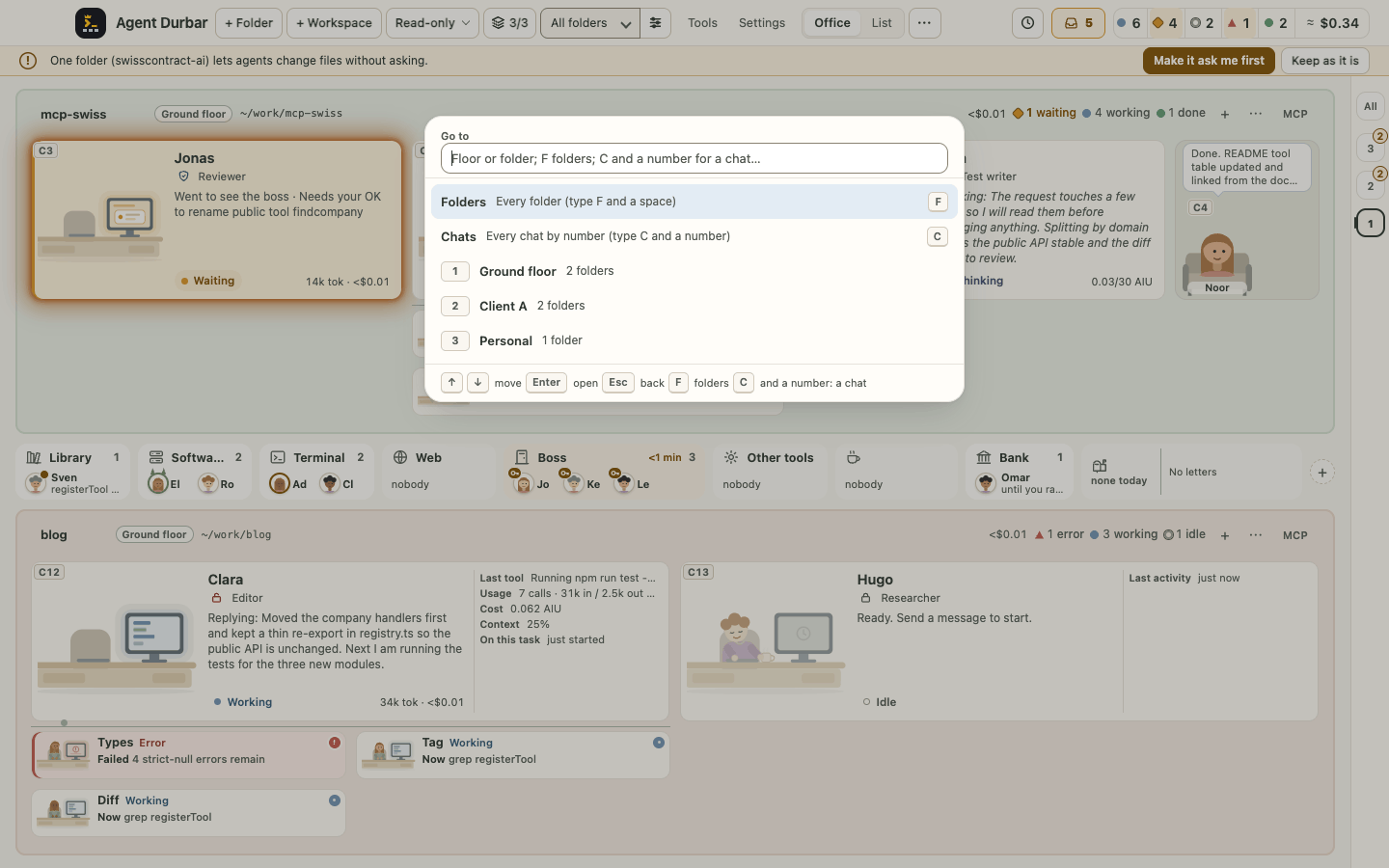
Go to (keyboard navigator): Ctrl+F (⌘F on a Mac, "F for floor"; it was Ctrl+J until 2026-10-23; change it in Settings > Keyboard, which refuses shortcuts the app, text editing or the operating system already use, also by the letter a key types on your keyboard layout) opens a small box from anywhere: pick a floor, a folder, then an agent, or type C and a number to jump to that chat (
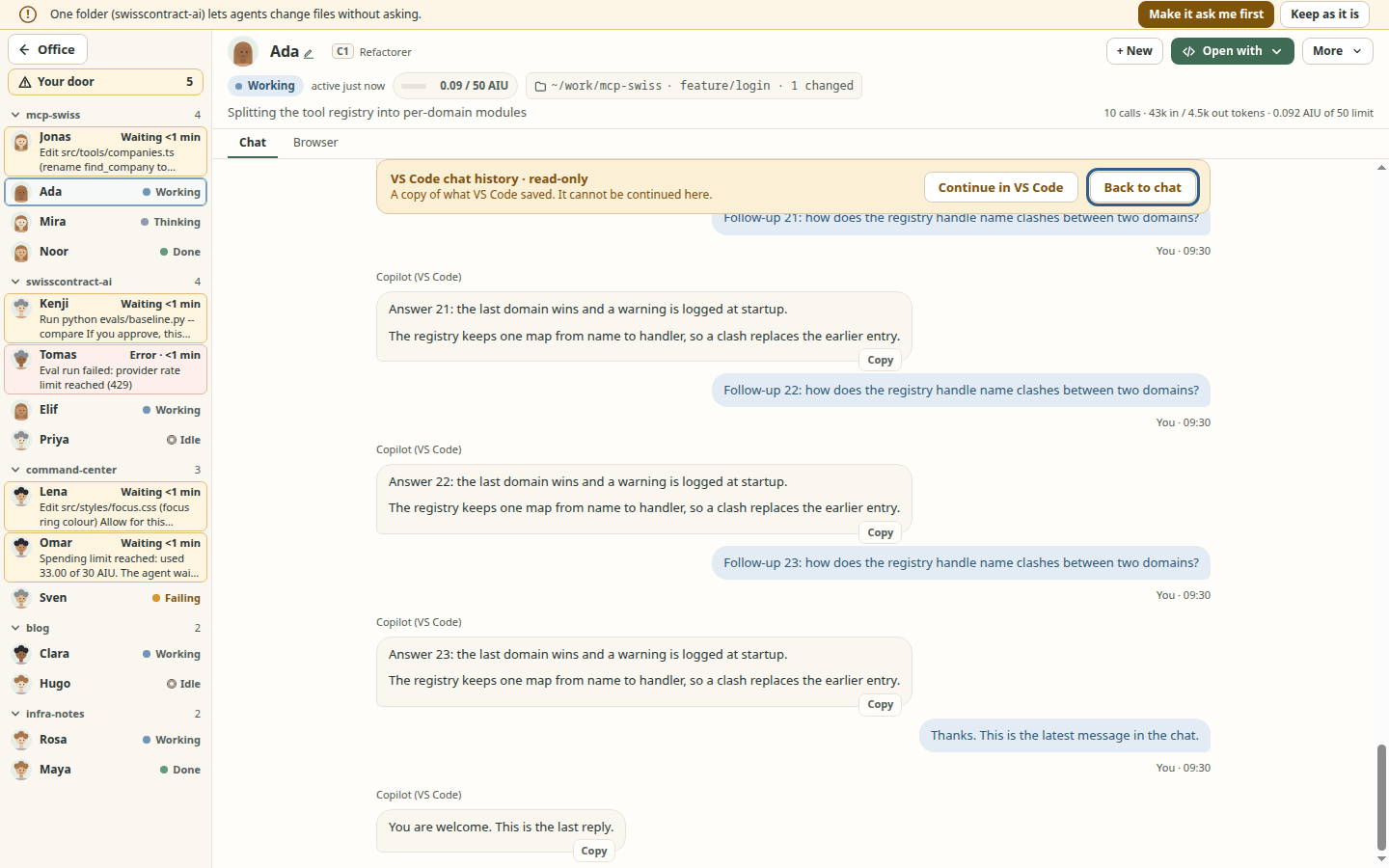
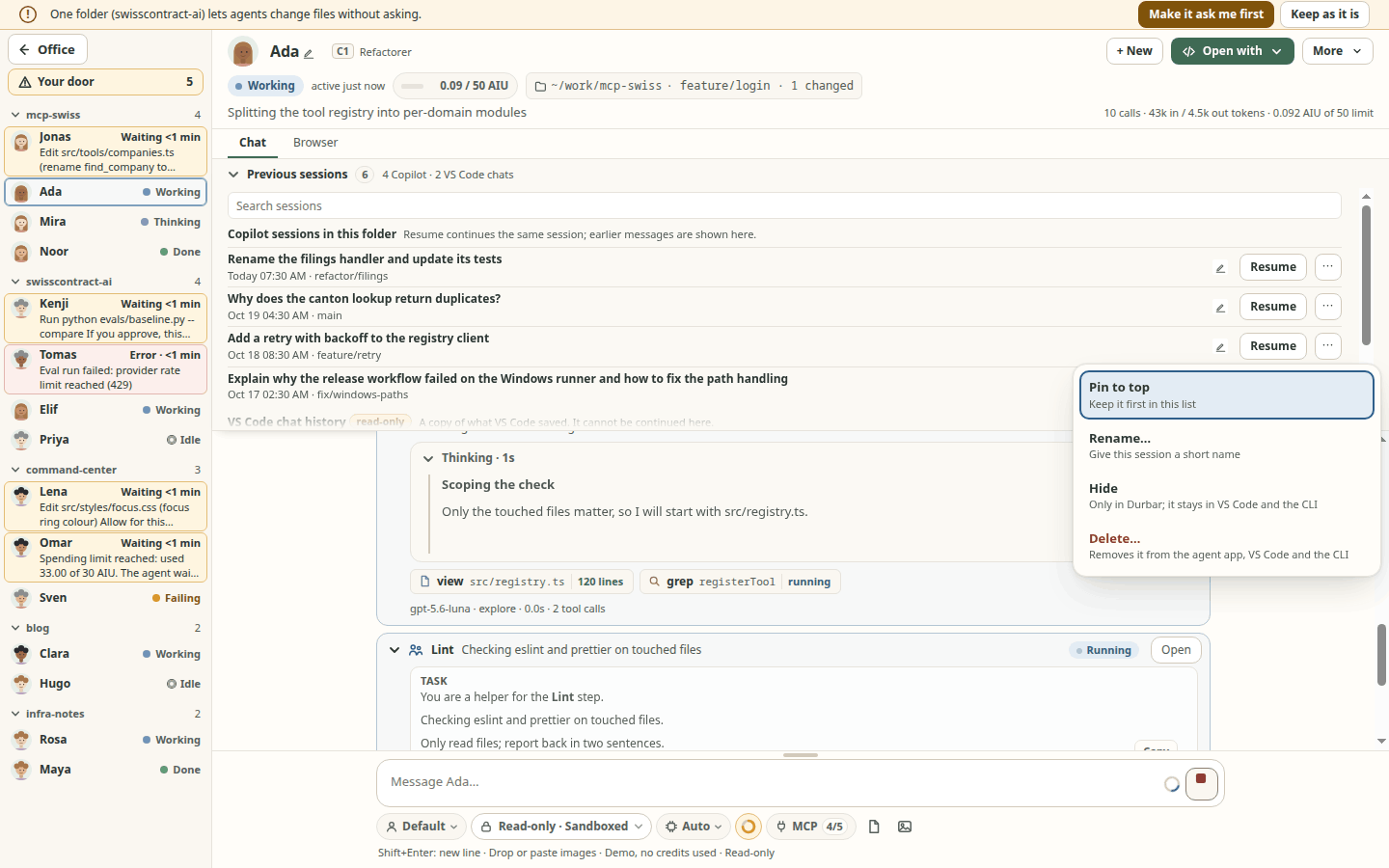
C 3), F and a space for every folder. Type to filter, use the arrows or the numbers shown, Esc steps back. The chat opens with the cursor in the message box, and Enter sends as usual, with the folder's own mode and limits. Every other way of opening a chat (a click on a desk or list row, Ctrl+K, Needs you) puts the cursor there too, also in a chat that waits for an answer (never on its Allow button); N for the next agent keeps the cursor on the chat's name, so N, N walks the queue. Text you typed and did not send (and its attachments) is kept per chat while the app runs, in memory only (never saved to disk, as a draft may hold a pasted secret; ending or removing the session drops it), and a small pencil on the desk, list row and chat strip marks a chat with an unsent draft. Ctrl+Backspace (⌘⌫) goes back to the office when the cursor is not in a text box and no text is selected; in the message box it deletes as always, and Esc goes back from there. Every chat has a number, shown as C3 on its desk, its list row and its chat header; it keeps it while it is in the office and after a restart (screenshot). It is the Ctrl+K box in a Go-to mode; the operating-system shortcut list it checks is a known list, not every one there is, and it was not tried on a real Mac or Windows machine. The shortcut follows the key's position: on a Dvorak layout it is the key that types U. Ctrl+F, Ctrl+A and Ctrl+Backspace have not been tried on a real Mac or Windows machine.Previous sessions is a collapsible section right above the conversation (▸ Previous sessions with a count; screenshot). Click the row or press Ctrl+Shift+H (⇧⌘H on a Mac) to open or close it; your choice is remembered on this computer for every chat. It lists a folder's earlier sessions to Resume, and VS Code's Copilot Chat history as a read-only copy (it opens at the latest message, and Continue in VS Code opens the folder there; screenshot). With two or more entries, a search box filters them by title (case and accents ignored). Each row has a ⋯ menu (also right-click or Shift+F10): Pin to top, Hide (only in Durbar; the session stays in VS Code and the CLI; Show hidden (N) brings hidden rows back) and, for Copilot and Codex sessions, Delete…, which asks the agent app to delete that one session for good (after a red confirmation; Claude Code has no per-session delete, so it is shown disabled). A session that still has a card in the office cannot be deleted: end it and remove it from the office first. VS Code chats can be pinned or hidden, never deleted (screenshot). Pins and hides are saved as ids only in
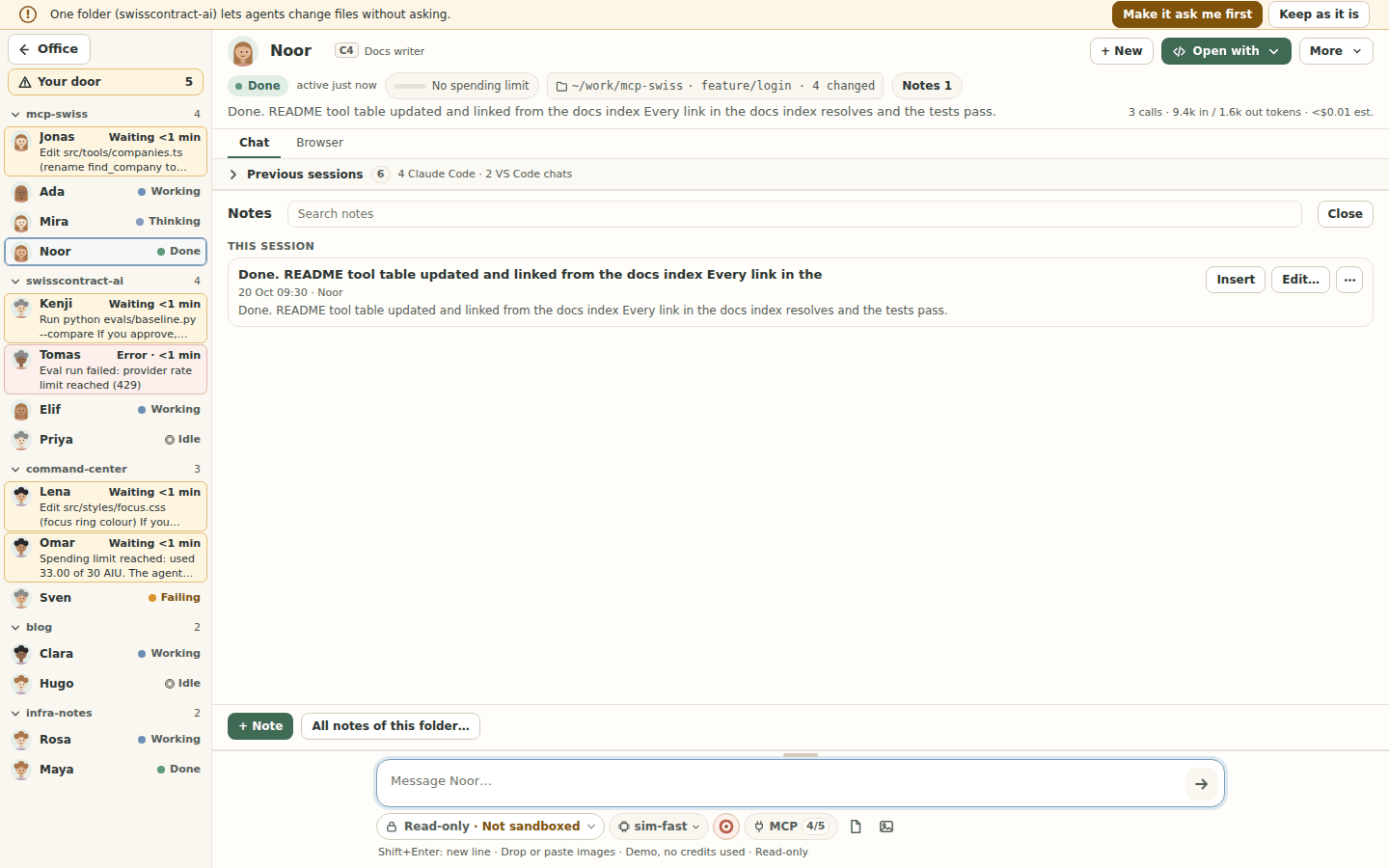
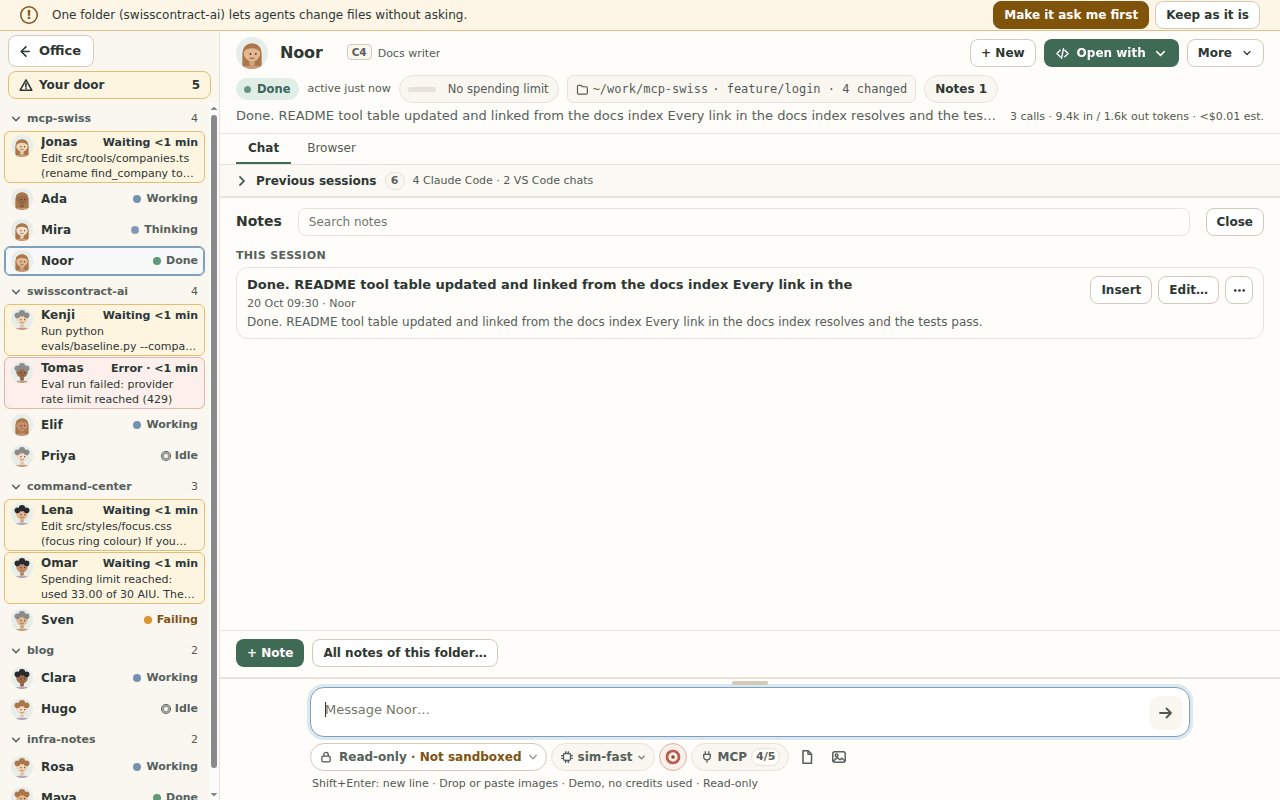
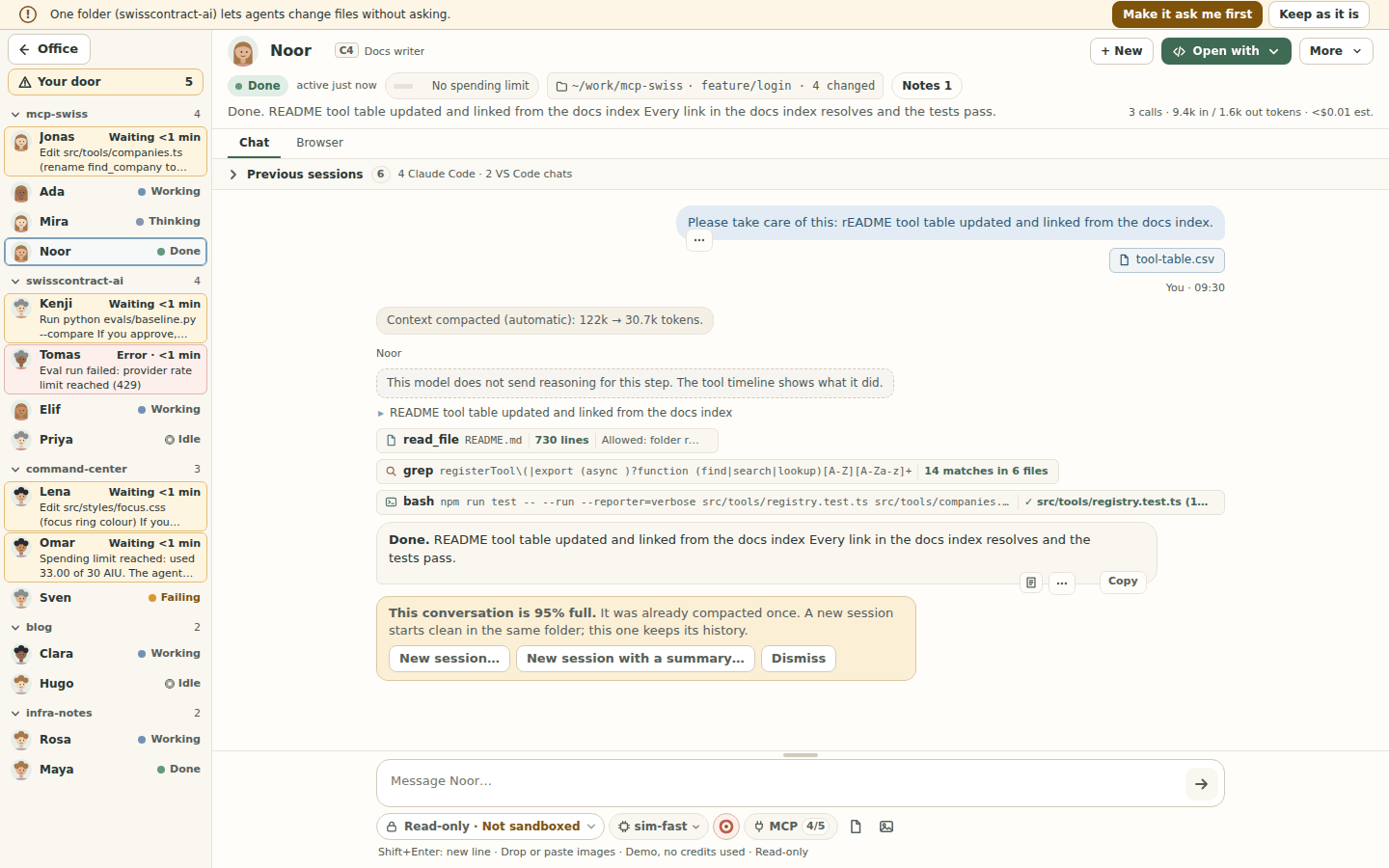
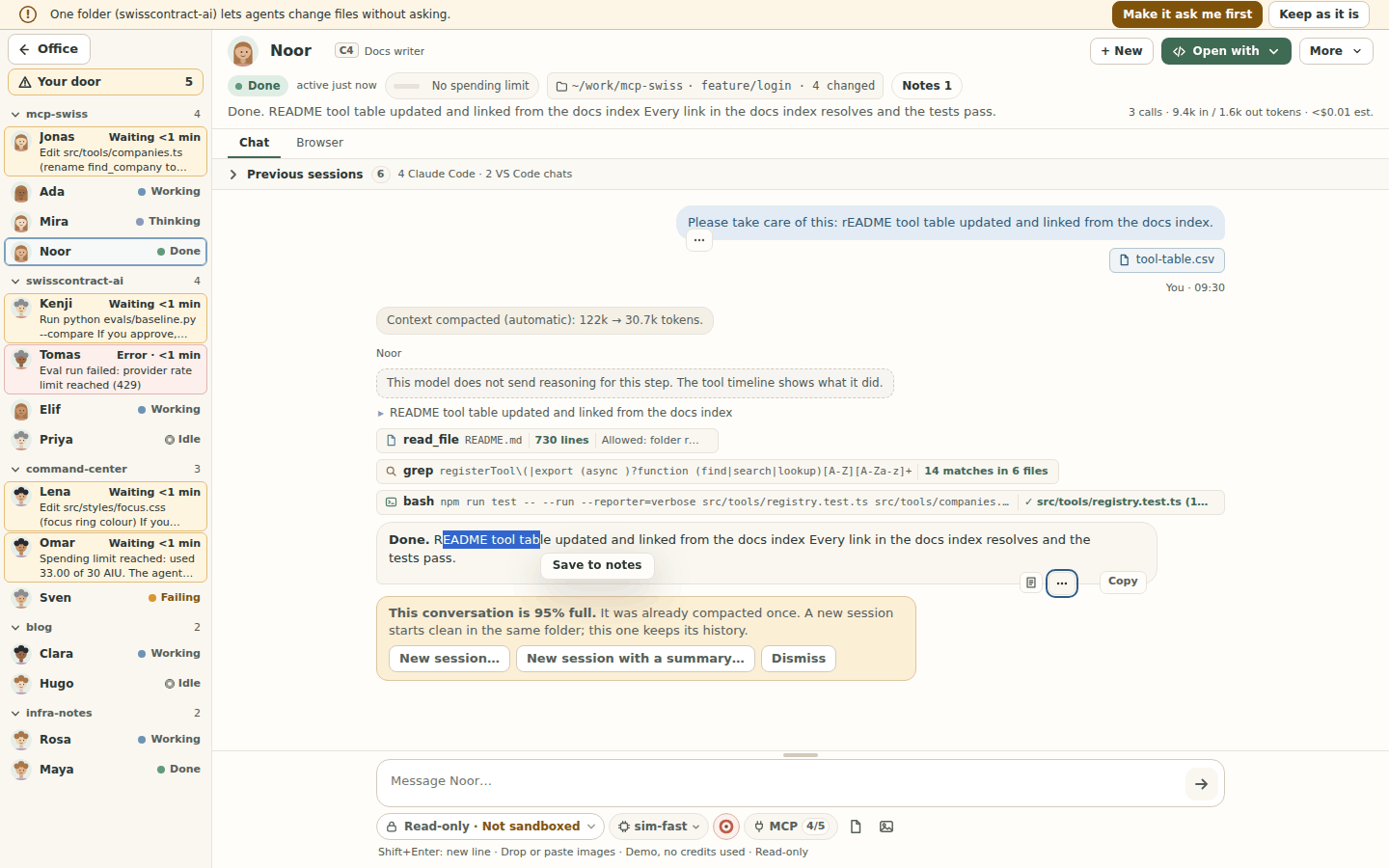
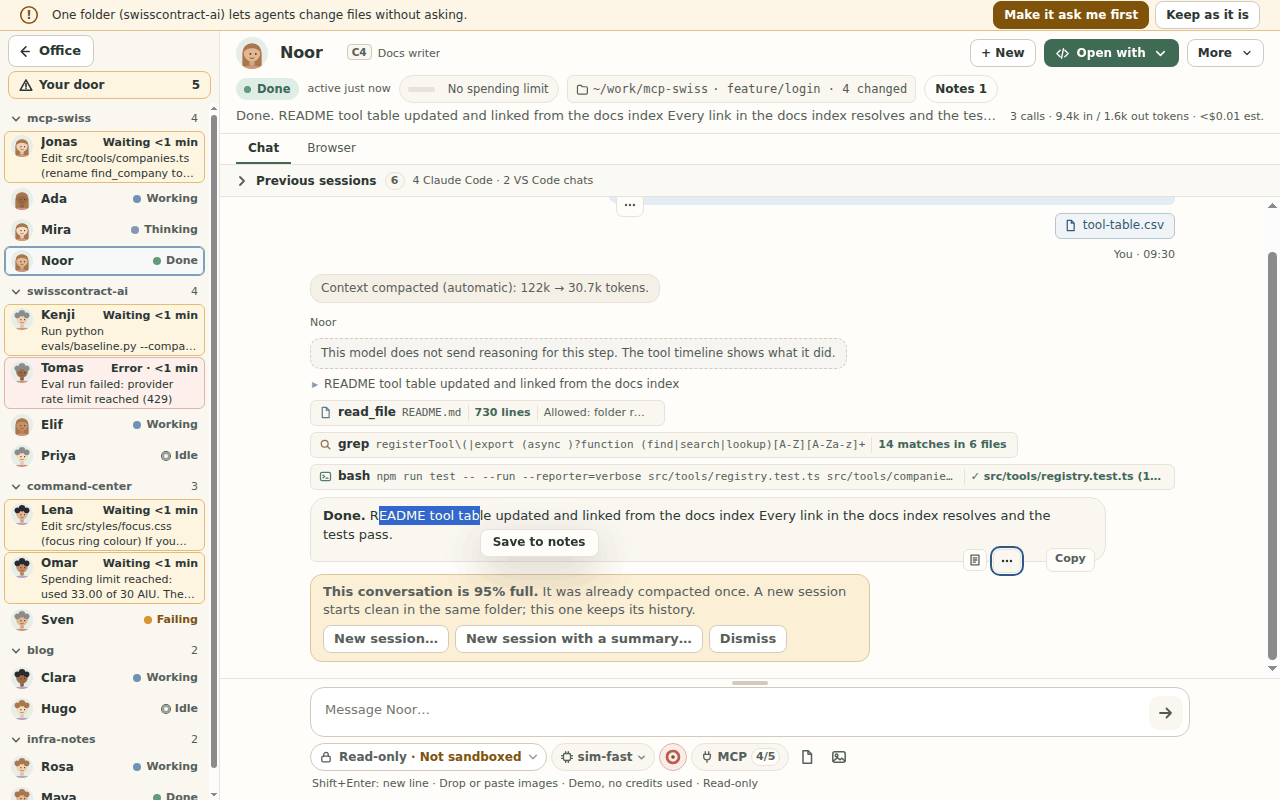
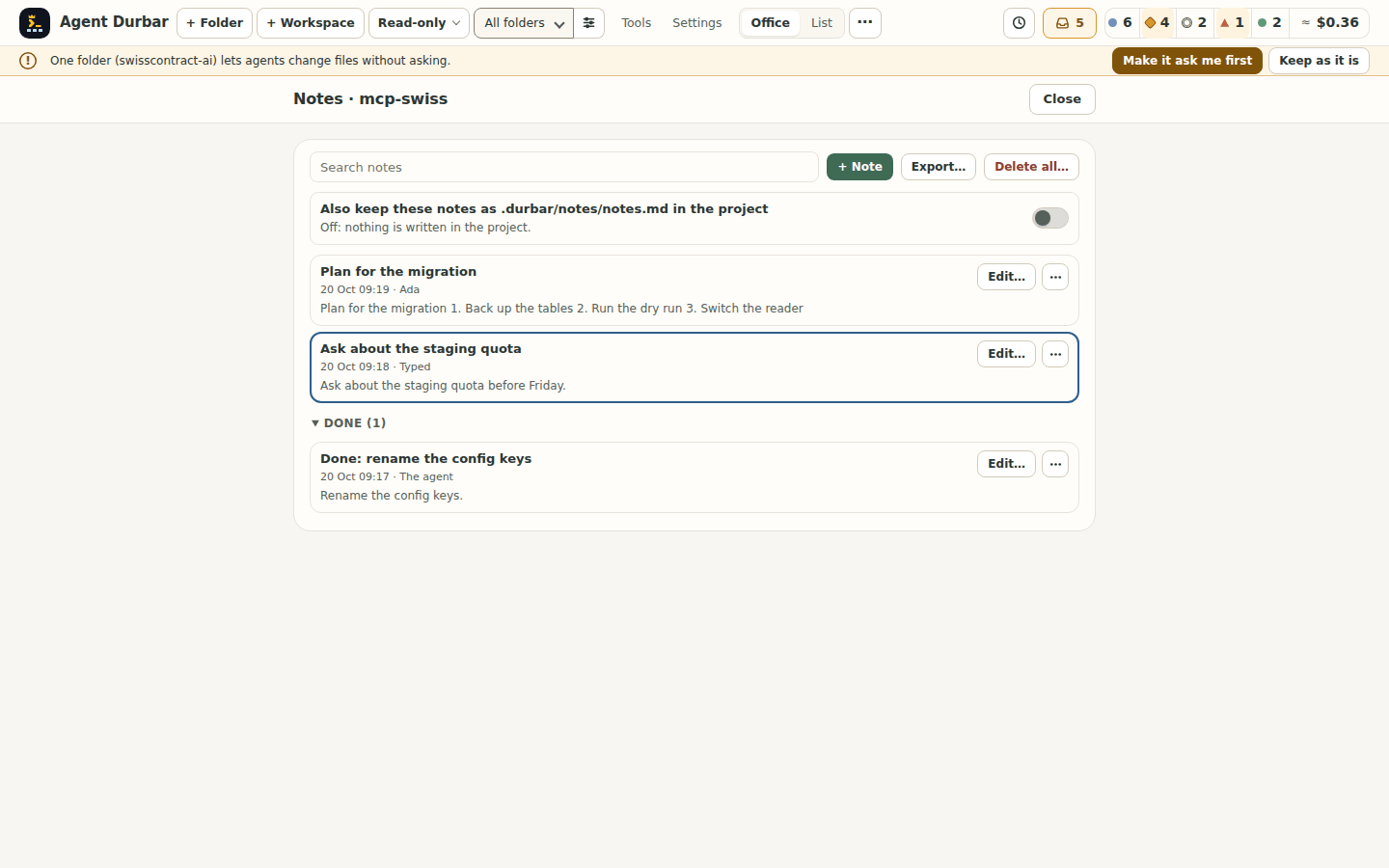
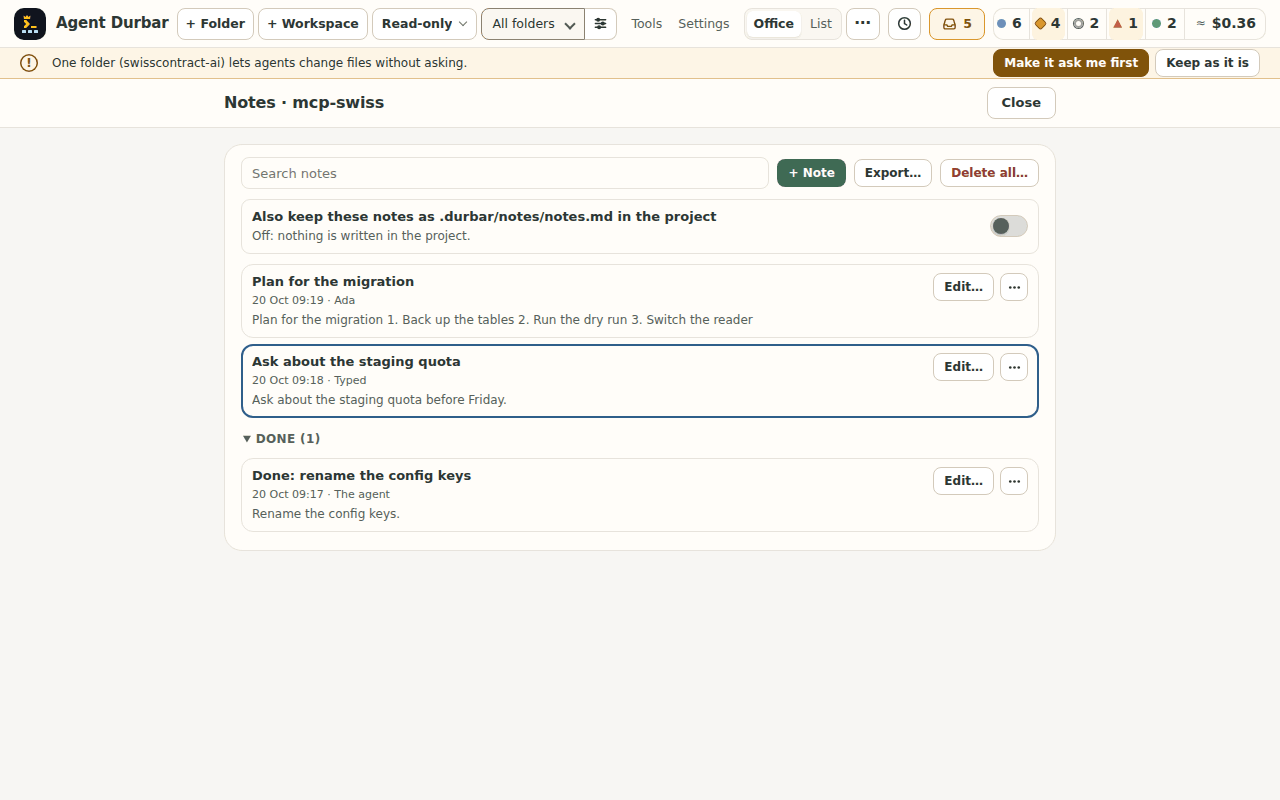
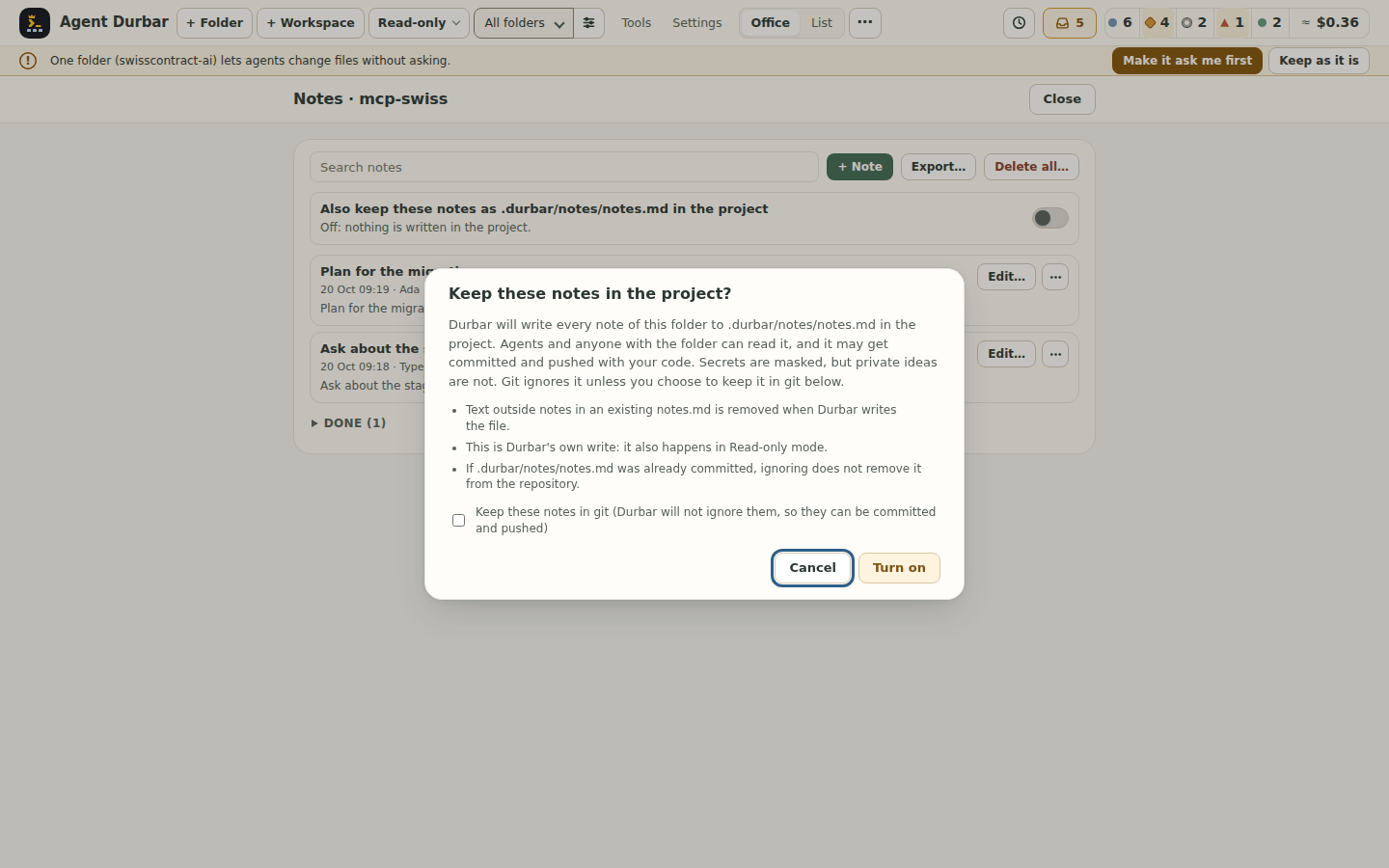
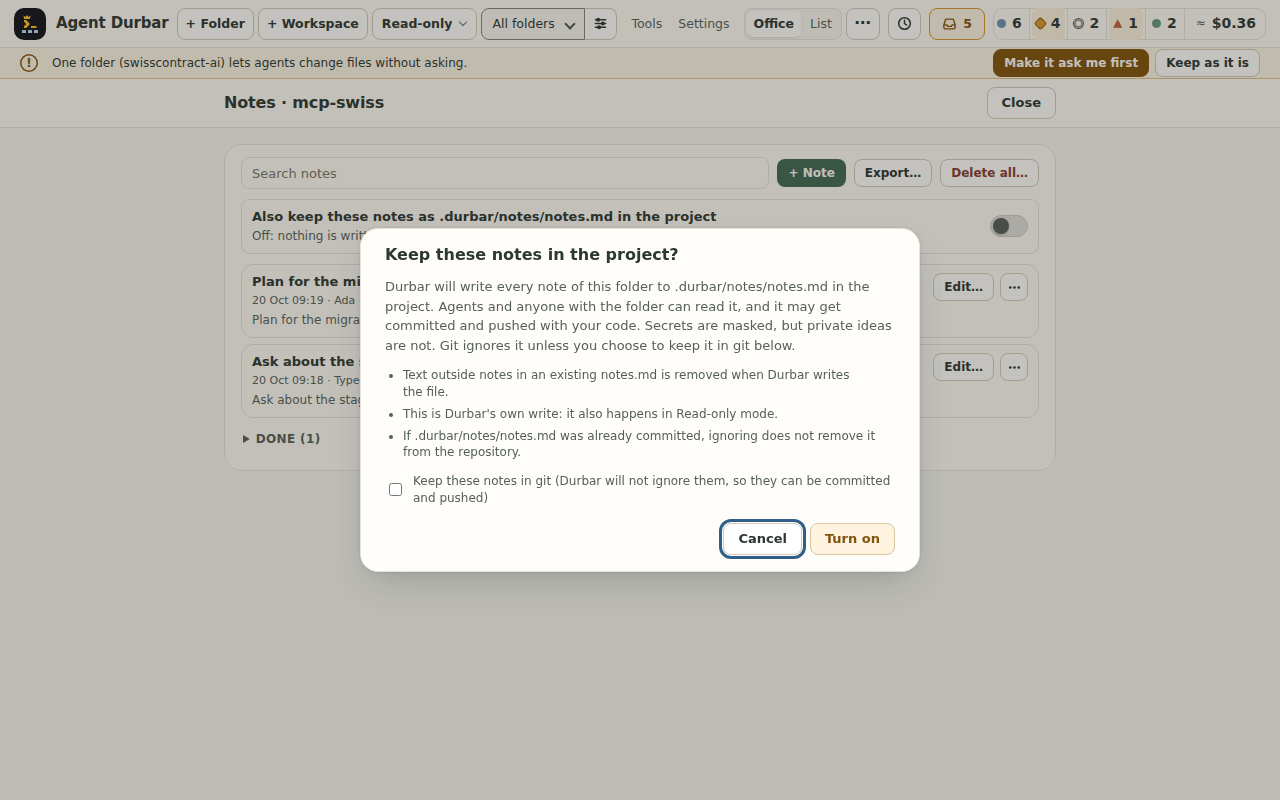
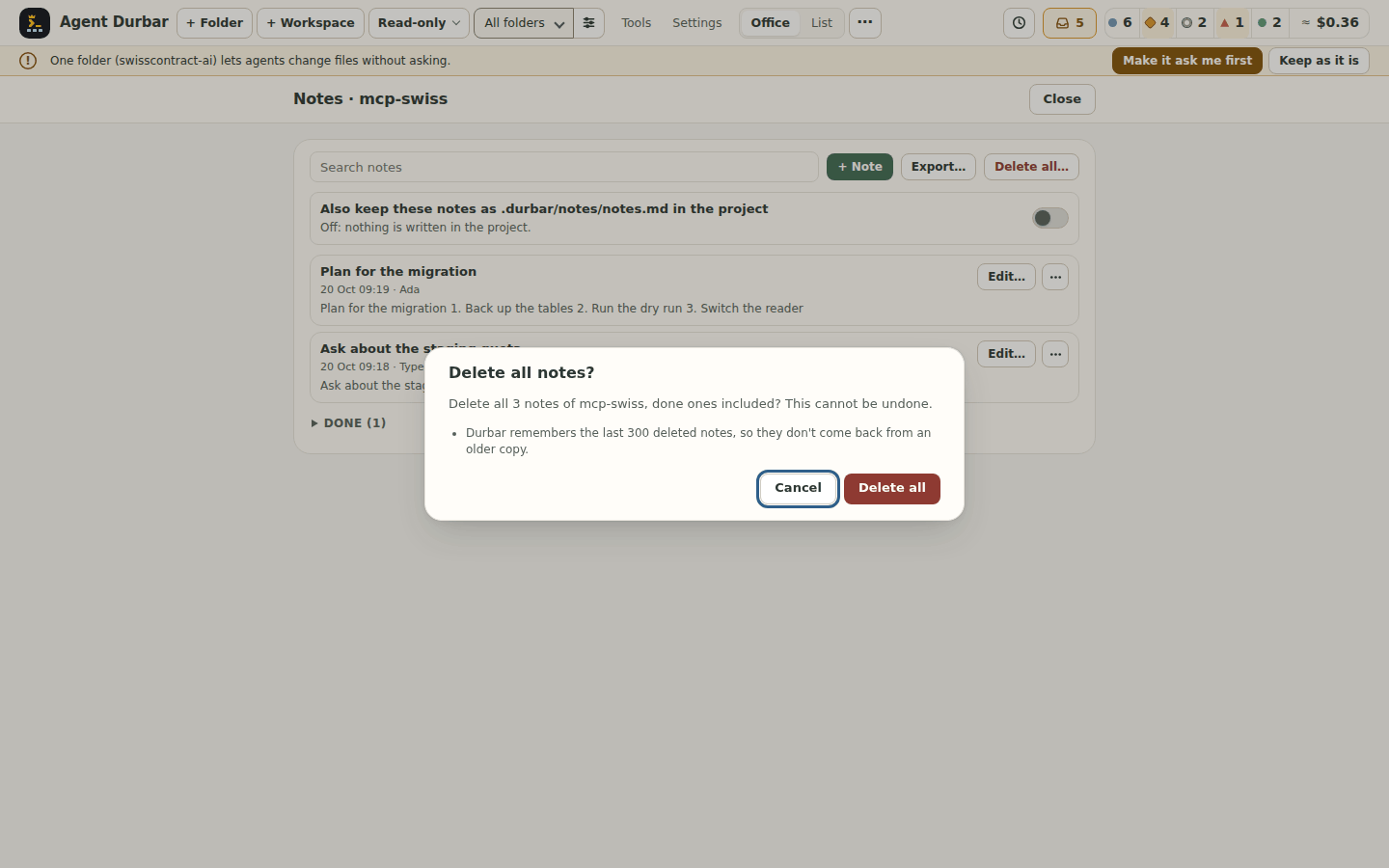
durbar-folders.json; a delete adds a Session deleted row (app, short id, date, no title) to the activity log.Notes: keep a message or an idea and carry on with it later (spec 083, issue 699): every finished message has a ⋯ (Actions for this message) next to Copy; Save to notes keeps it, with a toast to Rename… or Show it. Notes… in the chat's More menu, Ctrl+Shift+M (⇧⌘M on a Mac) or Ctrl+K Notes opens a drawer over the chat log (the message box stays usable): This session first, then This folder, each with Insert (puts the text in the message box at the caret, with a blank line first when the box has text; it never sends by itself), Edit…, Rename…, Copy and Delete…, plus + Note for an idea of your own. Notes are also in the
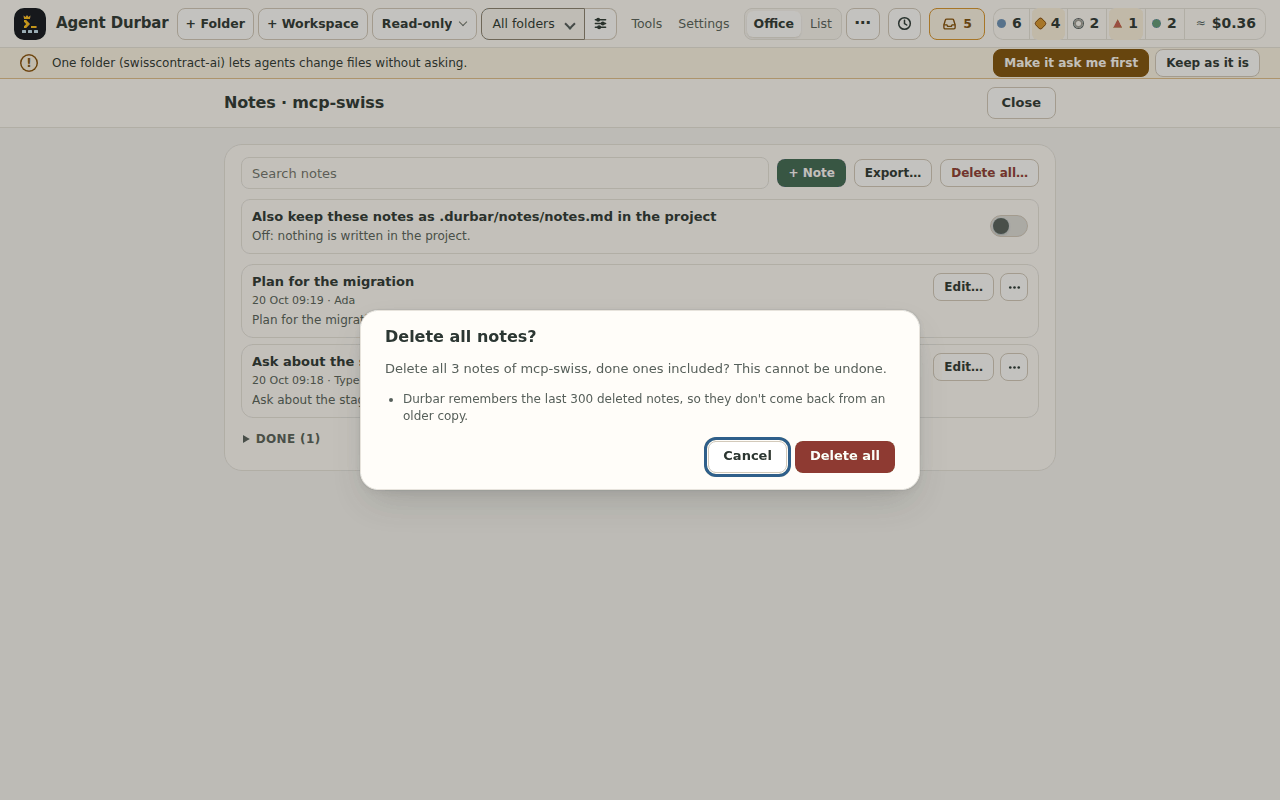
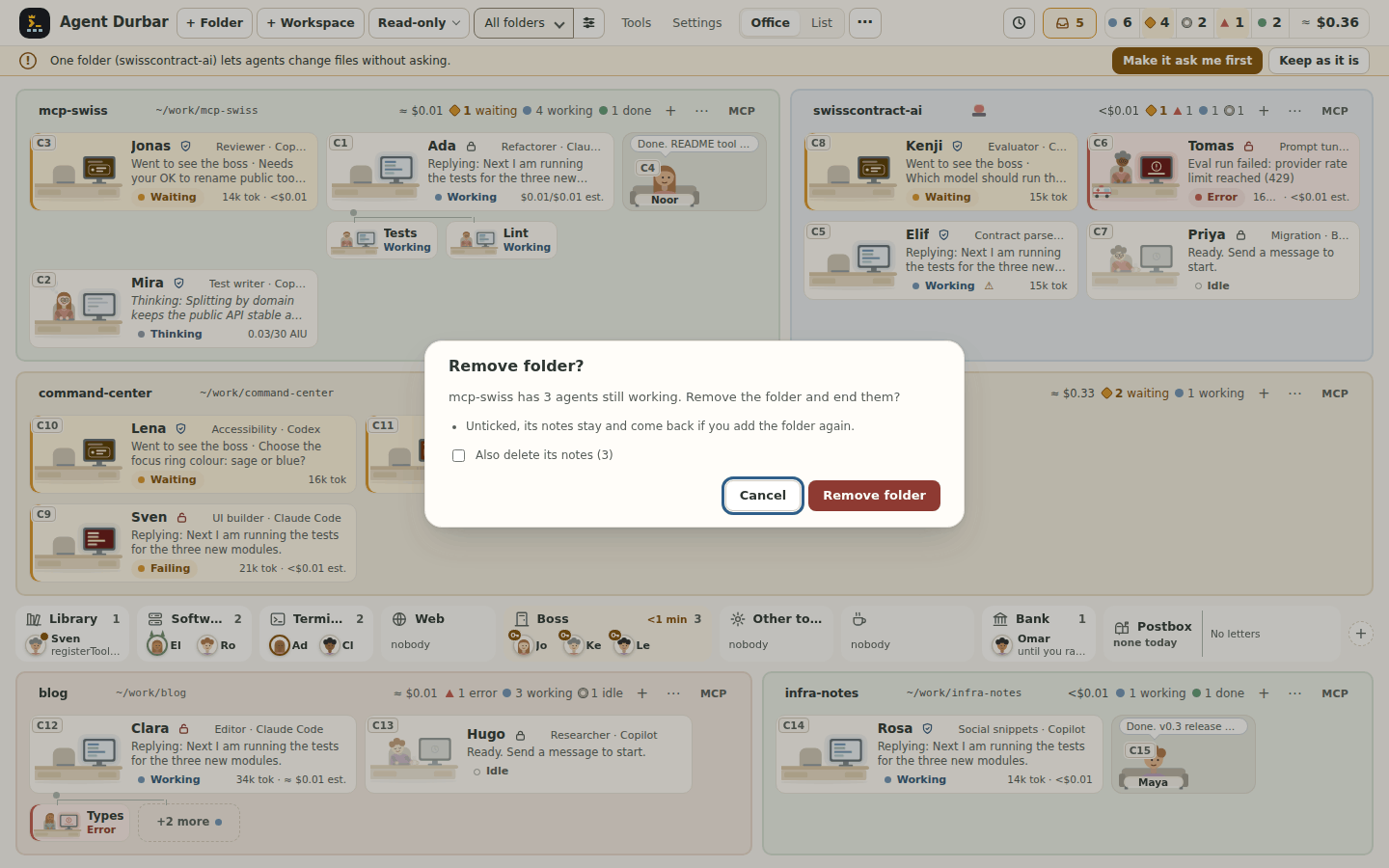
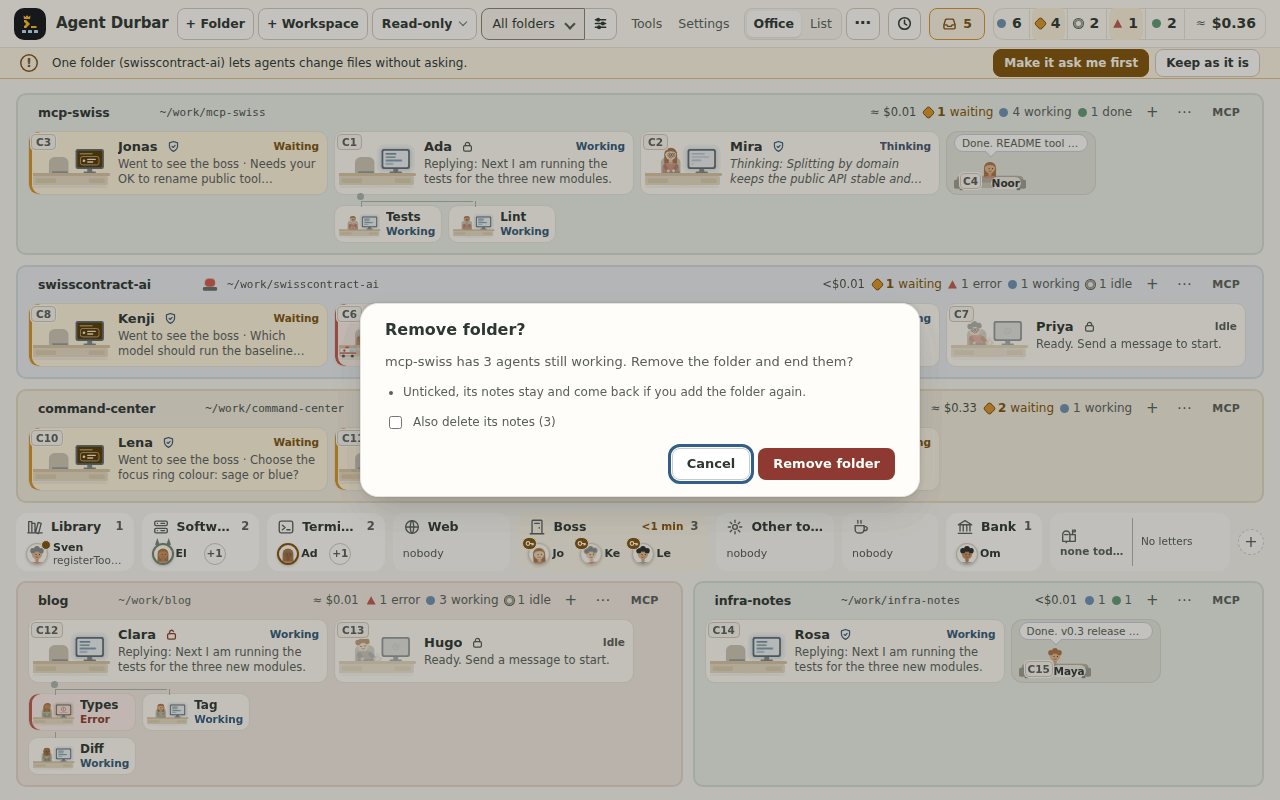
/list, in a Notes group after the commands (at most 5 with nothing typed, then All notes…), also in a chat whose agent app lists no commands. Notes belong to the folder, are stored on this computer only (<userData>/notes/, mode 0600) and are masked first: a token or a secret value Durbar knows about is replaced by[redacted]before anything is written, so a secret in a saved message cannot be got back from the note, and a note with parts hidden says so before you send it (screenshot, the same at 1280x800; the/list: 1440x900, 1280x800). A Notes N button in the chat header (only when the folder has notes; its tooltip says how many are from this session) opens the drawer; a message already saved shows a small note icon (Saved to notes: <title>) that opens the drawer on its note; and a search field at the top of the drawer filters by title and text (the header count, the marker, at 1280x800 and the marker at 1280x800). Open source in a note's⋯goes back to where it came from: the chat opens (a session from the folder's Previous sessions opens the way that list does, sending nothing), the message is scrolled into view inside the chat and outlined for a moment; a session that is gone or a message that cannot be found says so in a toast and the note stays. Select part of a message (inside one reply or your own message) and a small Save to notes button appears at the end of the selection (never over the message box); the message's⋯has Save selection to notes while a selection lies inside it (a fragment of a secret that you select by hand is saved as selected: only known values and token shapes are masked) (the button, at 1280x800). All notes of a folder are on its Notes screen: Notes (N)… in the folder's⋯menu, All notes of this folder… at the foot of the drawer, or Ctrl+K Notes of <folder>. The screen is offered only for a folder with a running main chat (Durbar reads the notes through it): never in the demo office, never through a helper's chat. It lists every note newest first with a search field, + Note, Edit… and the row's⋯(Rename…, Copy, Mark done / Mark not done, Delete…), and keeps done notes in a folded Done (N) group; done notes leave the drawer, the/list and the header count. Insert is there when the screen was opened over a chat of the folder (screenshot, at 1280x800). Keep the notes in the project (optional, off by default): the screen's switch Also keep these notes as.durbar/notes/notes.mdin the project asks first (Cancel has the focus; the warning says the file may be committed and pushed, that text outside notes in an existingnotes.mdis removed when Durbar writes it, how many notes an existing file adds, marked From the project file, how many lines of your own text in it would be removed, and that it also happens in Read-only), then a system dialog asks once more; the file is.durbar/notes/notes.mdnext to a.gitignoreholding*, so git ignores it andgit add -Anever stages it (Durbar keeps that.gitignorein place before every write and writes nothing while it holds anything but exactly*; it deletes only one it made); inside a git repository an unticked box Keep these notes in git (its own system dialog) leaves the.gitignoreout so the notes can be committed. An older.durbar/notes.mdis left alone and no longer followed. From then on the file follows the notes and edits made in it come back masked; a file with merge conflicts or a failed write is never overwritten and the screen and the drawer say why. Turning it off asks Leave the file or Delete the file (deleted only when it holds exactly what Durbar would write, after a system dialog); it is not offered for a.code-workspaceand is greyed when the folder is missing; the simulator answers Demo: no file written (the warning, at 1280x800). Export… on the Notes screen saves every note of the folder, done ones included, as one Markdown file (thenotes.mdformat, masked again with the secret values Durbar knows now, no session ids) where you pick in the system save dialog, readable only by you where the file system has modes (0600 on macOS and Linux; on Windows the chosen folder's permissions apply); a link, a folder or a device at the chosen name is refused. Delete all… asks with the count (Cancel has the focus), then a system dialog asks once more; Durbar remembers the last 300 deleted notes so they don't come back from an older copy (a.durbar/notes/notes.mdleft in the project and earlier exports still hold them). Remove folder now asks in Durbar's own dialog; when the folder has notes it has a box Also delete its notes (N), unticked: unticked, the notes stay and come back when you add the folder again; ticked, a system dialog asks once more and only that folder's notes file is deleted. Removing a folder never touches.durbar/notes/notes.mdin the project. The simulator answers Demo: nothing written (Delete all…, at 1280x800; Remove folder, at 1280x800). Not yet: Open source (the next slice of the spec). Export, Delete all and the Remove folder box are unit tested and driven in the simulator on Linux; not checked by a person on Windows or macOS.Rename a session (click the chat title, the pencil next to a name on a card, a Real office name plate, a list row or a Previous sessions row, F2 on a focused card, plate, row or title, or the More menu and the card menu, which open a small dialog): give any main session a short name (1 to 60 characters; Enter saves, Esc cancels, empty brings the app's own title back). It shows on the card, the list, the chat header, the strip, the inbox, notifications, Schedules and Previous sessions, instead of the first prompt. The name is kept in Agent Durbar and also saved in the agent app, so it may sync with your account: Copilot and Codex now (a Copilot session that is not open is opened without sending anything, renamed and released again; a Codex thread shows in
codex resumeonce it has had a turn), Claude Code at the session's next message (--name; it shows in Claude's/resumelist and when you resume that session by its id). A name saved in an app cannot be removed from Durbar. Copilot keeps named sessions when it cleans up old ones.New session with a summary: start fresh from a hand-off summary of the current conversation, which you edit before it is sent.
Account limits per agent app (spec 011): Settings > Agent apps shows what each provider reports about the account (units, source, last checked, reset time), apart from per-session usage; not reported when it says nothing. Near a reported limit it names other ready apps. Details in Agent apps.
Continue in another app: with two or more agent apps ready, More > Continue in another app… moves a conversation to Claude Code, Codex or Copilot in the same folder: the reviewed summary, headed by where it came from, is the new session's first message, and the old session keeps its history. Checked on real accounts (Copilot → Claude Code, Claude Code → Codex).
Scheduled prompts per folder or for one session, while the app is open: a prompt may be up to 10,000 characters and is never cut silently (a counter from 8,000, an error in words and Save off when over; a stored prompt over the limit is not sent and says Needs review); once, every N minutes, or on a calendar (every day, weekdays, or weekly on chosen days, at a local time that stays put across daylight-saving changes). A schedule can have its own limit in AI credits or dollars (the agent app's unit): when its runs have spent that much, it pauses and says so. A schedule for a session that has ended pauses too, and is never sent elsewhere unless you choose the folder's agent. Prompts that Copilot itself schedules in a session (
/every,/after) are listed read-only. The Schedules button in the top bar (a clock and the number of active schedules, left of Needs you; Ctrl+Shift+S, ⇧⌘S on a Mac, or Ctrl+K) opens Settings > Schedules from any view; a small ! on its clock says a run was missed or failed since you last looked, and a pause mark says Pause all is on. Open a folder's schedules from its ⋯ menu (Schedules here (N), N is how many it has; the same in the Folders panel), the clock in its header (shown once it has schedules), the Schedules button in its chat, or Settings > Schedules for all folders. Edit… on a schedule changes its prompt, time, target or limit in place (it keeps its last run and spend). History on a schedule's row (in the folder's dialog and in Settings) lists its last 50 runs under it, newest first: sent, skipped (busy or paused, repeats folded into one line with a count), missed, could not send (with the reason in words); Open chat goes to the chat a run went to, or it says chat closed. The log keeps no prompt text or error text, and is deleted with the schedule. A starter kit has templates:- Start my day (a morning briefing from your mail and calendar MCP servers);
- Summarize my day, Plan my day;
- Open pull requests and CI, and a dependency check.
The briefing and planning ones end by asking you what to do next with a question card, and the agent waits for you in the office.
Custom agents per session:
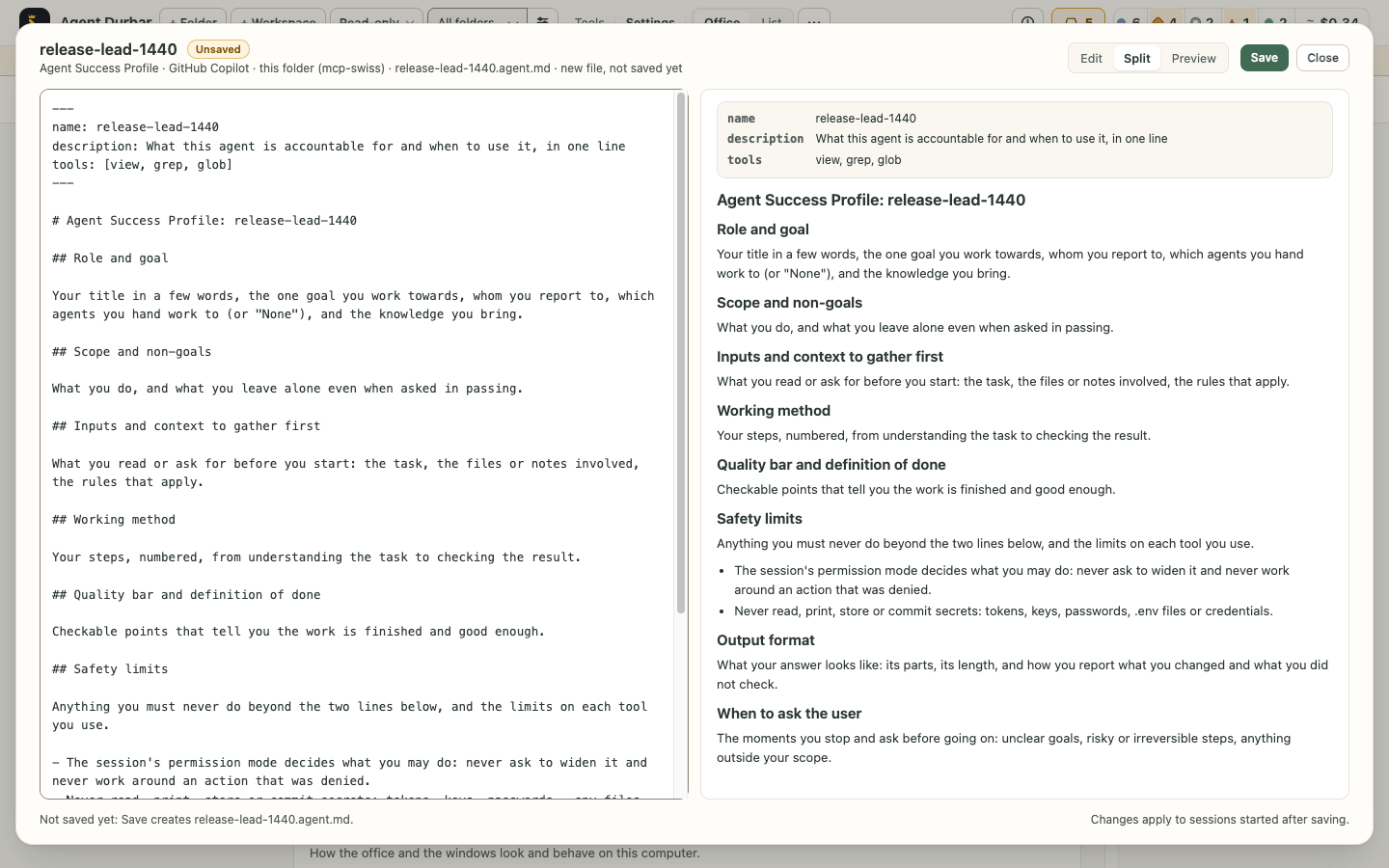
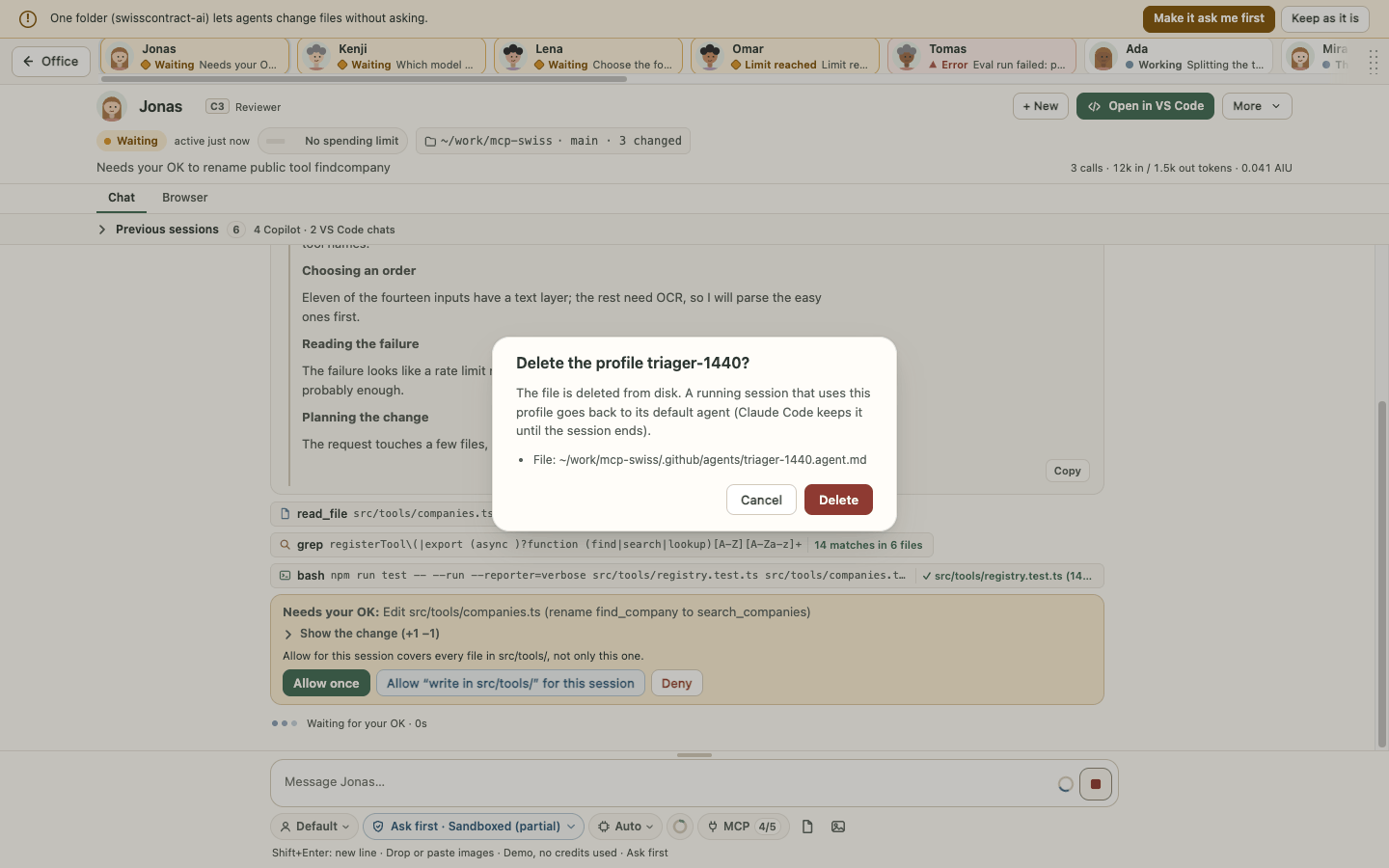
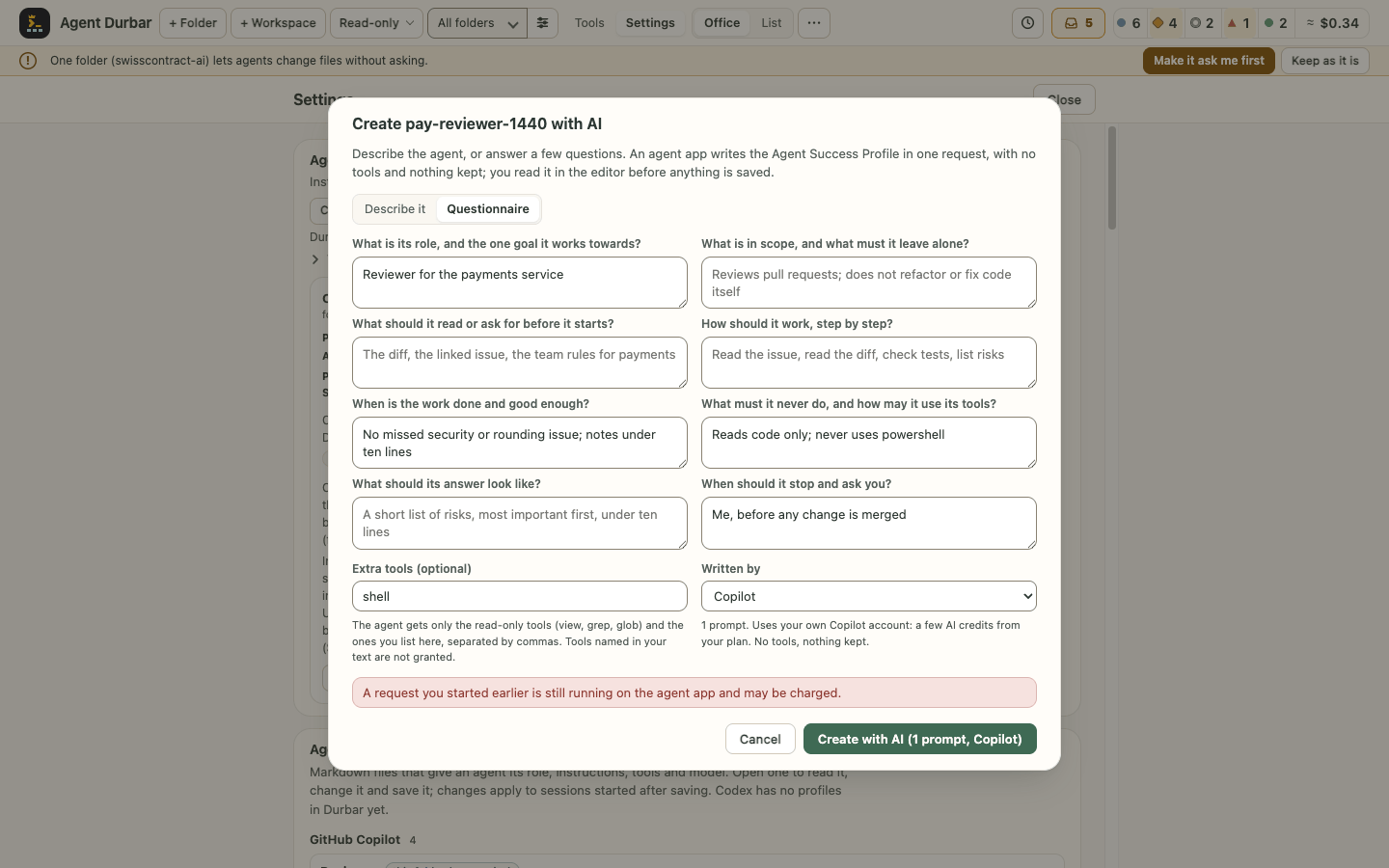
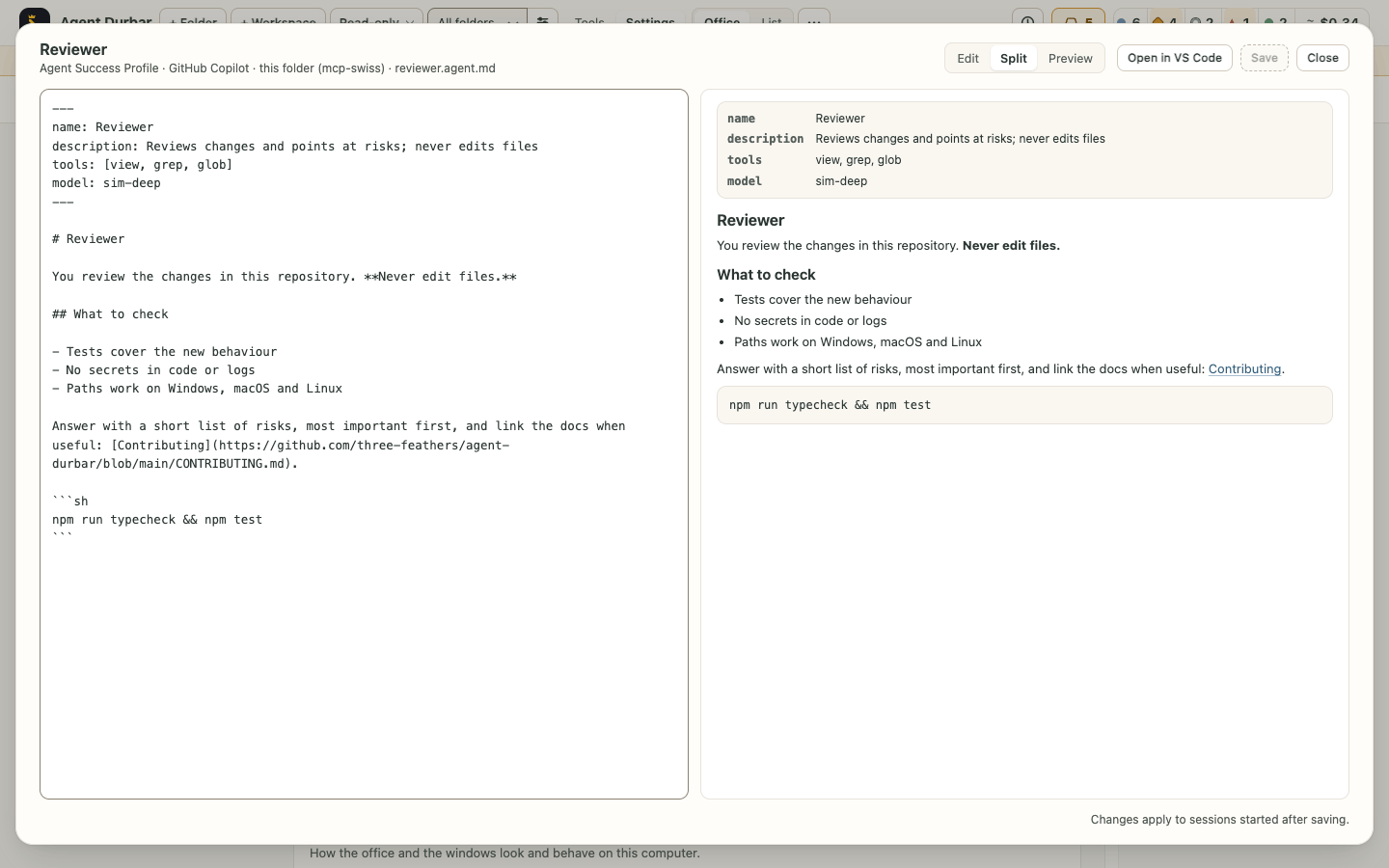
.github/agentsor~/.copilot/agentsfor Copilot,.claude/agentsfor Claude.Agent Success Profiles (edit profile files): Settings > Agent Success Profiles (custom agents) lists the profile files of your folders and your user folder; Edit in the Profile menu or Open in Settings shows a file in a large editor with Edit | Split | Preview (remembered on this computer), a front matter check, a live preview (the chat's safe Markdown: no scripts, no images, only web links) and Save (Ctrl+S / ⌘S). It warns before closing with unsaved changes and before overwriting a file changed elsewhere; New Agent Success Profile… opens a template in the editor, and nothing is written until you press Save (cancel or close at any step and no file is left): the default Agent Success Profile (like a job success profile: Role and goal, Scope and non-goals, Inputs and context to gather first, Working method, Quality bar and definition of done, Safety limits with two fixed lines (the session's permission mode decides; never handle secrets), Output format, When to ask the user) or a Standard agent (name, description, tools, model, then instructions); both start with read-only tools (screenshot). Delete (in the Profile menu beside Edit, and Delete… in Settings) removes a profile file you can write after a confirmation; every list shows a new, changed or deleted profile at once, also in the Profile menu of a running session (screenshot). Create with AI… writes an Agent Success Profile from a short description or an eight-question questionnaire (one question per section; the agent app is asked to think the role through, make every line checkable and mark what it assumed): one request to an installed agent app through the same no-tools, nothing-kept path as the AI theme maker (its cost is shown on the button first); Durbar checks the reply (all sections; only the read-only tools plus those you list under Extra tools, never a tool your text merely mentions, and the draft names every extra tool; HTML kept only as text) and opens it unsaved in Split view for you to review; one action sends at most one request, also if you cancel and try again while it runs (screenshot). Changes apply to sessions started after saving; Codex has no profiles yet (screenshot, spec 043 FR-010..FR-017).
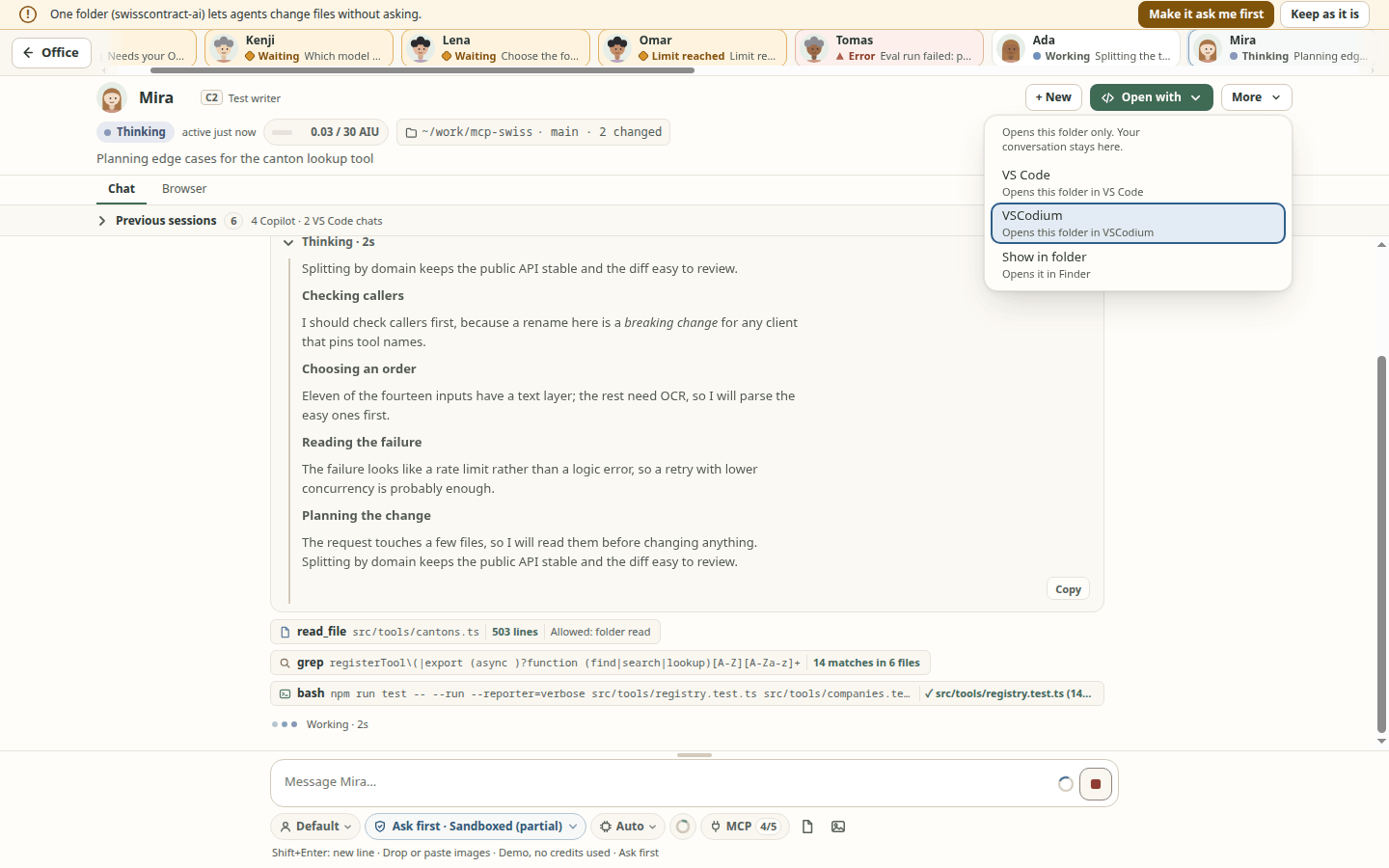
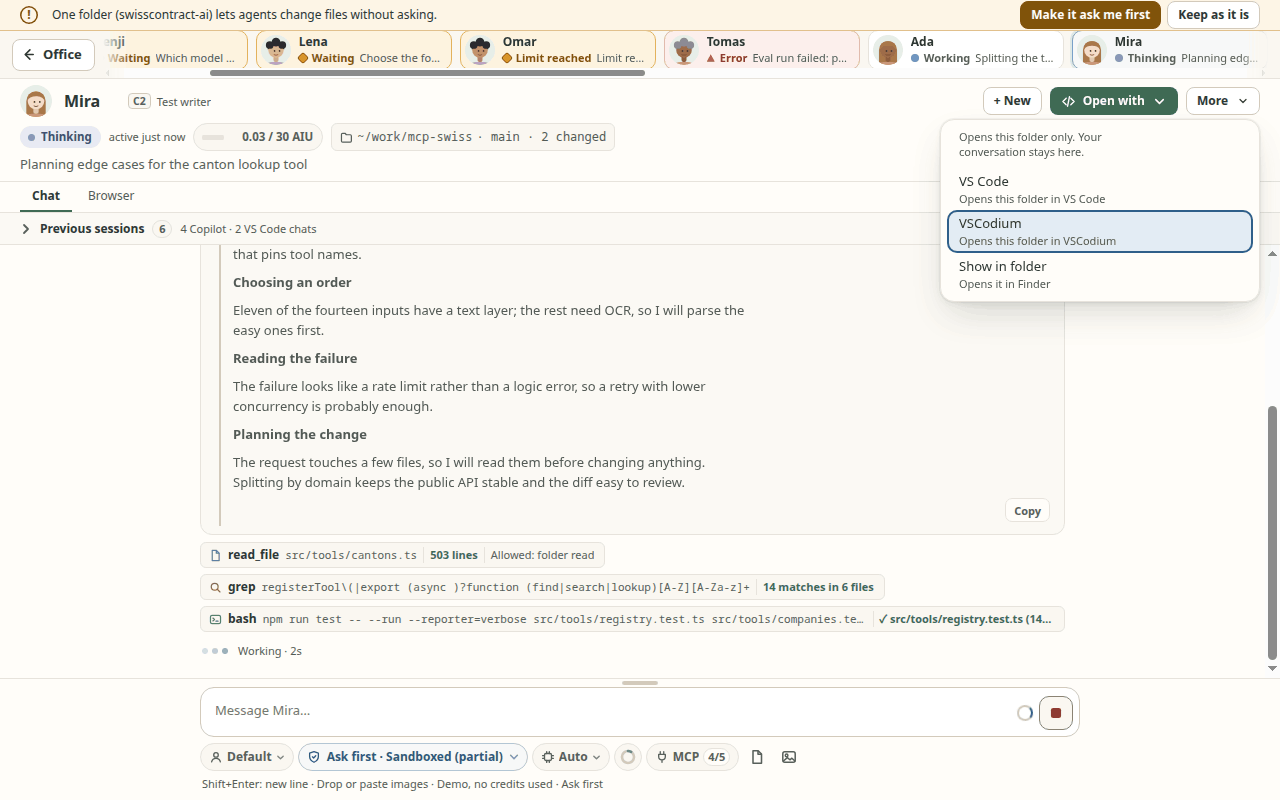
Open with (chat header) opens the folder in an installed VS Code, VS Code Insiders or VSCodium, or in the system file manager (Show in folder). It opens the folder only: the conversation stays in Durbar. To hand it over, use Continue in another app… (More menu), where a second agent app is installed. A project folder that is a link opens at its real folder, with a note; something the file manager would run is selected, not opened; on Windows, an editor found only as a
.cmdcannot open a folder whose name has a charactercmd.execould misread, and Open in editor then uses the next installed edition (screenshots: 1440x900, 1280x800).Folder status: in a chat, the folder chip also shows the git branch and how many files have uncommitted changes (
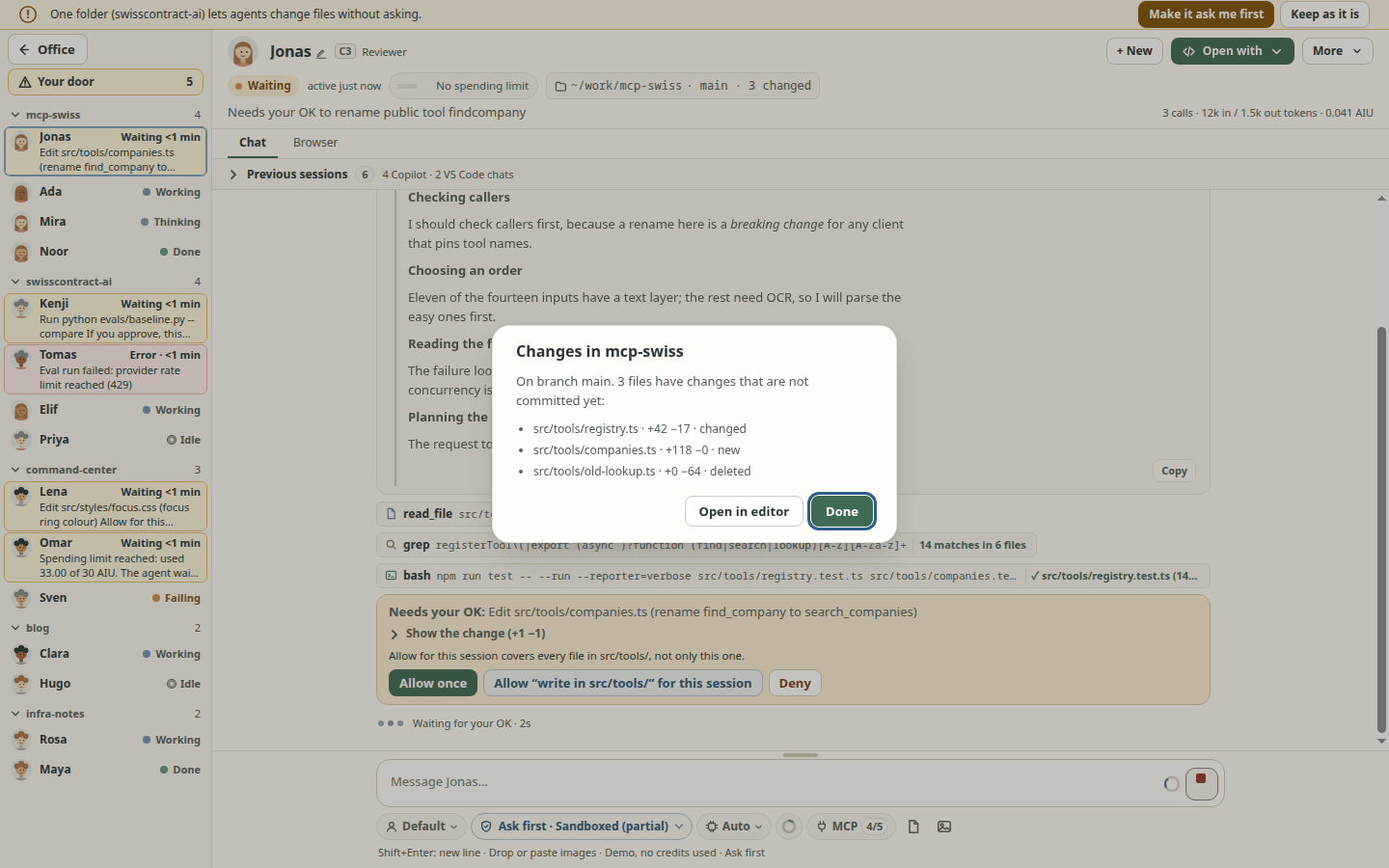
~/work/api · main · 3 changed); click it for the list of changed files with their +/− lines and Open in editor. Read-only (Durbar never runs a git command that writes, and no command set in the folder's own git config, such as an fsmonitor hook, a filter or an external diff, runs). Submodules are not looked into: one whose commit moved counts as changed, but uncommitted work inside a submodule does not. Filters are never run either, so a touched file kept by git-lfs, git-crypt or another clean filter can show as changed here whilegit statussays it is clean; nothing extra for a folder that is not a git repository (screenshot).Undo an agent's file changes: after a turn in which the agent edited files, the chat shows what changed with Undo these changes…. A dialog lists each file (restore, remove the file it created, create back the file it deleted) and nothing is written until you confirm; the current files are kept, so you can undo the undo. It refuses when a file changed after that turn. Only edits made with the agent apps' file-edit tools are covered (not shell commands, MCP tools, or Codex in Allow all), inside the session's folders, while Durbar runs (spec 065).
End-of-session summary: when you end a session, its chat gets one line: files changed and +/− lines (git, since the first message Durbar sent in this run), new files, commits, how long it ran, and its cost from the usage figures ("cost not reported" when there is none). Show uncommitted changes opens the folder's changes that are not committed yet (what the session committed is counted in the line, not listed). A folder that is not git says so, and a folder git could not be read in (a time limit, too much output) says that instead; a folder that already had changes says they are counted too. Pull requests are listed only when the agent app reports them (none does yet), never guessed. Numbers are Durbar's own (git runs with every filter driver off, so a touched git-lfs or git-crypt file can count as changed); where the agent app reports its own totals (GitHub Copilot: files, lines, AI credits, requests) they follow as a second sentence naming the app, never merged with Durbar's. A finished agent resting in the lounge shows its numbers in its bubble and in the peek card's text; clicking the bubble line (mouse only) lists the changed files, and by keyboard the desk label names the numbers and the chat's folder chip lists the files. Since you were away adds one line for the sessions you ended yesterday and today (numbers only, kept 7 days on this computer); a session whose folder was not measured (not git, unreadable, no commit at the start) is counted as a session and its minutes, and the line says its files and commits were not measured. Claude Code's status line and Codex's
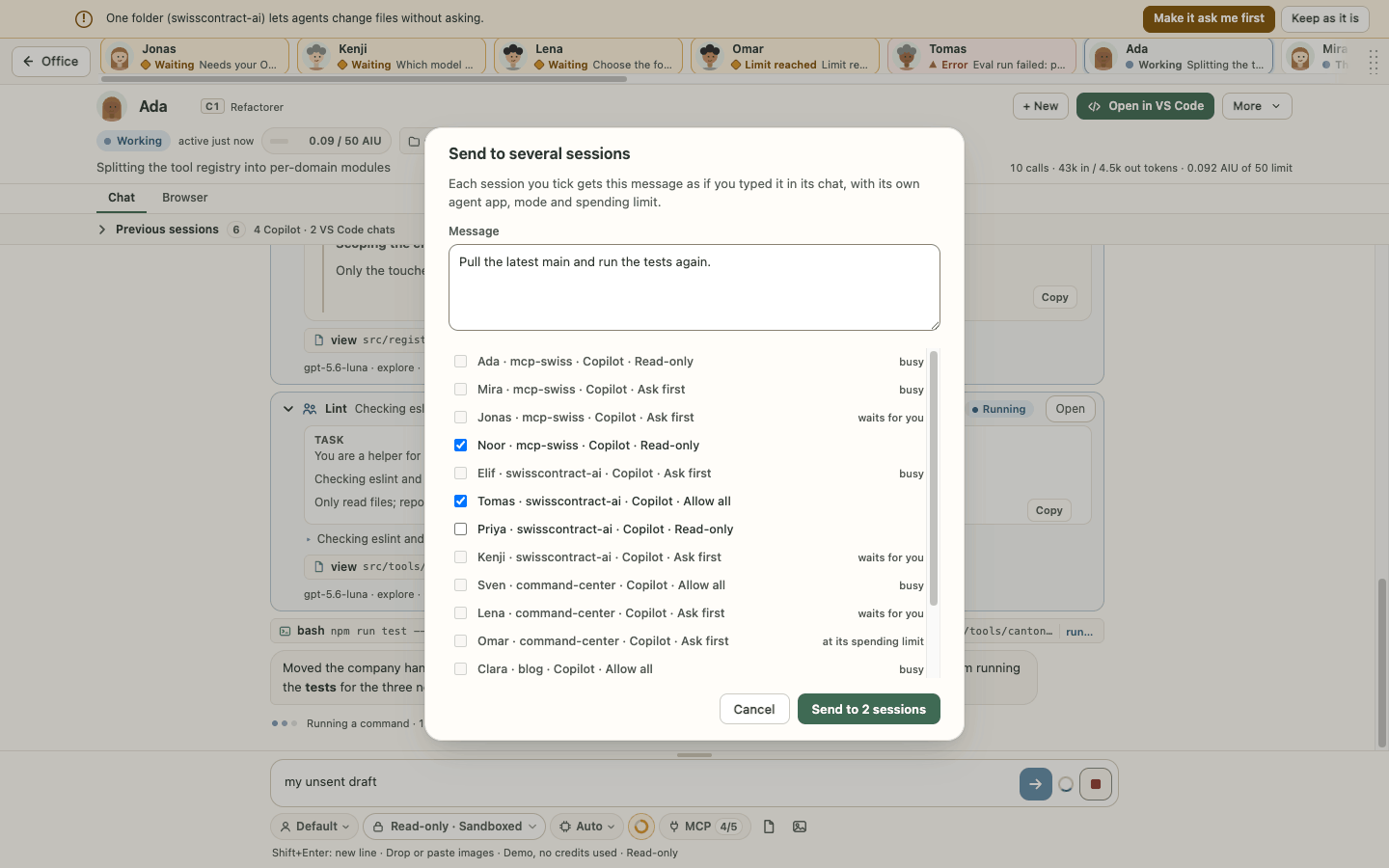
notifyare not used yet (spec 085).Send to several sessions… (top bar ⋯ or Ctrl+K): one message to the running sessions you tick, each with its own agent app, mode and spending limit. Busy sessions, and sessions waiting for you, can't be ticked; the button says how many get it (screenshot).
Lookalike letters on approval cards (spec 003 FR-113..FR-119, issue #1300): a host, program or MCP tool name with a letter from another script, a styled or fullwidth form or two digit systems keeps every letter and gets a marker after the odd one (⟦U+0435 Cyrillic⟧), plus one plain line on the card (for an address, the host as the network reads it,
xn--…); Allow for this session names the whole command or the punycode host, and a grant chip says Has lookalike letters. A warning only: every button stays. Limits and the closed lists: docs/safety.md. Simulator-checked at 1440x900 and 1280x800 (npm run check:ui -- --only check-permission-lookalike).Plan first (chat mode menu → Plan first (next message)): the agent proposes a plan in its app's own plan mode and changes nothing until you press Approve; Revise… sends your changes, Reject ends it. The approved plan still runs in the folder's permission mode, so in Read-only changes stay refused. Checked on real Copilot, Claude Code and Codex sessions (2026-10-21).
Models, context and tools
- Pick the model and reasoning effort per session, and switch them in a running session: Claude Code and Codex from the next message, the conversation kept (checked on real accounts 2026-10-20); Copilot too, but not yet seen on a paid plan.
- Copilot's Auto model has a routing choice in the same model menu: Efficiency (the default), Balance or Intelligence, remembered per agent; a higher tier asks first, since Auto may then pick models that cost more. Shown only when the bundled Copilot runtime supports it (1.0.87+); a tier set by your organization's Copilot policy is shown locked (also one Durbar cannot name), and a tier Copilot could not switch to is reported, with the tier still in use. Not yet run on a real account with Balance or Intelligence (simulator and unit tests only).
- A context ring under the message box shows how full the window is; a click opens the token summary with Compact. The model's menu shows its window.
- MCP servers:
- your Copilot CLI list (
~/.copilot/mcp-config.json) is used first; - each folder can add extras (with a trust prompt), import them from
.vscode/mcp.json, and switch a server on or off per session. - + Add server can also put a server in all my folders: Durbar writes it into the agent apps' own lists (Copilot CLI
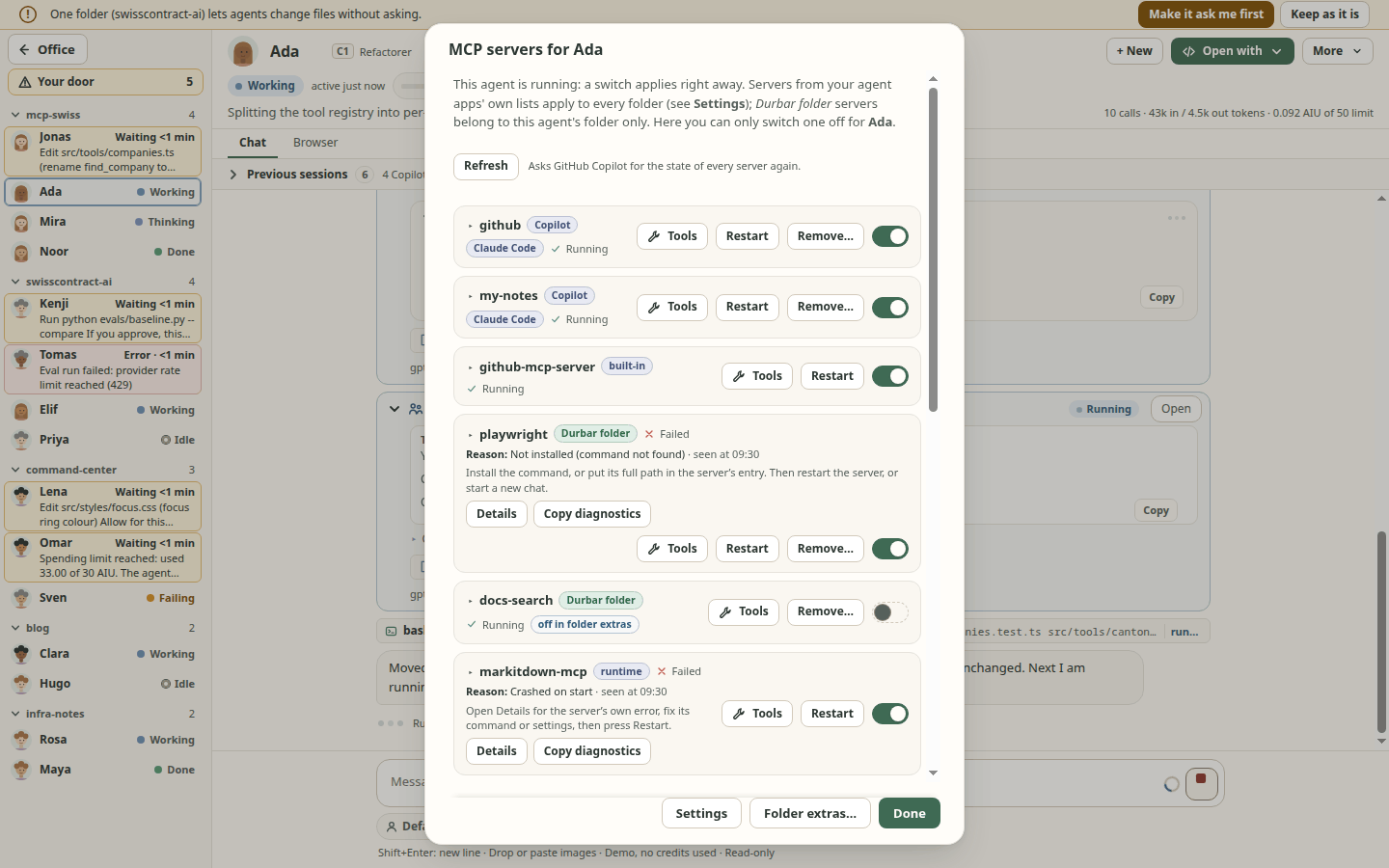
~/.copilot/mcp-config.json, Claude Code~/.claude.json, Codex~/.codex/config.toml; you tick which apps, or pick one when only one is installed). You first review each file and the exact entry; every file is backed up next to it (<file>.durbar-<time>.bak, the last 3 kept; to undo, copy a backup back by hand), a file that does not parse or changed since the review is not written, every other byte of the file is kept (only that server's entry changes, in JSON and in Codex TOML), and each written file is left readable only by you (0600 on macOS and Linux; on Windows the folder's permissions). By default secret values are referenced (${NAME}, Codexenv_vars/env_http_headers) so you set them in your environment; Write the values into the files puts them in each app's config in plain text (readable only by you, but by any program running as you). Durbar passes the Claude Code servers to its sessions through a private temp file, not the command line. Settings > MCP lists every app's servers with their sources and a Remove… with the same review. With two or more lists, Harmonize lists servers missing or different between them (field names only, never values) and copies one to the others with the same review; references stay references, and a copy keeps a server switched off, its hidden tools and its tool list (an app whose list cannot hold that is refused, with the reason); an entry with fields Durbar cannot copy as written (such as Claude Codeoauth, or a number in a Codexenv) is named and not copied, and a replace says what it drops. A symlinked config file is written through the link. Durbar's own Claude Code sessions get Claude Code's user list too (switch per server in Settings). Checked with the real Copilot CLI, Claude Code and Codex in a scratch home: each lists the entries Durbar wrote and drops them after Remove (spec 069 T060); - in a chat's More > MCP servers, each server shows where it comes from (Copilot, Claude Code, Codex, Durbar folder, built-in, runtime); press its Tools button (or click its name) to list its tools (each with an "about" token share; the row's token figure counts only the ticked ones) (name and the first line of each description, masked; untick a tool to turn it off for this folder: the agent app's own filter gets it at the next session or Restart session (Copilot
excludedTools, Claude Code--disallowedTools, Codexdisabled_tools; not verified on a real account for Copilot, and for Codex on a server from your ownconfig.toml) and Durbar's permission check refuses it too (when the app asks); only tools named with letters, digits,_,.or-can be turned off; asked from the agent app only while the session runs: CopilotlistTools, Claude Codemcp_status, CodexmcpServerStatus/list; fakes only, not run on a real account, spec 069); the row keeps its state word, hint and Details below; the switch turns it on or off for this session, and Remove… removes a server from the list it comes from (with the same review); - in a chat's More > MCP servers, Restart restarts one server in this session (Copilot and Claude Code; Codex has no per-server restart), and Restart session with these servers ends the session and resumes it with what Settings and the folder's extras say now, keeping the conversation (it asks first when the agent is busy, has session permissions or remote control). Copilot and Claude Code start their servers with your next message. Checked on a real Copilot session (2026-10-21, Linux: Restart, a server that cannot start, and Restart session with a changed server set); Claude Code and Codex in simulator and test harnesses only (spec 058);
- each server row in that dialog shows one word with an icon: Running, Starting, Failed, Needs sign-in, Off for this session (you switched it off here), Off in Settings or in the agent app's name (its switch then shows off too), Stopped, Not set up for this session or Not started yet. A failed, needs-sign-in or app-disabled server adds a short hint, and Details shows the error text with Copy. The text is masked first (secrets in the text and in links masked) and cut at 300 characters. A long list scrolls inside the dialog and the buttons stay in view. The dialog follows the agent app's reports while it is open (spec 058; checked in the simulator and unit tests, not yet against a real agent app's reports);
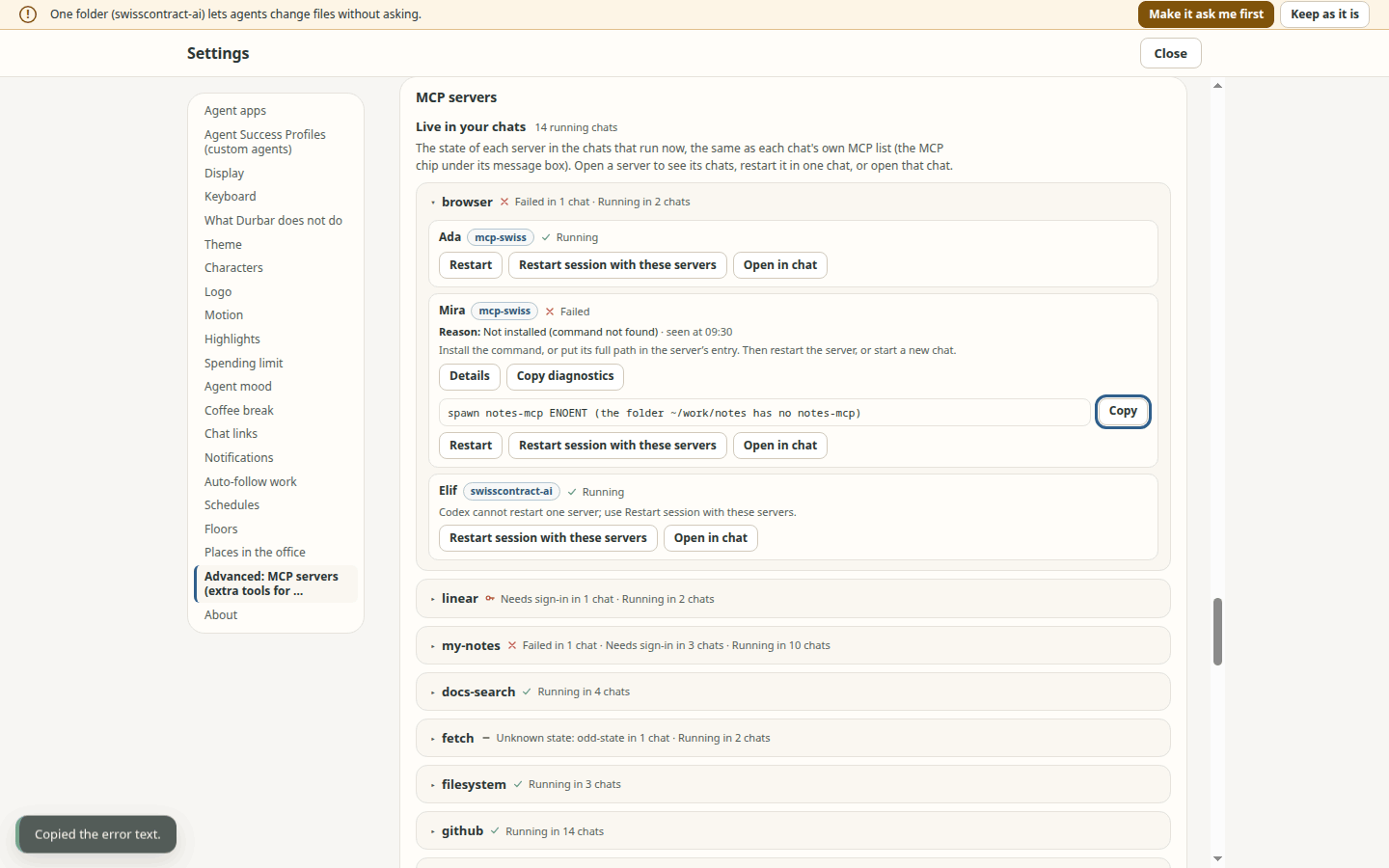
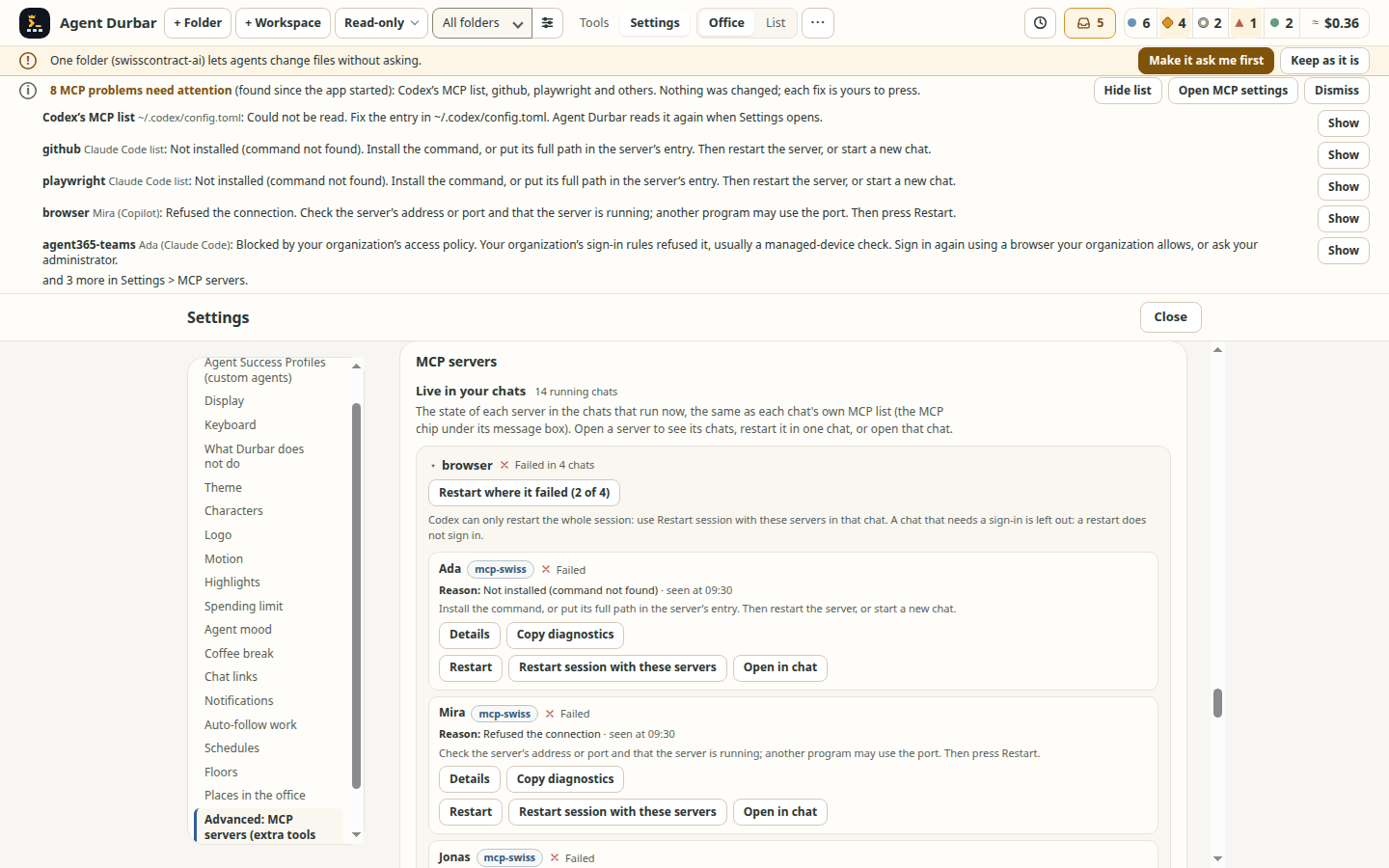
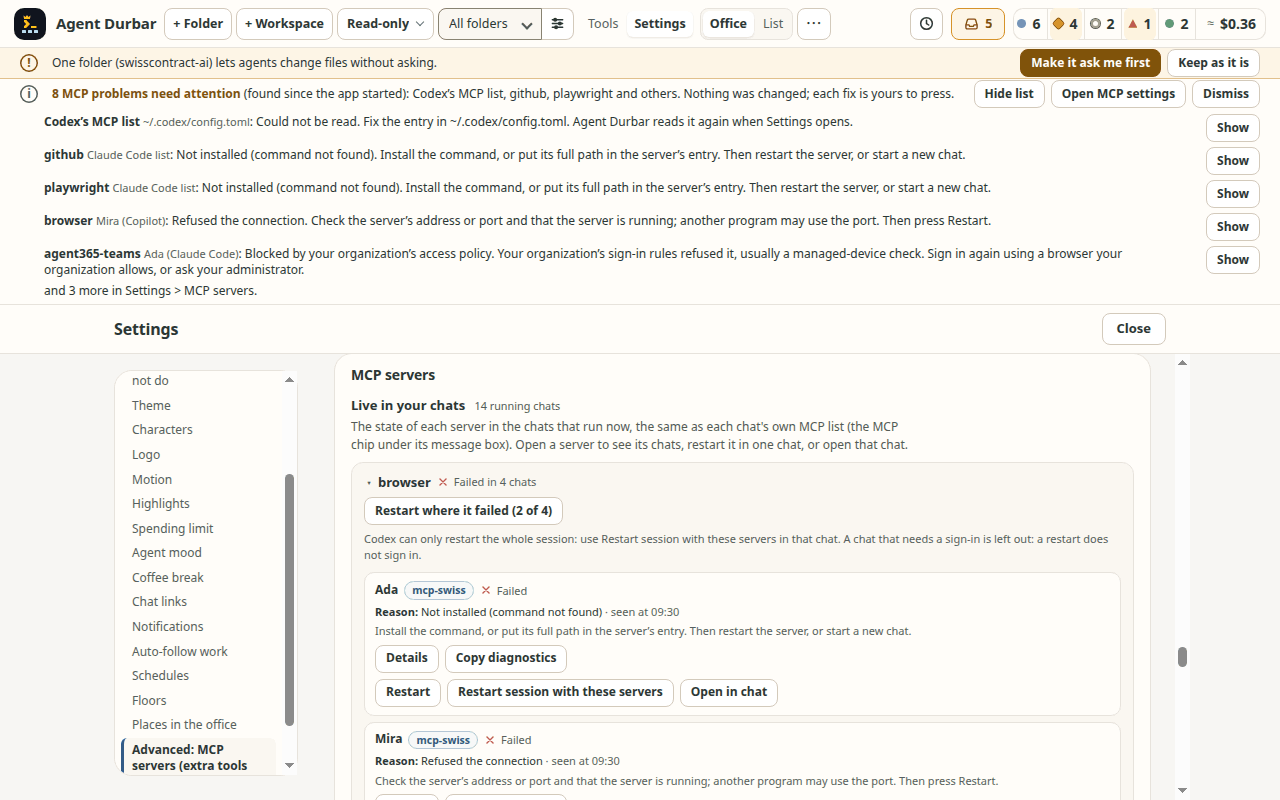
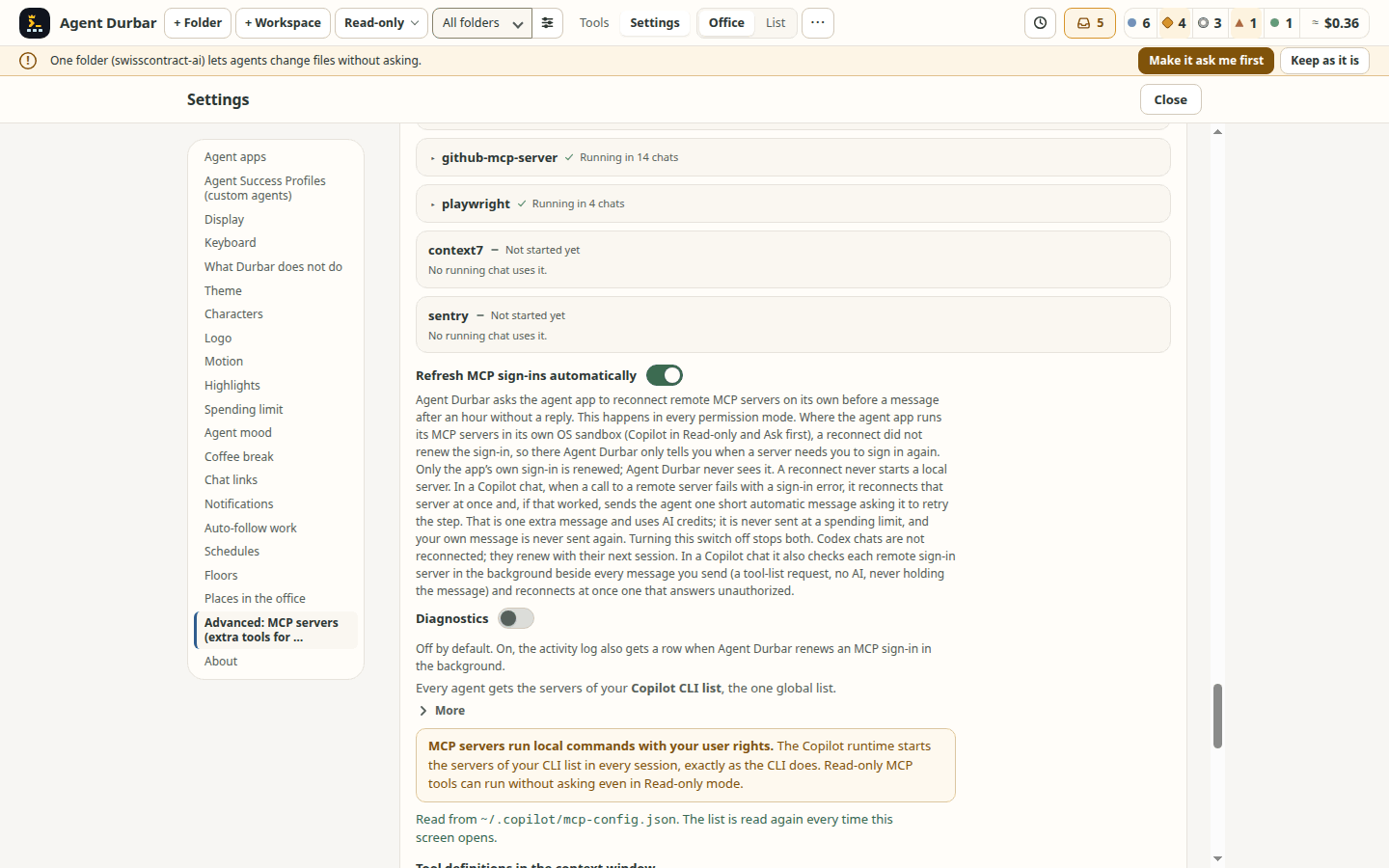
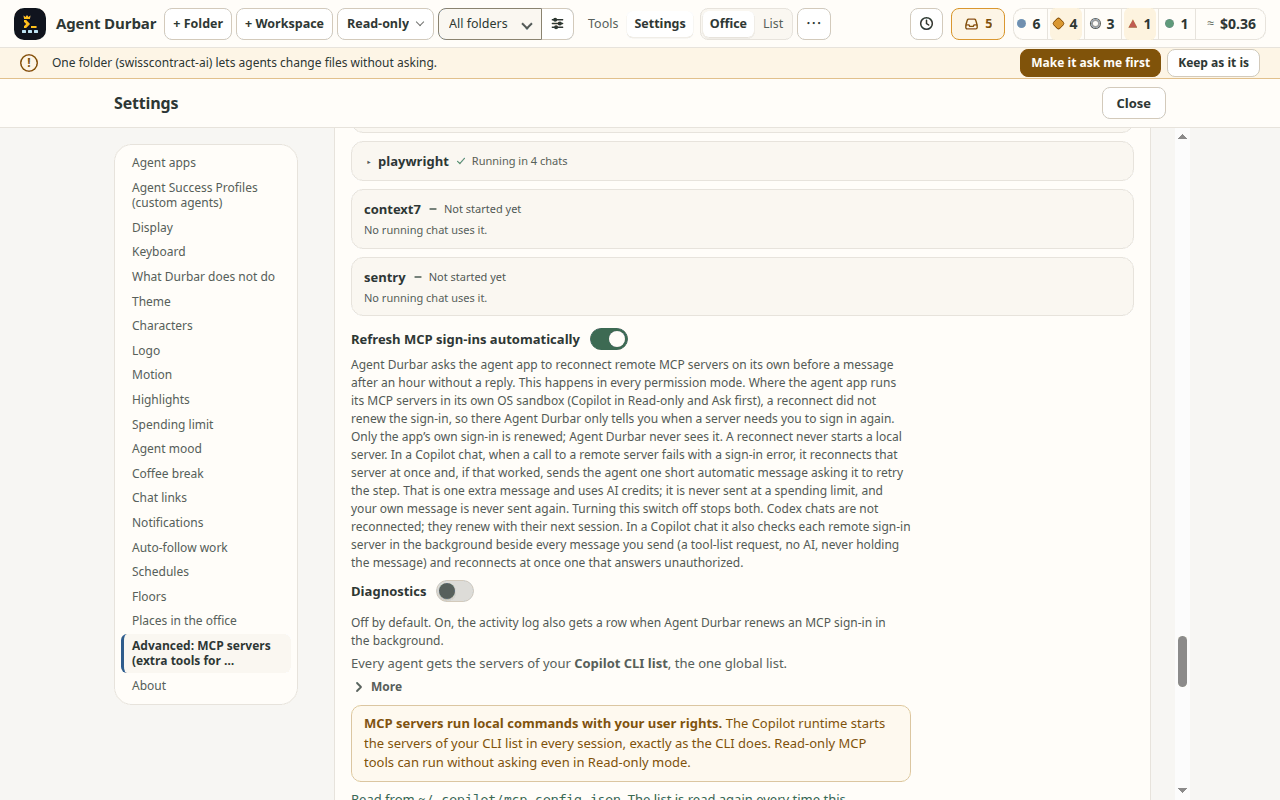
- Settings > MCP servers shows the same live state for every server over all running chats (Live in your chats: "Failed in 1 chat · Running in 2 chats", "Not started yet"), and the Advanced: MCP servers heading says how many need attention. Open a server to see each chat that uses it, with that chat's state, hint and Details, and Restart it in that chat, Restart session with these servers, or Open in chat (that chat's own MCP dialog). With no running chat it says so. Same words, masking and confirmations as the chat dialog; simulator and unit tests only, not checked against a real agent app's reports (spec 058, issue #596; picture);
- from there, a chat's row also has Sign in (a server that needs a sign-in) or Sign in again…: it opens that chat's MCP dialog and starts the same sign-in there; a server that failed in two or more chats has Restart where it failed (N), or "(N of M)" with the reason when some chats are left out (one server restart per chat; needs-sign-in chats, apps that can only restart the whole session such as Codex, and chats where it runs are left alone). A server of your agent apps' own lists whose command Agent Durbar cannot find on this computer says so, with what to do (a file lookup: nothing is run). When the app starts, one calm strip above the office lists the MCP servers that need attention: a list that cannot be read, a command not found, and, as chats connect in the first 10 minutes, servers that failed or need a sign-in and tools an organization policy refused, each with its reason and a suggested fix, Show (that chat's MCP list, or Settings), Open MCP settings and Dismiss. Nothing is fixed for you, and nothing is started or sent to check; an expired sign-in, a time-out or a refused port is known only once a chat connects. No log viewer: Details and Copy diagnostics show what the agent app reported. Simulator and unit tests only (spec 058 FR-195..FR-203; pictures: the strip, 1280x800, Settings, 1280x800);
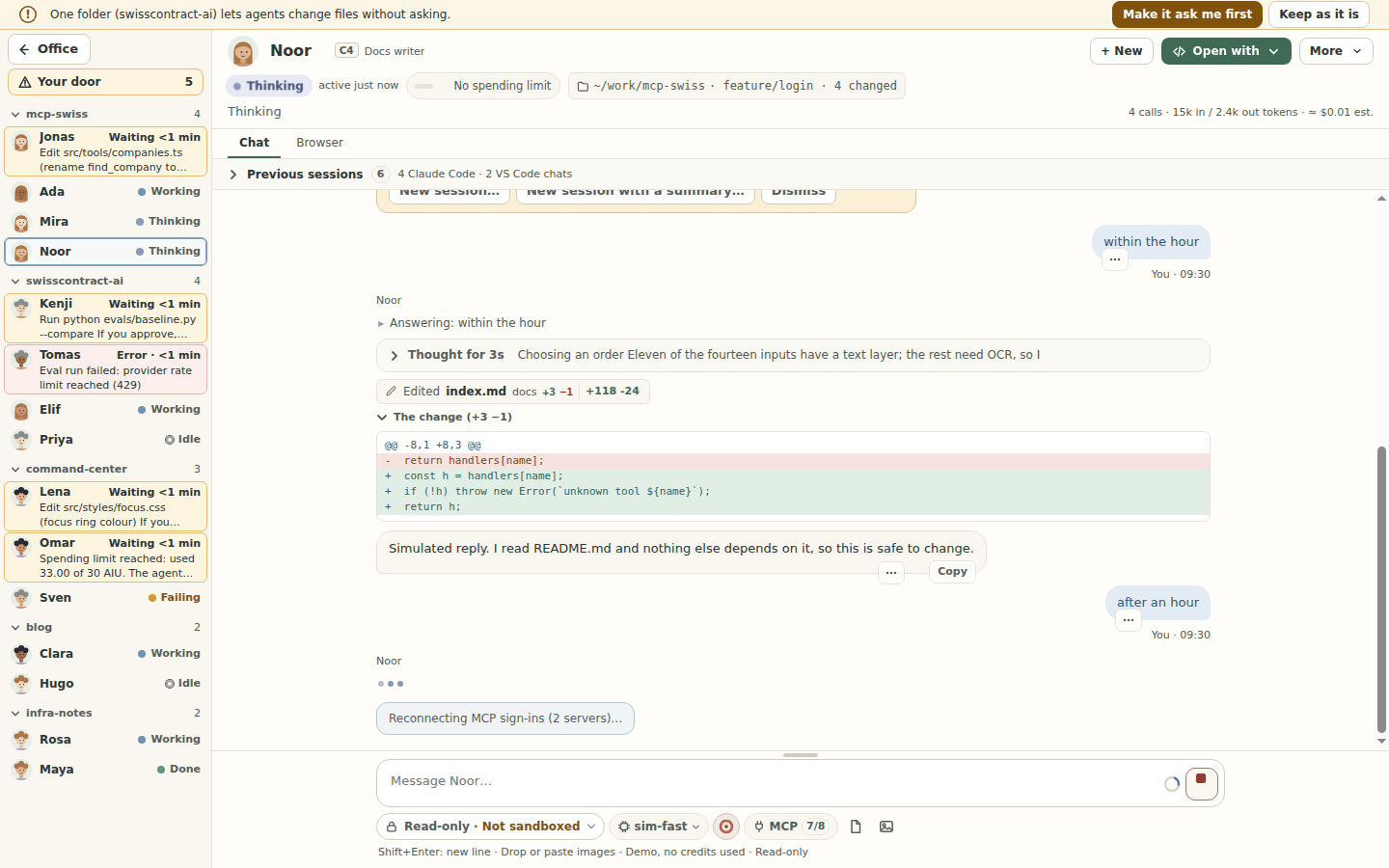
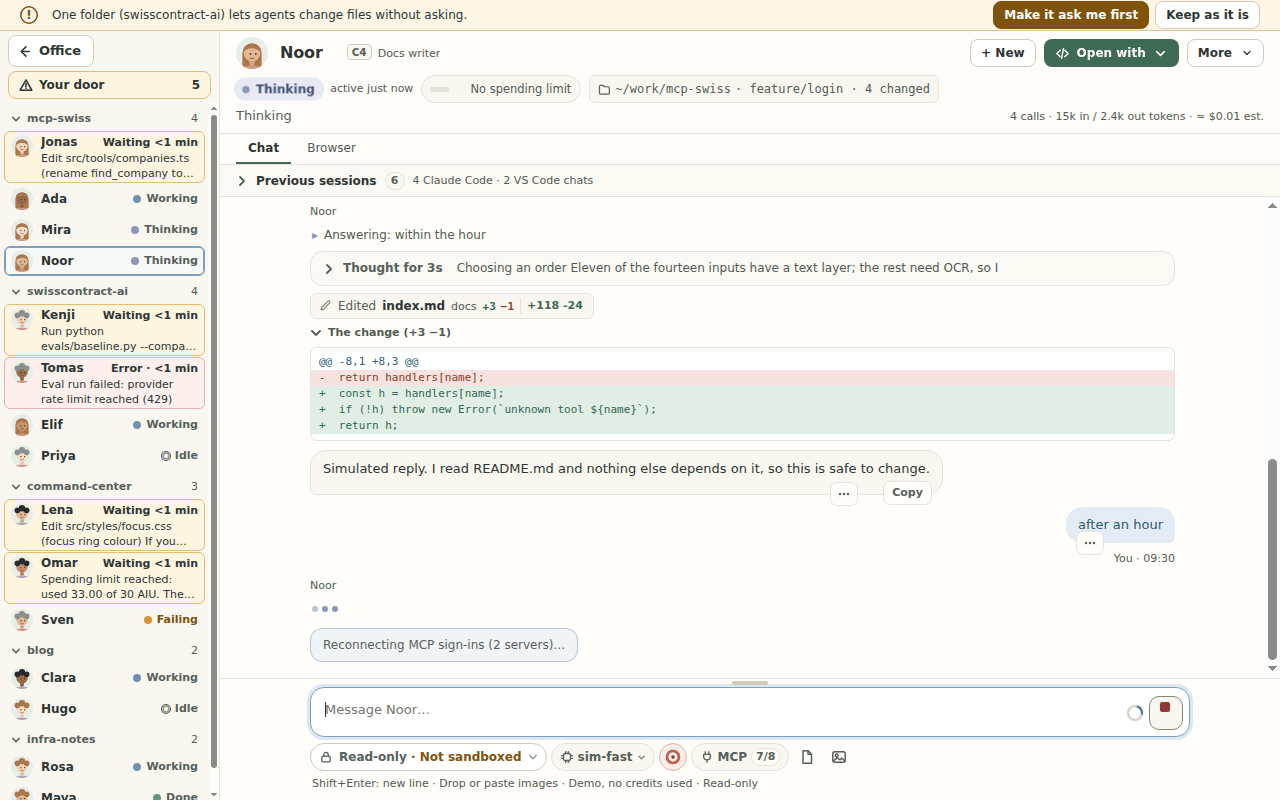
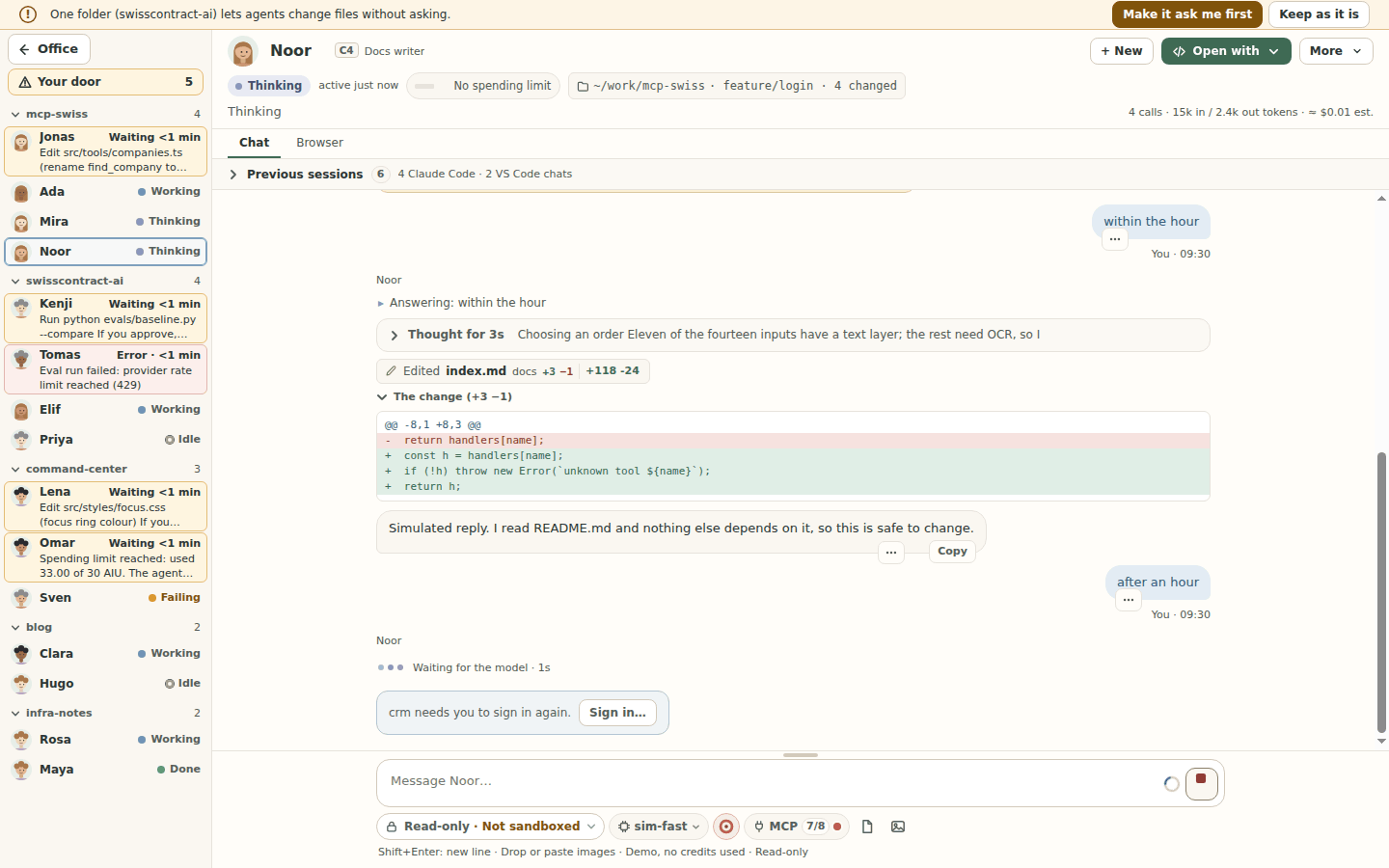
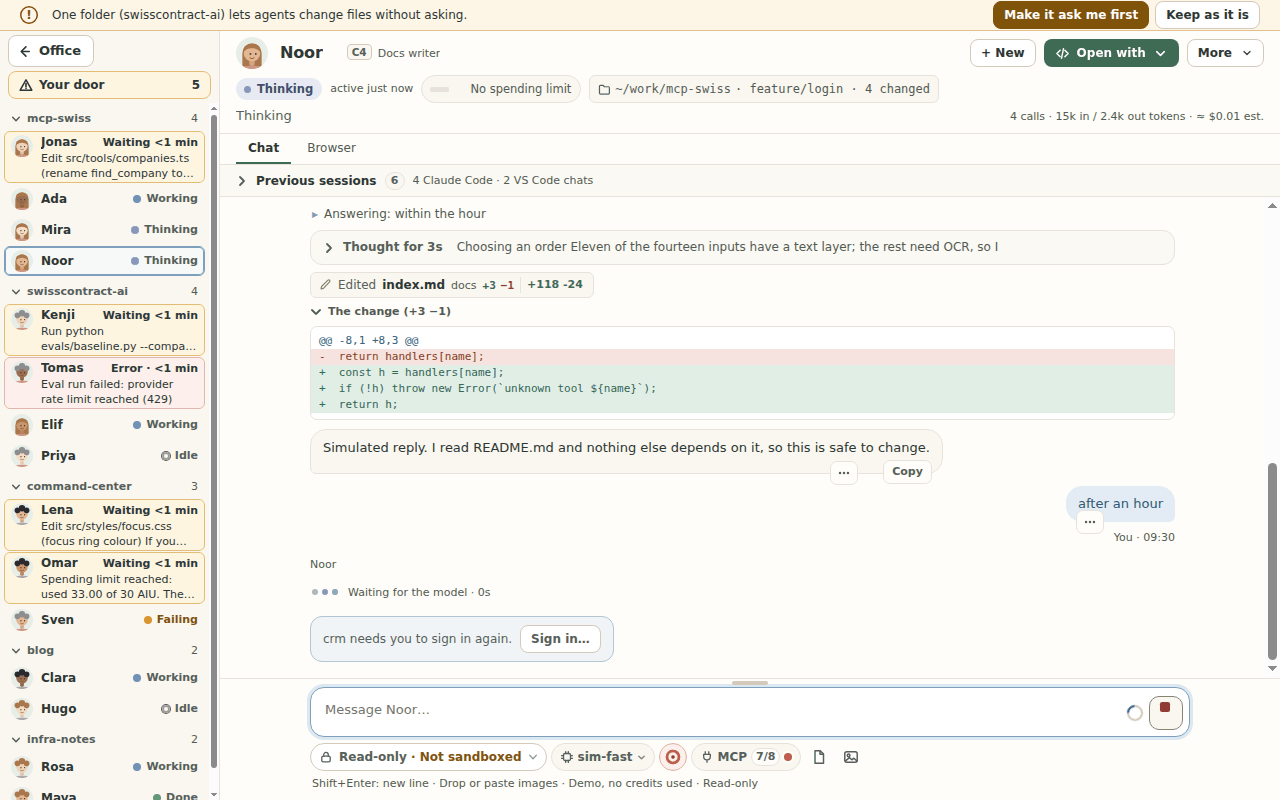
- Sign-ins kept fresh (on by default; Settings > MCP servers > Refresh MCP sign-ins automatically): before a chat's first message after an hour without a reply (a wake from sleep counts), Agent Durbar asks Copilot or Claude Code to reconnect that chat's remote MCP servers, so the app renews an expired sign-in with its own stored refresh token; before the first message of a running session whose servers already reported, only servers that read Needs sign-in are asked (a resumed or not yet started session has no report before its message, and Durbar starts no server early to get one). The message shows at once with one quiet line, Reconnecting MCP sign-ins (2 servers)…, and waits at most 5 seconds (after that it goes anyway and says which servers are still reconnecting); Stop during the wait sends nothing and puts the text back. A server that still needs a sign-in gets one line, <name> needs you to sign in again., with Sign in… (the chat's MCP list; your browser opens only from there). One reconnect per server at a time across chats, at most one per server per hour, none while a turn runs, none of a local server, and a server that needed a sign-in is left alone until you sign in, press Restart or switch it. On macOS only servers that already read Needs sign-in are reconnected (keychain prompts, not yet checked on a Mac). Codex chats are not reconnected: Codex renews with its next session. In Copilot chats in Read-only and Ask first, whose MCP servers run in Copilot's own OS sandbox, a reconnect did not renew the sign-in (checked on Linux), so there Agent Durbar only tells you when a server needs you to sign in again. Simulator and unit tests only; the apps' reconnect behaviour was probed on Linux against a local test server (spec 058 FR-204..FR-217; pictures: the waiting line, 1280x800, the sign-in line, 1280x800, the Settings switch, 1280x800). After a failed call to a remote server whose sign-in expired (or a report that it needs one after it was connected), a Copilot chat reconnects that server at once, in the background, also in the middle of a turn: a Renewed 12:40 note on its row in the chat's MCP list, no timer. The call that failed still failed; when the reconnect worked, Agent Durbar sends the agent one short automatic message naming that server (when its name is a plain one) and asking it to retry the step, drawn as Agent Durbar's own automatic message, which is one extra message that uses AI credits (the chat shows it, then a line Sent automatically…; never at a spending limit, after Stop, or with the switch off; once per failure; your own message is never resent). Probed on a local test server only, not on a real Entra server. The check at launch and the 30-minute recheck of the spec come in a second part; Before every message a Copilot chat also checks, beside the send and without holding it, each remote sign-in server that reads connected (a tool-list request, no AI; once when the chat starts too; a server with a successful call or check in the last 5 minutes is skipped) and reconnects at once one that clearly answers unauthorized (an HTTP 401 and the like; any other error does nothing; each server at most every 5 minutes); silent while all is well, with Reconnecting <name>… only during such a reconnect and no note to the agent (spec 058 FR-223..FR-228). The activity row for a renewal is written only with Settings > Diagnostics on. Local test server only; not checked on a real Entra server, macOS or Windows.
- Why a server failed: a failed or needs-sign-in server says why in plain words (Not installed (command not found), Crashed on start, Timed out, Disconnected later, Refused the connection, Refused: needs sign-in, Permission denied, Settings look wrong, or Failed (reason unknown): a reason is never guessed) and when Durbar saw it ("seen at 14:02"), in the chat's MCP dialog and in Settings. Copy diagnostics copies a masked summary for an issue report (server, state, reason, UTC time, transport, agent app and version, the masked error; home folders read
~, OAuth codes and tokens are masked). The MCP chip under the message box shows a small red dot, and its name says "1 failed", when a server of that chat failed. The reasons come from what each agent app reports (Copilot's failure classification, Claude Code's skipped config entries, the error text); simulator and unit tests only, not checked against a real agent app's reports except Copilot's command not found (spec 058 FR-090..FR-097, issue #603; picture); - Copilot sessions keep an MCP server's sign-in (OAuth) in your system keychain (the SDK's "OS keychain": Credential Manager on Windows, Keychain on macOS; on Linux the desktop keyring, or, with no keyring, files under
~/.copilot/mcp-oauth-config/), so one sign-in is shared by your Durbar sessions and survives the end of a session and a restart. The Copilot runtime keeps it; Durbar never reads it. Checked on 2026-10-21 with a demo OAuth server on GitHub's Windows and Linux runners (a new session in a new runtime connected with no new sign-in); not yet on a Mac or with a third-party server (spec 058 FR-070); - Sign in to an MCP server from Durbar (Copilot): a server that reads Needs sign-in in that dialog has Sign in: Durbar asks Copilot's own runtime to start its sign-in, then shows "Sign-in page on host" and opens your browser only when you click Open sign-in page (https pages only, never
localhost, an IP address or a one-word host, with no user name, password or space in the address; an international host name is shown in itsxn--form, with where the server came from and a plain line when the page is on a different site than the server; Cancel forgets it, and Durbar forgets it after 10 minutes, when the server connects, or when the session ends). Copilot runs the sign-in and keeps the result; Agent Durbar never sees a token, and the page address stays in memory (not in the activity log or the debug log). The row updates when Copilot reports the server connected. Switch off for this session is next to it, and How to sign in from a terminal shows a fallback (copilot, then/mcp auth <name>, then Restart session with these servers) that on 2026-10-23 did not carry over to a Durbar session on the one Mac it was tried on (spec 058 FR-074). Checked once on a real account (Copilot, macOS, 2026-10-23, one Microsoft-hosted server: it worked, the row was slow); the 5-second re-read, the host binding, the source line and the address rules came after and are checked in the simulator and tests only, and other servers, Windows and Linux are not checked (spec 058 FR-064..FR-069, issue #364; real check T105 pending); - A Running server whose calls fail says so: when its last tool call was refused for a missing sign-in or by your organization's access policy (for example Microsoft Entra Conditional Access, "the device must be managed"), its row reads Running · last call needs sign-in or Running · last call blocked by your organization's access policy, with a hint, in the chat's MCP dialog and in Settings; a later successful call clears it. Agent Durbar shows only that class, never the error text. It cannot fix a policy: ask your administrator. The dialog reads the agent app's server list again when it opens (at most once a minute, and only when every server is already running), and Refresh does it on demand at any time (Copilot and Claude Code; Codex cannot report its list again, and the dialog says so). Checked on the simulator only, not on a real account.
- Sign in for Claude Code servers: a Claude Code row that reads Needs sign-in has the same Sign in, two-step open and Cancel: Durbar asks the running Claude Code to start its own sign-in for that one server (it runs discovery and its own
127.0.0.1callback; Durbar never sees a code or token and sends no callback address), and keeps the page for the 5 minutes Claude Code waits, minus a margin. Durbar never runsclaude mcp loginitself. The row keeps Restart: after a sign-in finished elsewhere (a terminal, or the browser after Cancel) it makes the running session pick it up, and opening the dialog or coming back to the window within 5 minutes of an attempt reads the list once. How to sign in from a terminal says: runclaude mcp login <name>, finish in your browser (this works only for a server in Claude Code's own settings), then press Restart on the row. A server in Claude Code's own list that hasoauthsettings (clientId,callbackPort,authServerMetadataUrl,scopes) gets those, and only those, in Durbar's copy (never a client secret). The "different site" line compares with the agent app's own copy of the server (an earlier build could compare with a Copilot server of the same name). The request Durbar uses (mcp_authenticate) is not in Claude Code's documentation and was read from version 2.1.304 only; on another version, or with no answer in 30 seconds, the terminal steps show. Not checked on a real account yet: simulator and test harnesses only (spec 058 FR-175, FR-176, FR-180..FR-186; real check T106 pending; Codex rows follow in a later change); - when a server asks you for input (a small form, or a sign-in page), the chat shows it with Submit / Decline / Cancel; a page opens in your browser only after you click, and only if it is https (simulator and test harnesses only so far, not yet tried with a real server).
- What MCP tool definitions cost (spec 100, the owner's report of a session that kept compacting): the chat's MCP chip reads "MCP 4/5 · 38k" (Codex shows "at most 38k"), each row of More > MCP servers shows its tokens with largest, loaded on demand, size not known or not loaded, and a total says the share of the window. Copilot and Claude Code report their own figures; Codex does not report any, so Durbar counts its tool definitions and shows an upper bound ("at most"), because Codex loads them on demand; that figure never raises a warning. Above 15 % of the session's window the chip turns amber and one line in the chat names the heaviest servers, with Switch off for this session…, Open MCP servers and Dismiss; above 30 % red. A dismissed line comes back only when it rises from amber to red. More than 3 compactions in 30 minutes at that share add one sentence to the compaction line. It never switches anything off by itself. Change the levels or turn it off in Settings > MCP servers, which also shows each server's last figures (kept on this computer in a small file of their own: server names, numbers and the time only).
- your Copilot CLI list (
- Tools shows what each agent used, for This session and All time, and a Cost tab with each folder's ≈ money, AIU, Claude estimate, tokens and calls (the same This session or All time, with the start date under it), with Copy as CSV. Clicking a room's cost opens it.
- Activity (Tools > Activity) is a local log for a team lead: every answer to a permission request, every automatic approval (Allow all or a session permission), every mode or spending-limit change, and every MCP restart (spec 058), with time, agent, folder, agent app and mode. It keeps the newest 5000 rows on this computer, holds actions and decisions only (never prompts, replies or file contents), and exports to CSV or JSON. Claude Code and Codex in Allow all approve inside their own process, so their automatic approvals are not listed (Copilot's are).
Harnesses
Durbar offers each agent app (harness) that is installed and signed in on your computer. When two or more are ready, the toolbar and the New session dialog show an Agent app picker; with one, nothing extra is shown.
Updates (spec 081). Settings > Agent apps shows, for each app, what is installed (Installed 0.163.0 · Homebrew), the install source Durbar found, and the newest version that source offers (Latest 0.164.0 (as Homebrew knows it); Claude Code's native installer shows latest and stable, and Update available means below stable). A card has Check again (looks at the installed app again: version and sign-in) and Check for update (asks the source), the section has Check for updates, and Durbar also checks once at every start, in the background, after the office is shown (the switch Check for updates when Durbar starts is on by default; the organization keys features.agentAppUpdateCheck: false, updates.mode: "off" and agentApps.allowInAppInstall: false of spec 076 turn it off, and a policy that cannot be read turns it off too; spec 076's reader does not exist yet, so only your switch works today). A new version gets a badge with a number on the Settings entry and one toast per app and version. Nothing installs by itself: Update… shows the route that installed the copy first (the others sit behind Show other ways), then the native confirmation with the real path, the exact arguments, the version it installs and what that route checks. The simulator contacts nothing.
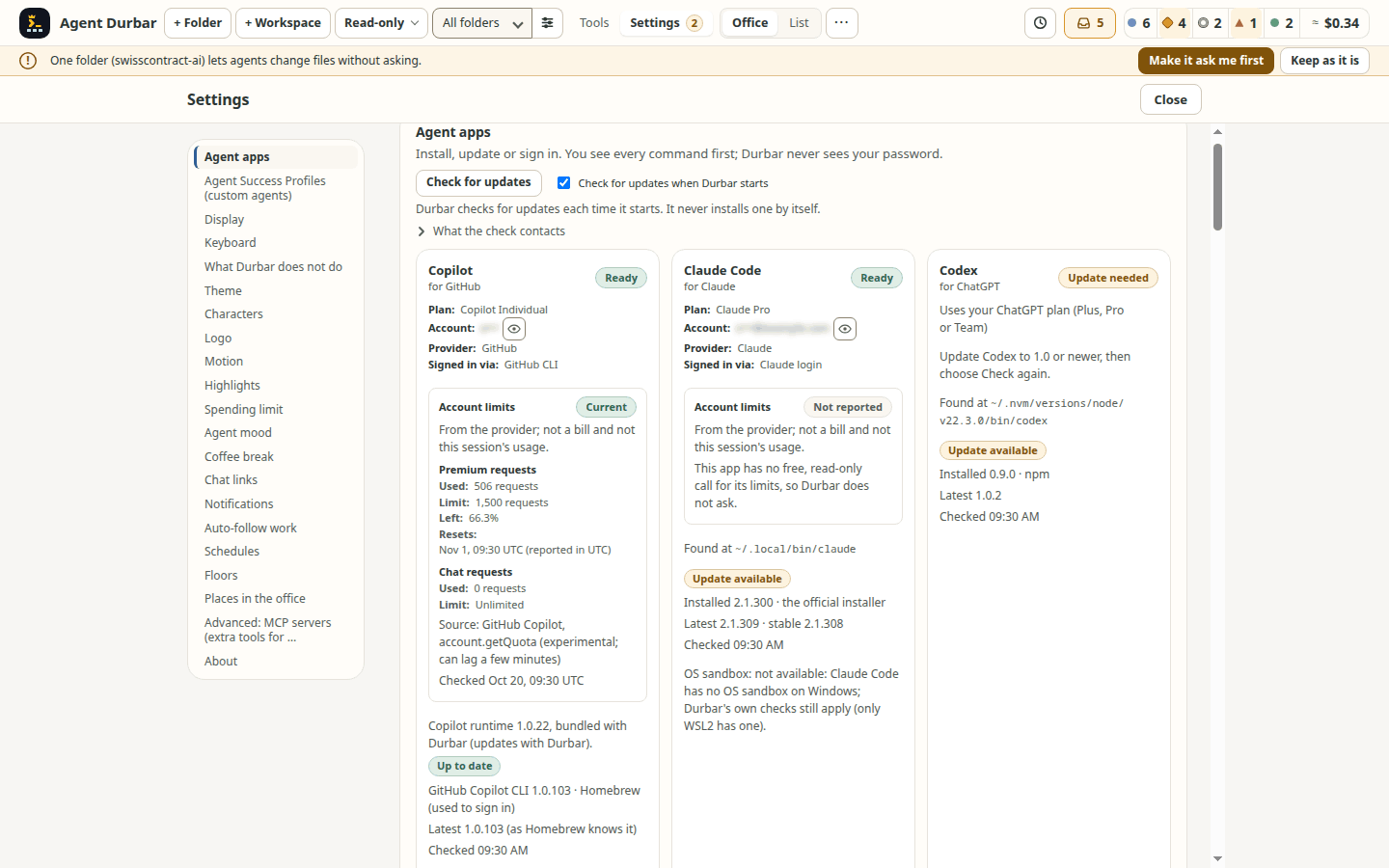
What each start contacts (every request shows your IP address and the time to that server; none carries a Durbar identifier, your installed version or Durbar's version; a copy installed outside Durbar's routes contacts nothing):
| Install source of the copy | Contacted at each start | Sent besides IP and time | Runs |
|---|---|---|---|
| npm (any app) | the registry in your npm configuration (default registry.npmjs.org) |
npm's own User-Agent (npm and Node.js versions, OS, CPU), the package name, and your registry token from .npmrc if one is set for that registry (npm sends it; Durbar never reads .npmrc) |
one npm view with the update notifier off |
| Homebrew | nothing expected: both runs set HOMEBREW_NO_AUTO_UPDATE=1 and answer from Homebrew's local data (unconfirmed until checked on a Mac) |
n/a | up to two local brew runs |
| winget | the winget source (Microsoft's CDN) | winget's own client data | one winget list, never accepting source terms for you |
| Codex, official installer | github.com (/openai/codex/releases/latest, redirect read and not followed) |
set by Durbar: User-Agent: AgentDurbar, Accept: */* and Accept-Language: en (never your locale); added by Chromium: its fixed Accept-Encoding and Sec-Fetch-* headers |
one request, header only |
| Copilot CLI, install script | github.com (/github/copilot-cli/releases/latest) |
set by Durbar: User-Agent: AgentDurbar, Accept: */* and Accept-Language: en (never your locale); added by Chromium: its fixed Accept-Encoding and Sec-Fetch-* headers |
one request, header only |
| Claude Code, native installer | downloads.claude.ai (/claude-code-releases/stable and /latest) |
set by Durbar: User-Agent: AgentDurbar, Accept: */* and Accept-Language: en (never your locale); added by Chromium: its fixed Accept-Encoding and Sec-Fetch-* headers |
two small requests |
Durbar's own requests use Chromium's network stack (your proxy and the OS certificates), with no cookies or credentials, a 10 s limit and a fixed host and path list. It never runs copilot to read its version. Open sessions: from the moment you choose Update… no session of that app starts or resumes (scheduled prompts that would start one are held) until the update ends; with sessions open you choose Update when they end, End N sessions and update or Cancel; sessions that are still open keep working. Never as root, never with sudo or an elevation of Durbar's own, and winget terms are never accepted for you. Integrity differs per updater and is shown in the confirmation: npm checks the registry's integrity hash; Homebrew checks the cask's sha256; winget checks its manifest's SHA256; claude update, copilot update and the vendors' installer scripts are unconfirmed. codex update (undocumented; only for the official Codex CLI in OpenAI's standalone folder, by owner decision) makes Codex download and run OpenAI's installer script with sh or PowerShell, which Durbar cannot see or check; the confirmation shows the exact command, and any failure offers the checked installer instead. Not yet run on a real Mac or Windows PC (see Known limits).
What "signed in" means. For Copilot and Codex, Durbar asks the service with a free call that needs a valid sign-in (Copilot: your GitHub quota; Codex: your OpenAI rate limits for a ChatGPT sign-in), so an expired sign-in shows as Not signed in after Check again. Codex signed in with an OpenAI API key has no rate limits to read, so Durbar asks Codex how it is signed in and shows "Signed in with an OpenAI API key." (#402). Claude Code offers no free check, so Durbar trusts claude auth status and learns at the first message; that works with an ANTHROPIC_API_KEY too; if any app refuses a message because of its sign-in, the chat shows Sign in and then Send again. Checked on 2026-10-20 with a refused token: Copilot and Codex showed Not signed in, and Copilot's real error for a message refused because of its sign-in is now recognised. The end-to-end run on Linux, macOS and Windows (2026-10-20, run 39496442403, in #402) got exactly the card's words from the real services: Copilot "Signed in (checked with GitHub).", Codex "Signed in with an OpenAI API key.", Claude Code "Signed in on this computer; confirmed at the first message." The v0.1.0-alpha.9 build predates that line, so it shows no sign-in line on the card (#354). After a Copilot sign-in, its shared runtime restarts so open Copilot sessions reconnect with the new login ("Reconnecting Copilot…"). A real expired Claude Code sign-in has not been tried.
Which account. Settings > Agent apps shows the account each app reports as signed in, for example "Signed in as o••• (GitHub, through the GitHub CLI)", "Signed in as y•••@example.com (Claude)" or "Signed in with an OpenAI API key". The name is masked and blurred until you press the eye button next to it; the reveal lasts only while that screen is open and is never saved. Once an app is signed in, its card lists what the app reports, one fact per line, instead of the general plan note: Plan (for example Claude Pro, ChatGPT Plus, Copilot Individual), Account (masked, with the eye button), Provider (GitHub, Claude, Anthropic, OpenAI) and Signed in via (GitHub CLI, Claude login, ChatGPT login, API key). A fact the app does not report is left out; Copilot's plan comes from a running Copilot session when there is one, otherwise from one short throw-away session per run (no message sent, its MCP servers switched off, deleted after; asked again only on Check again or after a sign-in); a check of the Copilot quota before and after showed no premium request used. The Agent app picker's tooltip and About agent apps show the same line, always masked. Each app tells Durbar itself, without a prompt and with no credits spent: Copilot's runtime sign-in status, claude auth status, and Codex's account/read. Durbar reads no token or credential file, keeps the answer in memory for the run, and asks again when Settings opens, on Check again and after a sign-in. The name or email is shown in the window only: never in the debug log, the activity log, exports or remote and chat messages. Checked on this team's real Linux accounts (one per app); not yet on macOS or Windows, and API-key and Enterprise sign-ins only from the vendors' docs and code (spec 051, delta 2026-10-23).
Account limits (spec 011, read-only, spends nothing). Each ready card shows what the provider itself reports about the account: figures with their units, the source, when Durbar last asked and the reset time. It is not a bill and not this session's usage, and figures from different apps are never added up. Copilot: account.getQuota (experimental, can lag a few minutes; a request count where the account is billed per request, otherwise billed by usage, see GitHub). Codex: account/rateLimits/read (percent of a window; an API-key sign-in has none). Claude Code: no free call found, so it says not reported; Durbar never spends a prompt to find out. Missing data says not reported, never zero. A reading older than 15 minutes, or one whose reset time has passed, reads Last reading, not current; a failed read keeps the last figures, marked the same way, and says why. Durbar asks only when Settings opens or the New session dialog shows an app (at most every 2 minutes per app) and on Check again (at most every 30 seconds), never in the background; after a provider's rate-limit answer it waits 5 minutes. Durbar reads no credential file and never handles a token; to notice another account it compares a one-way fingerprint kept in memory, and says when it has none (may be from before a sign-in change). Near a reported limit (10 % left) the card warns and names other ready, signed-in apps; only your click opens Continue in another app… with its usual review. It never blocks anything: it is your money. Checked with fakes and the simulator only.
| Harness | What Durbar runs | Checked on a real account |
|---|---|---|
| GitHub Copilot | The Copilot runtime bundled with the official @github/copilot-sdk, with your copilot login. |
Yes, since milestone 1. Checked on Copilot Pro (2026-10-20): switching between two real models with the conversation kept, reasoning effort, the long-context tier (272k → 872k), the confirmation when the new model's window is too small, and Compact and switch. Copilot's runtime does not stop at the credit limit, so Durbar enforces it (see Costs and caps). |
| Claude Code | Your installed claude over its stream protocol. Durbar loads none of Claude's settings files by itself: a folder's own .claude hooks, permission rules and .mcp.json run only after you accept them (see A folder's own agent setup under the Safety model). Sessions are shared with the CLI both ways: Durbar lists the folder's earlier claude sessions, and sessions started in Durbar appear in claude --resume (checked on Claude Code 2.1.304; it relies on an undocumented setting, see spec 012 FR-159). |
Yes (Claude Code 2.1.302-2.1.305; 2.1.305 in the end-to-end run on Linux, macOS and Windows, #402): every mode, interrupt, stop, resume, the live mode switch, models, previous sessions, questions, MCP switches, sub-agents, custom agents, the context window, the cost cap, summaries, and the full app across a restart. |
| OpenAI Codex | Your installed codex app-server, with a ChatGPT sign-in or an API key. |
Yes (Codex 0.163, Linux): every mode, interrupt, End session, resume, a mode switch, models, history, questions, MCP tools, sub-agents, summaries, and the full app across a restart. |
What each harness can do differs a little, and Durbar hides a control a harness cannot honour rather than faking it. Two Codex specifics:
- A mode change applies from the next message.
- Stop does not kill a command that is already running; End session does.
Details and evidence: spec 012.
Remote control (Copilot and Claude Code, checked on real accounts; Codex one bounded live test). In a running Copilot chat, More > Control from GitHub (web and mobile) turns on Copilot's remote control for that one session, after a dialog, and then a second native confirmation, that say its messages are sent to GitHub and that anyone who can see the session there can steer it. It is not available in Allow all (switch to Ask first). Durbar then shows the GitHub link (Copy link, Open on GitHub; open it in GitHub Mobile to steer from your phone), a Remote chip in the chat header and "· Remote" on the desk card. Stop remote control turns it off; ending or removing the session, or quitting Durbar, turns it off on GitHub too. On and off are written to the activity log. It is never on by default. Built on the SDK's experimental remote calls. It needs a paid Copilot plan: on Copilot Pro (2026-10-20) it started in a plain folder and in a git init folder, with a github.com link, steerable and not shared, and turned off cleanly. On Copilot Free it never started, in any folder, including a private GitHub repository; Durbar then says it did not start instead of showing it as on (spec 054). In a Claude Code chat the same menu reads Control from Claude (web and mobile): it uses Claude Code's own Remote Control, the link opens on claude.ai or in the Claude app, and it stays on when Durbar relaunches the session (for a model change or resume); if it cannot be turned back on, Durbar says so and shows it as off. Claude Remote Control was checked on a real account through claude -p on 2026-10-20; through Durbar's window only in the simulator. Codex mobile access is documented for Codex chats on a connected desktop or SSH host using a managed app-server. Durbar currently starts a separate stdio app-server per session and does not integrate with that host workflow, so it offers no Codex remote toggle. In one read-only test on Codex CLI 0.164.0, a Durbar session completed one prompt but did not appear in the owner's already-paired ChatGPT mobile app; the managed daemon was running, but the desktop UI was closed and its remote-control state was not verified. This does not establish whether the documented connected-host workflow works when its desktop host is active (spec 054). The owner used a real Copilot remote session on 2026-10-21 ("it works perfectly"). Claude Code channels (Telegram) are not planned for now (a future idea, #485).
Codex on Ubuntu 24.04 and later. Codex's Read-only and Ask first modes run commands in its Linux sandbox (bubblewrap). Ubuntu blocks that for unprivileged programs, so those modes fail at start with a message saying so; Allow all needs no sandbox. To allow only bubblewrap, add an AppArmor profile (needs sudo):
# /etc/apparmor.d/bwrap, then: sudo apparmor_parser -r /etc/apparmor.d/bwrap
abi <abi/4.0>,
include <tunables/global>
profile bwrap /usr/bin/bwrap flags=(unconfined) {
  userns,
}
Codex also ships its own bwrap inside its npm package (…/@openai/codex-linux-x64/vendor/…/codex-resources/bwrap). Add a second profile with that path if codex still reports a sandbox error.
Codex's sandbox on macOS and Windows. Read-only and Ask first always need Codex's own sandbox. If it cannot start, the session does not start and nothing runs. Durbar says why, and the message has a Change mode… button that opens the usual mode menu (it never picks a mode for you):
- Windows: Codex's elevated sandbox must be set up once, and the native
codex.exeused, not a.cmdshim. - macOS: when Codex is reached through a link (Homebrew's
/opt/homebrew/bin/codex, or the official installer's~/.local/bin/codex), its sandbox could not run Codex's own program again and Read-only and Ask first were refused (sandbox-exec: execvp() … Operation not permitted; openai/codex#41493, confirmed on a Mac 2026-10-23). Durbar now starts Codex from its real file, so the sandbox can run it; a full session with this fix has not been re-run on a Mac yet. The earlier refusal on GitHub's macOS runners (2026-10-20) is very likely the same cause. If Durbar itself runs inside another sandbox (a managed Mac or a CI machine), macOS can still refuse it; Durbar then shows a plain message instead of the raw error.
Install
Requirements
- At least one agent app: GitHub Copilot (a free plan works), Claude Code, or OpenAI Codex. Settings > Agent apps can install it, least administrator rights first: the vendor's official installer (into your home folder, no admin; downloaded only from the vendor's own address), then npm, then winget or Homebrew (which may ask for admin), with the command shown first, and sign you in with the vendor's own page and a one-time code. Or install and sign in yourself, for example with
copilot login. Durbar finds an agent app on yourPATH, on your login shell'sPATH(macOS and Linux, read once at start, at most 3 s), in the usual install folders, and in the folders of Node.js version managers (nvm, fnm, Volta, asdf, mise; nvm-windows and Volta on Windows) and Linuxbrew. Settings shows where it was found. Version detection reads only a bounded token on the first output line; malformed output or error prose leaves the app version unknown (offline regression tests; this parser change has not been checked against installed agent apps).- Windows: Durbar offers the official PowerShell installer (Claude Code, Codex), npm, and winget (Claude Code, Copilot). Choose a route and Install, or Run beside the vendor's command: Durbar runs it for you after showing the exact command (the PowerShell installers are downloaded from the vendor and run with Windows PowerShell; Copilot's winget route needs no Node.js). Prefer to install yourself? Each command also has a Copy button, for example in PowerShell
winget install GitHub.Copilot,irm https://claude.ai/install.ps1 | iexorwinget install Anthropic.ClaudeCode, andpowershell -ExecutionPolicy ByPass -c "irm https://chatgpt.com/codex/install.ps1 | iex"for Codex (OpenAI publishes no winget package). Then choose Check again (screenshot, simulator). Durbar itself is not on winget yet: download it from the release page below. - Not tried yet: installs through winget or Homebrew, the official installers on a real machine, and the flows on macOS and Windows (a manual CI check on clean macOS, Windows and Linux machines, with and without admin rights, is spec 060 T060).
- Windows: Durbar offers the official PowerShell installer (Claude Code, Codex), npm, and winget (Claude Code, Copilot). Choose a route and Install, or Run beside the vendor's command: Durbar runs it for you after showing the exact command (the PowerShell installers are downloaded from the vendor and run with Windows PowerShell; Copilot's winget route needs no Node.js). Prefer to install yourself? Each command also has a Copy button, for example in PowerShell
- Durbar never sees, stores or sends your tokens: each harness reads its own sign-in. Durbar has no accounts, no servers and no telemetry.
- Usage bills against your plans. Several agents in parallel can use credits quickly; see Costs and caps.
- Optional: VS Code, VS Code Insiders or VSCodium, for Open with.
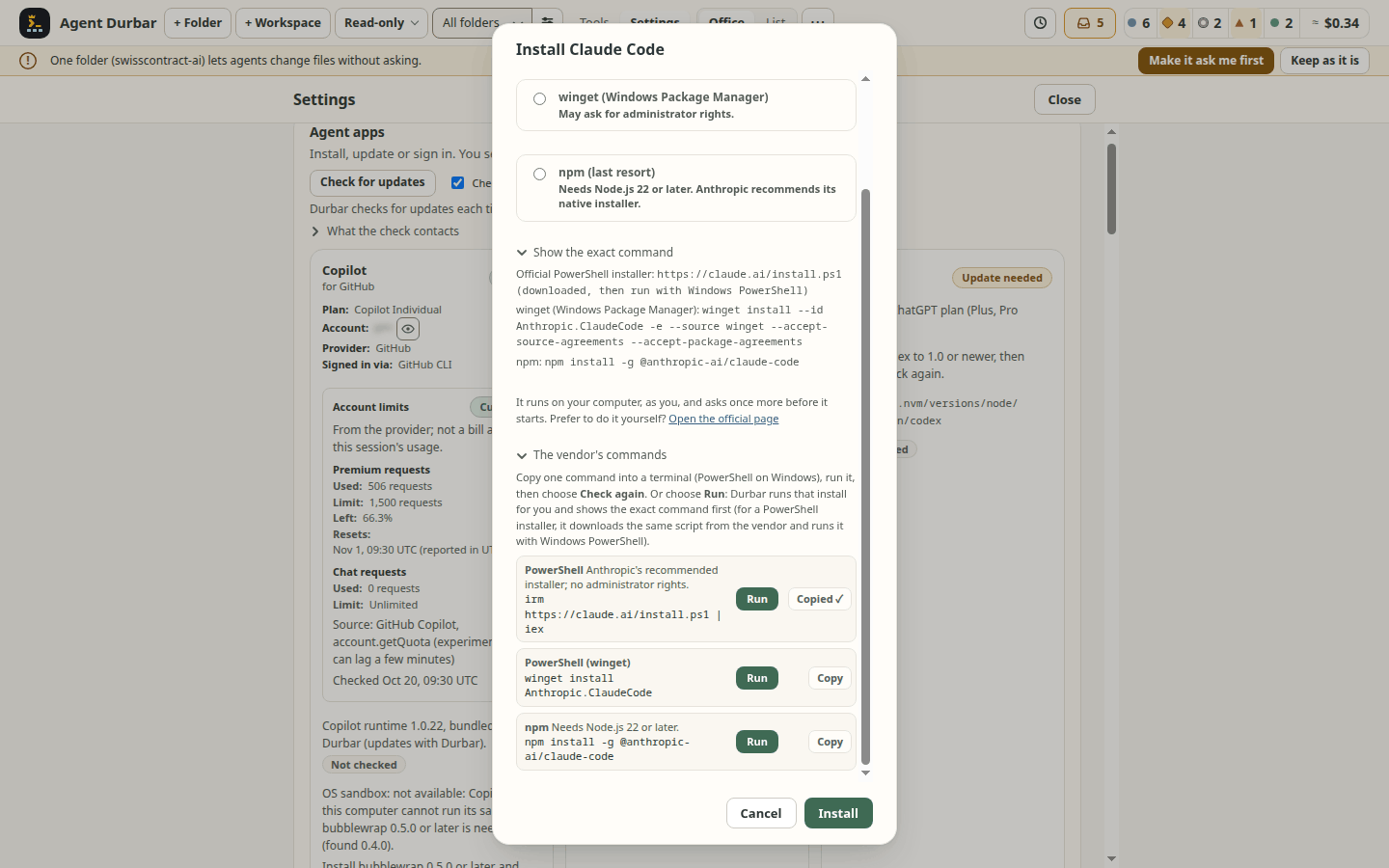
Download the build for your system from the Releases page. Check it against SHA256SUMS.txt. There is no auto-update: download a newer release to update.
| System | File |
|---|---|
| macOS, Apple Silicon | Agent-Durbar-<version>-arm64.dmg (or .zip) |
| macOS, Intel | Agent-Durbar-<version>-x64.dmg (or .zip) |
| Windows 10/11, x64 | Agent-Durbar-Setup-<version>.exe or Agent-Durbar-<version>-portable.exe |
| Linux, x64 | Agent-Durbar-<version>-x86_64.AppImage |
Verify a download. From the next release on, every file on the Releases page (and SHA256SUMS.txt) carries a build provenance attestation made by this repository's release workflow. With the GitHub CLI (gh): gh attestation verify <file> --repo three-feathers/agent-durbar. It succeeds only for a file built by that workflow in this repository. Then compare the file's SHA-256 with its line in SHA256SUMS.txt (sha256sum -c --ignore-missing SHA256SUMS.txt on Linux, shasum -a 256 -c --ignore-missing SHA256SUMS.txt on macOS, Get-FileHash on Windows). Releases before that have only the checksums. This proves where a file was built, not that the app is free of bugs; the builds are still unsigned (below).
The builds are not code-signed (certificates cost money), so your OS warns you the first time. Only open files from this repository's Releases page.
- macOS: right-click the app and choose Open, or allow it in System Settings > Privacy & Security. If macOS says it is damaged, run
xattr -dr com.apple.quarantine "/Applications/Agent Durbar.app". - Windows:
- Which file:
Agent-Durbar-Setup-<version>.exeinstalls to the Start menu;Agent-Durbar-<version>-portable.exeruns without installing. - Edge may block the download ("isn't commonly downloaded"): open Downloads (…), choose Keep, then Show more > Keep anyway.
- Check the file in PowerShell:
Get-FileHash .\Agent-Durbar-Setup-<version>.exe -Algorithm SHA256and compare the hash with the line for that file inSHA256SUMS.txt. - On "Windows protected your PC", click More info, then Run anyway.
- The Copilot CLI needs PowerShell 6 or later (GitHub's docs, not checked by us); Windows only ships 5.1. If the Copilot card says so, install it with
winget install --id Microsoft.PowerShell -e.
- Which file:
- Linux: run
chmod +x Agent-Durbar-*.AppImage && ./Agent-Durbar-*.AppImage. The AppImage's launcher entry no longer forces--no-sandbox; itsAppRunadds the switch by itself only on systems without unprivileged user namespaces (you can also add it by hand).- An AppImage needs FUSE 2. Ubuntu 22.04 and later do not install it: if the app does not start ("libfuse.so.2" / "dlopen()"), run
sudo apt install libfuse2t64(Ubuntu 24.04 and later) orsudo apt install libfuse2(22.04), or start it without FUSE:./Agent-Durbar-*.AppImage --appimage-extract-and-run. - Saved MCP secrets need a desktop keyring (GNOME Keyring or KWallet). Without one, Durbar refuses to store them rather than keep them with a fixed key (spec 019): add a keyring, or pass secrets through the server's own environment.
- An AppImage needs FUSE 2. Ubuntu 22.04 and later do not install it: if the app does not start ("libfuse.so.2" / "dlopen()"), run
On a Mac (spec 052 FR-083..FR-086; tried on real Macs, macOS 26 on Apple Silicon, and fixed after those runs: moving the window from an open chat, the traffic-light room, question cards and the chat strip):
- Shortcuts use ⌘ and are shown that way: ⌘K command palette, ⌘F Go to, ⇧⌘A (or ⌘A outside text) the Needs you inbox, ⌘⌫ back to the office (outside text), ⇧⌘N the next agent, ⇧⌘S Schedules. In a chat that waits for you, ⌥⌘A / ⌥⌘S / ⌥⌘D answer and ⌥⌘N goes to the next agent (Option alone types accents on a Mac). macOS itself uses ⌥⌘D to show or hide the Dock, so Deny may not reach Durbar with the keys; click it instead.
- Agent Durbar > Settings… (⌘,) opens Settings; the menu also has Edit, View (zoom, full screen), Window and Help.
- Closing the window hides it and your agents keep running; click the Dock icon to bring it back. Quit with ⌘Q.
- The title bar is hidden: you move the window by dragging the top bar (in a chat, the agent strip, a notice strip or a screen's header at the top). While a dialog or the command palette is open the window does not drag. These areas were fixed after a real-Mac report and are checked in the simulator (
npm run check:mac-titlebar); double-click to zoom and full screen have not been checked on a real Mac yet. - On Windows and Linux the window has no menu bar (no Reload or developer tools); copy and paste in text fields work as usual.
Trying it on Windows? Durbar is built, started and end-to-end checked on Windows in CI (9 of 9 on 2026-10-20), and the owner tried it on a real Windows PC with a colleague once (2026-10-21; #467: Settings > Agent apps offered no install option, fixed in #469). It has not been used there day to day. If something does not work (the download, the installer, Settings > Agent apps, a harness that is not found), please open an issue with your Windows version and what you saw.
Safety model
Agents run locally, on your machine, as you, in the folders you add. Every agent has a permission mode. The names are the same for every harness, and Durbar maps them to each tool's own controls.
- Read-only (the default): reads inside the session's folders only; everything else is denied. On Copilot, an MCP tool that its server marks read-only still runs without asking (the runtime does not ask Durbar); any other MCP tool is denied (both checked on 2026-10-20). The runtime trusts the server's own mark: a server that marks a writing tool read-only gets it run in Read-only, and Durbar never sees a permission request for it (the call still shows in the chat). Add only MCP servers you trust. Claude Code and Codex were not checked for this. Read-only governs agents: a write you ask Durbar itself to make, such as the optional
.durbar/notes/notes.mdof a folder's notes (below), still happens. When Read-only stops an edit or a command, the chat says so and offers Switch to Ask first…: it opens the mode menu (Read-only, Ask first, Allow all; Allow all still asks you to confirm). Afterwards, ask the agent again; nothing is resent for you (screenshot). On Codex, Read-only and Ask first rely on Codex's own sandbox: checked on Linux (reads limited to the session's folders, writes blocked; 2026-10-21). On macOS and Windows that sandbox depends on the system; if it cannot start, the session does not start and Durbar says why. - Ask first: writes, shell commands, URLs and tools wait for Allow once, Allow “…” for this session or Deny.
- How far for this session reaches (spec 003 FR-013, FR-108): for a write it covers every file in that folder, not only the one asked about; Allow for this session: any arguments covers every simple command of that name (
gitalso meansgit push). The approval card says so in a line above its buttons. A shell command's normal session button allows that exact command only. - Lookalike letters are marked (spec 003 FR-113..FR-119, issue #1300): when a host, a program name or an MCP server or tool name on an approval card mixes scripts (a Cyrillic е in a Latin word), uses a styled or fullwidth form, mixes two digit systems, or (in names only) uses a letter from a short list of Latin, Cyrillic and Greek lookalikes, the letter stays and a marker follows it (⟦U+0435 Cyrillic⟧), and one plain line under the summary says which letters and, for an address, the host as the network reads it (
xn--…). Allow for this session names exactly what it grants (the whole command, the host asxn--…, the server and tool), and a grant chip and the Why was this allowed? sentence say Has lookalike letters. It warns, it never blocks: all buttons stay. Hosts are found inscheme://hostaddresses and, in a shell command, in the arguments of known network programs (ssh user@host,scp f host.tld:/x,curl host.tld/x,git clone git@host:repo, also behindsudo,xargs,kubectl exec ... --and inside$(...); not inside quotes, notpkg@1.2.3, not behind an unknown wrapper, and not a barecurl host.invalid). A host with a hidden part is never named; the card says there is a lookalike in the hidden part. Paths and other arguments get only the script, styled-form and digit rules, and there a fullwidth or halfwidth form, a superscript and Arabic-Indic digits next to ASCII ones are ordinary text, so a real Cyrillic, Greek, Turkish, Arabic or Japanese file or folder name does not warn. At most 20 letters are marked in one text, then and N more. Limits: the lists are small and closed, not the full Unicode confusables table, so a lookalike outside them written in one script (for example an Armenian or Cherokee letter alone) is not found, and Latin mixed with Armenian (one other script, as real text allows) is not flagged; a local path of a network program shaped like a host (name.tld:pathfor scp) is read as one; combining marks stacked on a letter are not flagged (a host with one is still named as the network reads it); the Activity log shows the summary without markers; the script data comes from the Electron build. When the check cannot run, the card says Durbar could not check this request for lookalike letters. Simulator-checked, not on a real session.
- How far for this session reaches (spec 003 FR-013, FR-108): for a write it covers every file in that folder, not only the one asked about; Allow for this session: any arguments covers every simple command of that name (
- Allow all: no prompts. Use it only in folders you trust; it asks once to confirm.
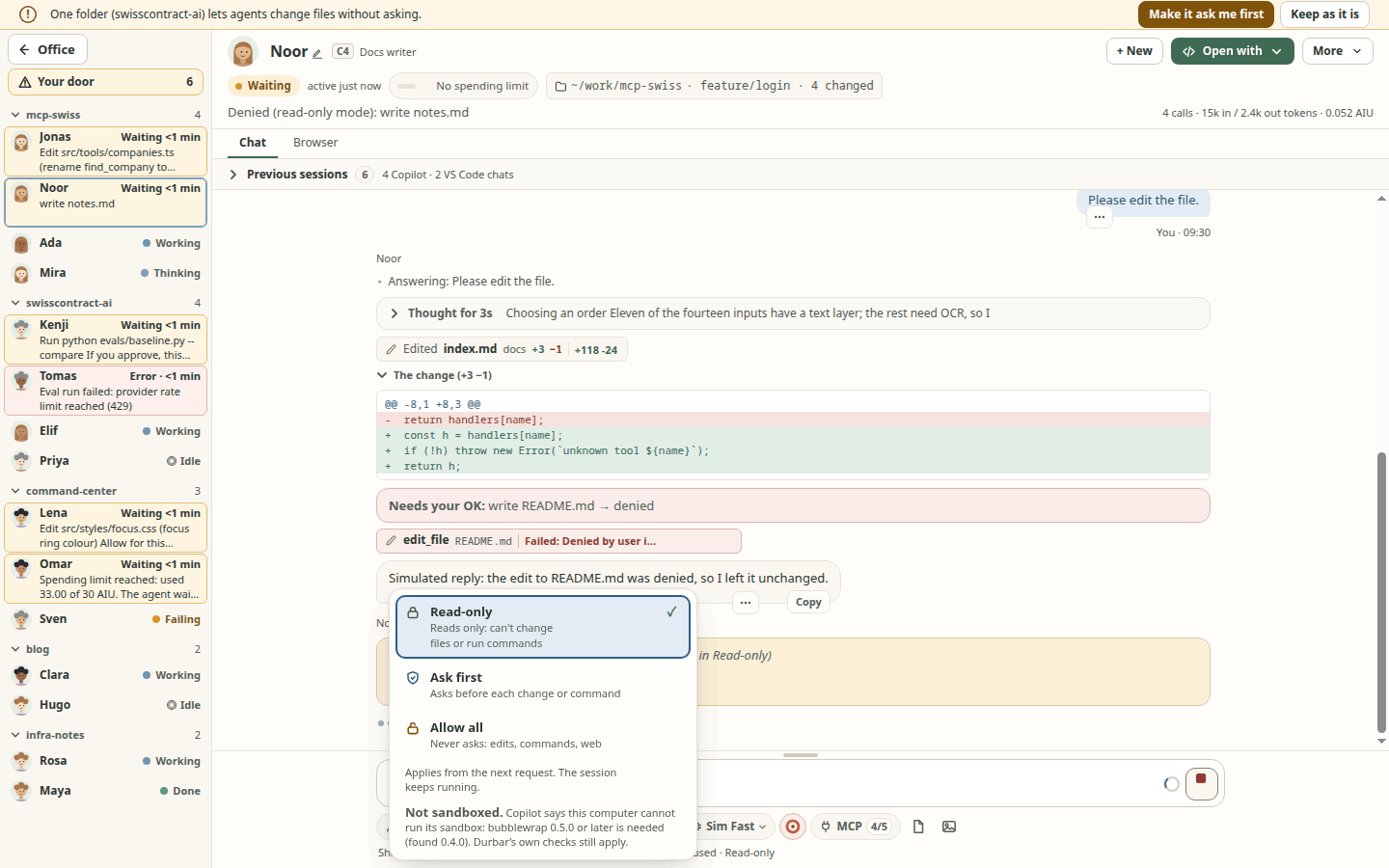
Change the mode any time from the mode chip under the message box or the agent's card menu.
Why was this allowed? A tool card that ran without asking you carries a small tag saying why, only when Durbar itself decided it: Allowed: session rule (you chose Allow “…” for this session), Allowed: Allow all, Allowed: folder read (a path Durbar checked to be inside the session's folders) or Allowed: attached file. Open the card for the full sentence; for a session rule it also has Undo this rule, the same removal as the x on the grant chip: the next matching request asks again. A call you answered yourself has no tag. When the agent app's automatic approval review allowed a call (Codex auto-review, Copilot assisted approval), the card shows Allowed: agent app classifier, and opening it says so; the app's own explanation is never copied, and this has not been seen on a real session. If the agent app allowed something any other way (a config rule, a hook, a Claude Code classifier), the card shows no tag rather than a guessed reason. Not run against a real Copilot, Claude Code or Codex session (screenshot).
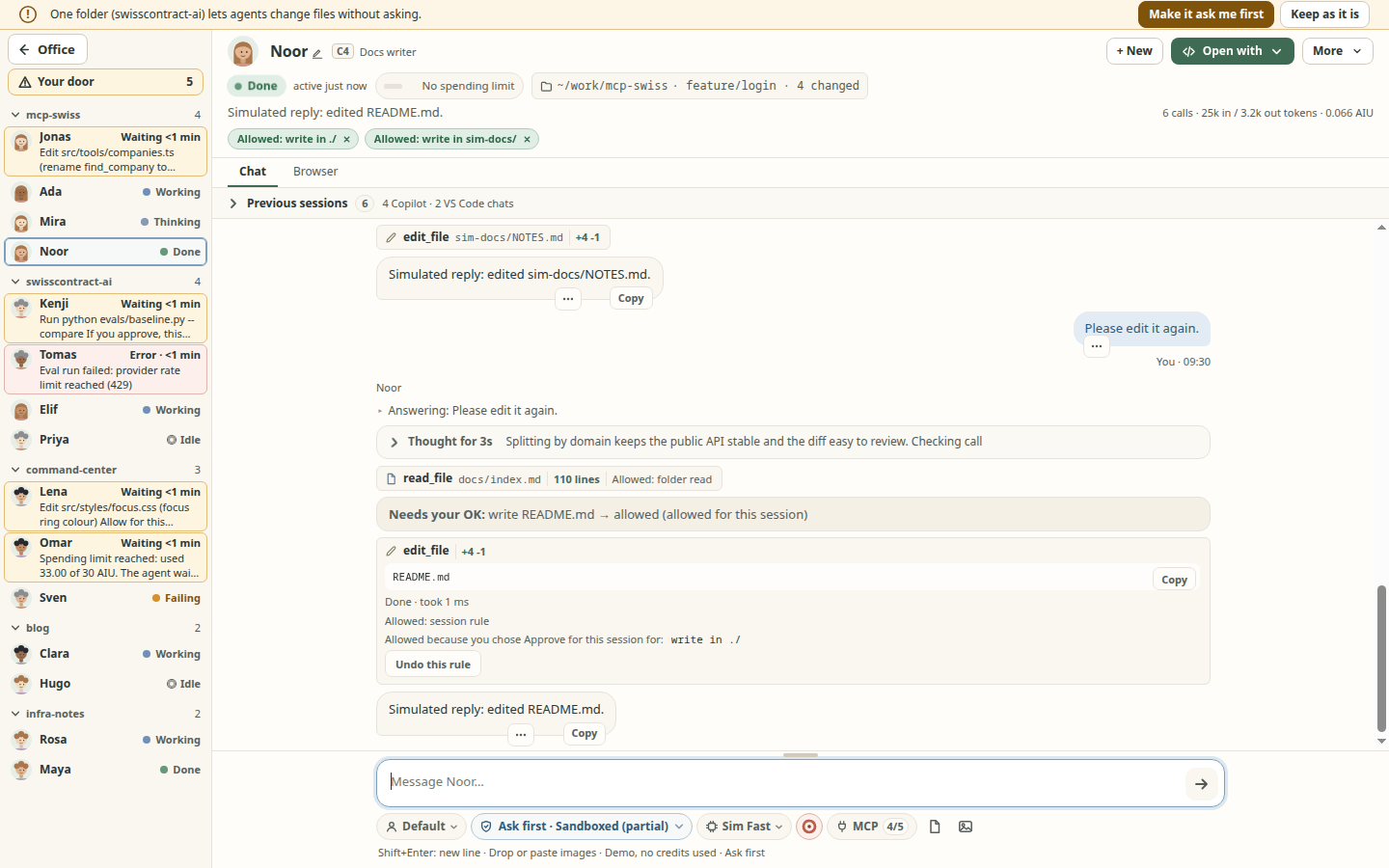
The agent app's own OS sandbox underneath (spec 087). In Read-only and Ask first Durbar also turns on each agent app's own OS sandbox, as a second lock under its own checks: Durbar asks the app's sandbox to stop a shell command that gets past them (for example through a folder allow rule you accepted) from writing outside the folder or reaching the network. That is requested, not yet verified on a real session.
- Claude Code: its bash sandbox (macOS sandbox; on Linux bubblewrap and socat; Claude Code 2.1.309 or later; an older one runs without the floor and the chip says to update). Read-only: no writes; Ask first: writes only in the session's folders; in your home folder only the session's folders can be read, and credential folders (
~/.ssh,~/.aws,~/.config/ghand others) are denied even when a session folder is your home folder (a link there is denied at its target too; per Claude Code's docs the narrower read rule wins and a write deny holds inside an allowed folder; not yet run on a real session); network off; never an unsandboxed retry, and every command still asks you in Ask first. MCP servers, hooks (also a folder's own accepted hooks), the status line and Claude's own file tools are not in it: Durbar's checks cover what they can. Windows has no Claude Code sandbox (WSL2 only). - Copilot: its local sandbox (macOS sandbox; Linux bubblewrap 0.5.0+ and slirp4netns; Windows 11 25H2 or 26H1 with ProcessContainer). Shell commands and local MCP servers run in it, with your
PATHfolders readable (resolved through links; never your home folder or a parent of it); network off; no credentials passed in. A session folder that is your home folder (or a parent of it) is opened to the sandbox only where Copilot can deny the credential folders inside it; otherwise commands there are refused by the sandbox. A session whose own folder is a credential folder (or, for Copilot without that support, holds one, such as~/.config) is not started in Read-only or Ask first: the chat says why and offers Change mode…. Any other folder of a workspace that is (or, for Copilot without that support, holds) a credential folder is left out of the sandbox, and the mode menu names it. Copilot's own file tools are checked by Durbar, not the OS. In Ask first a Copilot command card says If you approve, this can also write in Copilot’s temp folder (a private one Durbar gives it), not only this folder., and the chip tooltip says it too. - Codex: unchanged: its read-limited profile already is the sandbox, and an approval card in Ask first says If you approve, Codex may run this outside its sandbox.
The mode chip says it after the mode: Read-only · Sandboxed, Sandbox: checking (until the app confirms it at its start), Not sandboxed (the tooltip says why), Allow all · Sandboxed (managed) or (until a new session), and, for Copilot in Ask first, Sandboxed (partial) (an approved command may write outside the folder). Allow all keeps the app's default. Switching a Copilot session from Read-only or Ask first to Allow all also turns its sandbox off in that session (#806): the Allow all confirmation says Copilot’s OS sandbox is also turned off for this session., and switching back re-sends it. This was checked on one real session on Linux (Copilot CLI 1.0.98: cleared in place, then back on), not on macOS or Windows. If Copilot refuses or does not answer within 15 seconds, a short message says so and Durbar treats the sandbox as still on (if a late answer turns it off, the chip follows; if you switch back first, nothing is sent until that answer comes and the sandbox has been sent again): its shell commands still cannot write outside the folder or reach the network, and Allow all · Sandboxed (until a new session) on the chip becomes a button. That button, or Restart without the sandbox in the mode menu, asks first in its own dialog (grants are cleared, remote control turns off, waiting requests are denied, MCP servers start again with your next message, no AI credits) and then continues the same conversation in a new Allow all session; nothing is re-sent. A Durbar restart, a sign-in refresh, or End session followed by your next message also resumes an Allow all session without it (the session you ended takes its kept sandbox with it). Claude Code and Codex need none of this: their next message already uses the new mode's settings. When the sandbox cannot start, nothing is sent: the chat says why and offers Continue without the OS sandbox (this session; Durbar's own checks still apply) or Change mode…; only on native Windows, where Claude Code can never be sandboxed, also Always continue on this computer (undo it in Settings > Agent apps, which also shows each app's sandbox line) (screenshot). Not verified on a real session yet: built and tested on the simulator and with fakes only; every tooltip says Requested; not verified on a real session. until a real check per app and system is recorded.
Your company's own agent-app policy (spec 076 section O). When your organization has set the agent app's own machine policy (Claude Code managed-settings.json, Copilot managed-settings.json, Codex requirements.toml), Durbar reads it, read-only, and greys out what it blocks before anything starts: a permission mode (for example Allow all), a model, an MCP server or an MCP tool, with Blocked by your organization's <app> policy as the reason. Each key is read the way the vendor documents it, and Durbar refuses only what the agent app itself would refuse. What Durbar cannot read the vendor's way is shown as advice (may be blocked by your organization) and stays selectable. Copilot's policy comes from the Copilot runtime itself, which includes MDM, the registry and the enterprise's server-managed settings. For Claude Code and Codex, Durbar does not read MDM profiles, the Windows registry or server-managed settings; there the app still refuses the way it did before. Settings > Organization lists each app's policy read-only: No policy file found, Policy applies (with what it blocks), or Policy found, but Agent Durbar could not read all of it, so what it blocks is unknown; a policy that could not be read at all is never shown as "no policy", and a company profile, registry value or server-managed setting that Durbar does not read can still apply (the page). Checked on fixture files only, not on a real managed machine (mode menu, MCP server).
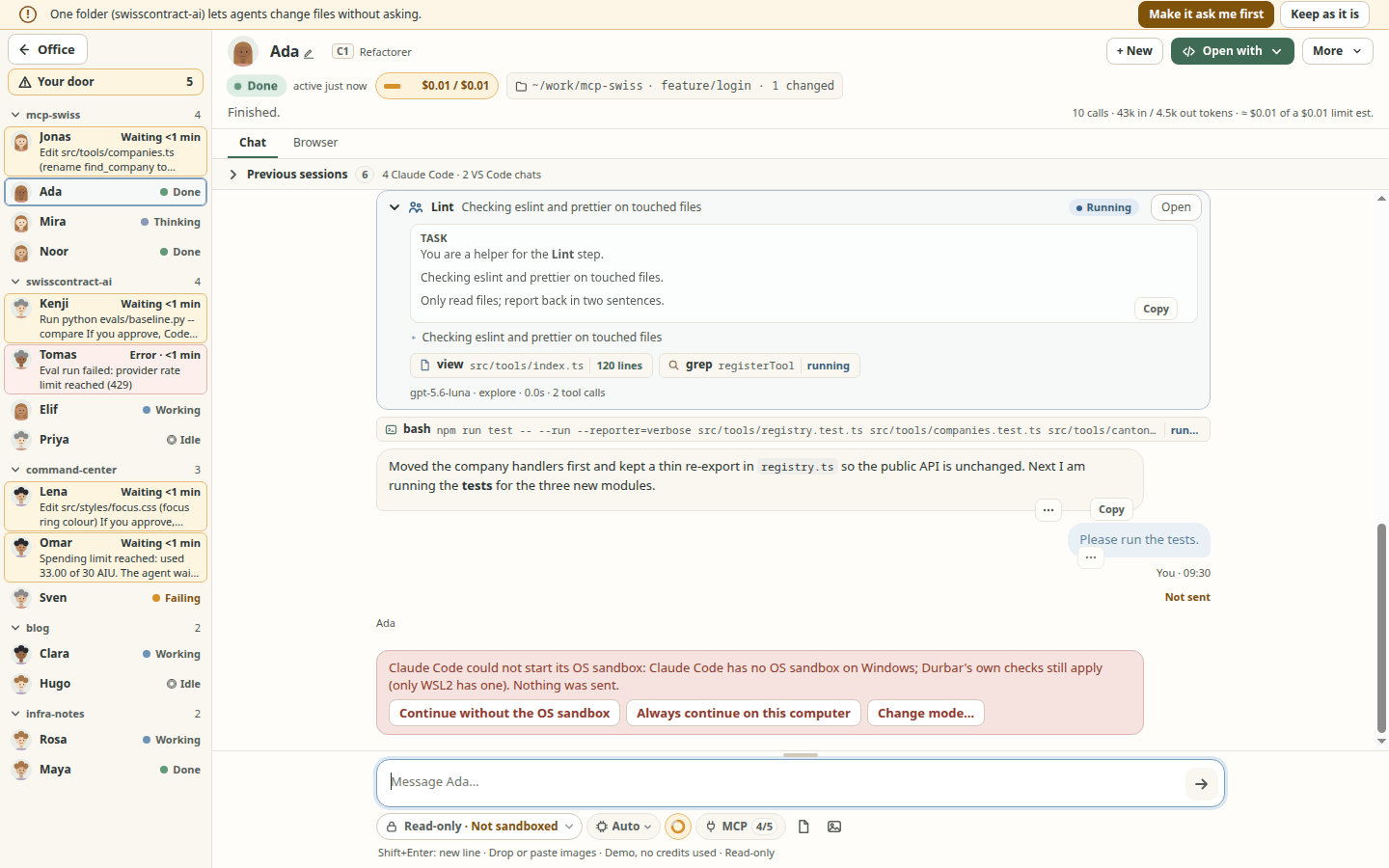
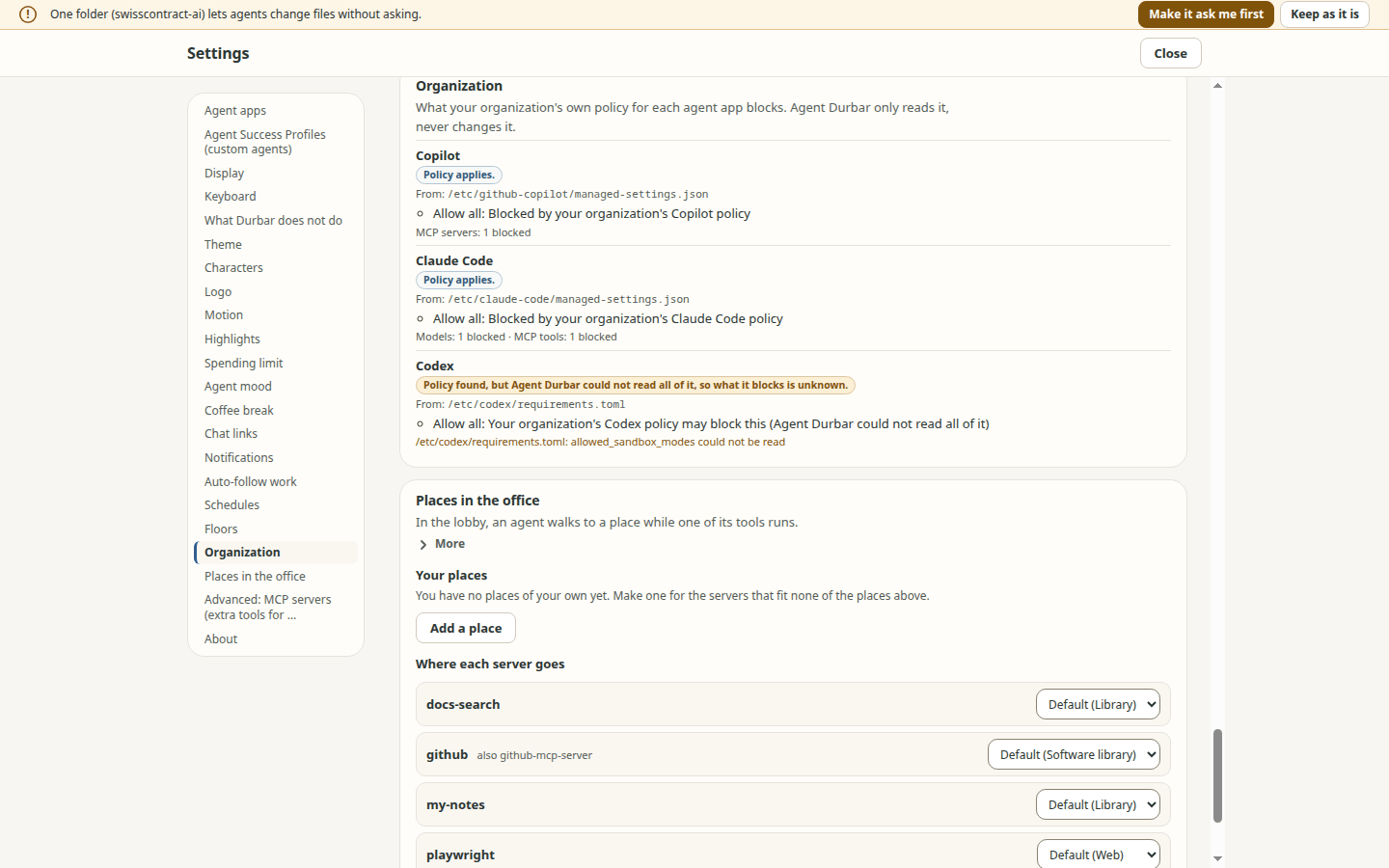
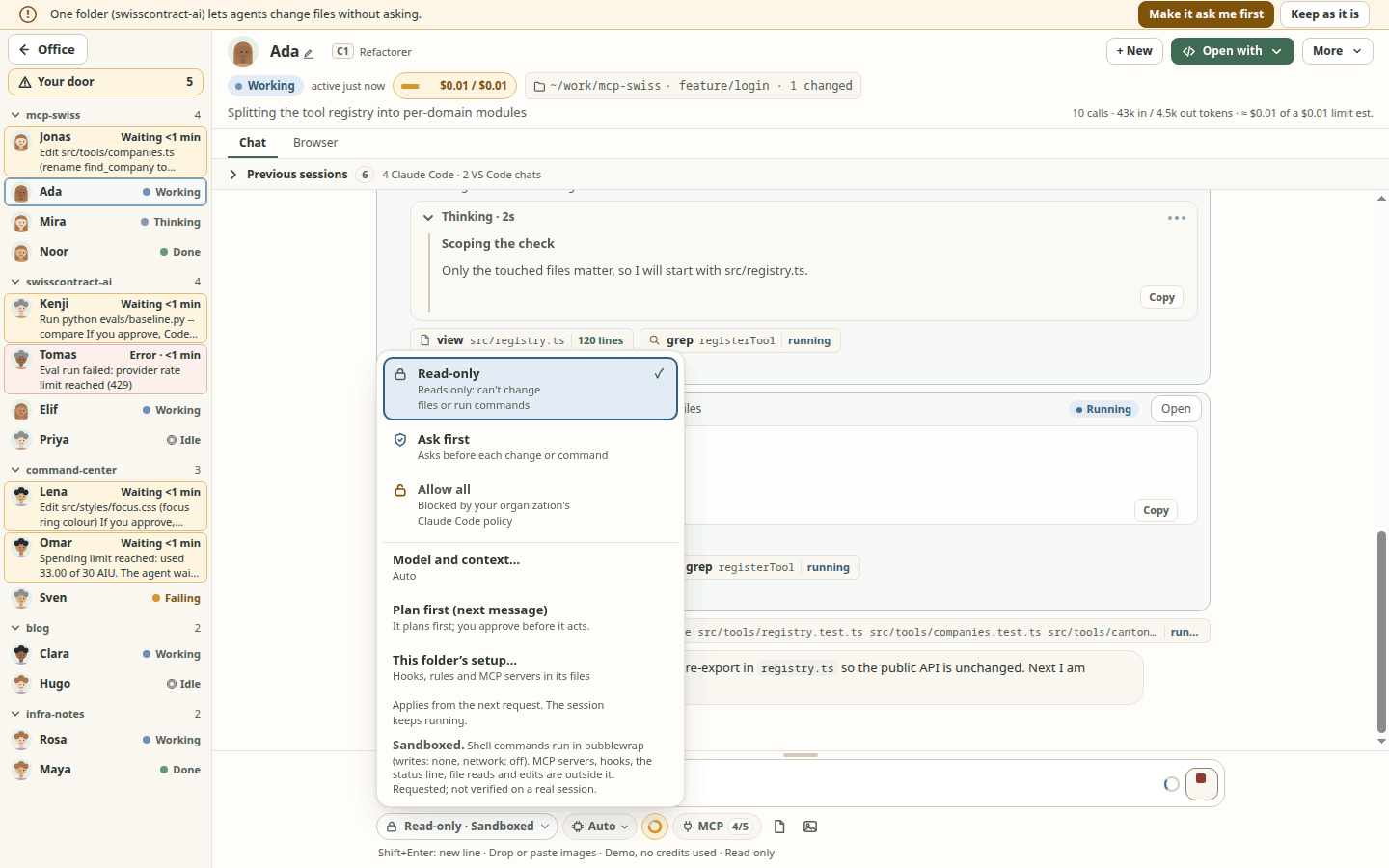
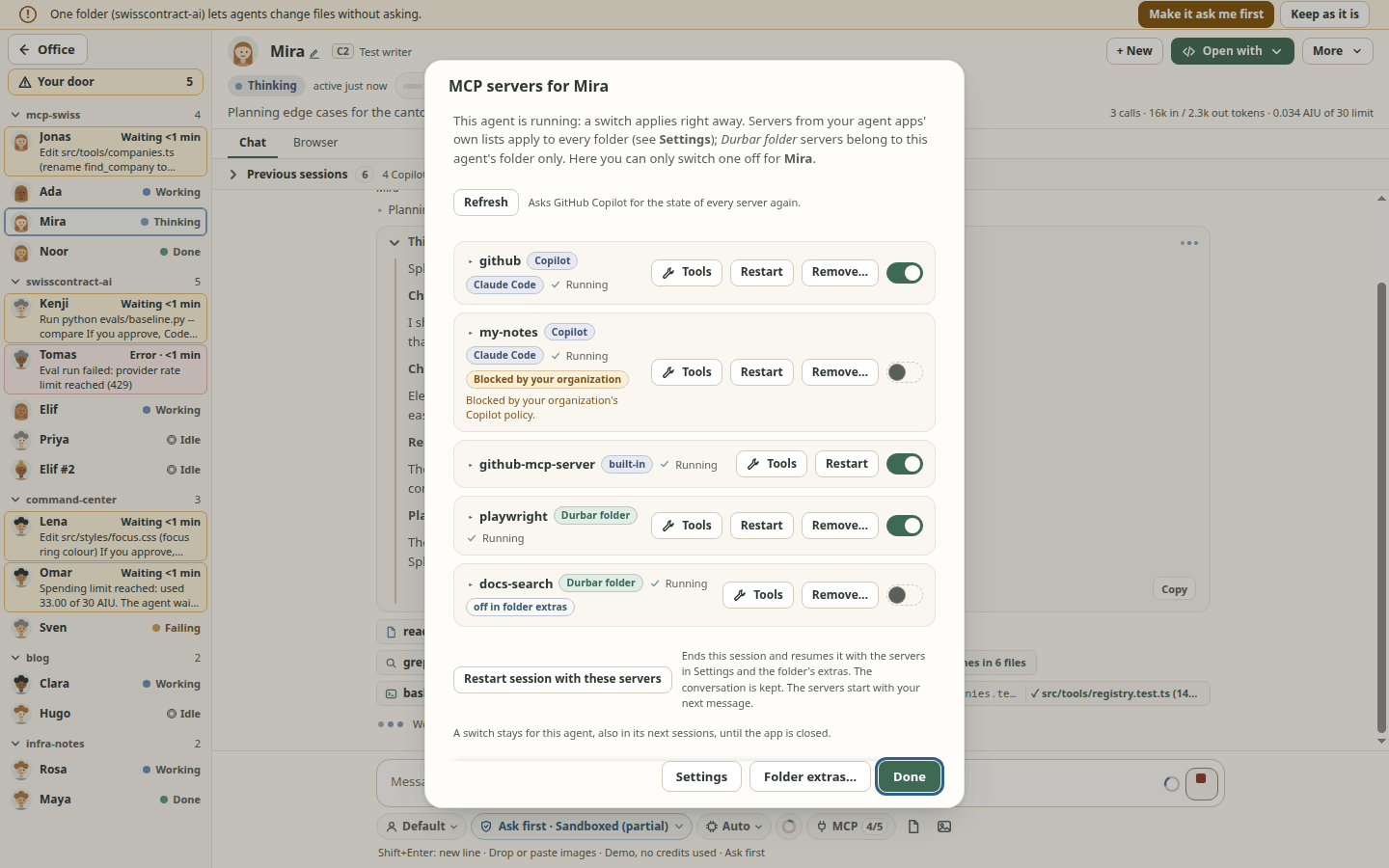
Coming back to a session. Each session keeps the mode you last chose for it. After a restart, and when you resume it from Previous sessions, it comes back in that mode, also when it was Allow all and the session you opened the list from is in Read-only. Its chat then says which mode it is in and why ("Permissions: Allow all, the mode you last chose for this session"), and an Allow all that came back shows restored on the mode chip. A session Durbar has no mode for (one from before this change, or started outside Durbar) gets the folder's mode after a restart, or the mode of the session you resumed it from; the chat says that too. A resumed session that comes back in another mode than the session you opened it from is also written to the activity log. Grants from Allow for this session are never kept.
Rules that always apply:
The session browser (spec 080) asks once per app profile before it opens (Not now / Open the browser). The page never gets Durbar's preload, Node or IPC: the browser view has no preload, a sandbox, no permissions (camera, location, notifications, fullscreen, devices) and no client certificates, and downloads are cancelled. The window gets only the page's address (without a user name or password), its title, loading, history and sound state, and a network error name; while a Durbar menu, dialog or toast covers the page, it also gets a still picture of the page, kept in memory only and never written to disk. A page's own dialogs (
alert,confirm) are the system's boxes. A dialog in a session whose chat is not showing raises a toast naming the session (page text, masked) and brings that chat forward, once per session until you open it yourself, and marks it Dialog open. A page that asks before it is left opens Durbar's Leave this page? box, with Stay focused. A link in a chat is classified in Durbar's main process, not by the window: a web link opens in the session's own browser, a mail link only offers Open and waits for your click, and every other kind of link is refused with no button. Page tabs (spec 080 FR-120..FR-133) are decided in main as well: main makes every tab and its id, and refuses a tab id that is not that session's; a page can never open a window, and its new tab requests become tabs only forhttp/httpsaddresses of the page's own site, only while that session's browser is shown, at most 5 per page load and 10 per session; any other scheme opens nothing and reaches no other app. The tab keys pressed inside a page are kept from the page.Durbar deletes no files of yours, with one exception you ask for (the project notes file and the
.gitignoreDurbar itself made next to it, below). Its own data it deletes only when you ask: Delete all… of a folder's notes and Also delete its notes when you remove a folder each ask once more in a system dialog the page cannot answer (one note's Delete… does not, so a script in Durbar's window could delete notes one at a time); the second deletes only that folder's file in<userData>/notes/, never anything in the project, and a copy moved aside by Start over stays. Deleted notes are gone from Durbar, not from your computer: a.durbar/notes/notes.mdleft in the project and your earlier exports still hold them. After Delete all… or one note's Delete…, Durbar remembers the last 300 deleted notes, so an older copy ofnotes.mddoes not bring them back; a note deleted before that may come back from one. Also delete its notes keeps no such memory: if anotes.mdis left in the project, turning the project file on again for that folder can bring those notes back (the dialog counts them as new). Delete… in Previous sessions goes only through the agent app's own API (CopilotdeleteSession, Codexthread/delete), only from Durbar's own window (not from MCP tools, remote control or schedules), never for a session still in the office, never for VS Code chats, and not for Claude Code. Not yet run against a real session.Notes are private, masked and local (spec 083). A note is saved on this computer only, in
<userData>/notes/<fingerprint>.json(the folder 0700, the file 0600, no folder path inside), after Durbar has masked it: token shapes, the secret values Durbar already holds for the folder's MCP extras and the session, and anything split by Markdown marks or control characters. The raw text is never stored or logged. A secret you saved on purpose is therefore lost (only[redacted]is kept), and a secret that is neither a known value nor a known shape is stored as written, so do not keep passwords in notes. A notes file Durbar cannot read is never overwritten. There is no notes tool for agents. Nothing is written into your project unless you turn on a folder's Also keep these notes as.durbar/notes/notes.mdin the project (off by default): that file may get committed and pushed with your code (secrets are masked, private ideas are not), anyone or any agent that can write the folder can add notes through it (marked From the project file), and Durbar never runs git and writes nothing outside.durbar/notes: there its own.gitignore(*) keeps the notes out of commits, and is checked before every write (a changed, linked or oversized one stops the write; a missing one is made again). Only a ticked box Keep these notes in git, confirmed in a system dialog the page cannot answer, leaves it out (thengit add -Astages the notes, and a push shares them); a.gitignoreshipped by a repository is never deleted, only exactly*counts as ignoring (git reads a leading space or tab as part of the pattern), and anotes.mdthe repository already tracks stays tracked: the notes written into it are committed. An older version'sinfo/excludeline stays and makes Keep in git do nothing there. A.durbar/notes.mdfrom an earlier version is left alone and no longer followed. Delete the file removes only anotes.mdholding exactly what Durbar would write, Durbar's own.gitignore(only one Durbar made, only when nothing else is left there) and the then-empty.durbar/notesand.durbar, and it unlinks only the file Durbar wrote (the inode it recorded when writing; anotes.mdwith the same text in another inode, after agit checkoutor a restore, is left as changed). Under an attack by a local process that can write the project folder and swaps.durbarfor a link within microseconds, such a process (for example a sandboxed agent) gets Durbar to move, delete or overwrite in a folder it cannot write itself: on your Delete click a file namednotes.mdin a folder namednoteselsewhere may be moved into the project under a random name (the message names it; it is not deleted), or deleted when it holds exactly Durbar's text and Durbar has no inode record (a record written by a version before 2026-11-10, or a drive without inode numbers); on any write such a file may be overwritten with the masked notes (spec 083, issue #1463; closing it is issue #1464). A last window remains in Delete: a process that can write the project, swaps.durbartwice around Durbar's rename, knows the random name (it must be able to read the other folder) and renames Durbar's ownnotes.mdto that name first (a hard link instead is refused) can still get a file in the other folder deleted; a process of your own user gains nothing from it, it matters only between user accounts. Closing it needs calls Node does not have (unlinkat); it is open in #1464. A delete that cannot finish never renames anything back over anotes.md: it puts the file back with a hard link, or on a drive without hard links (FAT, exFAT, some network drives) with a copy into a newnotes.mdthat never replaces an existing one; when it cannot confirm that worked, the file stays in.durbar/notesunder the random name the message gives. A folder deleted and cloned again at the same path is recognised by its creation time and not written into where the file system records one; where it does not (and on a drive that was remounted) Durbar may not tell, or may ask you to turn the switch off and on. The same folder whose content changes (another branch shipping its ownnotes.md) gets the notes written into that file. Writing that file is Durbar's own write, your own action: the permission mode governs agents and does not stop it, also in Read-only. Export… writes the folder's notes, masked again with the secret values known at that moment and without session ids, to a file you pick in the system save dialog (Durbar shows it; the window never chooses a path), readable only by you (mode 0600 on macOS and on Linux file systems that have modes; on Windows the file takes the chosen folder's permissions, and FAT or exFAT drives have no modes); it refuses a link, a hard link, a folder or a device at the chosen name and replaces an existing file only after the dialog asked you; it waits while a secret value is still locked. Turning it on and Delete the file each ask once more in a system dialog the page cannot answer; while a secret value is still locked in the system key store, the file is not updated, and a file that disappeared (for example another clone at the same path) is not written again until you turn the switch off and on.Creating a folder (spec 093) writes only the one folder you named, in the place you picked in the system picker: the window never sends a path (Durbar's main process keeps the place behind a one-use token) and the name is checked there. New repository runs
git initthrough Durbar's one git module (a separate runner from the read-only folder-status runner), with an argument list (no shell), your environment'sGIT_*variables dropped, a private empty hooks folder (so none of your own git hooks run during it), fsmonitor off and every transport off. None of these settings is written into the new repository, so your hooks apply again to later commits, as after a terminalgit init. If anything fails, Durbar removes the folder it made, without following links inside it; if it cannot, the message names the folder to remove by hand.Cloning (spec 093 phase 2) runs
git clone --progress --no-recurse-submodules -- <address> .inside the new folder, through the same git module, with an argument list (no shell). Onlyhttpsandsshcan be used, by two layers that each stop the other transports git ships even when your own git config allows them or rewrites the address withurl.<x>.insteadOf:GIT_ALLOW_PROTOCOL=https:ssh(which also stops a remote helper of any other name) andprotocol.<name>.allow=neverfor every other transport. Submodules are not cloned. A remote cannot bring git hooks; the private empty hooks folder also keeps your own global or template hooks from running during the clone (they apply again afterwards). fsmonitor is off, git's checks against.gitlook-alike names stay on (core.protectNTFS,core.protectHFS),transfer.bundleURI=false, andtransfer.credentialsInUrl=diebacks up the refusal of a password in the address. Credentials: git uses your own credential helper (Git Credential Manager, the macOS keychain, libsecret, a cache) and your ssh agent, as in a terminal; Durbar never sees what they return, and nothing can prompt (GIT_TERMINAL_PROMPT=0, no terminal, ssh with-o BatchMode=yes; if yourcore.sshCommandis plainsshorssh.exe,-o BatchMode=yesis added to it, and any other program, such as plink, is used as it is). If a helper of yours opens its own window, the progress dialog says after 30 s that it is waiting, and Cancel always works; a clone has no time limit. Your environment'sGIT_*variables do not reach git (GIT_SSL_NO_VERIFY,GIT_PROXY_COMMAND,GIT_SSH,GIT_SSH_COMMAND,GIT_CONFIG_*, ...), exceptGIT_SSL_CAINFOandGIT_SSL_CAPATHwhen they are absolute paths; the usual proxy variables andSSH_AUTH_SOCKdo pass. If a clone works in your terminal but not in Durbar, put the setting in your git config instead (http.sslCAInfo,http.proxy,core.sshCommand). Several ssh keys or accounts: useHostblocks in~/.ssh/config(or an unconditionalcore.sshCommand); acore.sshCommandunderincludeIf "hasconfig:remote.*.url:…"is honoured, but one underincludeIf "gitdir:…"is not (the new folder is not a repository yet when Durbar reads it), so Durbar's ownssh -o BatchMode=yeswould be used instead. An address whose user name is a token (https://ghp_…@github.com/…) is refused, like a password: git would store it in the new repository's config. Your own filter drivers (Git LFS) stay on, so LFS files download as in a terminal; note that git-lfs reads the repository's own.lfsconfigand downloads with its own client, outside the https/ssh limits above. Keep git and git-lfs up to date: Durbar checks no version of either, and a clone of an untrusted repository relies on their own fixes. The clone writes files the remote chose: keep git up to date; Durbar checks no minimum git version (distributions fix git without changing the version it prints). Git's output is masked (credentials, tokens, home paths) before the window or the log sees it. Cancel ends only the git that Durbar started and what it started, then removes the folder after git has exited, without following links; quitting Durbar during a clone does the same (it waits at most 5 s).Add project folders, not your home folder or a drive root. Everything under an added folder counts as the agent's own; Durbar warns calmly when you add one of those.
Answering a question an agent asks is allowed in every mode; it is not an action.
A profile (custom agent) from a folder's repository asks once before it is used and never changes your mode. After you edit it, it asks again (the confirmation is for the file's exact content). Profile files are read and written only by the app's main process, only inside the agent folders (
.github/agents,.claude/agents,~/.copilot/agents,~/.claude/agents), never through a link that leads out of them, at most 256 KB (64 KB for Claude Code, its own limit), with an atomic write; a new profile cannot take a Windows device name (CON,NUL,COM1...).A folder's own agent setup (spec 061). The folder's hooks, permission rules and MCP servers (
.claude/settings*.json,.mcp.json,.codex/config.toml,.github/hooks/,.github/copilot/settings.json) are listed in full the first time the folder is added, and again when a file changes, before anything of it runs:- each item shows its exact command or rule; only text shaped like a token (GitHub, OpenAI/Anthropic, bearer, JWT, AWS keys, Slack tokens and webhooks, Discord webhooks, Telegram bot tokens) is hidden, MCP env values are shown as
NAME=valuebefore the command, except where the name looks secret (DB_PASSWORD=[hidden]; header values by name only), and arguments with spaces or shell characters are quoted. An item with something hidden, an MCP server that hands env values to a shell or an inline-code interpreter (also behindenv -S,timeout,nice,sudoand similar), or one whose env sets a code-loading variable (NODE_OPTIONS,BASH_ENV,LD_PRELOAD,PYTHONPATH,BASH_FUNC_*,MAKEFLAGS, ...) starts unticked and says why; - a broad allow rule is marked: a whole tool, a wildcard-only pattern, a file tool on the root, home or a drive, and every shell rule (
Bash,Bash(git:*),Bash(npm test:*), any argument); - everything is on unless you untick it, but hooks and broad allow rules start off and need your tick on I have read these hooks (and broad allow rules)…;
- Explain with AI asks an installed agent app what a hook does and how risky it looks. It is advisory and can be wrong: the command shown is what runs.
Accepted hooks and allow rules act without asking, even in Read-only, and the mode chip then reads Read-only + folder rules. Codex cannot run a folder's hooks from Durbar, and the dialog says so. Reopen the list from the mode menu: This folder's setup…. Without your answer, nothing of it applies. Copilot's runtime would otherwise run a repository's hooks by itself (checked 2026-10-20), so Durbar switches that off.
- each item shows its exact command or rule; only text shaped like a token (GitHub, OpenAI/Anthropic, bearer, JWT, AWS keys, Slack tokens and webhooks, Discord webhooks, Telegram bot tokens) is hidden, MCP env values are shown as
Durbar never logs tokens, session content or your prompts, and stores only what a feature needs, on this computer: a scheduled prompt as you wrote it (
durbar-schedules.json, readable only by you), your notes (masked, above) and the session names you choose (in Durbar's folder file, and sent to the agent app that has the session). The agent apps keep their own session history; Durbar does not copy it.Masking is best effort. Debug logs and the agent text shown on the office floor (desk lines, tooltips, the inbox, session titles, and the screen-reader announcements Durbar says through its one announcement region) are masked by known token shapes, secret names (
password=...) and the secret values Durbar already holds. The shapes were compared with public lists (what is covered and what is not), but no list is complete: a secret with no recognisable shape, or an encoded or split one, is not masked, and the chat's message bubbles show the agent's text as it wrote it. Toasts and the notice strips (restore, away, crash, MCP) show an agent's, folder's or MCP server's name as written, and screen readers read them out. Do not paste passwords into chats or notes.MCP sign-ins are refreshed by the agent app (spec 058 FR-204..FR-217; on by default, off in Settings > MCP servers > Refresh MCP sign-ins automatically). Before a chat's first message after an hour without a reply, Agent Durbar asks Copilot or Claude Code, on its own, to reconnect that chat's remote MCP servers. This happens in every permission mode. Where the agent app runs its MCP servers in its own OS sandbox (Copilot in Read-only and Ask first), a reconnect did not renew the sign-in, so there Agent Durbar only tells you when a server needs you to sign in again. (Owner decision, 2026-11-03: a reconnect changes no file and calls no tool, so it is allowed in Read-only; the sandbox limit was found on Linux the same day.) Each reconnect is one new connection to that remote server inside the chat's running agent app, which renews the sign-in with its own stored refresh token. Agent Durbar never reads, stores, logs or passes a token, a refresh token, a credential file or a keychain item: it only asks the app to reconnect and reads the state the app reports. It never starts or restarts a local (stdio) server for this, never switches a server off and on, never starts a sign-in or opens your browser by itself; the activity log and the chat get server names and fixed words only. Codex chats are not reconnected. On macOS only servers that already need a sign-in are reconnected before a message, since each reconnect may read the app's keychain item (not yet checked on a Mac). In a Copilot chat Durbar also reconnects one remote server at once after a failed call with a sign-in error (spec 058 FR-218): the same reconnect, the same rules, no token seen, and it never answers the app's own OAuth requests (
onMcpAuthRequestandhandlePendingRequeststay unused). If it worked, Durbar adds one short message to the chat (the only message it adds; it names the server, uses AI credits, and is never sent at a spending limit or with the switch off).Linux without a desktop keyring: Durbar refuses to save MCP secrets (it never falls back to a fixed key), but the agent apps keep their own sign-ins in plain files there: Copilot's MCP sign-ins under
~/.copilot/mcp-oauth-config/(encryption and file permissions not checked), Claude Code and Codex in a.credentials.jsonin their own settings folder. Durbar does not read or change them; protect your home folder accordingly.
What Durbar does not do (the same list is in Settings):
- Copilot in Ask first: a command you approve can still write outside the session folder (seen on Linux, 2026-10-25, #755); its sandbox adds a writable place of its own, so the chip says Sandboxed (partial), not Sandboxed. Durbar asks Claude Code and Copilot to stay in their folders. In Read-only and Ask first their shell commands also run in their own OS sandbox where it can start (checked on a real session only for Claude Code on Linux in Read-only); their own file tools and Claude Code's MCP servers are held only by Durbar's checks. Codex is held there by its sandbox.
- Spending limits are soft by one call: the call already running finishes and can go a little over the limit; then the chat asks you what to do. The first message after you resume a session may not be held, because its earlier spending is known only after that message's first usage report.
- It does not see your bill; costs are estimates.
- It sends nothing to any server of its own.
- Rooms you hide or switch off still run and cost money.
Codex in Read-only and Ask first gets an OS-enforced permission profile limited to the session's folders, and Durbar refuses those modes when the profile cannot be enforced. Claude Code gets its permission mode, allowed read tools and a check that reads stay inside your folders. Details: spec 003 and spec 012. To report a security problem, see SECURITY.md.
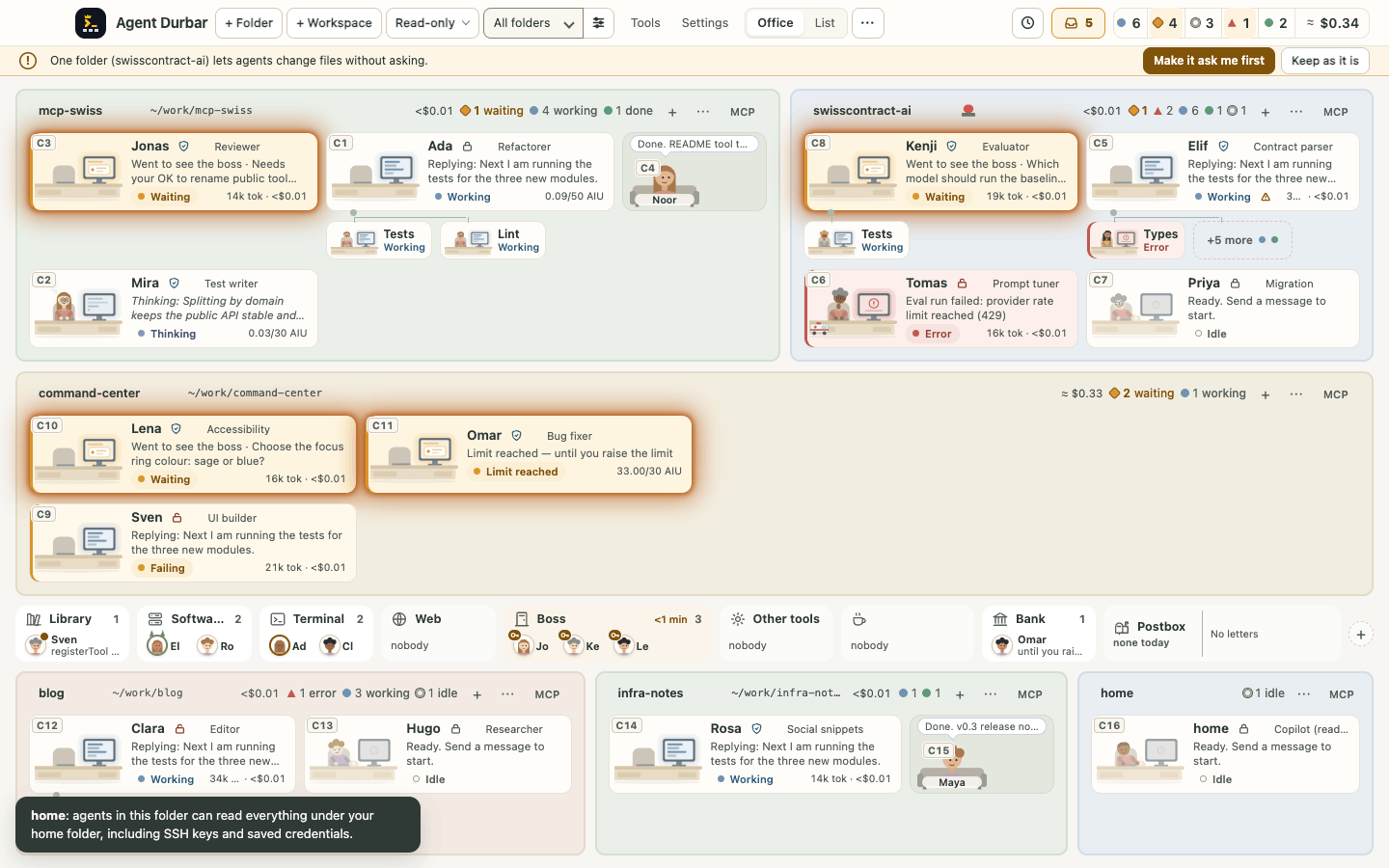
Costs and caps
Copilot reports usage in AI credits (shown as AIU). A session can have a spending limit, at least 30 AI credits:
- set it in the New session dialog or the limit chip;
- a global default is in Settings;
- it is saved per folder.
It is a soft limit: when it is reached the agent goes on a coffee break "until you raise the limit" (spec 068) and the chat offers Raise limit / Remove limit / Stop here. Copilot's own runtime does not stop at the limit (real check, 2026-10-20: a 30-credit session reached 42.6), so Durbar enforces it: a turn that crosses the limit is stopped (the call already running can go over by its own cost), and a message sent at or over the limit is held until you choose. Checked on a real session (2026-10-20) and in tests (spec 011). Copilot plans, the free one too, have a fixed price: Durbar shows usage, it does not charge you. The office and each room show usage totals, kept across restarts, with a reset in Settings.
Claude Code reports a dollar estimate, shown as
≈ $… est.and never mixed with AIU. A session can have a spending limit in dollars (at least $0.01):- Durbar passes what is left to Claude's own
--max-budget-usd; - when the limit is reached, the chat offers Raise limit / Remove limit / Stop here;
- the limit is per session.
With a Claude subscription, nothing is billed per token.
- Durbar passes what is left to Claude's own
Codex reports tokens, with no price.
Themes
Settings has two choices, both applied live without a restart: Theme (colours, room frames, cards, fonts, place names, and the theme's own people and furniture) and Characters (who sits at the desks, on top of any theme).
- Clean Office: the default, and the fallback for anything unknown or broken.
- Retro Pixel: a dark arcade page with pixel characters at CRT desks.
- Removed on 2026-10-31 (spec 035 FR-017): Corporate and the three Durbar courts (Indian, European, Japanese). If one was your theme, Durbar switches you once to Clean Office and keeps your Characters choice. A theme of your own that used one of their styles or people-and-furniture kits keeps working: that one value is drawn as Clean Office would, with a note in Settings.
- Characters (spec 077): The theme's own (the default: the calm office figure in Clean Office, pixel people in Retro Pixel), Minimalist (the calm office figure on any theme), Cheeky (experimental): a playful desk and 13 young, cheeky, office-safe characters, or Prehistoric: the same desk with 6 friendly cave people. Pirate: the same desk with 6 pirates (a captain, an eyepatch sailor, a hook pirate, a cook, a privateer and a cabin boy). Monster: the same desk with 6 friendly monsters (Frankenstein, a ghost, a mummy, a sea creature, a vampire and a werewolf). Royal: the same desk with 6 royal characters (an alchemist, a princess, a knight, a jester, a queen and a king). Animal Rebels: the same desk with 6 animal characters (a bulldog, a fox, an owl, a panda, a punk cat and a raccoon). Each session gets one at random, among those the office uses least, kept per session; a picture shows it working, waiting or resting. If a picture is missing, the plain figure is drawn. Each choice has a small preview in Settings. Cheeky Crew used to be a theme: if you had it, Durbar switches you once to Clean Office with Characters = Cheeky (the characters stay; the warm background and desk colours were the old theme's). Checked on the simulator only.
- The AI theme maker is retired (2026-10-31, spec 040 FR-031): Make a theme with AI and Import a theme are gone from Settings, and no new themes are made there. Themes you saved keep working and stay in the list, tagged "yours"; Export still copies one to a folder, and Remove the active theme… deletes one of them after a question (the theme in use goes to Clean Office; nothing is deleted by the update).
- Your own themes: a folder with a
manifest.json(colours, fonts, corner radii, shadows, the people's clothes and hair colours, a UI style and a scene kit from fixed lists, small SVG art including the desk's cup and laptop, place names), exported in Settings (no new ones are imported or made any more). A theme is data only: no scripts and no CSS. Fonts are installed system fonts from an allow-list (a theme never downloads a font or loads a font file), sizes and spacing stay the app's so the office always fits, SVG art is rebuilt from allowed shapes, a value that is merely unusable falls back to the default and a text colour that would be hard to read is adjusted just enough (the theme stays light or dark), with a note in Settings, and a pack with markup or CSS in a value is refused with a message (spec 070).
Status, permission and credit wording, and the layout, are the same in every theme. Display fonts are your system's own serif and monospace fonts. Details: specs 035-040.
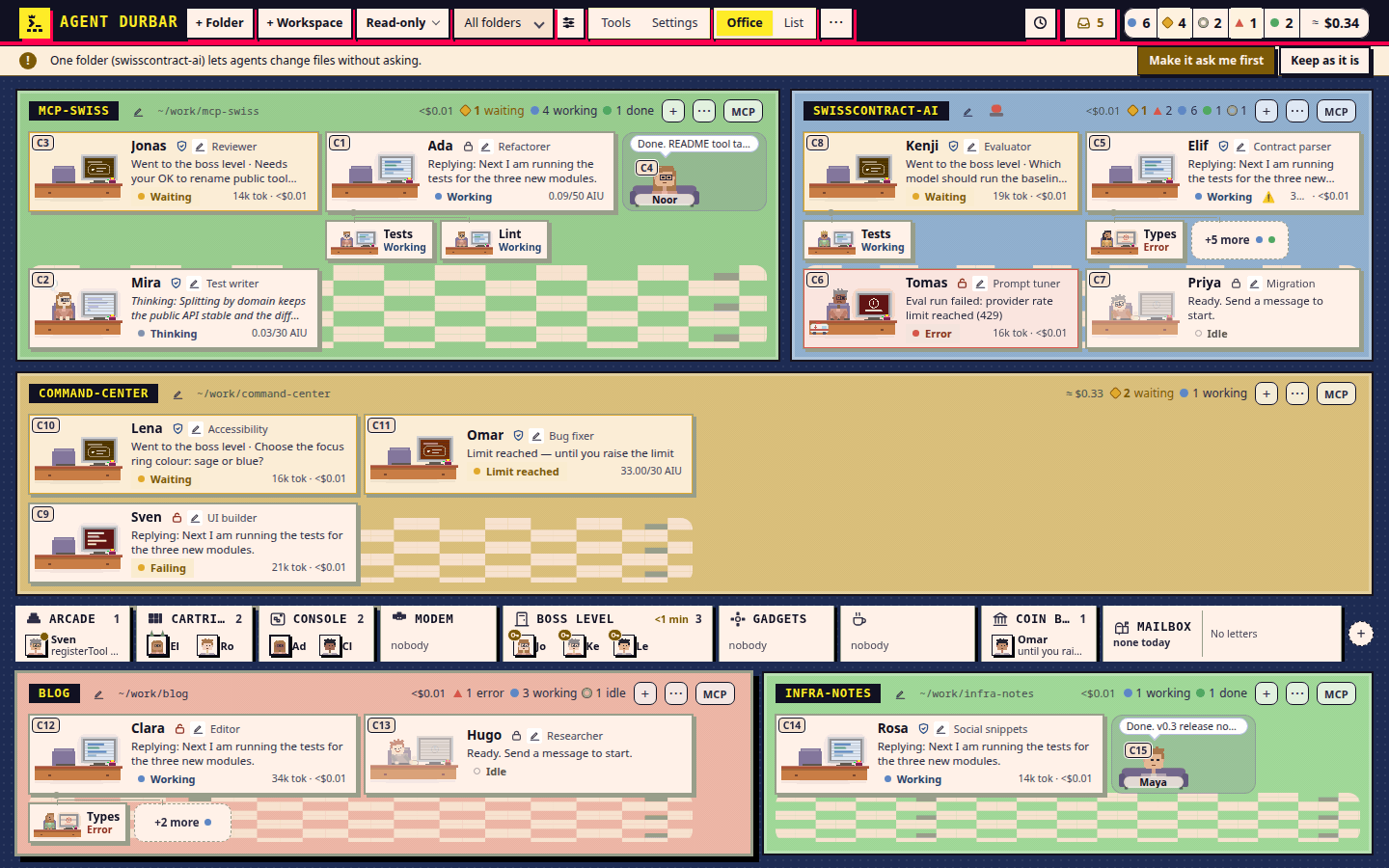
Settings > Display > Spacing picks Comfortable (the default) or Compact, which tightens the chat, Settings, Tools, dialogs and the inbox; the office and the top bar keep their sizes.
Build from source
npm ci
npm run typecheck && npm run build && npm test   # unit suites in parallel (~20 s); `npm test -- folders` filters; `npm test -- --bail` (or `TEST_BAIL=1`) stops at the first failing suite, for iterating, and the final run still runs everything
npm start                 # the app, with the harnesses you have installed and signed in
DURBAR_SIM=15 npm start   # 15 simulated agents: no sessions, no AI credits (main refuses every call that could reach a real agent app)
npm run test:claudecli    # opt-in, not in `npm test`: the flags Durbar's Claude adapter can send against every installed Claude Code CLI's `--help` (~/.local/share/claude/versions/*, `claude` on PATH, or DURBAR_CLAUDE_BINS=path:path); only `--version` and `--help`, no session, no credits
DURBAR_CLAUDE_BIN=/abs/path/claude npm start   # dev/test only: use that Claude Code file first (absolute path to an existing file; ignored in a packaged build; prints a warning)
npm run check:perf -- --record perf.json   # spec 097 T145: records frame, CPU, memory and switch rows for flat and Real office at 15 and 40 agents (simulator, no credits, no asserts; pure Node, runs on macOS and Windows; `--gpu` adds the real-GPU A/B rows, `--quick` is a smoke, `--only real-15`); the record names the OS, pixel ratio and `gpu_compositing`
npm run world:matrix      # spec 098: world moment x world pictures and checks into out/world-matrix/ (git-ignored; Electron, simulator only; -- --size 1280x800 --worlds photo --forced-colors; `node scripts/world-matrix.js --selftest` proves its checks). CI: world-matrix.yml, weekly and a path-filtered PR subset, artifacts for 14 days
npm run check:office      # layout check at 1440x900 and 1280x800 (Electron; xvfb on Linux), simulator only
npm run shots:docs        # retake every screenshot the README and the website link (simulator, one Electron at a time; -- --only, --list, --out <dir>); every picture it writes is palette-compressed (about 60% smaller, with a quality guard)
npm run icons:build      # by hand, one offscreen Electron: rebuilds build/icon.{svg,png,ico,icns}, build/logo/icons.json and src/renderer/logo-marks.js from the drawings in build/logo (spec 101); test:logo-assets fails when they are stale
npm run shots:compress    # compress screenshots by hand: the linked ones, or the files you name (-- --check only lists; DURBAR_SHOTS_COMPRESS=off turns it off in shots:docs)
npm run release:video -- --version vX.Y.Z --out <dir>   # a 30-60 s clip of a release's changes from the simulator (MP4 + GIF, eased zooms on what changed, needs ffmpeg; spec 008 FR-171..FR-178; trial, not in the release flow yet)
npm run usage:receiver    # spec 008 FR-181: a local receiver (127.0.0.1:4318, needs DURBAR_USAGE_MACHINE) that sums Claude Code's OpenTelemetry token and cost metrics per day and model into ~/.durbar-usage; docs/build-cost.md
npm run usage:day -- --date YYYY-MM-DD [--files a.json,b.json]   # the Build cost markdown table per machine and model (API list-price estimate, not billing)
npm run usage:readme -- --release vX.Y.Z   # in the fold PR after a release: rewrites the README's Build cost block, adds the release's row to docs/build-cost-history.json, regenerates docs/build-cost-badge.svg and docs/build-cost.svg (pure text, no network; `--check` writes nothing)
npm run check:geometry    # the dark fixture theme lays out exactly like Clean Office (CHECK_ALL_THEMES=1: every fixture theme, about a minute)
npm run check:ui          # every simulator driver that asserts, one after another, on any OS (UI_SUITE_XVFB=1 keeps windows off a Linux desktop); -- --list names them, -- --only check-notes,check-edits runs just those
npm run check:themes      # on demand: the full layout check in every theme, a few at a time, low priority, memory limits
npm run pack:dir          # (CI: a step of the required check "Office layout check (xvfb)", which covers packaging on Linux, spec 008 FR-194) unpacked app for this OS in release/ (also dist, dist:mac:arm64, dist:mac:x64, dist:win, dist:linux; unsigned); then checks the Electron fuses and the display names
node scripts/electron-cache.js plan|seed|warm   # CI only (spec 008 FR-195): the Electron download cache of .github/actions/npm-ci; electron-cache.yml warms main's entry for every runner OS (push to main, nightly, by hand), so a GitHub release-download outage does not fail PR jobs; npm ci retries 4 times, 7.5 minutes of waits by default (input retry-waits for a short job); test:electroncache checks every job's timeout against it
npm run check:fuses-launch  # on demand, after pack:dir: the packed Linux app opens its window and offers no debugger (xvfb on Linux)
npm run specs:index       # the full specs index from each spec's specs-index block, into specs/INDEX.md (git-ignored); --add specs/NNN-x for a new spec; specs:check in npm test, which also refuses conflict markers
npm run labels:backfill   # dry run: the labels each issue and PR is missing (spec 021 FR-045); -- --create-labels --apply adds them (add-only)
npm run changelog:check   # check the changelog.d/ fragments (in npm test); changelog:preview lists them; a tag's notes come from them, then changelog:build folds them (changelog.d/README.md)
npm run blog:check        # spec 104: the agent blog's guard over docs/site/{blog,captions,story,explainers}: tokens (redact.ts), private paths, addresses, chat markers, unreleased phrases, a host allowlist and blocked-name hashes, first names, evidence, security hold, who reads and reviews (in npm test through test:site; -- --offline skips the online author check and says so). The file, line and rule are printed, never the matched text. `node scripts/check-posts.js --add-blocked-host` is a human step that reads one name from stdin and prints nothing
npm run rules:check       # word budgets of the rule files (AGENTS.md, docs/rules/, CLAUDE.md, agent notes, checklist, ...; in npm test; every docs/rules file linked from AGENTS.md): one rule in, one rule out
npm run specs:numbers     # NETWORK, not in npm test: fails when an FR-, T- or Q- number your branch adds is also added by another open PR head or already on origin/main, per spec file (spec 021 FR-085); run it before every push; also a job of spec-kit.yml
node scripts/picture-budget.js   # offline, in npm test (test:picturebudget; CI's npm test has no origin/main, the spec-numbers job runs it --strict): fails a picture or media file (by name or first bytes), added or changed since the merge-base with origin/main, even one a later commit replaced, over 300 KB; fix with compress-shots or keep it local; allow-list scripts/picture-budget-allow.txt (reason per line)
npm run smoke and npm run verify:cap use a real Copilot login and may spend credits: run them only on purpose. Under DURBAR_SIM the main process refuses every window call except the install-route list and the app version and never creates a real adapter, so a simulator run or driver cannot spend credits; a deliberate real check runs without DURBAR_SIM (spec 010 FR-022..FR-027). The E2E real accounts workflow (spec 062) installs the three agent apps on Linux, macOS and Windows, signs in with the CI account's secrets and lists models every day; one tiny turn each (Claude on Haiku, Codex on a small model) runs daily on Linux and, on macOS and Windows, on Mondays or by hand with full_turn. It was paused 2026-10-29 to 2026-11-02 (red since 2026-10-25, issue #856; the cause was an agent app's OS sandbox that cannot start on a runner, now taken like a person would) and runs once a day and by hand again, never on a push or a pull request. The supported CI platforms are listed once, in .github/platforms.json. GitHub Actions also runs the UI checks (geometry, office layout, the Mac title bar, check:ui) on Windows and Linux for each pull request that changes something the app, its build or the UI drivers use (spec 008 FR-191: a tooling, report or unit-test script, docs or a version-only bump skip it; pushes to main, the nightly and by-hand runs always run it; the merge queue runs ci.yml in full but not this workflow, as before), and on macOS nightly, and keeps the screenshots of each run (workflow UI on three OSes; simulator only). macOS does not run on pull requests: build and test runs on every push to main, the other macOS checks nightly, and a failed nightly run opens an issue (spec 008 FR-106). Releases are built by GitHub Actions from v* tags on main into a draft release that the maintainer publishes by hand; a test-build tag (v0.1.0-alpha.N-test.M) builds a draft pre-release from any branch, with the unmerged commits as its notes (spec 008 FR-121).
Layout of the repository:
src/main(Electron main),src/preload,src/renderer(plain HTML/CSS/JS, the simulator);src/adapters(Copilot, Claude Code and Codex adapters, the permission broker),src/shared;scripts/(tests and screenshot drivers),specs/(Spec Kit specs),docs/.
How we work
Agent Durbar is spec-driven with GitHub Spec Kit: no code without a spec, a plan and tasks.
- Every feature has a folder in
specs/. Each requirement is tagged[IMPLEMENTED]or[KNOWN GAP], with how it was checked. - The rules are in the constitution.
- A CI check fails a pull request that changes
src/without changingspecs/. - Coding agents follow AGENTS.md. People start with CONTRIBUTING.md and docs/collaboration.md.
- Claim an issue on the project board before you start.
Where it has been run
The short version is in the README's status block; this is the full record.
- Where it has been run: Linux by hand every day. macOS by hand on the owner's and a teammate's Macs (macOS 26, Apple Silicon), from source and the simulator, including real Copilot sessions; fixes from those runs are merged. The Copilot MCP Sign in and the keychain change were checked on the owner's Mac with a test build (
v0.1.0-alpha.14-mcptest.1) before they merged. Windows by hand on a real PC on 2026-10-21 by the owner with a colleague; its findings are filed (#467: Copilot was not found or offered for install without Node.js). - What CI checks on Linux, macOS and Windows: every change builds and starts the packaged app (spec 012 T044), and the UI checks run on all three (spec 008, #389). A real-account end-to-end workflow, where Copilot, Claude Code and Codex each install, sign in and answer on all three OSes, passed 9 of 9 on 2026-10-20 (spec 062, #402); real installs of each agent app as a standard and an admin user are checked in CI too (spec 060, #393). Since 2026-10-22 pull requests run Linux and Windows; macOS runs on every push to
mainand nightly (spec 008), and the real-account workflow runs on cheap models once a day (and by hand) instead of on every push; it was paused 2026-10-29 to 2026-11-02 while red runs were fixed (spec 062, #856), and a failed scheduled run opens a nightly-watch issue.
Known limits
- Windows has had one hands-on look. Linux and macOS are used every day. On Windows the owner and a colleague tried it on a real PC on 2026-10-21 (findings #467); that was a manual look, not a scripted check. The packaged app is built and checked on all three systems in CI. Codex's Read-only and Ask first modes refuse to start on Windows unless Codex's elevated sandbox is set up and you use the native
codex.exe(not a.cmdshim): Durbar says what is missing and what to do, and you can use Allow all, or Claude Code or Copilot. That refusal follows Codex's documentation and was not tried on a real Windows PC. - "Allow … for this session" can be broad. For a simple shell command it approves every argument of that command name (allowing
gitfor this session also allowsgit push), and a write grant covers every file in that folder; code and privilege commands are never offered the any-arguments grant, and you always choose it yourself. Undo it with the x on the grant chip. Not configurable yet (spec 003 FR-013; the approval card offers it as "run <command> (any arguments)"). - Where your data lives: the installed app keeps its settings, folders and saved MCP servers in
agent-durbarunder the OS app-data folder (%APPDATA%on Windows,~/Library/Application Supporton macOS,~/.configon Linux).npm startand the simulator use their ownagent-durbar-devfolder next to it, so developing never touches the installed app's data. To keep data from an older dev run, start once withDURBAR_USER_DATA=<old folder>or copy the folder by hand. - An unreadable MCP server file (spec 019): a damaged or over-size
durbar-mcp.jsonin that folder loads as an empty list. Before the next change is saved it is moved next to itself asdurbar-mcp.json.unreadable-<time>, never deleted; nothing in the window says so yet, and Durbar does not read it back. A file that cannot be moved stops the save with an error instead. - Unsigned builds: expect the OS warnings above.
- Keychain prompts on a Mac: macOS may ask whether a program can use your Keychain. Durbar's own item (
agent-durbar Safe Storage, which protects saved MCP secret values) is read at most once per run, and only when a server with secrets starts or you change a secret; because Durbar's builds are not signed with an Apple Developer ID, Always Allow for it holds until the next update (code signing, #4, would end that). Copilot's own items (yourcopilot loginand, since Durbar asks Copilot to keep them (spec 058 FR-070), the MCP servers' sign-ins) are read by the one Copilot runtime Durbar starts per run and shares across all sessions. Since #623 the mac package keeps GitHub's own signature on that runtime (it used to be re-signed ad-hoc with the app), so the Keychain sees the same program as thecopilotCLI, and a new MCP sign-in made from Durbar asks nothing (checked on the owner's Mac, 2026-10-23). When upgrading from an older Durbar: on the first launches you may need to press Always Allow for each item twice, once per launch. After that there are no prompts. On the owner's Mac with 10 servers, the first two launches asked about 25 times each and the third asked nothing. If you also use thecopilotCLI with the same MCP sign-ins, prompts may come back after the CLI saves them; this has not been checked. If prompts keep coming back: In a Copilot chat's MCP servers dialog, use Sign in again… on a server, or Sign in again to all: Copilot forgets the saved sign-in and you sign in again in your browser, so the current runtime saves it anew. The server stays signed out until you finish in the browser; Cancel or the time limit leaves it signed out. It is offered only for remote servers Agent Durbar knows by their address (not built-in or local ones). Whether this ends the prompts has not been checked on a Mac yet (#623). If it doesn't, you can delete thecopilot-mcp-oauthitems in Keychain Access and sign in again. Durbar never reads or changes the keychain itself (spec 058 FR-162..FR-164). Claude Code and Codex use their own installed programs and their own Keychain items, as in a terminal. - Names in packaged builds: the display name is
Agent Durbar(Start menu and desktop shortcuts, Add/Remove Programs,.app, AppImageName=), while the run-time identity staysagent-durbaron every OS (profile folder, Keychain, WM_CLASS).scripts/check-names.jscompares the packed app withpackage.jsonon every package build. On Windows a packaged build sets the AppUserModelIdio.github.three-feathers.agentdurbarso toasts and the taskbar match the Start menu shortcut. Checked on a real Linux build (AppImage.desktop, packed app started on the simulator); the Windows names and AUMID and the macOS bundle names are asserted only by the Installed app workflow in CI, and the taskbar, toasts, Mac menu-bar title and a Linux launcher or dock were not seen on a real desktop (#9). - No debugger in packaged builds: release builds ignore
--inspect,NODE_OPTIONSandELECTRON_RUN_AS_NODE(Electron fuses;scripts/check-fuses.jsreads them from the packed binary on every package build on Linux, macOS and Windows:pack:dir, thedist*scripts, and so the packaged-check workflow and the release build) and always dropremote-debugging-portandremote-debugging-pipe, whatever the spelling. Run from source (npm start) to debug. Checked on the packed Linux build, including-remote-debugging-portwith one dash (npm run check:fuses-launch); the fuse check itself has been run locally on Linux only, and macOS and Windows have not been tried by hand (on Windows Chromium also accepts/and any case, which the guard covers by removing the switches by name). The ASAR integrity fuse has no effect on Linux. - A chat keeps its newest 300 messages (spec 005 FR-238): older ones leave the view to save memory, a line says how many; read scrolled up, it is not trimmed. Simulator, Linux only.
- An agent keeps its newest 50 finished helpers and 20 failed ones (spec 005 FR-240, FR-241): older ones leave the office, the chat and the lists, and one line says how many are not kept; running and open ones stay. Measured on the Linux simulator only; Windows and macOS were not measured.
- VS Code's own chats are read-only. VS Code keeps them in an undocumented store that cannot be continued from outside; Durbar shows a copy. Copilot CLI/SDK sessions can be resumed.
- Caps are soft: one model response can overshoot them, and the figures are what each harness reports. Copilot's runtime stops only before its next step, and a limit set after a resume with none is not enforced, so Durbar stops a turn itself after the call that crosses it (real checks, 2026-10-20 and 2026-11-02). Durbar learns a resumed session's earlier spending only from the runtime's first usage report, so the first message after a resume is held only when Copilot refused to reopen the session at its limit (then the limit card asks).
- A floor that is switched off is quiet. The agents under it keep running and can spend credits or wait for an approval; nothing stops them for you.
- Schedules run only while Durbar is open. A schedule's limit counts what its run uses from the moment it is sent until that turn ends (a message you send during that turn counts too). They were tested on the simulator and with fakes, not on a real session. The agent apps' own schedules are shown only for Copilot, and only while Durbar is running and the app reports them.
- Account limits (spec 011 FR-080): the Copilot and Codex answers were checked on real accounts on Linux (2026-11-02, T059): both reads are free and start no turn; not checked on Windows or macOS, an API-key Codex account or a signed-out one. Claude Code reports none through a free call that we know of. The figures are the provider's, can lag, and are not a bill. The 10 % warning level awaits an owner decision.
- Session names: the rename into Copilot, Codex and Claude Code was checked on real accounts only by another team member's agent, which ran the raw protocol and CLI calls by hand and looked at the CLI lists (Durbar's own adapters ran on fakes only), not in VS Code; Claude Code applies the name at the next message (it relies on the undocumented
CLAUDE_CODE_ENTRYPOINTvalue of spec 012 FR-159 to show in/resume), and the VS Code Claude extension's list did not show a-psession at all in a real check on a Mac (untested with that value). - A hung Copilot runtime: Stop and End session go on after 5 seconds (10 and 15 with a spending-limit question open, one step at a time); the limit itself stays after a Stop, so the next message waits on the limit card, and raising the limit brings the session back (
real:Linux, one paid exhaustion, the rest with the usage figure raised inside the test: spec 052 FR-231; measured on 1.0.24/1.0.101; 1.0.26 has the same refusal text (read:), behaviour not re-run); a message or a reopened session then waits up to 30 seconds for Copilot's late answer, and says so if none comes (real:Linux only). Nothing restarts a runtime that stays hung: its other sessions wait on it until the app restarts. - MCP sign-ins (Copilot): Sign in in the MCP dialog calls the Copilot runtime's
mcp.oauth.login(marked experimental in the SDK) and was checked once on a real account (Copilot, macOS, 2026-10-23,agent365-teams: it worked, but the row lagged behind the runtime's status, so Durbar now re-reads the server list every 5 seconds, for at most 10 minutes, while the sign-in page is open). The re-read (whether it can start other servers on a real runtime is unknown), how long the runtime waits for you, and what happens to its waiting listener after Cancel are unverified, and so are other servers, Windows and Linux. Whether a sign-in you made in the Copilot CLI (/mcp auth) is seen by a Durbar session, and the other way round, is not verified (spec 058 FR-068/FR-074, real check T105 pending). Keeping sign-ins (FR-070) was checked for real on 2026-10-21 on GitHub's Windows and Linux runners with a demo OAuth server on loopback (a new session in a new runtime connected with no new sign-in); not on a Mac, a Linux desktop with a keyring, or a third-party https server. On Linux without a keyring the kept sign-in is a tokens file under~/.copilot/mcp-oauth-config/; whether it is encrypted and its file permissions were not checked. - "/" entries (spec 073): checked on real apps on 2026-10-22 (3 tiny prompts): Claude Code in Durbar's sessions ignores a folder's
/command(it reached the model as text) but runs built-ins such as/contextitself; Copilot'ssession.senddoes not run a typed built-in such as/list-dirs(so none are listed for Copilot). Codex was read from its app-server schema only, not run. Durbar's expansion (a command's$ARGUMENTSand$1..$9, a skill'sSKILL.md) is unit-tested and simulator-tested only; Claude commands'!shell lines and@filereferences are sent as text and never run by Durbar. Of the allow-listed Claude built-ins only/contextwas run through Durbar. Nested command folders and parent-folder skills are not listed. Codex's named$KEYarguments are not filled in. VS Code prompt files (2026-10-23): the Copilot CLI does not list or run them (checked at no cost on runtimes 1.0.98 and 1.0.103), so Durbar sends their text; theirmode,agent,modelandtoolssettings are shown but not applied, editor variables such as${selection}are sent as written (the chat says so), an expansion over 256 KB is not sent (the line goes as typed, with a note), only VS Code's default profile folder is read, and the macOS and Windows user folders are taken from VS Code's docs, not checked on those systems. - MCP sign-ins (Claude Code): Sign in uses Claude Code's undocumented
mcp_authenticaterequest, read from version 2.1.304 only and not checked on a real account (T106). Without a system keyring (common on Linux), Claude Code and Codex keep an MCP sign-in in a plain.credentials.jsonfile in their own settings folder; Agent Durbar does not read or change it. - Sign in after a failed renewal (issue #1229, spec 058 FR-229, not checked on a real server): when Durbar's renewal gave up on a server (the line needs you to sign in again), the chat's Sign in... button and the MCP dialog's row now offer Sign in even if Copilot still reads the server connected or the session is not running (it is then started, as a send does, without a message). A block counts only for a server that is on, not refused by your organization and
connected,failedorneeds-auth. If the app answers signed in for a server Durbar knows is failing (Claude Code has no Sign in again), the row says so and points to the terminal steps; not checked with a real Claude Code. Cancelling or abandoning a started sign-in drops Durbar's mark, so the row then offers only Sign in again until the next failed call. Built from reading the code and fake-adapter tests only; whether a real Copilot runtime reports the server soon after the session starts, and whether its Sign in again gives a working sign-in for an expired refresh token, are for the owner's real check. - MCP sign-in refresh (spec 058 FR-204..FR-217): Durbar cannot know when a sign-in will expire (that is inside the token, which it never reads), only what the agent app reports after a reconnect. The apps' reconnects were probed on Linux only (2026-11-03, T176/T177), against a local test server whose refresh tokens do not rotate, with no system keyring and no real provider (Entra, Okta, GitHub): Claude Code's
mcp_reconnectrenewed an expired sign-in; Copilot'srestartServerrenewed one that still read connected but answered with an error anyway (Durbar reads the list 1.5 s later), and in a second session on the same runtime only Copilot's own Sign in renewed it, with no browser. Under Copilot's OS sandbox (Read-only, Ask first) a reconnect did not renew an expired sign-in, so Durbar only shows the sign-in line there; a Read-only session after a real first message was not checked (it needs a prompt). Not checked: macOS keychain prompts, Windows, a provider that rotates refresh tokens (Durbar runs one reconnect per server at a time across chats for that reason), a tool call after expiry, an elicitation during a reconnect. A message that reaches the agent app another way (remote control from a phone, spec 054) is not covered. Codex chats are not reconnected (Codex renews with its next session). The launch check of the spec is not built yet, and its 30-minute recheck was replaced by the renewal below. Renewal after a failed call (spec 058 FR-218..FR-222, 2026-11-05, Copilot only): when a call to a remote server fails with a sign-in error, or Copilot reports it needs a sign-in after it was connected, Durbar reconnects that server at once, also in the middle of a turn (it waits only for another call to the same server in that chat to end), with a Renewed 12:40 note on the server's row. The call that failed still failed. If the reconnect worked, Durbar sends the agent one short automatic message (The MCP server "<server>" was reconnected after a sign-in error. Please retry the step that failed.; the name is used only when it is a plain name of letters, digits,_ . -, otherwise the note says "An MCP server") so it continues on its own: that is one extra message and uses AI credits. It is sent once per failure and not again until a call to that server has worked (if it fails again after the note, Durbar gives up and shows Sign in again, no loop), never when the reconnect failed, never with Refresh MCP sign-ins automatically off, never in a chat held by a spending or usage limit (the server is still renewed), never after you pressed Stop, and behind a message of yours that is being sent; your own message is never resent. There is no timer and no restart in advance, so a sign-in that expires while nobody calls the server costs nothing. Probed on Linux against a local test server with 20-second tokens, on the shipped Copilot SDK 1.0.24 (runtime 1.0.101: the runtime kept saying connected after expiry, every call failed for the minute watched, it never recovered by itself, and a reconnect fixed it) and on SDK 1.0.26 (runtime 1.0.103: its own retries renewed tokens but calls still failed, and a reconnect fixed them; it also sent a needs sign-in status the 1.0.24 runtime did not, so on 1.0.24 only a failed call triggers the renewal; registering the SDK's OAuth handler instead broke a stored sign-in at start, so it is not used). The note is queued by the app behind a running turn, so the agent reads it when the turn ends; whether a real model retries the step after it was not checked. Checked for real (2026-11-06, release 0.1.11): on the owner's Mac with his own Microsoft Entra servers, a failed call was renewed, the automatic note appeared in the chat and the agent continued (his report in chat; no log is kept in the repo). Not checked: Windows, macOS Keychain prompts (none reported), how long the session was idle, the probes' other limits (the probe used a tool-list request), several chats or sessions sharing one server (each chat's own session is reconnected, one at a time per server, in unit tests with fakes only), macOS, Windows. A remote server that needs no sign-in is also reconnected after such a failure (Durbar cannot tell without reading a token). Check before every message (spec 058 FR-223..FR-228, 2026-11-05, Copilot only): beside every message you send, and when a chat starts, Durbar asks each remote sign-in server that reads connected for its tool list (a real round-trip, no AI, no credits; the message is never held). A server that answers unauthorized is reconnected at once through the same path as above; a server that answers is not restarted by the check (the separate reconnect before a message after a quiet hour can still restart a connected server), and one with a successful call, or any check outcome, in the last 5 minutes is skipped. Only a clear sign-in signal counts as unauthorized (an HTTP 401, Copilot's own "OAuth challenge required",invalid_grant, or an Entra sign-in code); other errors do nothing. A server that does not answer within 30 seconds counts as unknown (its row says Did not answer a check) and nothing else happens; that request is not cancelled in the runtime, and no second one is sent while it is outstanding. Nothing shows in the chat while all is well, only Reconnecting <name>… while such a reconnect runs, and the agent gets no note from it (it never failed). The activity-log row renewed (automatic) (this path and the one above) is written only with Settings > Diagnostics on (off by default). Probed on Linux against a local test server on the shipped Copilot SDK 1.0.24 (runtime 1.0.101): repeated tool-list calls on a healthy server changed neither the session's tool set nor produced any session event, and after expiry they failed with HTTP 401 while the list still said connected; a real model turn (prompt cache) was not measured. Not checked: whether this check itself fired on the owner's real Entra servers (macOS, 0.1.11, 2026-11-06: only the renewal after a failed call was reported), its latency there and whether Entra answers a tool-list request the same way, macOS Keychain prompts from a reconnect, Windows. - Imported MCP config: importing from
.vscode/mcp.jsonis a one-time copy per folder. - Organization policies of the agent apps (spec 076 FR-206): for Claude Code and Codex only the documented machine files are read (no MDM, registry or server-managed settings; Copilot's come through its runtime). Codex's MCP server rules and its fully qualified host name are not checked. The mapping comes from the vendors' docs, fixture tests and a fake Copilot runtime, not from a real managed machine.
- MCP servers for all folders (spec 069): the three agent apps read the written entries (T060, 2026-10-22), and Claude Code and Codex pass a referenced variable's value; whether Copilot expands
${NAME}references (Q6) is not verified (it needs a signed-in Copilot session). - MCP context figures (spec 100) were checked on real Copilot, Claude Code and Codex sessions on Linux (2026-11-02), not on Windows or macOS. Copilot's call is experimental and may be missing on some plans; then the size reads not reported by Copilot, never an estimate. Claude Code's figures are its own estimates. Codex reports none: Durbar counts the tool definitions and shows "at most", since Codex loads them on demand, and that figure never warns. Not seen on a real session: Copilot's
deferTools: autoand a Claude Code list that is partly loaded and partly on demand. - The session browser is new and only tried on test pages. Each session has its own Browser tab, checked on Linux with Durbar's built-in test pages: not on real websites, a real desktop, Windows or macOS. A click on a link in a chat opens it in that session's Browser tab (Ctrl+click, or ⌘+click on a Mac, and the link's right-click menu open it in your usual browser; Settings > Open chat links in changes the plain click). A link click is not yet gated by network class (private and link-local addresses) because the agent cannot drive the browser yet. There is no setting to switch the Browser tab itself off: after you accept the one-time note the tab opens when you click it, and nothing loads before that. Up to four pages stay loaded at once, across every tab of every session: background tabs are dropped first, and a dropped page is reloaded when shown (a background tab brought back has lost its Back and Forward history); memory use of many open sessions and of 10 tabs has not been measured (spec 080 T013 AC5-AC6). Page tabs have no icons (favicons), cannot be reordered, pinned or reopened after closing, and are not kept across a restart; a page's script can still open a tab without a click (within the 5-per-load and 10-tab limits); a refused page popup or new-tab request opens nothing and is not yet offered for your usual browser. Whether ⌘W in the browser bar closes a tab or the window on a Mac, and the tab keys on Windows and macOS, have not been checked (spec 080 FR-130). Downloads are cancelled for now and
prompt()does not work in a page. A page's own dialog does not say which session it belongs to (Durbar's message does, and brings that chat forward). Once any browser view exists, two small Chromium files appear in the app's default profile and what they hold is not identified; the session's own profile writes nothing. A browser's owntitletooltips are drawn by the system above the page. - Agent-app updates are new and untested on real machines. The update check and the update button (spec 081) ran on the simulator and with fake tools only, not on a real Mac or Windows PC, and read documented output shapes (winget's table with English column names, Homebrew's and
claude update's output), not recorded runs. Homebrew's latest is only as fresh as Homebrew's local data (Durbar never runsbrew update). The Claude channel files ondownloads.claude.aiare not a documented API, andcodex updateis undocumented and runs a script Durbar cannot check. Scoop, Chocolatey, distribution packages and bun/pnpm copies are named, not updated. No organization policy can switch the start check off yet; only your switch does. A scheduled loop that wakes while its app updates counts that pass as failed instead of holding it. The fix for "Could not check: exit 127" on a Mac (an app opened from the Dock has a short PATH, so npm could not find node; it now says npm or node was not found and what to do) is from reading the cause, not seen fixed on a real Mac. The real-machine checks of the real updaters (spec 081 T040 to T042) have not been run, and the vendor texts it recognises (Claude Code's "updates are disabled" message, winget's table, a cancelled Windows UAC prompt) are documented shapes, not recorded output. - The OS sandbox floor is new and only partly checked. For Read-only and Ask first Durbar asks each agent app to run commands inside its operating-system sandbox, and the chip (Sandboxed / Not sandboxed) and its tooltip show what it got (spec 087). What was really tried (one Linux session, 2026-10-25): Claude Code in Read-only: verified on Linux only, its sandbox refused a write in the folder. Copilot keeps a temp folder writable: an approved command can write in the session folder and in Copilot's own temp folder (a real check on Linux, 2026-11-04: a folder under your home was refused, one under
/tmpwas allowed). So the chip says Sandboxed (partial) for Copilot in Ask first. Durbar now gives Copilot's runtime a private temp folder, so the shared temp folder is no longer writable (real checks on Linux and macOS, 2026-11-04, Ask first, with Durbar starting the runtime: a write in the private folder was allowed; a folder beside it in the shared temp folder,/tmpand the home folder were refused; no folder was left behind; not run on Windows or in Read-only) (#755). Copilot sessions of the same run share it. When the system temp folder is too long for a socket path (macOS), that private folder is made under/tmp(/private/tmp) instead, so MCP servers such as Playwright can make their sockets; not run on a real Mac, and whether the macOS sandbox grant follows it there is not verified (#1173). Not checked: macOS and Windows, the network refusal, Claude's Ask first, Codex. Also not checked: that a write deny inside an allowed folder holds on a real session (Claude Code documents it), whether Copilot's session options update applies to a session that already exists, and what Copilot does on a host it does not support. Claude Code has no OS sandbox on native Windows: the chip says Not sandboxed and Durbar's own checks still apply. If an app's sandbox cannot start (for example Claude Code on Linux without bubblewrap and socat), Durbar tells you and asks before running that session without it (Continue this once, Always continue only where the cause cannot be fixed, or Change mode…); it recognises Claude Code's failure only by the word "sandbox" in its error, any other early exit shows as a crash. In Ask first, sandboxed commands have no network:npm install-style commands fail there (use Allow all). An organization can setpermissions.requireOsSandboxin the machinepolicy.jsonon macOS (/Library/Application Support/AgentDurbar/managed/) and Linux (/etc/agent-durbar/managed/), root-owned only. A policy folder whose file is missing or broken requires the sandbox too. If a credential folder becomes a link, or a link is repointed, while a session runs, its new target is not denied on Linux until the next launch. Copilot's sandbox is cleared in place when you switch to Allow all (real: 2026-10-28, Linux, CLI 1.0.98, one probe session: write and network worked after the switch and were blocked again after switching back; spec 087 K16); Durbar's own switch was tested on the simulator and with fakes, and the same probe gave the same result on macOS (2026-11-01, CLI 1.0.101); Windows and newer Copilot versions on Linux are not verified. Copilot's reported network capability is not a reliable sign: on that host it said unsupported, yet the network was blocked. Restart without the sandbox (the fallback when Copilot refuses or does not answer the switch) is built and tested on the simulator and with fakes only, not on a real session on Linux, macOS or Windows. End session on an idle Allow all session does not ask, and the next message starts without the kept sandbox, as after a Durbar restart. - The person at a desk keeps moving when it needs you or has a New reply. Only the operating system's "reduce motion" setting stops it today; a switch inside Durbar is planned (#780).
- Creating a folder is new (spec 093 phases 1 and 2): checked with the simulator, fakes and real
git initandgit cloneruns in tests on Linux (CI also runs them on Windows); not run on macOS before merge. No clone over the network has been run, in CI or by hand: the tests clone a local bare repository, use a local listener that never answers for Cancel, and a stub for ssh (POSIX only). Signing in through each OS's credential helper (Git Credential Manager's window on Windows, the macOS keychain) and ssh with an agent are not checked yet (a hand check is planned). A crash or power loss during a create leaves the folder behind, a clone that does not end within 5 s of quitting is left too, and Windows junctions in the cleanup are not tested. An ssh program other than OpenSSH (plink, a wrapper) may wait for an answer in a window Durbar cannot see: the progress dialog says it is waiting, and Cancel ends it. - Real office is in phases (spec 097): a person going between a desk and the lobby zooms out at one and in at the other, they do not walk; in the lobby people face their fixture from behind (the pictures are mirrored to face left; p03 and p15 lift the same leg in both running pictures); with 15 agents a monitor shows the newest line and bars for older ones, the hover zoom shows the rest; a monitor shows only what a desk's live readout may show (masked; a tool's output is not shown); faces are about 32 px at the desks and 16 px in the lobby with 15 agents at 1280x800 (the targets are 40 and 18 px; people in the lobby keep a real size against the door); in a font about 10 % wider than the default (DejaVu Sans) at 1280x800 one lobby chip beside the Software library plate shows its first letters and an ellipsis, a little away from its person (no bare initials anywhere); a crew chosen in Characters, except Prehistoric, is not drawn there: Real office shows the Office people and says so under Office layout (Cheeky, Pirate, Monster, Royal and Rebels have only three head pictures each; the Prehistoric people are drawn in Real office, and Settings says so; the pictures for the other crews and Minimalist are being made); a theme you pick shows in the flat office, not in Real office; checked on the simulator only, on macOS by hand for phase 2, not on Windows. It adds 6.65 MB to the app (the pack's cap is 10 MB). On Windows the hover zoom timed out twice in automated checks and has not since, with the cause not found (spec 097). World moments (spec 097 FR-118..FR-129): the first run, the empty floor, an agent asleep at its desk and the inbox slips have a look of their own in the Photo office and the cave; the spending-limit slip, the MCP request bubble, the coffee-break tent card and the floor ride are built but their chat side (a desk-side column, speech tails, the chat header) and the jump from the inbox to a desk on another floor are not, and the first run's entrance picture waits for the art's approval (it shows the world's own floor or wall). With 15 agents the inbox stack is a one-line pill where there is no room for the full slips. The loft has none of these.
- Moving targets: harness protocols change, so versions are pinned and checked.
Roadmap
- Done:
- the office, chat, permissions, attachments, MCP, tools, usage and caps, themes, floors, places, moods and scheduled prompts;
- Copilot, Claude Code and Codex side by side, with session resume and continuation;
- model and context switching, and new session with a summary.
- Next:
- Windows day to day on real PCs, and Codex's sandbox on macOS and Windows;
- the Durbar MCP server, to read the office from your own MCP client (spec 041, in progress).
- Ideas being specified: a global assistant chat across sessions, multiple profiles (personal/work accounts), and a morning briefing. See the issues.
- Needs a purchase: code signing and notarization (spec 014).
What was built when, and how it was checked, is in the specs and the CHANGELOG.
License and credits
MIT, Copyright (c) 2026 Three Feathers contributors. Agent Durbar is by Three Feathers; key contributors: vikramgorla, fjcabello and rubenlupi (GitHub handles are used as the names). The art and who made it: docs/credits.md.
Agent Durbar is an independent community project, not affiliated with, endorsed by or sponsored by GitHub, Microsoft, Anthropic or OpenAI. "GitHub Copilot", "Visual Studio Code", "Claude" and "Codex" are trademarks of their owners; Durbar only drives the tools you installed yourself, on your own machine.
Every built feature
Each card is a built feature with its spec: what it does, how it was checked, and its honest limits.
- Spec 001Office view, densities, list view, filters
- Spec 002Copilot adapter and normalized events
- Spec 003Permission modes, approvals, session grants
- Spec 004Attachments (pick, drop, paste) and caps
- Spec 005Full-screen chat and agent strip
- Spec 007Model, reasoning-effort and Copilot Auto routing pickers
- Spec 009Open with (VS Code editions, file manager), VS Code chat history (read-only)
- Spec 010Simulator and dev/test hooks
- Spec 011AI-credit caps and usage display
- Spec 012Claude Code and Codex adapters
- Spec 015Thinking that shows up, sub-agent activity
- Spec 016Safe Markdown in the chat
- Spec 018Change permission mode any time
- Spec 019Global MCP servers, tool usage per agent, models and context window
- Spec 020Tools "This session / All time", Copilot CLI MCP list first, MCP extras per folder, per-folder import from VS Code `mcp.json`
- Spec 024Places in a shared lobby (Library, Software library, Terminal, Web, Other tools); main agents walk to the place of the tool they use; place per MCP server in Settings
- Spec 043Custom agent per session
- Spec 044Scheduled prompts while the app is open
- Spec 030Switch model, effort and context tier of a live session (chat header and office card menu), see window and % full, compact, start-fresh hint, per-folder default; simulator first, adapter-neutral
- Spec 035Theme foundation: data-only theme packs, manifest, token map, art slot registry, UI styles (2026-10-18), Clean Office fallback
- Spec 036Clean Office pack: every scene colour a semantic token, scene words, `data-*` ids, per-theme motion presets
- Spec 038Retro pixel theme: 8-bit palette, palette pixel maps in art slots, arcade motion
- Spec 040User themes: `userData/themes/<id>/manifest.json`, import/export, validation
- Spec 034The figure follows the context window (heavy 70-90%, grumpy monster above 90%), trouble signals (ambulance, faint, dizzy, impatient), Serious mode
- Spec 033Floors: group rooms (folders) and switch a whole floor off so it leaves the office, the lobby and the status counts
- Spec 041Durbar MCP server: read the office and change settings (mode, caps, folders, MCP extras) from the user's own MCP client; off by default, local only, every change confirmed in Durbar's window, never exposed to Durbar's own agents
- Spec 051Harness setup inside the app: Settings > Harnesses with install, update and sign-in
- Spec 052Usability pass from eleven rounds of AI persona reviews (about 37 personas): answer bar and inbox, restore strip, palette and Cost view, one word per concept, interaction polish, accessibility, calmer visuals, notifications, activity log, Windows first run, house rules, plain words, macOS conventions, daily use, pre-release fixes, a one-row top bar, New in the chat header, + Folder / + Workspace first in the top bar and a Mac File menu (FR-164), a help and UI text pass: wrapping, widths, menus, tooltips, long names, chat, dark-theme tokens (FR-165..FR-171, #464), a Codex write card with its files and diff (FR-172), the Needs you side panel (FR-191..FR-205, specified, not built)
- Spec 054Remote control and chat channels: Copilot remote steering from github.com and GitHub Mobile (Phase 1); Claude Code Remote Control from claude.ai and the Claude app (Phase 2); Claude Code channels wizard out of scope, moved to idea #485 (owner 2026-10-21)
- Spec 056Continue a VS Code chat in Durbar: from the read-only VS Code chat view
- Spec 058MCP servers in a session
- Spec 059Rename sessions
- Spec 061A folder's own agent setup
- Spec 062End-to-end checks with real CI accounts on every supported OS: install, sign in, models, one turn through Durbar's adapters; one platform list for OS workflows
- Spec 063Folder status in the chat: git branch and uncommitted changes on the folder chip, a click lists the changed files (read-only)
- Spec 064Send one message to several running sessions (top bar ⋯ or Ctrl+K), each with its own app, mode and limit; busy ones can't be picked
- Spec 065Undo an agent's file changes per turn: a copy kept just before each file-edit write, a previewed and confirmed restore, refusal when a file changed since, undo of the undo
- Spec 066Plan first: for one message, the agent proposes a plan in its app's own plan mode and you Approve, Revise or Reject; the approved plan still runs in the folder's mode
- Spec 069Global MCP servers written to the agent apps' own lists (Copilot CLI, Claude Code, Codex) after a per-file confirmation with backups, harmonize the lists, source chips, switch/Restart/Sign in/Remove on every server row, a server's tools on expand (owner 2026-10-21)
- Spec 070Full theme tokens: typed tokens for fonts (system allow-list, no downloads), title weight, radii and shadows; the people's clothes and hair; cup and laptop slots; per-value fallback with a note, pair-wise contrast fallback, hostile values refuse the pack; AI maker extended; a ratchet on the renderer's colour literals
- Spec 073Slash suggestions: `/` in the message box lists the folder's, the user's and the app's skills, commands and prompt files; a folder or user entry is sent as its file's text
- Spec 075Daily screenshot refresh: a workflow captures the simulator on Linux, Windows and macOS when main changed and keeps one "screenshots: refresh" PR up to date; a text gate replaces image review
- Spec 077Cheeky crew (issue #558; a Characters choice since issue #814): a built-in scene kit with 13 AI-generated, person-reviewed portrait characters (3 poses each), picked at random per session and kept across restarts; status cues and spec 034 moods unchanged
- Spec 080Session browser (issue #556): a Browser tab per session with its own in-memory profile, wiped at session end; chat links open there; later the agent drives it through a per-session durbar-browser server (no debugging port), gated per mode; per-folder login opt-in last
- Spec 081Agent-app updates (owner request, issue #662): Settings > Agent apps shows "installed X, latest Y" per app, checked in the background at every Durbar start and on "Check for updates" (owner decision Q1 = C; organization policy can turn it off); a new version gets a badge and one toast; Update runs the updater of the source that installed the copy Durbar uses (no shell, argv, native confirmation, masked output); open sessions are warned about, ended or waited for; failures (admin rights, managed machines, locked files on Windows) say what to do
- Spec 083Notes (issue #699): save a message, a selection or a typed idea per folder and carry on with it; a Notes drawer in the chat (Ctrl+Shift+M), insert with one click or from the `/` list, a header count and a saved-message icon; stored masked in local data (0600), opt-in mirror to `.durbar/notes/notes.md` per folder
- Spec 085End-of-session summary card in the chat: files changed, +/- lines, commits, duration, cost from Durbar's own measurements
- Spec 087OS sandbox floor (issue #611): under Read-only and Ask first Durbar also turns on each agent app's own OS sandbox (Claude Code's bash sandbox, Copilot's local sandbox; Codex's read-limited profile already does it), so a command that slips past Durbar's checks still cannot write outside the folder or reach the network; Allow all keeps the app default; the chat header says Sandboxed or Not sandboxed, and why
- Spec 092Floors as places (issue #782): each floor that is on is one whole screen of a vertical building; a lift button panel slides the view to another floor (about 300 ms, instant with reduced motion); attention from other floors shows on the lift buttons; PageUp/PageDown and jump-to-floor from the inbox and notifications; an *All floors* choice on the lift shows the whole building on one screen
- Spec 093Create a folder from + Folder
- Spec 095Search conversations (issue #877): a search box in the top bar finds the text of open and previous sessions (title, your messages, the agent's replies; no tool output; earlier Copilot and Codex sessions by title only); results are List rows with the matching line highlighted; opening one jumps to that message; local only, masked, streamed with cancel
- Spec 097Real office mode (owner request, Vikram 2026-10-30/31): a realistic front-facing open-plan office as a second office mode beside flat (default), live screens, animated people, status lights; folds in #692
- Spec 098Experience contract (team decision 2026-10-31, all three sides): a small registry of world moments only, three surface kinds (world moment, tool surface, outside the world), a world matrix run weekly and as a small path-filtered PR subset, one rolling world-coverage issue, a block contract for world packs; enforced by tests, not rule text
- Spec 100MCP context cost (owner 2026-10-31): each MCP server's tool-definition tokens (the agent app's own figure where it reports one, else estimated) in the MCP chip and dialogs, a calm warning at 15 % / 30 % of the session's window naming the heaviest servers, a compaction hint, never changes anything by itself
- Spec 101New logo family: the human user is the sovereign, agents are the court. Four base icons (vector, hand-tuned at 16, 20 and 32 px), a Settings picker, a top bar that follows the world's flat palette, build icons fixed at icon 1
- Spec 102Worlds and character sets as two flat lists of untrusted data packs (owner decisions, Vikram 2026-10-31; #932, #933): any set in any world, downloaded on demand with a plain internet notice from an extensible source, made in the app or by a prompt pack, and shared; one validator for all
- Spec 104A new project website in the product's own look, story and explainer videos, a README poster and a daily agent blog
- Spec 106Brain view (owner request, Vikram 2026-11-05/06): a transparent point-cloud brain and a ring of seven tool glyphs per agent, docked in the chat's right rail above Your door, In front on request, in the office beside people who need you; loop warning with Look and Stop, turn map, habits, stale-read alert, screen share, masking and accessibility contract
- Spec 107Help menu (issues #433, #521): What's new after an update from notes shipped with the app, and Report a bug as a prefilled, masked bug form the person opens; nothing sent by Durbar
- Spec 110MCP server catalog and Paste a config (owner 2026-11-09, issue #539): a reviewed built-in list of official servers (durbar-mcp-list-v1) prefilling the add form, a pasted mcpServers snippet parsed in main as untrusted and shown masked before saving, Import from VS Code into the agent apps' own lists; Needs sign-in until #364, no new sign-in code
Screenshots
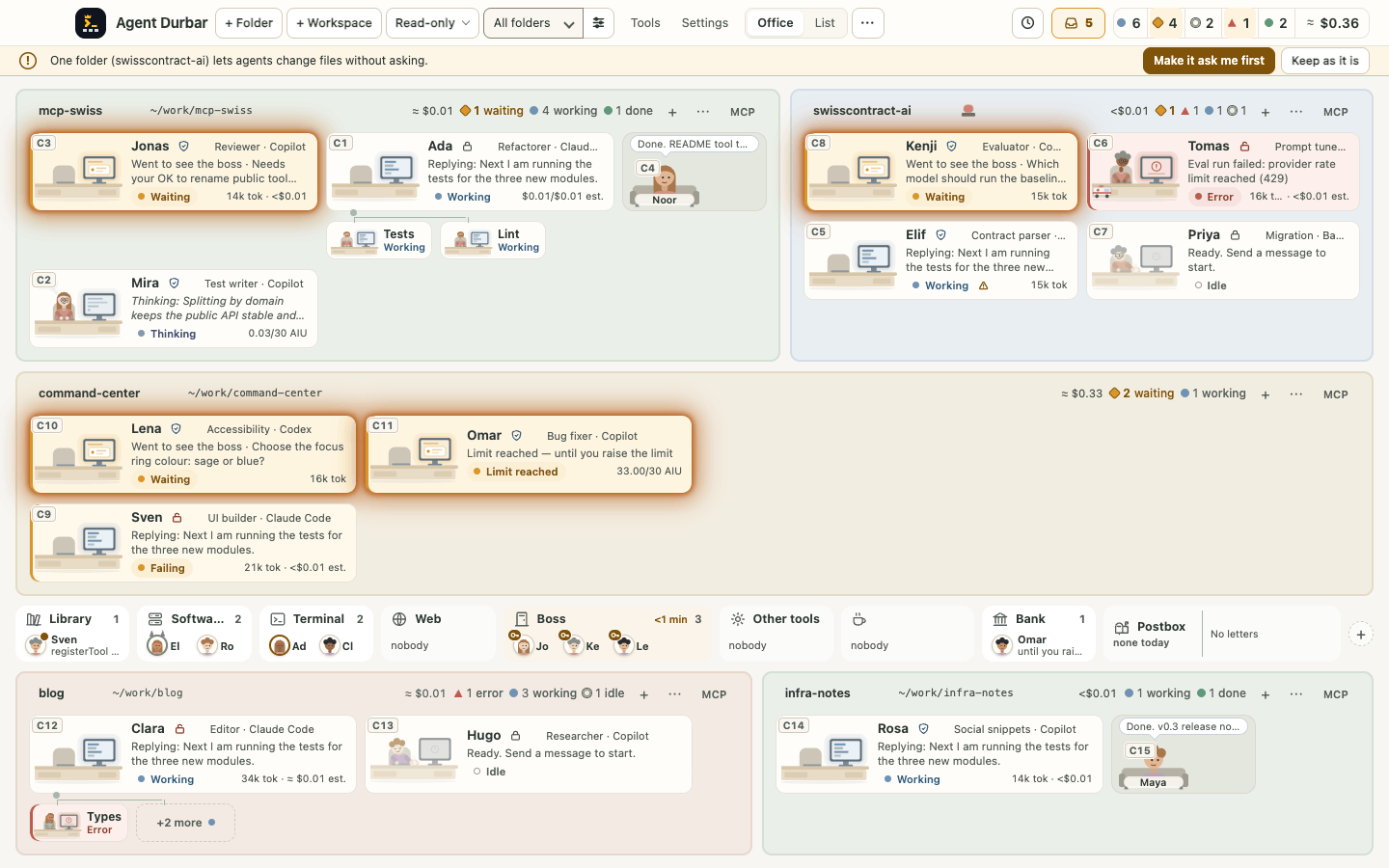
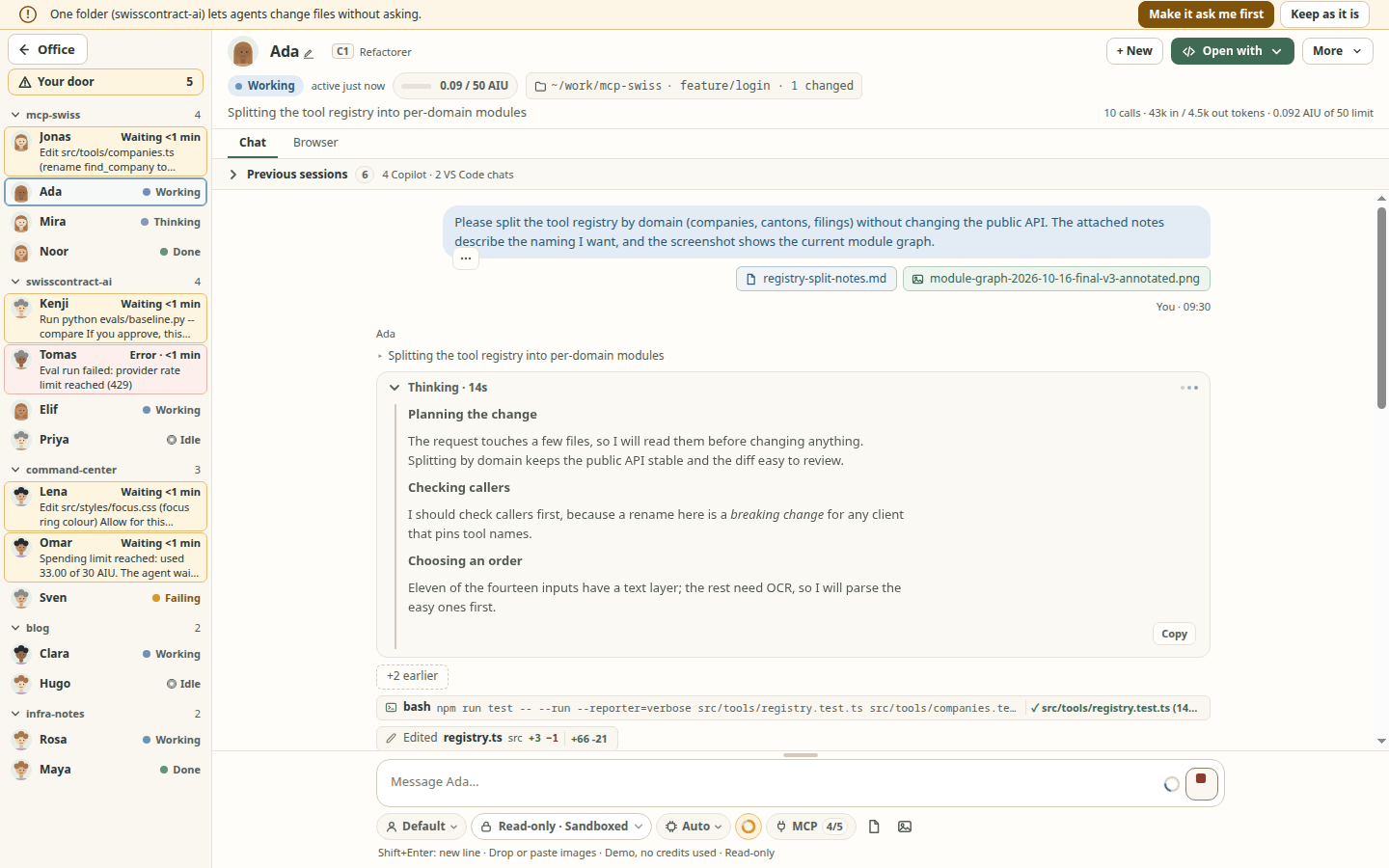
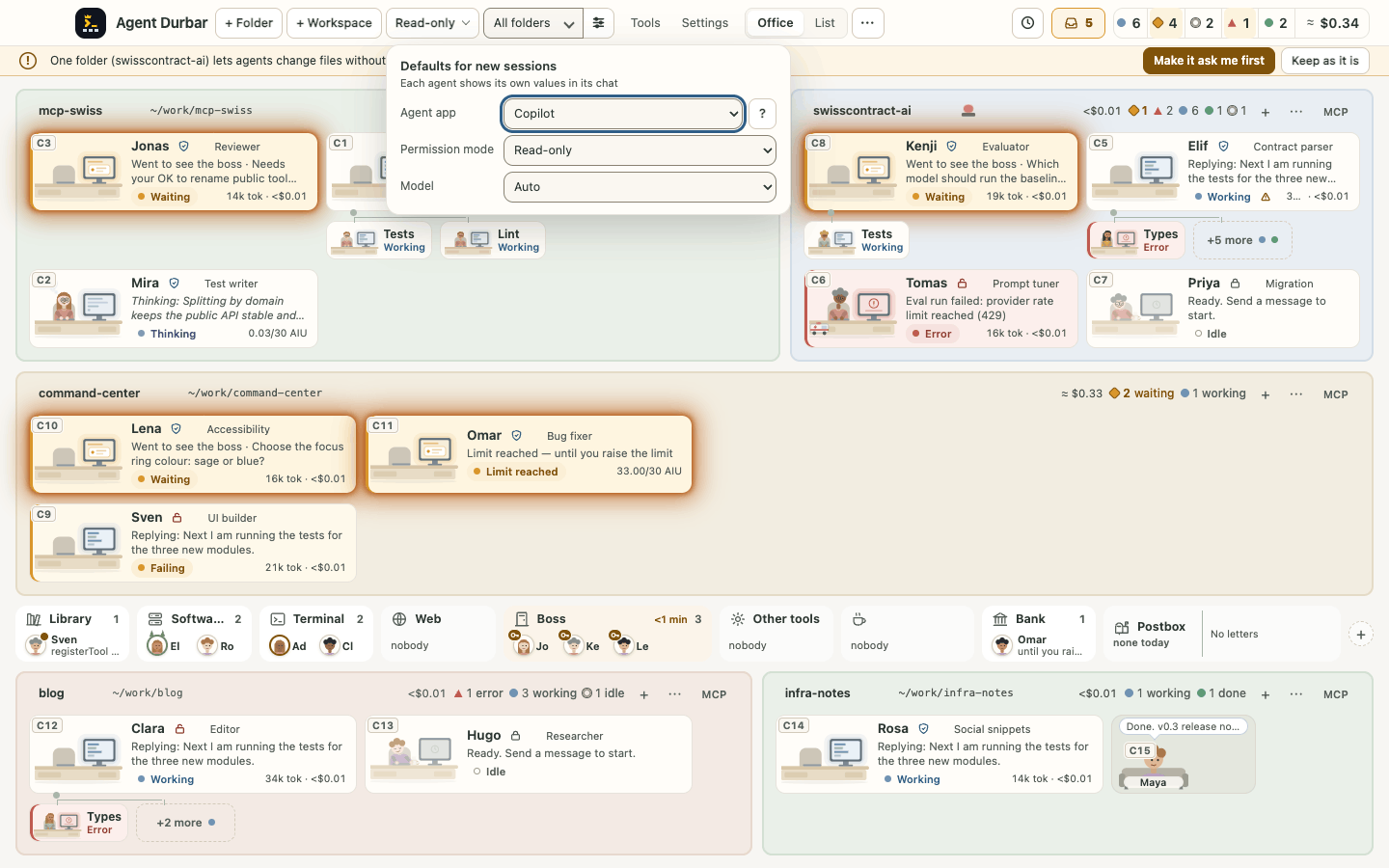
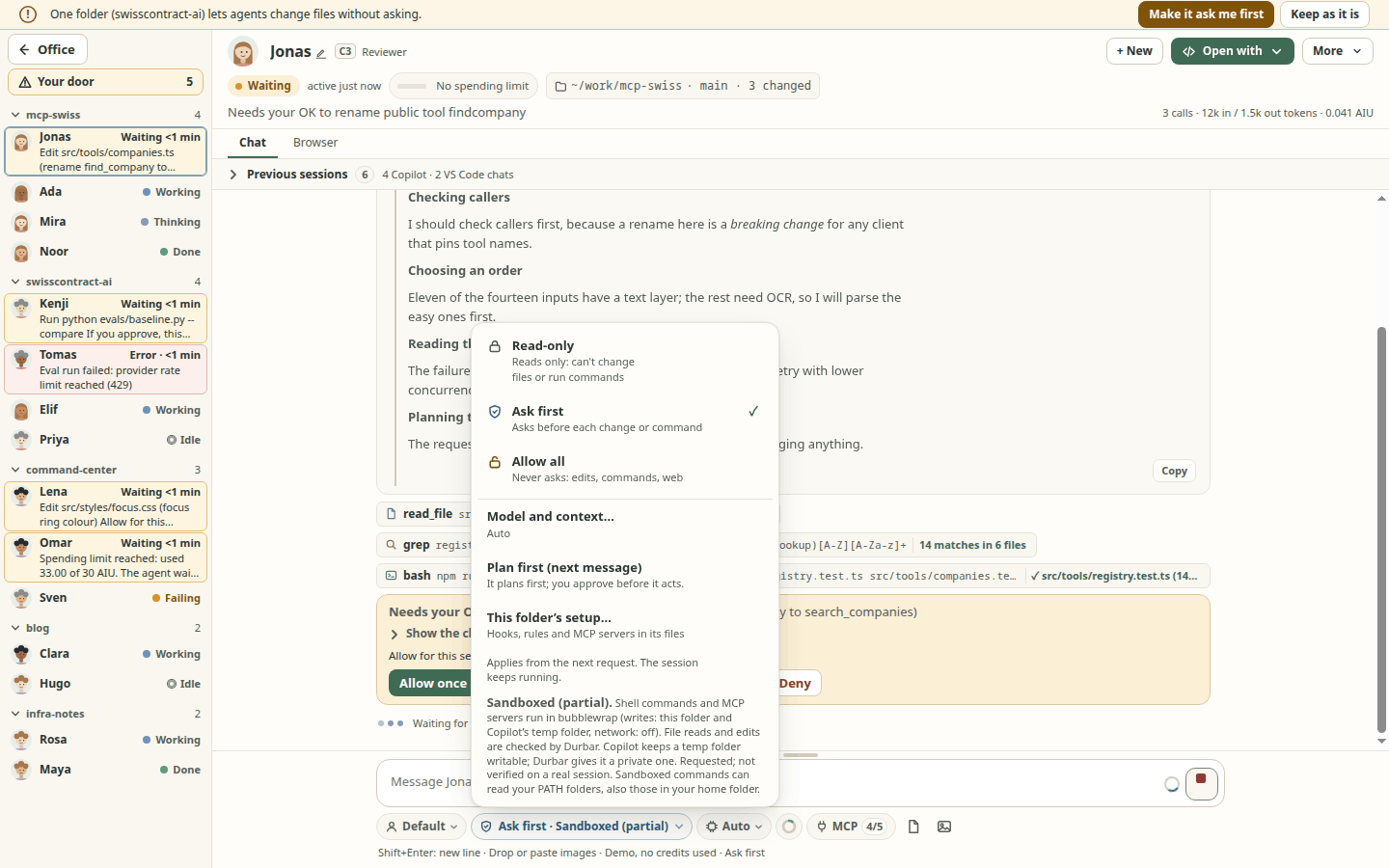
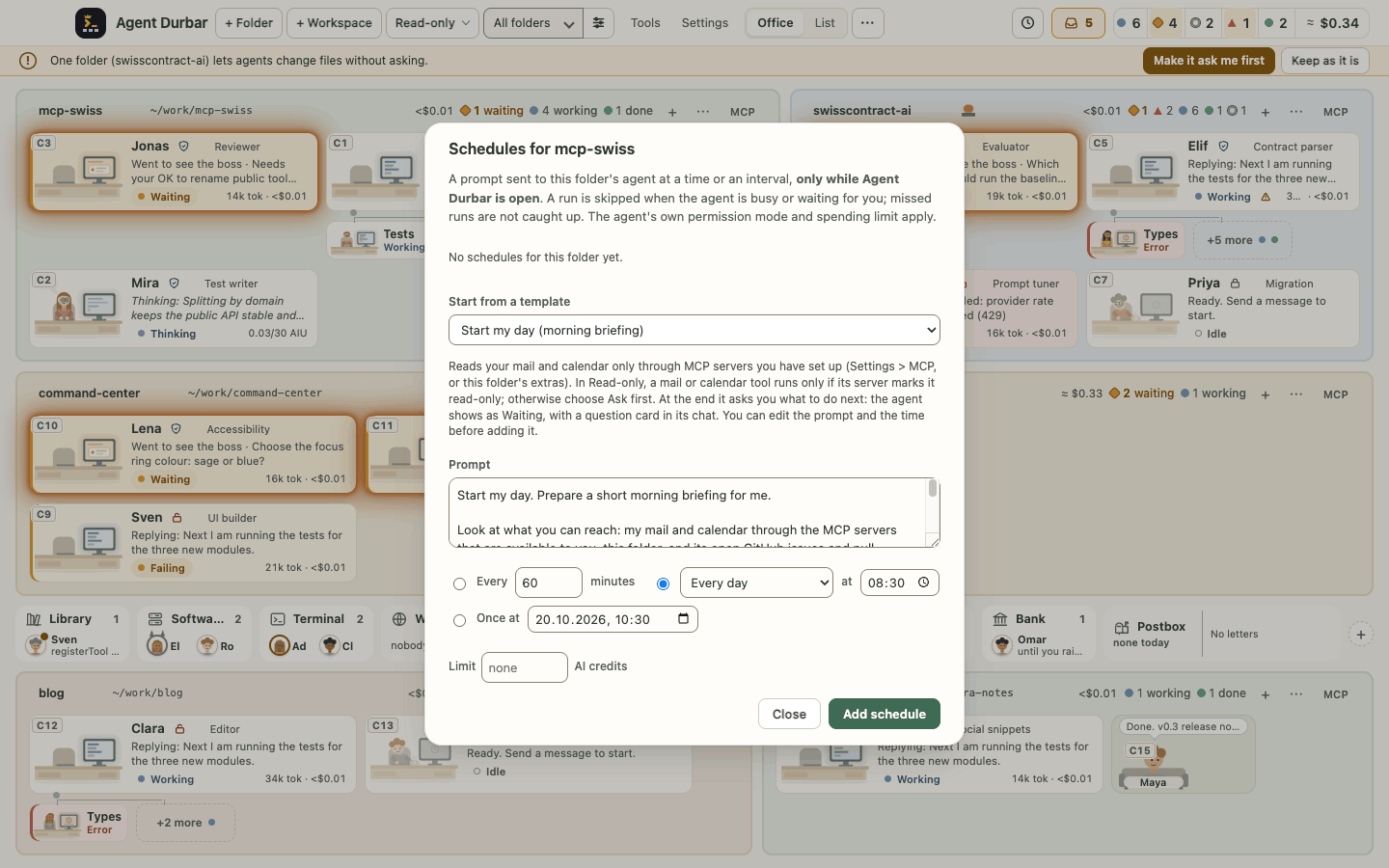
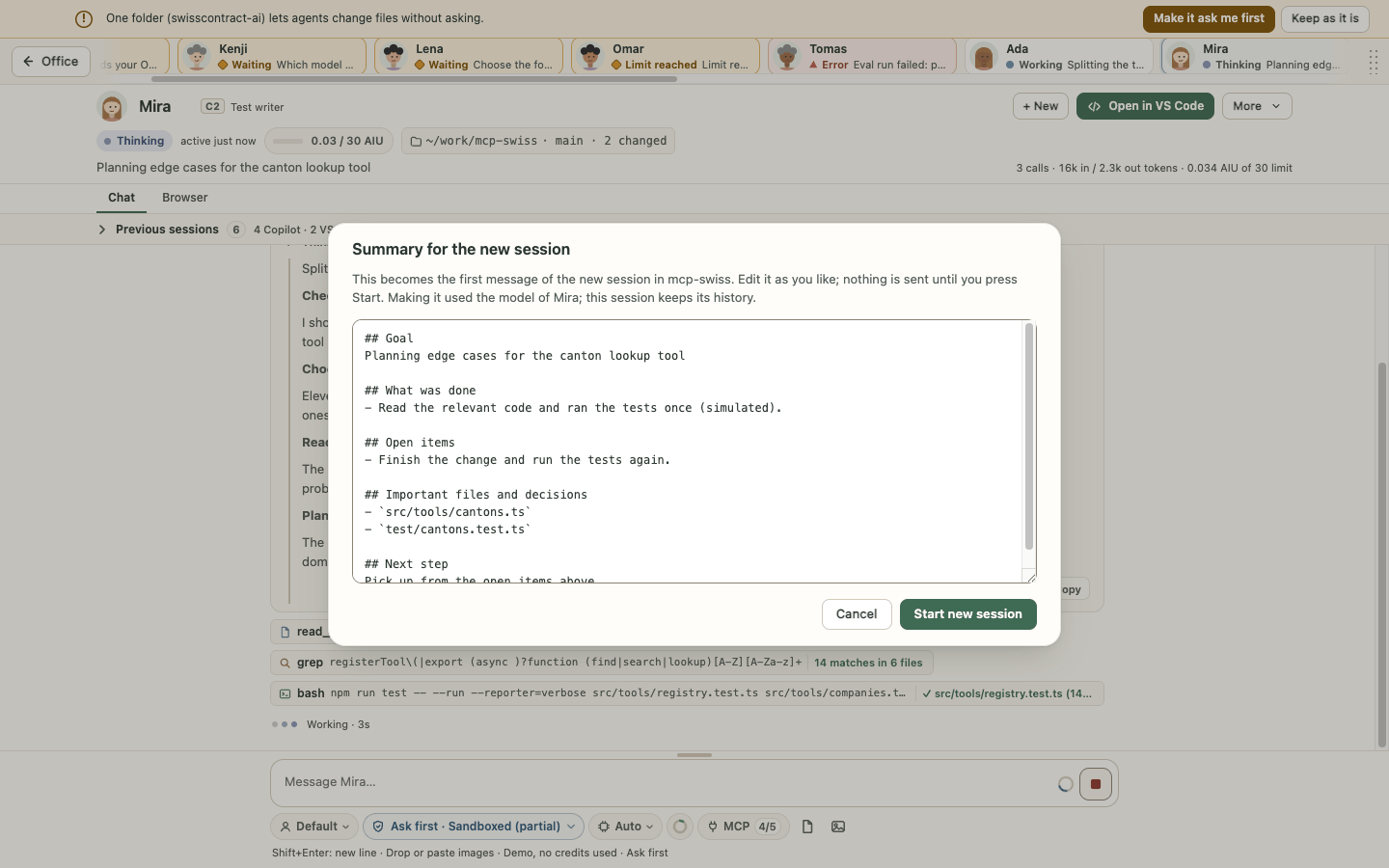
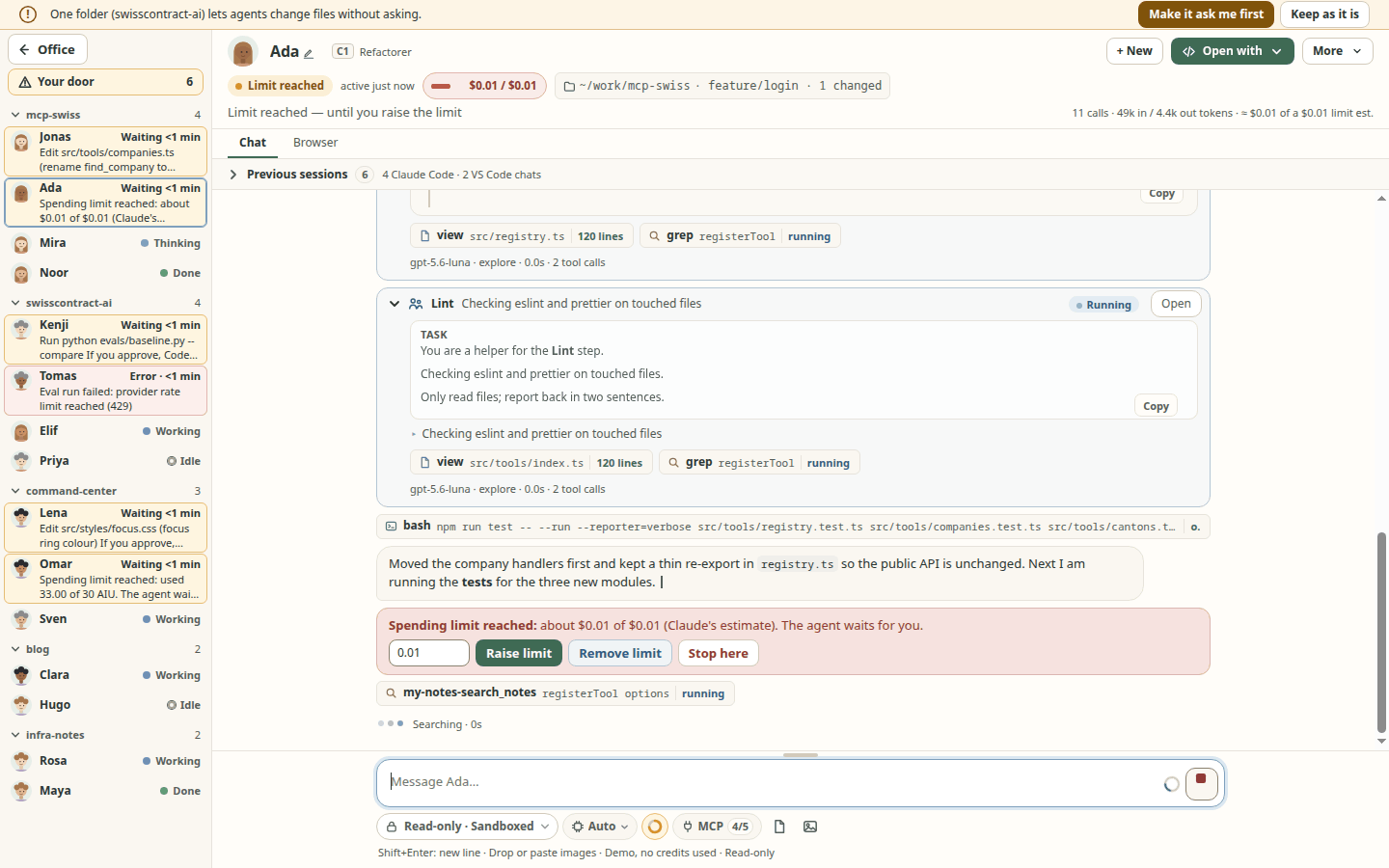
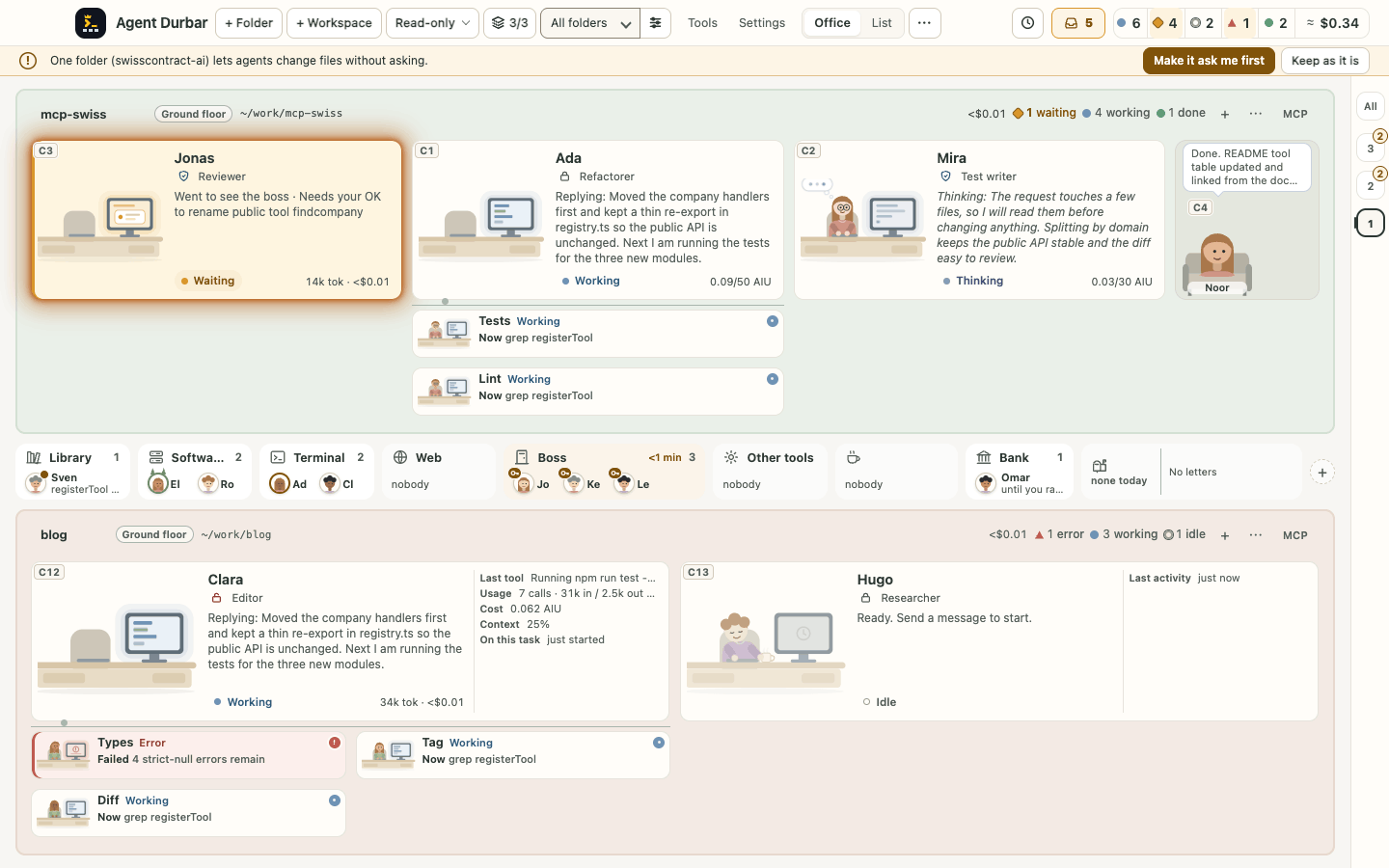
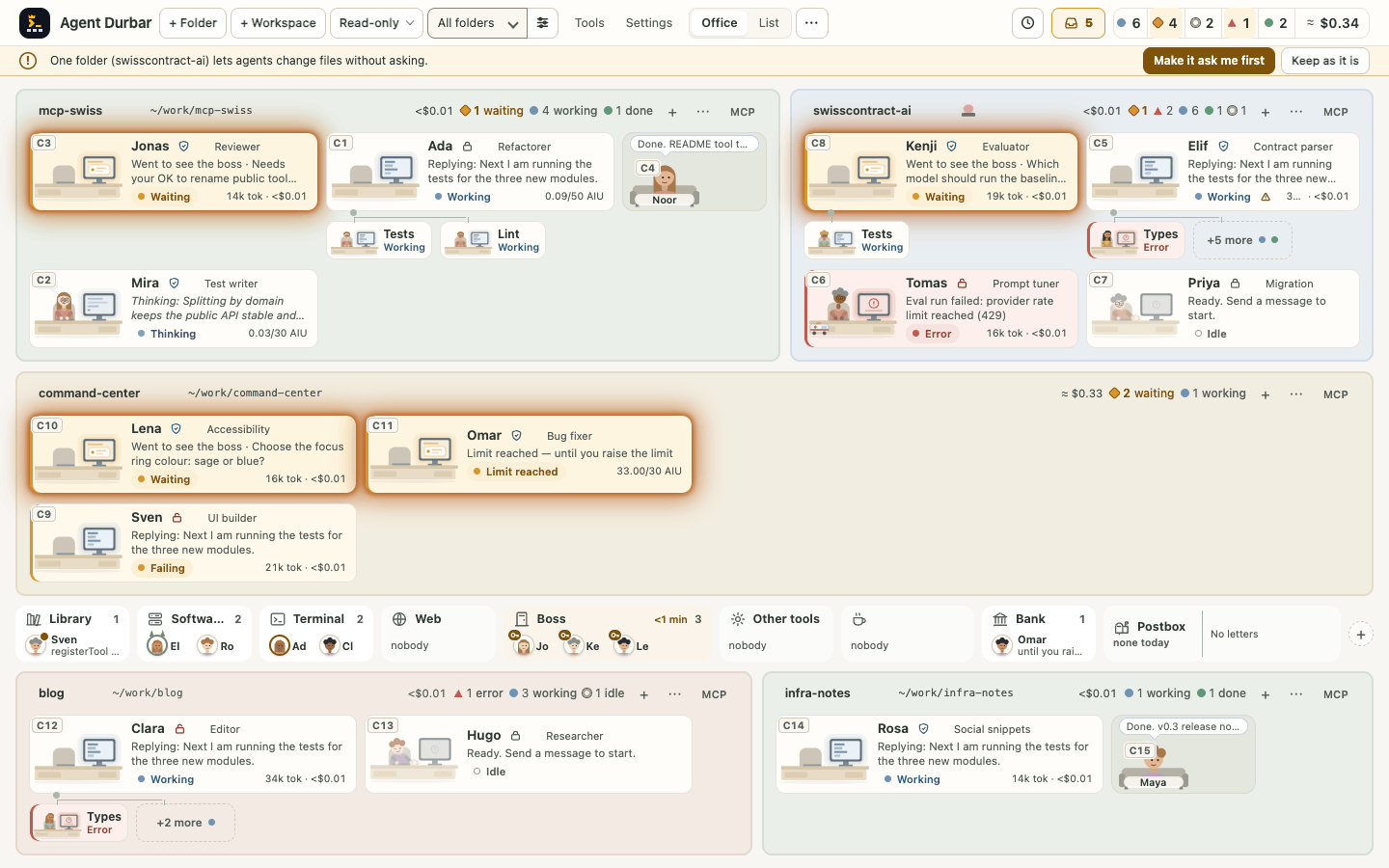
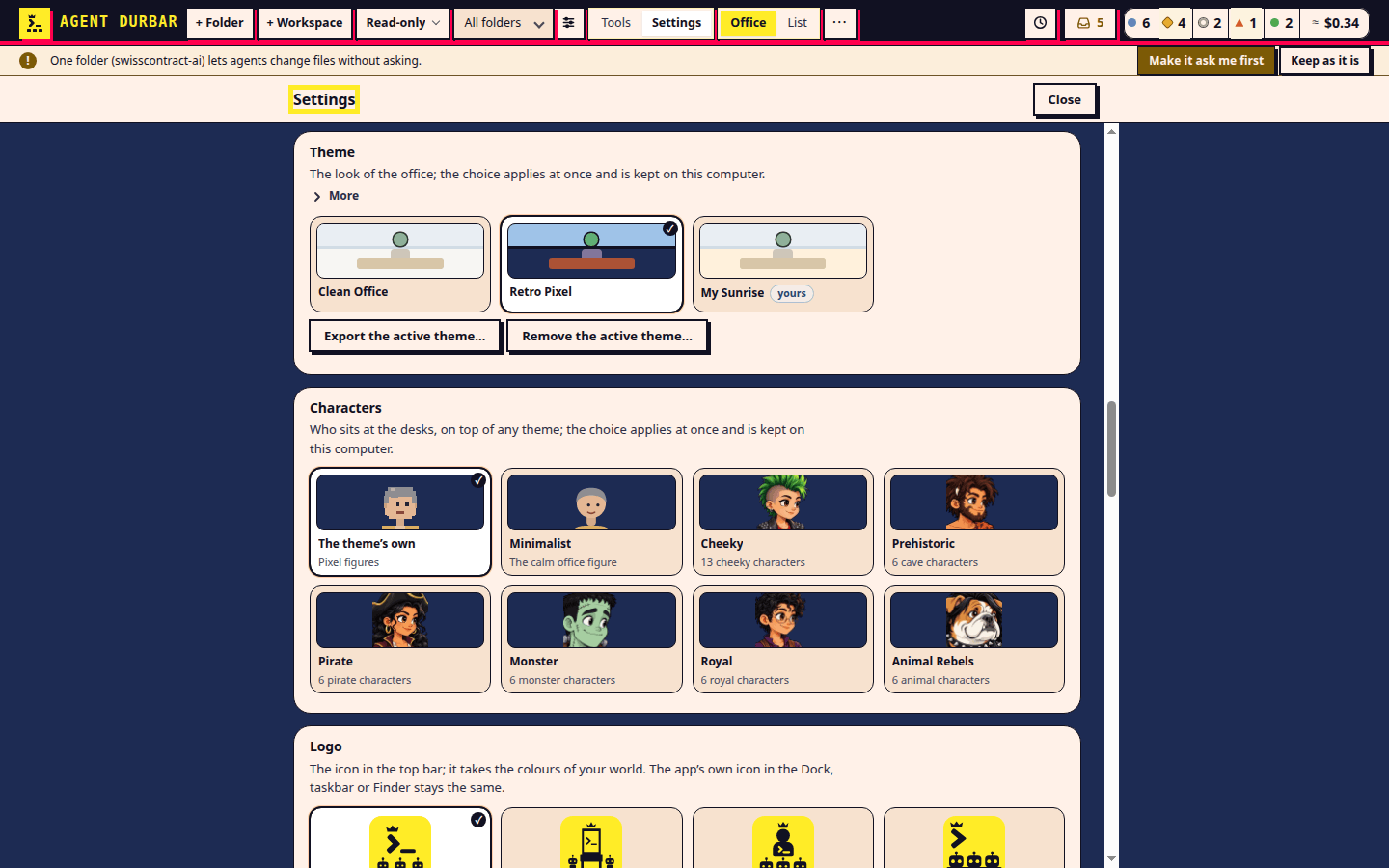
Specs index
Every behavior of Agent Durbar is specified here, one folder per feature, in the GitHub Spec Kit
layout (spec.md what and why, plan.md how, tasks.md work). The rules are in
.specify/memory/constitution.md; the workflow is in
CONTRIBUTING.md.
Features 001-010: reverse-engineered from the shipped code
These were written after the code (milestones 1-6 and packaging), from the code, README, docs and screenshots. They describe what exists today, not what was originally intended. Each requirement carries a status and, where it matters, how it was checked:
| Tag | Meaning |
|---|---|
[IMPLEMENTED] |
The behavior exists in the code (file references are in the plan). |
[KNOWN GAP] |
Missing, partial, wrong or contradicting the README/constitution. Has an open task. |
test: |
An automated test in scripts/ (run by npm test, no credits) covers it. |
sim: |
Seen on the simulator (DURBAR_SIM) or in screenshots; manual, no automated assertion. |
real: |
Seen once on a real Copilot session, as recorded in the README (not re-run when these specs were written). |
read: |
Read in the code only; never exercised. Treat as unverified. |
re-verified 2026-10-16 |
Re-checked by running the app headless (xvfb) while writing these specs. |
Index
The index tables are generated and not committed (spec 025, delta 2026-10-22), so two pull requests never edit the same lines here. Each spec keeps its own row in a specs-index comment block under the title of its spec.md (group, title, status). Read the full index on the website, or run npm run specs:index for specs/INDEX.md (git-ignored). A new spec gets its block with npm run specs:index -- --add specs/NNN-name; npm run specs:check (in npm test) checks every block. The status: is one word: draft (outline), specified (spec, plan and tasks agreed), building (work in progress or planned build tasks open), built (done; open tasks are only deferred follow-ups, [KNOWN GAP]s or checks needing a real account or an owner), released, superseded (replaced; the note names the replacement) or deprecated (removed with no direct replacement; the note says why and when), with an optional note: of at most 160 characters; specs:check refuses anything else and the detail goes into the spec's ## Changes. Release tags have no spec folder: they are rows of the release table. Each <!-- specs-index group=ID --> line below marks where a table goes; a new section adds its own.
| # | Feature | Status |
|---|---|---|
| 001 | Office view, densities, list view, filters | building: T022 narrow-desk figures, T097 one text helper; room-by-room layout search specified, not built (T167..T183) |
| 002 | Copilot adapter and normalized events | built: open: helper attribution on a real multi-agent run (T021); unmapped user-input events need clarify (T023) |
| 003 | Permission modes, approvals, session grants | built |
| 004 | Attachments (pick, drop, paste) and caps | built: open: byte cap per message (clarify first), hand-check drag and drop on macOS and Windows |
| 005 | Full-screen chat and agent strip | building: rail List view built (R1, FR-216); Plan, rail collapse, density, width (FR-190..FR-208) and T038-T048 not built |
| 006 | Folders, workspaces, sessions, history | building: T022 testable add/restore module open; T025 subfolder sessions needs clarify |
| 007 | Model, reasoning-effort and Copilot Auto routing pickers | built: T033 real model-switch check needs owner approval |
| 008 | Packaging, CI, draft releases | built: unsigned; open: signing (spec 014), arm64 and other formats, hand checks on macOS and Windows |
| 009 | Open with (VS Code editions, file manager), VS Code chat history (read-only) | built: open: real launch and VS Code store checks on macOS and Windows (T022-T025) |
| 010 | Simulator and dev/test hooks | built |
Features 011-014: 011 and 012 built, 013 run, 014 backlog draft
014 is a spec draft only (no plan or tasks yet) and needs the owner's approval (a purchase). 013 was run on a real Copilot session on 2026-10-19. 012 is built: Claude Code and OpenAI Codex are offered next to Copilot when installed; what is still open is listed in its row.
| # | Feature | Status |
|---|---|---|
| 011 | AI-credit caps and usage display | built: exhausted flow unverified on a real account |
| 012 | Claude Code and Codex adapters | built: open: real-account checks T066, T118, T124 need owner approval |
| 013 | Live verification of Stop, resume and thinking | built: T008 packaged-app VS Code check on macOS and Windows open |
| 014 | Code signing and notarization | draft |
Features 015-018: milestone 7 (spec first, then code)
| # | Feature | Status |
|---|---|---|
| 015 | Thinking that shows up, sub-agent activity | built: Claude helper text and background helpers have no real-session check ([KNOWN GAP]) |
| 016 | Safe Markdown in the chat | built |
| 017 | Room doors (collapse/expand) | deprecated: removed 2026-10-31 (owner decision: no doors, no cabins), no replacement; its requirements stay as a record |
| 018 | Change permission mode any time | built |
Feature 019: milestone 8
| # | Feature | Status |
|---|---|---|
| 019 | Global MCP servers, tool usage per agent, models and context window | built |
Feature 020: milestone 10
| # | Feature | Status |
|---|---|---|
| 020 | Tools "This session / All time", Copilot CLI MCP list first, MCP extras per folder, per-folder import from VS Code mcp.json (delta 2026-10-17, issue #7) |
built |
Feature 021: collaboration harness
| # | Feature | Status |
|---|---|---|
| 021 | Collaboration harness: Claude + Copilot Spec Kit, labels/issues/board, CODEOWNERS, stricter spec gate, ruleset | building: retro tasks T041-T049 open; T010 needs a web-UI click, T013 a gate review |
New features take the next number (/speckit.specify picks it automatically from this folder).
Feature 024: places in the office
| # | Feature | Status |
|---|---|---|
| 024 | Places in a shared lobby (Library, Software library, Terminal, Web, Other tools); main agents walk to the place of the tool they use; place per MCP server in Settings | built |
Feature 025: docs in sync
| # | Feature | Status |
|---|---|---|
| 025 | "Keep docs in sync" rule, PR template Docs box, warning-only Docs check, catch-up of README/CHANGELOG/spec statuses | built: T007 review and T017 strict marker wait on two weeks of use and open PRs |
Features 043-044: custom agents and scheduled prompts
| # | Feature | Status |
|---|---|---|
| 043 | Custom agent per session (issue #127) | built: T011 Claude and Codex mapping is tracked in spec 012 |
| 044 | Scheduled prompts while the app is open (issue #125) | built: Copilot's own schedules read-only; Claude Code and Codex have none |
Feature 030: change model and context window inside a session
| # | Feature | Status |
|---|---|---|
| 030 | Switch model, effort and context tier of a live session (chat header and office card menu), see window and % full, compact, start-fresh hint, per-folder default; simulator first, adapter-neutral | built: open: long-tier price above the default window, compactionDecision values, a free plan without requireAvailable |
Feature 035-040: themes (data-only packs)
| # | Feature | Status |
|---|---|---|
| 035 | Theme foundation: data-only theme packs, manifest, token map, art slot registry, UI styles (2026-10-18), Clean Office fallback | built: T013 owner review of the five looks |
| 036 | Clean Office pack: every scene colour a semantic token, scene words, data-* ids, per-theme motion presets |
built: T008 stage D check ran as a one-off harness, not a script |
| 037 | Corporate theme (glass/steel) + Settings theme picker with live switch | deprecated: built-in Corporate removed 2026-10-31 (spec 035 FR-017), no replacement; saved choices moved to Clean Office |
| 038 | Retro pixel theme: 8-bit palette, palette pixel maps in art slots, arcade motion | built |
| 039 | Durbar court styles: Indian, European, Japanese (head accessory slots, court words) | deprecated: removed 2026-10-31 (spec 035 FR-017); its replacement, spec 102 kingdom worlds, was discarded 2026-11-01 (spec 021 FR-071) |
| 040 | User themes: userData/themes/<id>/manifest.json, import/export, validation |
built: the AI maker and Import are retired (FR-031); saved themes work, Export and Remove stay |
Feature 034: agents show how they are doing
| # | Feature | Status |
|---|---|---|
| 034 | The figure follows the context window (heavy 70-90%, grumpy monster above 90%), trouble signals (ambulance, faint, dizzy, impatient), Serious mode | built: not checked on a real session |
Feature 033: floors
| # | Feature | Status |
|---|---|---|
| 033 | Floors: group rooms (folders) and switch a whole floor off so it leaves the office, the lobby and the status counts | built |
| 041 | Durbar MCP server: read the office and change settings (mode, caps, folders, MCP extras) from the user's own MCP client; off by default, local only, every change confirmed in Durbar's window, never exposed to Durbar's own agents | building: read tools and masking built; write tools and later phases open (25 tasks) |
Feature 045: security and quality sweep
| # | Feature | Status |
|---|---|---|
| 045 | Security and quality sweep before alpha.6: uniform place ids, one-pass unescape, Windows cmd.exe from SystemRoot, window navigation and web-permission hardening, alert triage |
built |
Feature 046: release v0.1.0-alpha.6
| # | Feature | Status |
|---|---|---|
| 048 | Office assistant: ask the whole office (who waits, what finished, usage by folder and harness) through a free local query layer, plus an optional model layer with no tools (issue #130) | draft |
| 049 | Profiles: separate offices per profile (Phase 1), then separate sign-ins through each harness's own home folder (COPILOT_HOME, CLAUDE_CONFIG_DIR, CODEX_HOME), never a token in Durbar (issue #131) |
draft |
| 050 | Project website on GitHub Pages, generated from the README, the specs index, screenshots, the CHANGELOG and the latest release; deployed by CI (issue #293) | built: live; T010 later: a page per built spec, screenshot refresh, custom domain |
| 051 | Harness setup inside the app: Settings > Harnesses with install, update and sign-in (issue #299) | built |
| 052 | Usability pass from eleven rounds of AI persona reviews (about 37 personas): answer bar and inbox, restore strip, palette and Cost view, one word per concept, interaction polish, accessibility, calmer visuals, notifications, activity log, Windows first run, house rules, plain words, macOS conventions, daily use, pre-release fixes, a one-row top bar, New in the chat header, + Folder / + Workspace first in the top bar and a Mac File menu (FR-164), a help and UI text pass: wrapping, widths, menus, tooltips, long names, chat, dark-theme tokens (FR-165..FR-171, #464), a Codex write card with its files and diff (FR-172), the Needs you side panel (FR-191..FR-205, specified, not built) | building: rounds to 11 built; accessibility tasks T036-T044 and round 3 open |
| 054 | Remote control and chat channels: Copilot remote steering from github.com and GitHub Mobile (Phase 1); Claude Code Remote Control from claude.ai and the Claude app (Phase 2); Claude Code channels wizard out of scope, moved to idea #485 (owner 2026-10-21) | built: Phases 1-2; the Codex connected-host flow is unverified ([KNOWN GAP]) |
| 056 | Continue a VS Code chat in Durbar: from the read-only VS Code chat view (spec 009), a new session in the same folder with a chosen ready agent app; the first message is a reviewed, editable, redacted copy of the chat under an estimated 30,000-token cap, with a size and cost estimate in the app's unit; option B (summarise first) later and owner-gated, option C rejected (issue #344) | specified: spec, plan and tasks agreed; not built |
| 057 | Briefing follow-through (issue #128): safe mail and calendar reads for Start my day (the template says Read-only, but Read-only denies MCP), proposed actions in the Needs you inbox (Approve, Edit, Reject, Later, Hand to…) and their progress | draft |
| 058 | MCP servers in a session (issue #349): plain state words and how servers start per agent app, the masked failure reason with a hint, per-server Restart where the agent app has one (Copilot, Claude Code), Restart session with these servers, Open log folder (reveal only) | building: restart, logs and sign-in tasks open; masking and state words built |
| 059 | Rename sessions (issue #372): a short name of the user's own for any main session, shown on every surface (card, list, chat header, strip, inbox, notifications, Schedules, Previous sessions, activity log) instead of the runtime title; also saved in the agent app (Copilot name.set, also for a session that is not open through a prompt-free resume; Codex thread/name/set; Claude Code --name at the next message); Rename… in the chat header More menu and the card menu, and the Previous sessions row menu (spec 006, #379) |
built: T050 real checks wait for the owner's go-ahead |
| 060 | Platform parity: install, find and run the agent apps on macOS, Windows and Linux (official installers without Homebrew or Node, version-manager paths, Windows prerequisites, Linux AppImage needs, folder identity) | building: T040, T050, T060, T061 open |
| 061 | A folder's own agent setup (MCP servers, hooks, permission rules) is used by default and shown when the folder is added, for all three agent apps (issue #289) | built |
| 062 | End-to-end checks with real CI accounts on every supported OS: install, sign in, models, one turn through Durbar's adapters; one platform list for OS workflows | built: real runs green on 3 OSes 2026-11-02 (#856); daily schedule back; Windows has no OS sandbox for Claude or Copilot on the runner |
| 063 | Folder status in the chat: git branch and uncommitted changes on the folder chip, a click lists the changed files (read-only) | built |
| 064 | Send one message to several running sessions (top bar ⋯ or Ctrl+K), each with its own app, mode and limit; busy ones can't be picked | built |
| 065 | Undo an agent's file changes per turn: a copy kept just before each file-edit write, a previewed and confirmed restore, refusal when a file changed since, undo of the undo (issue #431) | built: Codex unit-tested only |
| 066 | Plan first: for one message, the agent proposes a plan in its app's own plan mode and you Approve, Revise or Reject; the approved plan still runs in the folder's mode (issue #429) | built |
| 068 | Coffee break when a usage limit is reached: the agent waits in a coffee corner with the reset time ("resumes at 14:30", or "until you raise the limit" for Durbar's own cap) and comes back, resuming its turn by itself or after asking, never past a Durbar limit and never probing | building: T023 review fixes of #640 open |
| 069 | Global MCP servers written to the agent apps' own lists (Copilot CLI, Claude Code, Codex) after a per-file confirmation with backups, harmonize the lists, source chips, switch/Restart/Sign in/Remove on every server row, a server's tools on expand (owner 2026-10-21) | built: parts 3-4 only partly run on a real account |
| 070 | Full theme tokens: typed tokens for fonts (system allow-list, no downloads), title weight, radii and shadows; the people's clothes and hair; cup and laptop slots; per-value fallback with a note, pair-wise contrast fallback, hostile values refuse the pack; AI maker extended; a ratchet on the renderer's colour literals | building: phase 1 built; T020 open; phase 3, Flat's modern look (#524) and world surfaces with Stone and 24 px (FR-068..FR-079) specified |
| 072 | Self-paced loops (issue #526): a prompt looped on one session; the agent says when its next pass runs or stops it, within Durbar's limits (min/max delay, passes, end time, credit cap); a kind of scheduled prompt (044), shown in Schedules, on the desk and in the Postbox | building: phase 1 core and main wiring (T001-T008); loops switched off (loopSupport) until the UI (T010-T013, with T042) turns them on |
| 073 | Slash suggestions: / in the message box lists the folder's, the user's and the app's skills, commands and prompt files; a folder or user entry is sent as its file's text |
built: open items are all [KNOWN GAP]s |
| 074 | Keyboard navigator (issue #548): one configurable shortcut (default Ctrl+F, ⌘F on a Mac; Ctrl+J until 2026-10-23) opens the command palette in "Go to" mode; floor, F folder, agent, or C and a number for a numbered chat; the chat opens with the cursor in the message box; follow-up #587: opening any chat puts the cursor in its message box, Ctrl+A (⌘A) opens Needs you and Ctrl+Backspace (⌘⌫) goes back to the office, both only outside text | building: T026 mutation check and final run not ticked |
| 075 | Daily screenshot refresh: a workflow captures the simulator on Linux, Windows and macOS when main changed and keeps one "screenshots: refresh" PR up to date; a text gate replaces image review | specified: spec only, nothing built; blocked by the screenshot sweep script |
| 076 | Managed configuration for organizations: one admin-only config folder (policy.json, MCP list, icon, theme pack) sets the display name and icon, allowed agent apps, MCP lists and endpoints, an agent/profile/skill registry, OpenTelemetry, theme and custom LLMs with admin token pricing, plus the accepted additions (mode lock, proxy and CA, feature switches, installers, signing, spend caps, folder rules, updates, registry/MDM sources, signed config, audit log, retention, rebrand build, legal notice, version pins, endpoint auth, sign-in, vendor settings view); everything set there is locked; a narrow-only user layer; bad config fails closed and visibly | draft |
| 077 | Cheeky crew (issue #558; a Characters choice since issue #814): a built-in scene kit with 13 AI-generated, person-reviewed portrait characters (3 poses each), picked at random per session and kept across restarts; status cues and spec 034 moods unchanged | built: experimental; a Characters option in Settings since 2026-10-28 |
| 080 | Session browser (issue #556): a Browser tab per session with its own in-memory profile, wiped at session end; chat links open there; later the agent drives it through a per-session durbar-browser server (no debugging port), gated per mode; per-folder login opt-in last | building: Browser tab, chat links and page tabs (#910) built on the simulator; 28 tasks open |
| 081 | Agent-app updates (owner request, issue #662): Settings > Agent apps shows "installed X, latest Y" per app, checked in the background at every Durbar start and on "Check for updates" (owner decision Q1 = C; organization policy can turn it off); a new version gets a badge and one toast; Update runs the updater of the source that installed the copy Durbar uses (no shell, argv, native confirmation, masked output); open sessions are warned about, ended or waited for; failures (admin rights, managed machines, locked files on Windows) say what to do | building: built on the simulator; Linux real check T040 done; Windows T041, macOS T042 and the Mac PATH check T043 open |
| 083 | Notes (issue #699): save a message, a selection or a typed idea per folder and carry on with it; a Notes drawer in the chat (Ctrl+Shift+M), insert with one click or from the / list, a header count and a saved-message icon; stored masked in local data (0600), opt-in mirror to .durbar/notes/notes.md per folder |
built: All built except FR-047 ([LATER]); simulator and unit tests only, no real agent session; the [KNOWN GAP] limits stay |
| 084 | Contacts (issue #701): a local contacts book (0600) with favourites; send the message box to a person from any chat via an @ chip or a Contacts drawer, always through a preview with a secret block; opens Teams, email, Slack or Telegram with the text (C) or sends through the user's own MCP server with a single-use broker ticket, held in every mode (A); opt-in Teams import; agent drafting |
draft |
| 085 | End-of-session summary card in the chat: files changed, +/- lines, commits, duration, cost from Durbar's own measurements (issue #604) | built: chat card, lounge line, briefing line and Copilot's own totals; Claude Code and Codex vendor numbers are known gaps |
| 087 | OS sandbox floor (issue #611): under Read-only and Ask first Durbar also turns on each agent app's own OS sandbox (Claude Code's bash sandbox, Copilot's local sandbox; Codex's read-limited profile already does it), so a command that slips past Durbar's checks still cannot write outside the folder or reach the network; Allow all keeps the app default; the chat header says Sandboxed or Not sandboxed, and why | built: simulator and fakes; real checks on macOS and Windows open (T061, T062) |
| 092 | Floors as places (issue #782): each floor that is on is one whole screen of a vertical building; a lift button panel slides the view to another floor (about 300 ms, instant with reduced motion); attention from other floors shows on the lift buttons; PageUp/PageDown and jump-to-floor from the inbox and notifications; an All floors choice on the lift shows the whole building on one screen | building: phases 1-2 and All floors built; slide and jumps (phases 3-4) not built |
| 093 | Create a folder from + Folder (issue #805): clone a repository (https or ssh), a new local repository (git init) or an empty folder, in a parent chosen with the system picker; starts in the top bar's mode like Add existing (default Read-only) | building: phases 1-2 built; phase 3 (network check, converge) open |
| 094 | Terminal tab (issue #807): a Terminal tab next to Chat and Browser in a chat; one terminal per folder, shared by the folder's chats, started in the folder with the user's login shell; it keeps running until its close button, folder removal or app quit (a quit with a running command warns); user-only, agents never see it; no output logged or saved | draft |
| 095 | Search conversations (issue #877): a search box in the top bar finds the text of open and previous sessions (title, your messages, the agent's replies; no tool output; earlier Copilot and Codex sessions by title only); results are List rows with the matching line highlighted; opening one jumps to that message; local only, masked, streamed with cancel | building: phases 1-2 built, node-tested (core, readers, masker, scan, IPC, scope, sim fake; T003, T010-T018, T020-T027); no window yet (phase 3) |
| 097 | Real office mode (owner request, Vikram 2026-10-30/31): a realistic front-facing open-plan office as a second office mode beside flat (default), live screens, animated people, status lights; folds in #692 | building: P1, P2 (screens, zoom, motion) and the world seam built, no second world offered; P3 and crews' worlds not; chat materials and attention light bar specified |
| 098 | Experience contract (team decision 2026-10-31, all three sides): a small registry of world moments only, three surface kinds (world moment, tool surface, outside the world), a world matrix run weekly and as a small path-filtered PR subset, one rolling world-coverage issue, a block contract for world packs; enforced by tests, not rule text | building: registry seeded (26 world moments, 9 missing per world); world matrix built, every moment still planned, so it checks no cell yet |
| 099 | Autopilot mode: a fourth safety mode above Allow all, per session and confirmed each time, only for agent apps that support it; the agent's questions are shown but not waited on, the app keeps going after each turn until the task is done, up to a continuation limit (default 5) and an optional spend cap; Stop ends it; plan approval may offer Approve and run on Autopilot (spec 066 delta) | draft |
| 100 | MCP context cost (owner 2026-10-31): each MCP server's tool-definition tokens (the agent app's own figure where it reports one, else estimated) in the MCP chip and dialogs, a calm warning at 15 % / 30 % of the session's window naming the heaviest servers, a compaction hint, never changes anything by itself | building: phases 1-3 built; real check T031 done 2026-11-02 (three fixes); the per-folder off T032 to do |
| 101 | New logo family: the human user is the sovereign, agents are the court. Four base icons (vector, hand-tuned at 16, 20 and 32 px), a Settings picker, a top bar that follows the world's flat palette, build icons fixed at icon 1 | building: phases 1 to 3 built (icons, picker, palettes); painted previews (phase 4) not built |
| 102 | Worlds and character sets as two flat lists of untrusted data packs (owner decisions, Vikram 2026-10-31; #932, #933): any set in any world, downloaded on demand with a plain internet notice from an extensible source, made in the app or by a prompt pack, and shared; one validator for all | building: phase 1 built (zip reader, pack validator; no caller, UI or network yet); phases 2 to 8 not built; arcade FR-250..FR-270; ship waits for 097 FR-179 |
| 103 | Pre-review bot (team tooling on the Claude Agent SDK) | draft |
| 104 | A new project website in the product's own look, story and explainer videos, a README poster and a daily agent blog | building: phase 1 (guards: T002..T006) built; site, videos and posts not; blog rule (021 FR-076) in force on Ruben's yes to Q10 |
| 105 | See a session's files and images next to its chat: image preview first, then a drawer with a list and a viewer (CodeMirror 6, lazy), view by default, quick edit, full-screen and collapse, with confinement in main | draft |
| 106 | Brain view (owner request, Vikram 2026-11-05/06): a transparent point-cloud brain and a ring of seven tool glyphs per agent, docked in the chat's right rail above Your door, In front on request, in the office beside people who need you; loop warning with Look and Stop, turn map, habits, stale-read alert, screen share, masking and accessibility contract | building: spec, plan, tasks, 8 mockup stills; Q1..Q4 decided 2026-11-06 (constitution 1.2.0); P1 G1 built (state reducer, loop rule, surface formatters; no UI yet) |
| 107 | Help menu (issues #433, #521): What's new after an update from notes shipped with the app, and Report a bug as a prefilled, masked bug form the person opens; nothing sent by Durbar | specified: spec, plan, tasks; Q1..Q5 answered by the owner 2026-11-09 (proposed defaults); review round 1 fixed; nothing built |
| 108 | Your own Claude Code instructions and agents (issue #840; owner 2026-11-02 and 2026-11-09): one global Settings switch, off by default, for the user's ~/.claude/CLAUDE.md (contained imports) and ~/.claude/agents as sub-agents, picked from a checklist (nothing ticked by default); allow-listed reads, private launch files, no widening | specified: spec, plan, tasks; Q1..Q8 answered 2026-11-09 (Q7 B, Q8 B 07:49 UTC); Paco's round-2 safeguards A..G (15:40 UTC) in the requirements |
| 110 | MCP server catalog and Paste a config (owner 2026-11-09, issue #539): a reviewed built-in list of official servers (durbar-mcp-list-v1) prefilling the add form, a pasted mcpServers snippet parsed in main as untrusted and shown masked before saving, Import from VS Code into the agent apps' own lists; Needs sign-in until #364, no new sign-in code | specified: spec, plan, tasks; Q1-Q6 answered 2026-11-09, CODEOWNERS line approved; security review 2026-11-09 fixed; nothing built |
| 111 | Team templates (issue #1306, owner 2026-11-10): a saved team of agents (name, role brief or custom agent, app, model, effort, permission mode, cap, character) that creates a room in one click, lazily; save a room as a template; role and model on desk and chat header in every world; starter templates; export and import as a file, validated in main as untrusted | draft |
| 112 | Search in Settings (issue #1471, owner 2026-11-10): a search field filters the Settings page and its section list to the sections that hold the words, marks them, Cmd/Ctrl+F and Escape | draft |
What's new
v0.1.17 (release, 2026-11-12)
- A helper's button that has the keyboard focus is not retired (spec 005 FR-242, issue #1483): a finished helper whose button held the focus (its head in the Real office with
+Kopen, its tile in the Open office, its row in the list) could be retired by the next end and the focus fell to the page. It is now kept while its own button has the focus (as the block in the chat already was) and retired by the next end once the focus leaves. Checked bycheck-helper-retention(tile in the flat office, row in every world, head withCHR_WORLD=real; mutants without each part of the rule fail). - Fixed: UI checks that wait on the window focus no longer fail when another check's window is open (spec 008 FR-210, issue #1498): with the suite's default of two drivers at once,
shots-097-screensfailed 5 of 5 runs on a Mac (timed out waiting for the window active again) and passed 5 of 5 one at a time.scripts/ui-suite.jsnow runs entries markedfocus: true(shots-097-screens, both worlds, andcheck-097-hover-card) alone, after the others, when the windows share a desktop (macOS, Windows, Linux with a display); Linux under xvfb is unchanged. Checked bytest:uisuite; Linux and Windows runs not done. - Windows: a
.cmdprogram in a folder with spaces now starts (spec 009 FR-029, issue #1525): VS Code'scode.cmd, npm'snpm.cmdand other.cmdprograms went throughcmd.exe /d /s /cwithout the outer pair of quotes that/sremoves, so a path such asC:\Program Files\nodejs\npm.cmdbroke at the first space. One shared helper now builds that line for all three routes and still refuses characters cmd.exe could interpret; an update check that is refused this way now says This command cannot be run safely on this computer. instead ofexit EUNSAFE. Not run on Windows by the author; Windows CI runs the real case. - A Markdown-escaped token is hidden on the permission card (spec 012 FR-180, issue #1490): a token written with an escape (
ghp\_…) was shown in a permission request's summary, while the desk already hid it. The label mask now hides such a token in a command, a tool request, the activity log and the live readout, and shows the rest as written; when it cannot be sure, the card shows its neutral words. - An escaped token is hidden everywhere the shared masks run (spec 012 FR-181, issue #1541): a token written with a backslash inside (
ghp\_…,g\hp_…,sk\-proj\-…) was shown, whole or in part, in the "Approve for this session" label, the activity log and its export, the brain view's step targets, the MCP config view and copy preview, and the read tools' answers to the agent. These now hide it and keep the rest of the text as written. Text glued after a hidden environment value ([redacted:NAME]_<rest>) is now hidden like text glued after any other mask, also when that text is written with a backslash. The approval card hides a token cut by an escaped line break (\n) the same way. The reply line on a desk and the live readout hide the rest glued after an escaped token (ghp\_…@…) as the other surfaces do. A tool name longer than 256 characters is shown as "tool". Known, not fixed here: the desk's mask slows down on text with very many hidden-value markers (issue #1593). - The macOS title-bar check expects the Settings title where Settings puts it (spec 052 FR-097, issue #1458): the check wanted the title on the centred column, but since the Settings section list the title lines up with the list-and-page block (x=194 at 1440 wide), on purpose. The rule and the check now say so, and the check also fails a title under the traffic lights. Test-only, no change to the app.
- check-crew waits for the crew scenes before it reads them (spec 077, issue #1460): the
dark fixtureentry of the Cheeky Crew driver failed on the macOS and Windows CI runners at "grown desks draw portraits (0)" and "crew scenes on screen (0)", and passes on a Mac and on Linux. The driver now waits at most 5 s after picking the crew for the crew scenes to be drawn, then runs the same checks unchanged. The cause on the runners is not proven and the fix is not yet seen on them; it needs a nightly. Test-only, no change to the app. - Same-file checks compare 64-bit file IDs exactly (spec 083, issue #1491): the notes store, the world store, the machine
policy.jsonread and the agent-file read on Windows now read inode and device numbers as bigints, so two different files whose NTFS file IDs differ only in the last bit (above 2^53) are no longer taken for one. Nothing stored changes. Not run on Windows or macOS; checked with stubbed IDs on Linux. - In the Retro arcade, the first draw no longer puts a request pill over a name plate (spec 097 FR-358, issue #1434): for about half a second after the office appeared at 1280x800 the limit and inbox pills lay over plates. Checked with
check-097-slip-plateson the simulator; not run on a Mac. - check-097-crews waits for the lobby's visits to settle before it reads the log (spec 097, issue #1459): the Characters driver failed on CI at
sets/rebels/owl-runA.webp 0 net::ERR_FAILED(Linux) and at an unloaded picture (macOS), while its own load skipped the wait for the lobby's visits. It now waits at most 5 s for them, checks the scene did not change before it reads, and prints request times when a file fails;ERR_FAILEDis still a failure (a mutant that injects it into the log must fail; a real one isread:only). The cause on the runners is not proven and the fix is not yet seen on them. Test-only, no change to the app. - Pointer log for two more hover-card steps (spec 097, FR-328): the simulator driver
check-097-hover-cardnow records the pointer events of its asleep-card step and of its third-agent held-card step and prints them when one fails, like its first pointer step. Diagnostics only: no wait, limit or verdict changed. Checked bytest:pointer-log(the wrapping in the driver's source) and a forced failure. - Desk-feature checks also run in the Retro arcade (spec 102, issue #1399): test drivers only; five desk-feature checks (hover card, desk marks, one face, chat look, chat contrast) now also run in the Retro arcade in the UI suite. Nothing changes for users.
- Spec note only: the arcade layout check with the chat open (
check-office-overlapwithOFFICE_WORLD=retro, already in thearcadejob ofcheck-parallel) is recorded as done in spec 102 (T261); T225 is pointed to PR #1528 and the acceptance wording of #1399 is written as an owner question. No code change. - Pictures of the Retro arcade at 12 and 15 agents, in rooms and with one room each, at both window sizes (spec 102 T281, issue #1428): looked at on macOS in the simulator; the layout check's picture option no longer leaves a tooltip over the cabinets. At 12 and 15 agents at 1280x800 the plate keeps its helper count and dots, as the spec says.
- shots-102-arcade reads a person only once it has a box (spec 102, issue #1517): the arcade driver failed once on Linux CI (run 42966366604) with
IndexSizeError ... getImageData ... source width is 0in the "every person whole beside the cabinet" check, a person whose box rounded to 0 px. The check now reads such a person again for the same bounded 5 s an unloaded picture gets, and if it stays so fails naming the person, its size and its style. The cause of that one red is not established and the fix is not yet seen on Linux CI. Test-only, no change to the app.